Cannot Play DVD

JonnyAlpha

New member
Local time
4:09 PM
Messages
12
Hi;

Iv'e got windows 7 Ultimate Build 7600.
The problem I have is that I cannot play DVD's in either Windows Media Player, Windows Media Centre or VLC.

In Windows Media Player the DVD starts fine plays the first couple of items E.G. Software Piracy Message and starts to play the main feature but the Windows Media Player Freezes and I have to use Task Manager to exit the program.

If I play the DVD in Windows Media Centre or VLC even the first few features don't play, in Media Centre I just get the Twirling Circle timer and VLC just does nothing.

I have the latest nVidia Geforce 9 drivers and nForce drivers.

I found a couple of posts and one said to disable all Windows Startups and all non Microsoft Services. I did this and the problem exists however I can now exit the program by closing its window normally.

Tried another fix to disable then re-enable Windows Media Centre and Media Player but that too did nothing.

My Hardware:

Abit An-M2HD Mobo
AMD 64x2 AM2 4000 CPU
2GB Corsair XMS2 DDR2 RAM
Maxtor Diamond Max SATA 250GB HDD
Maxtor 200GB ATA HDD
Sony NEC Optiarc AD-7241S DL DVD Drive
Hauppauge HVR-1300
Buffalo WLI PCI 54 Wifi Card
 

My Computer My Computer

At a glance

Windows 7AMD 64x2 40002GB Corsair XMS2 DDR2nVidia Geforce 9800GT
Computer Manufacturer/Model Number
N/A
OS
Windows 7
CPU
AMD 64x2 4000
Motherboard
AN-M2HD
Memory
2GB Corsair XMS2 DDR2
Graphics Card(s)
nVidia Geforce 9800GT
Sound Card
Onboard Realtek HD
Monitor(s) Displays
Samsung 32 Inch LCD
Hard Drives
Maxtor Diamond Max 23 SATA
Maxtor ATA 200GB
PSU
Antec 430 Watt
Case
Antec Fusion

My Computer My Computer

At a glance

Windows 7 Ultimate 32bit SP1Intel(R) Core(TM)2 Quad CPU @ 2.40GHz, 2400 MHz4 GBATI Radeon HD 2600 Pro
Computer type
PC/Desktop
Computer Manufacturer/Model Number
Bruce ... somewhere in his 40's
OS
Windows 7 Ultimate 32bit SP1
CPU
Intel(R) Core(TM)2 Quad CPU @ 2.40GHz, 2400 MHz
Motherboard
INTEL/D975XBX2
Memory
4 GB
Graphics Card(s)
ATI Radeon HD 2600 Pro
Monitor(s) Displays
Samsung SyncMaster 914v
Screen Resolution
1280 x 1024
Hard Drives
2/500GB each ... ST3500630AS ATA Device.
One is not connected
PSU
Rocketfish 700 W
Case
G.Skill Gigabyte Chassis
Keyboard
Standard PS/2 Keyboard
Mouse
Microsoft PS/2 Mouse
Internet Speed
DSL
Antivirus
Avira Internet Security
Browser
IE 11
Other Info
ATI HDMI Audio
Welcome to the forum,
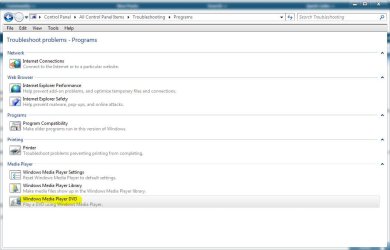
There's a troubleshooter in the control panel that might shed some light on what may be causing this, You could try that and post back your results.
 

Attachments

  • wmp.JPG
    wmp.JPG
    62.1 KB · Views: 143

My Computer My Computer

At a glance

Win 10 Pro x64Intel I5-2500K @3.3GHz16GB G.Skill Ripjaws X (4x4GB)EVGA GeForce 750 Ti SC 2GB
Computer type
PC/Desktop
Computer Manufacturer/Model Number
Self Built
OS
Win 10 Pro x64
CPU
Intel I5-2500K @3.3GHz
Motherboard
Asrock P67 Extreme4
Memory
16GB G.Skill Ripjaws X (4x4GB)
Graphics Card(s)
EVGA GeForce 750 Ti SC 2GB
Sound Card
ASUS Xonar DG 5.1 Channels 24-bit 96KHz PCI Interface Sound
Monitor(s) Displays
auria eq2367
Screen Resolution
1920 x 1080
Hard Drives
250GB Samsung 850 EVO SSD
1TB WD Blue
1TB Hitachi
PSU
SeaSonic X 650W 80 Plus Gold
Case
Corsair Obsidian 750D
Cooling
Corsair H60, Three 140mm case fans
Keyboard
Logitech Wireless Keyboard K520
Mouse
Logitech Wireless Mouse M310
Internet Speed
Wave Broadband ~ 100 dn 5 up
Antivirus
Windows Defender, Malwarebytes Premium
Browser
Edge, IE11, Chrome
Other Info
Laptop specs: HP g7-1365dx /
CPU: AMD A6-3420M APU with Radeon(tm) HD Graphics /
RAM: Crucial 8Gb (2x4Gb) /
SSD: Crucial M4-CT128M4SSD2 ATA Device/ FW 000F /
GFX: AMD Radeon HD 6520G /
OS: Windows 10 Pro x64
I had already installed v246 of Sharks Win 7 Codecs but will try v247. Ran the WMP troubleshooter, all it did was tell me to reset WMP to default settings which I did.

Still same problem DVDs will not play!!!
 

My Computer My Computer

At a glance

Windows 7AMD 64x2 40002GB Corsair XMS2 DDR2nVidia Geforce 9800GT
Computer Manufacturer/Model Number
N/A
OS
Windows 7
CPU
AMD 64x2 4000
Motherboard
AN-M2HD
Memory
2GB Corsair XMS2 DDR2
Graphics Card(s)
nVidia Geforce 9800GT
Sound Card
Onboard Realtek HD
Monitor(s) Displays
Samsung 32 Inch LCD
Hard Drives
Maxtor Diamond Max 23 SATA
Maxtor ATA 200GB
PSU
Antec 430 Watt
Case
Antec Fusion
I still haven't solved this problem.

Windows Media Centre and VLC will not play DVDs at all.
Windows Media Player plays about 10 seconds of the main feature then just stops with the last frame left displayed in the WMP window.

The DVD player is obviousl working as it plays the first 10 seconds it just seems to get jammed???

:cry:
 

My Computer My Computer

At a glance

Windows 7AMD 64x2 40002GB Corsair XMS2 DDR2nVidia Geforce 9800GT
Computer Manufacturer/Model Number
N/A
OS
Windows 7
CPU
AMD 64x2 4000
Motherboard
AN-M2HD
Memory
2GB Corsair XMS2 DDR2
Graphics Card(s)
nVidia Geforce 9800GT
Sound Card
Onboard Realtek HD
Monitor(s) Displays
Samsung 32 Inch LCD
Hard Drives
Maxtor Diamond Max 23 SATA
Maxtor ATA 200GB
PSU
Antec 430 Watt
Case
Antec Fusion
I still help with this - please :cry:
 

My Computer My Computer

At a glance

Windows 7AMD 64x2 40002GB Corsair XMS2 DDR2nVidia Geforce 9800GT
Computer Manufacturer/Model Number
N/A
OS
Windows 7
CPU
AMD 64x2 4000
Motherboard
AN-M2HD
Memory
2GB Corsair XMS2 DDR2
Graphics Card(s)
nVidia Geforce 9800GT
Sound Card
Onboard Realtek HD
Monitor(s) Displays
Samsung 32 Inch LCD
Hard Drives
Maxtor Diamond Max 23 SATA
Maxtor ATA 200GB
PSU
Antec 430 Watt
Case
Antec Fusion
Could you have a bad DVD drive? Try it in another machine.
 

My Computer My Computer

At a glance

Windows 7 Professional x64Intel i7 2600K OC'd @ 4620 MHz16GB GSkill Sniper 2133 Mhz (4x4GB)EVGA GeForce GTX 480 SuperClocked+
Computer Manufacturer/Model Number
Custom
OS
Windows 7 Professional x64
CPU
Intel i7 2600K OC'd @ 4620 MHz
Motherboard
Asus P8Z68-V Pro
Memory
16GB GSkill Sniper 2133 Mhz (4x4GB)
Graphics Card(s)
EVGA GeForce GTX 480 SuperClocked+
Sound Card
Realtek High Definition Audio
Monitor(s) Displays
2x Acer S273HLbmii 27"
Screen Resolution
2 x 1920x1080
Hard Drives
64GB Crucial M4 SSD

Storage: Hitachi 1TB 5400RPM, Samsung 1.5TB 5400RPM
PSU
Corsair HW Series 750w (modular)
Case
Cooler Master HAF 932 Advanced Blue Edition
Cooling
CM Hyper 212+ CPU cooler, 3x 230mm + 1x 140mm case fans
Keyboard
Logitech MK320 (wireless)
Mouse
Logitech MK320 (wireless)
Internet Speed
30 Mb/s : 2 Mb/s
Its brand new - I have just replaced it thinking it was the DVD drive that was faulty and the problem sill exits it also works fine in the same machine on Windows XP
 

My Computer My Computer

At a glance

Windows 7AMD 64x2 40002GB Corsair XMS2 DDR2nVidia Geforce 9800GT
Computer Manufacturer/Model Number
N/A
OS
Windows 7
CPU
AMD 64x2 4000
Motherboard
AN-M2HD
Memory
2GB Corsair XMS2 DDR2
Graphics Card(s)
nVidia Geforce 9800GT
Sound Card
Onboard Realtek HD
Monitor(s) Displays
Samsung 32 Inch LCD
Hard Drives
Maxtor Diamond Max 23 SATA
Maxtor ATA 200GB
PSU
Antec 430 Watt
Case
Antec Fusion

My Computer My Computer

At a glance

Windows 7 Enterprise (x64); Windows Server 20...16GB
Computer type
PC/Desktop
Computer Manufacturer/Model Number
Dell OP7010
OS
Windows 7 Enterprise (x64); Windows Server 2008 R2 (x64)
Memory
16GB
Monitor(s) Displays
4 Dell 24" LCD
Screen Resolution
1280x1024
Keyboard
Dell
Mouse
Dell Optical
Internet Speed
40meg
Removing Shark Codecs and installing K-Lite Full did not resolve the issue.
This is not a codec problem it must be a hardware driver issue.

The nVidia SATA driver appears to have a problem with win 7, my SATA HDD is OK but the DVD is not?
 

My Computer My Computer

At a glance

Windows 7AMD 64x2 40002GB Corsair XMS2 DDR2nVidia Geforce 9800GT
Computer Manufacturer/Model Number
N/A
OS
Windows 7
CPU
AMD 64x2 4000
Motherboard
AN-M2HD
Memory
2GB Corsair XMS2 DDR2
Graphics Card(s)
nVidia Geforce 9800GT
Sound Card
Onboard Realtek HD
Monitor(s) Displays
Samsung 32 Inch LCD
Hard Drives
Maxtor Diamond Max 23 SATA
Maxtor ATA 200GB
PSU
Antec 430 Watt
Case
Antec Fusion

My Computer My Computer

At a glance

Windows 7 Professional x64Intel i7 2600K OC'd @ 4620 MHz16GB GSkill Sniper 2133 Mhz (4x4GB)EVGA GeForce GTX 480 SuperClocked+
Computer Manufacturer/Model Number
Custom
OS
Windows 7 Professional x64
CPU
Intel i7 2600K OC'd @ 4620 MHz
Motherboard
Asus P8Z68-V Pro
Memory
16GB GSkill Sniper 2133 Mhz (4x4GB)
Graphics Card(s)
EVGA GeForce GTX 480 SuperClocked+
Sound Card
Realtek High Definition Audio
Monitor(s) Displays
2x Acer S273HLbmii 27"
Screen Resolution
2 x 1920x1080
Hard Drives
64GB Crucial M4 SSD

Storage: Hitachi 1TB 5400RPM, Samsung 1.5TB 5400RPM
PSU
Corsair HW Series 750w (modular)
Case
Cooler Master HAF 932 Advanced Blue Edition
Cooling
CM Hyper 212+ CPU cooler, 3x 230mm + 1x 140mm case fans
Keyboard
Logitech MK320 (wireless)
Mouse
Logitech MK320 (wireless)
Internet Speed
30 Mb/s : 2 Mb/s
Did you try a different DVD ? I like to start with the easy things first.
How many codecs do you have on your system now ? Having multiple codecs can interfere with each other. I use CCCP it uses MPC and has its own codecs and it will play everything i throw at it.
If it is driver related you could try to manually update the drivers via device manager or see if Windows update has any.

Edit: J-K, I checked out the dvd drive online and it is a newer one that is Windows 7 certified and have not seen any real problems with others having issues with DVDs. I would not rule out firmware but it is probably a software or driver issue.
 

My Computer My Computer

At a glance

Windows 7 Ultimate X64Q6600 @3.62X2 MushkinXFX 4870X2
OS
Windows 7 Ultimate X64
CPU
Q6600 @3.6
Motherboard
DFI X38-T2R
Memory
2X2 Mushkin
Graphics Card(s)
XFX 4870X2
Monitor(s) Displays
Philips 240PW
Hard Drives
Intel X25-M 80GB
PSU
PCP&C 750W
Case
Antec 900
Cooling
TRUE 120
I don't need to update the Firmware on this drive as it is already at 1.03, and I just downloaded the latest nForce and Geforce Drivers using Windows Update - still no joy.

However once WMP stopped instead of closing it I left it open and after about 5 minutes the DVD started to play in fast forward to the menu selection. I selected to play the movie and it stopped again. If I leave it eventually (5 minutes or so) it starts to play again but soon after stops.
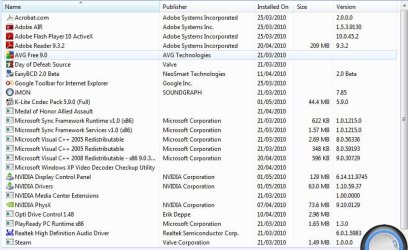
I have uploaded a screen shot of my programs and features.

I uninstalled nvidia pure video decoder and Shark007 codecs an installed klite codecs
 

Attachments

  • Progs1.JPG
    Progs1.JPG
    89.6 KB · Views: 15
  • Progs2.JPG
    Progs2.JPG
    22 KB · Views: 3
Last edited:

My Computer My Computer

At a glance

Windows 7AMD 64x2 40002GB Corsair XMS2 DDR2nVidia Geforce 9800GT
Computer Manufacturer/Model Number
N/A
OS
Windows 7
CPU
AMD 64x2 4000
Motherboard
AN-M2HD
Memory
2GB Corsair XMS2 DDR2
Graphics Card(s)
nVidia Geforce 9800GT
Sound Card
Onboard Realtek HD
Monitor(s) Displays
Samsung 32 Inch LCD
Hard Drives
Maxtor Diamond Max 23 SATA
Maxtor ATA 200GB
PSU
Antec 430 Watt
Case
Antec Fusion
Hi JonnyAlpha
Was Win 7 pre-installed or if not where did the OS come from. Was it a retail CD or download?
 

My Computer My Computer

At a glance

Microsoft Windows 7 Home Premium 64-bit 7601 ...Intel(R) Core(TM) i7-3770 CPU @ 3.40GHz8.00 GBIntel(R) HD Graphics 4000
Computer type
PC/Desktop
OS
Microsoft Windows 7 Home Premium 64-bit 7601 Multiprocessor Free Service Pack 1
CPU
Intel(R) Core(TM) i7-3770 CPU @ 3.40GHz
Motherboard
ASUSTeK COMPUTER INC. P8H77-M
Memory
8.00 GB
Graphics Card(s)
Intel(R) HD Graphics 4000
Sound Card
On Board
Monitor(s) Displays
Dell 24"
Screen Resolution
1920 x 1080
Hard Drives
(1) INTEL SSDSC2CT180A3 ATA Device (2) ST500DM002-1BD142 ATA Device (3) WDC WD3200AAKS-75L9A0 ATA Device (4) Generic- Compact Flash USB Device (5) Generic- MS/MS-Pro USB Device (6) Generic- SD/MMC USB Device (7) Generic- SM/xD-Picture USB
PSU
500w Corsair
Case
Cooler Master
Cooling
3 Fans
Keyboard
Logitech MK300
Mouse
Logitech WOM
Internet Speed
75Mb
Antivirus
Norton 360
Browser
Firefox, Opera, IE
What is the "Opti Drive Control 1.48" software listed in your screen shot? If that is for the DVD drive I would try removing it. Create a Restore point, remove it and see what happens. If that resolves your problem then you are good to go. If not you can always restore the restore point.
 

My Computer My Computer

At a glance

Windows 7 Enterprise (x64); Windows Server 20...16GB
Computer type
PC/Desktop
Computer Manufacturer/Model Number
Dell OP7010
OS
Windows 7 Enterprise (x64); Windows Server 2008 R2 (x64)
Memory
16GB
Monitor(s) Displays
4 Dell 24" LCD
Screen Resolution
1280x1024
Keyboard
Dell
Mouse
Dell Optical
Internet Speed
40meg
Opti Drive Control is an Optical Drive Diagnostic Tool from the NERO web site, I used it in an attempt to diagnose the drive, the problem existed before it was installed.

I'll remove it anyway.
 

My Computer My Computer

At a glance

Windows 7AMD 64x2 40002GB Corsair XMS2 DDR2nVidia Geforce 9800GT
Computer Manufacturer/Model Number
N/A
OS
Windows 7
CPU
AMD 64x2 4000
Motherboard
AN-M2HD
Memory
2GB Corsair XMS2 DDR2
Graphics Card(s)
nVidia Geforce 9800GT
Sound Card
Onboard Realtek HD
Monitor(s) Displays
Samsung 32 Inch LCD
Hard Drives
Maxtor Diamond Max 23 SATA
Maxtor ATA 200GB
PSU
Antec 430 Watt
Case
Antec Fusion
Still not happening!!
 

My Computer My Computer

At a glance

Windows 7AMD 64x2 40002GB Corsair XMS2 DDR2nVidia Geforce 9800GT
Computer Manufacturer/Model Number
N/A
OS
Windows 7
CPU
AMD 64x2 4000
Motherboard
AN-M2HD
Memory
2GB Corsair XMS2 DDR2
Graphics Card(s)
nVidia Geforce 9800GT
Sound Card
Onboard Realtek HD
Monitor(s) Displays
Samsung 32 Inch LCD
Hard Drives
Maxtor Diamond Max 23 SATA
Maxtor ATA 200GB
PSU
Antec 430 Watt
Case
Antec Fusion
This must be a driver issue with Windows 7. Since the drive is NEW and it works perfectly in Windows XP then the only thing left is the Driver in Windows 7. Check the vendors web site for a new updated driver if one is not available I would just replace the DVD they are so cheap now-a-days.
 

My Computer My Computer

At a glance

Windows 7 Enterprise (x64); Windows Server 20...16GB
Computer type
PC/Desktop
Computer Manufacturer/Model Number
Dell OP7010
OS
Windows 7 Enterprise (x64); Windows Server 2008 R2 (x64)
Memory
16GB
Monitor(s) Displays
4 Dell 24" LCD
Screen Resolution
1280x1024
Keyboard
Dell
Mouse
Dell Optical
Internet Speed
40meg
I had already replace the DVD Drive with a newer model, I used to have an AD-7170S which experienced exactly the same problems.

I have just been home to my PC workshop and fitted the SATA AD-7170S to one of my spare PCs an installed Windows 7 without a hitch.
The mobo is an Elitegroup 915-M5.

This confirms that it definitely must be a problem caused by the nVidia Chipset on the Abit AN-M2HD and either the NEC Firmware, the Phoenix Award BIOS or the MS drivers (because the problem affects the install of Windws before any other software gets loaded).

So unless i can get Abit / nVidia or MS to sort out the problem I am left with the following choices:
1. Fit an IDE DL DVD RW
2. Fit a PCI SATA Card (will have to remove my PCI WiFi Card and fit a USB dongle)
3. Replace the motherboard.
4. Stick to XP
:geek:
 

My Computer My Computer

At a glance

Windows 7AMD 64x2 40002GB Corsair XMS2 DDR2nVidia Geforce 9800GT
Computer Manufacturer/Model Number
N/A
OS
Windows 7
CPU
AMD 64x2 4000
Motherboard
AN-M2HD
Memory
2GB Corsair XMS2 DDR2
Graphics Card(s)
nVidia Geforce 9800GT
Sound Card
Onboard Realtek HD
Monitor(s) Displays
Samsung 32 Inch LCD
Hard Drives
Maxtor Diamond Max 23 SATA
Maxtor ATA 200GB
PSU
Antec 430 Watt
Case
Antec Fusion
Back
Top