Solved Cannot play .wmv files from Microsoft

Mike99

New member
Member
VIP
Local time
5:20 PM
Messages
258
I’m having problems playing .wmv video files from Microsoft’s website. I’m running Windows 7 Ultimate 64 bit and have done all the updates.

For example, in this link
Windows Media Center - Microsoft Windows
I click on “Watch the video” and Windows Media Player opens by default. I click on it & get a message that it cannot play the file & the player might not support the file type or codec that was used.

It will not play using Media Player Classic Home Cinema. It will play using VLC but it takes a long time to start. VLC indicates the video codec is Windows Media Video VC1 (WVC1). Mediainfo only lists the file as 264 bytes, no other data.

Here’s another, click on “Watch the demo”.
Demo: Burning TV shows to DVD using Windows Media Center

Again MPC-HC will not play. VLC will but it takes a while to start & it states the video codec is Windows Media Player 9 (WMV3). Mediainfo only lists the file as 150 bytes.

I can play .wmv files from other sources, is there any reason Microsoft’s files will not play?
 

My Computer My Computer

Computer type
PC/Desktop
Computer Manufacturer/Model Number
HP
OS
Windows 7 Ultimate x64
CPU
AMD Athlon x4
Motherboard
HP / Foxconn
Memory
8.00 GB
Graphics Card(s)
GTX 750Ti SC
Monitor(s) Displays
ACER
Hard Drives
1TB Seagate
PSU
380W
Cooling
Stock
Internet Speed
3 Mbps
I’m having problems playing .wmv video files from Microsoft’s website. I’m running Windows 7 Ultimate 64 bit and have done all the updates.

For example, in this link
Windows Media Center - Microsoft Windows
I click on “Watch the video” and Windows Media Player opens by default. I click on it & get a message that it cannot play the file & the player might not support the file type or codec that was used.

It will not play using Media Player Classic Home Cinema. It will play using VLC but it takes a long time to start. VLC indicates the video codec is Windows Media Video VC1 (WVC1). Mediainfo only lists the file as 264 bytes, no other data.

Here’s another, click on “Watch the demo”.
Demo: Burning TV shows to DVD using Windows Media Center

Again MPC-HC will not play. VLC will but it takes a while to start & it states the video codec is Windows Media Player 9 (WMV3). Mediainfo only lists the file as 150 bytes.

I can play .wmv files from other sources, is there any reason Microsoft’s files will not play?

So you have VLC installed? I believe that during the setup of it you have to tell VLC to not associate itself with .wmv

One thing to remember is that VLC is not just a program, but also a Codec pack. the best solution would probably be to uninstall VLC and then re-installing without associating .wmv
 

My Computer My Computer

Computer type
PC/Desktop
Computer Manufacturer/Model Number
HP Pavilion g7-1350dx
OS
Windows 7 Ultimate SP1 x64
CPU
AMD A6-3420M APU
Memory
4.0 Gb DDR3 838 MHz
Graphics Card(s)
AMD Radeon HD 6520G
Sound Card
IDT HD Audio
Screen Resolution
1600x 900
Hard Drives
500GB Hitachi HTS547550A9E384
So you have VLC installed? I believe that during the setup of it you have to tell VLC to not associate itself with .wmv

One thing to remember is that VLC is not just a program, but also a Codec pack. the best solution would probably be to uninstall VLC and then re-installing without associating .wmv

VLC is not associated with .wmv. But what has VLC got to do with Windows Media Player not being able to play Microsoft's .wmv files? And MPC-HC cannot play them either. And Mediainfo only lists a file size which seems way to small.
 

My Computer My Computer

Computer type
PC/Desktop
Computer Manufacturer/Model Number
HP
OS
Windows 7 Ultimate x64
CPU
AMD Athlon x4
Motherboard
HP / Foxconn
Memory
8.00 GB
Graphics Card(s)
GTX 750Ti SC
Monitor(s) Displays
ACER
Hard Drives
1TB Seagate
PSU
380W
Cooling
Stock
Internet Speed
3 Mbps
So you have VLC installed? I believe that during the setup of it you have to tell VLC to not associate itself with .wmv

One thing to remember is that VLC is not just a program, but also a Codec pack. the best solution would probably be to uninstall VLC and then re-installing without associating .wmv

VLC is not associated with .wmv. But what has VLC got to do with Windows Media Player not being able to play Microsoft's .wmv files? And MPC-HC cannot play them either. And Mediainfo only lists a file size which seems way to small.
VLC isn't just a media player, its also a Codec pack which is installed system wide. I have VLC installed also, yet I cannot view the files using windows media player.
But if you downloaded the files, the second one, "how to burn a dvd" should be 150 kb. and is ~2 minutes long. just open VLC and use it to play the file.

If you still cannot play the file it is possible that you corrupted an install of some codecs. Have you ever installed a codec pack?
 

My Computer My Computer

Computer type
PC/Desktop
Computer Manufacturer/Model Number
HP Pavilion g7-1350dx
OS
Windows 7 Ultimate SP1 x64
CPU
AMD A6-3420M APU
Memory
4.0 Gb DDR3 838 MHz
Graphics Card(s)
AMD Radeon HD 6520G
Sound Card
IDT HD Audio
Screen Resolution
1600x 900
Hard Drives
500GB Hitachi HTS547550A9E384
If you still cannot play the file it is possible that you corrupted an install of some codecs. Have you ever installed a codec pack?

The problem is not with VLC.

The problem is that nothing else plays these Microsoft .wmv files. And Mediainfo does not display any data about them other than the size.

You mentioned "how to burn a dvd" should be 150 kb. But Mediainfo states only 150 bytes, not 150 kb.

I do not have a problem opening .wmv files from other source. What is Microsoft doing that nobody is doing?
 
Last edited:

My Computer My Computer

Computer type
PC/Desktop
Computer Manufacturer/Model Number
HP
OS
Windows 7 Ultimate x64
CPU
AMD Athlon x4
Motherboard
HP / Foxconn
Memory
8.00 GB
Graphics Card(s)
GTX 750Ti SC
Monitor(s) Displays
ACER
Hard Drives
1TB Seagate
PSU
380W
Cooling
Stock
Internet Speed
3 Mbps
The problem is not with VLC.

The problem is that nothing else plays these Microsoft .wmv files. And Mediainfo does not display any data about them other than the size.

You mentioned "how to burn a dvd" should be 150 kb. But Mediainfo states only 150 bytes, not 150 kb.

I do not have a problem opening .wmv files from other source. What is Microsoft doing that nobody is doing?
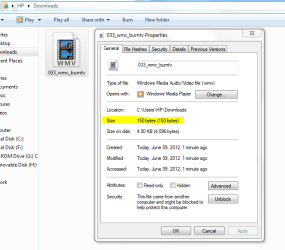
Sorry, that was a mistake, it is 150 bytes.
Capture.PNG
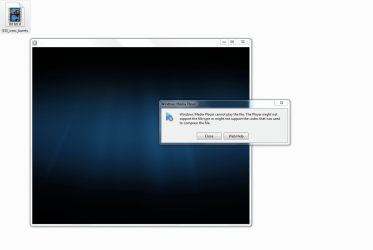
Also and I cannot play this file with WMP:
2.PNG
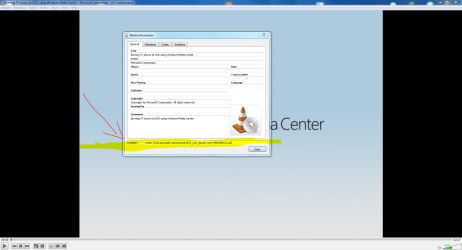
But, using VLC it will play, and here is why:
Capture3.PNG
The file basically is located on Microsoft servers. The file does not contain any audio/video data at all, it only contains a url that redirects your media player to the actual location of the file on the internet.

You can try it yourself:
go to: Demo: Burning TV shows to DVD using Windows Media Center
Right click 'Watch the demo' and select save link as... and save it to your desktop.
Next use VLC to open the file (Media--> Open File)
Once the file starts playing, pause the video
Then click Tools--> Media information
At the bottom of the dialog box you will see the Location as "mmsh://wm.microsoft.com/ms/woh/033_wmc_burntv.wmv?MSWMExt=.asf"

Hope this answers your question.
 

My Computer My Computer

Computer type
PC/Desktop
Computer Manufacturer/Model Number
HP Pavilion g7-1350dx
OS
Windows 7 Ultimate SP1 x64
CPU
AMD A6-3420M APU
Memory
4.0 Gb DDR3 838 MHz
Graphics Card(s)
AMD Radeon HD 6520G
Sound Card
IDT HD Audio
Screen Resolution
1600x 900
Hard Drives
500GB Hitachi HTS547550A9E384
Thanks for the information.

You say that you cannot play the file with WMP. Do mean when you are on Microsoft's website or after you have downloaded it to your PC? The image you posted looks like the one I get if I try playing it by either method.
 

My Computer My Computer

Computer type
PC/Desktop
Computer Manufacturer/Model Number
HP
OS
Windows 7 Ultimate x64
CPU
AMD Athlon x4
Motherboard
HP / Foxconn
Memory
8.00 GB
Graphics Card(s)
GTX 750Ti SC
Monitor(s) Displays
ACER
Hard Drives
1TB Seagate
PSU
380W
Cooling
Stock
Internet Speed
3 Mbps
Thanks for the information.

You say that you cannot play the file with WMP. Do mean when you are on Microsoft's website or after you have downloaded it to your PC? The image you posted looks like the one I get if I try playing it by either method.
That is for when I try to download it. If I try to play it from a browser other that IE9 it won't work. but once I open the website using IE9, the video is played properly.
 

My Computer My Computer

Computer type
PC/Desktop
Computer Manufacturer/Model Number
HP Pavilion g7-1350dx
OS
Windows 7 Ultimate SP1 x64
CPU
AMD A6-3420M APU
Memory
4.0 Gb DDR3 838 MHz
Graphics Card(s)
AMD Radeon HD 6520G
Sound Card
IDT HD Audio
Screen Resolution
1600x 900
Hard Drives
500GB Hitachi HTS547550A9E384
Thanks for the information.

You say that you cannot play the file with WMP. Do mean when you are on Microsoft's website or after you have downloaded it to your PC? The image you posted looks like the one I get if I try playing it by either method.
That is for when I try to download it. If I try to play it from a browser other that IE9 it won't work. but once I open the website using IE9, the video is played properly.

I just tried IE8 and both videos played. I guess Microsoft's website does not like Firefox.

Thanks for all your help.
 

My Computer My Computer

Computer type
PC/Desktop
Computer Manufacturer/Model Number
HP
OS
Windows 7 Ultimate x64
CPU
AMD Athlon x4
Motherboard
HP / Foxconn
Memory
8.00 GB
Graphics Card(s)
GTX 750Ti SC
Monitor(s) Displays
ACER
Hard Drives
1TB Seagate
PSU
380W
Cooling
Stock
Internet Speed
3 Mbps
You can try to reset wmp,
Go to uninstall a program,
On the top left, click Turn windows features on or off,
Click on the (+) symbol next to Media,
Uncheck the box for wmp, and confirm,
Boot (shut down) your machine,
Repeat and shut down again,
See if this helps,
wmp trouble shooter,
Open the Windows Media Player Settings troubleshooter
 

My Computer My Computer

Computer Manufacturer/Model Number
Microsoft
OS
Windows 7
Back
Top