Cannot reformate External HDD. Media is write-protected

MajorFoley

New member
Member
VIP
Local time
3:27 AM
Messages
254
Hey guys, my friend gave me his 1.5TB portable HDD (WD1111B or 1110B) because he said he didnt need it anymore but also the fact that it has gotten a problem i havent encountered before. I can in no way seem to be able to reformat this drive. It also doesnt seem to appear in My Computer but does appear in device manager when the drivers when installed.

I have so far tried the following things.

1. CMD Disk list (at one point it listed it and some poeple say run the command attributes disk clean readonly which didnt work and when i tried regular clean it diappeared from the list)
2. I tried WD reformatter but it it failed
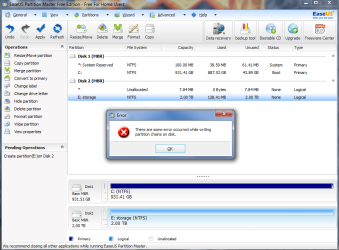
3. When i tried easeUS parition master free edition comes up with this error message (There are some error occurred while writing partition chains on disk)
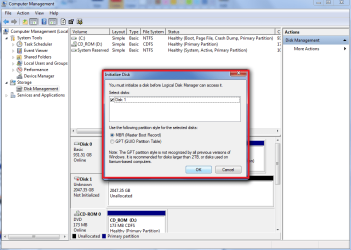
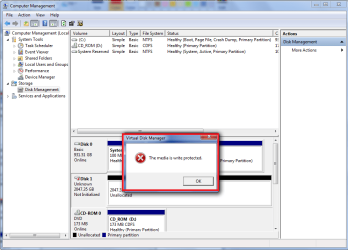
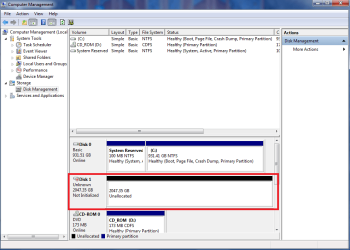
4. In Disk management it shows the disk is unknown, not initialized and when i choose to initialize with MBR (master boot record) it comes up with the media is write protected

Any ideas?
 
Last edited:

My Computer

Computer type
PC/Desktop
OS
windows 7 Ultimate Service pack 1 x64
CPU
intel i5 2500k
Motherboard
Asus p8z68-v motherboard
Memory
8gb Ram
Graphics Card(s)
Sapphire AMD 6950 2gb
Screen Resolution
1920x1080
Hard Drives
2x samsung hd103SJ
1x ST2000DL003-9VT166
PSU
Silverstone silver 850watt power supply (ST85F-P)
Case
silverstone raven RV02-E
Keyboard
microsoft side winder x4
Mouse
Razer death adder v2
Hello MajorFoley!

Could you please write the model of the drive once again as what you've given is somewhat incorrect?

If when trying to Initialize the rive, it says it's write protected, the write protection has to be first removed from the device. Recently there has been a similar problem here on the forum and I gave the steps there also:

1. Open Command prompt: click Start, type command, click Command Prompt
2. Type "diskpart" and press Enter
3. Type "list volume" and press Enter
4. Type select volume #, where # is the number of the drive that's giving you the "write-protected" error
5. Type "attributes disk clear readonly" and press Enter
6. Type "exit" and press Enter

These steps should make the drive read and write enabled again. Then it can be Initialized, Partitioned and Formatted, like already explained. To see which volume you have to type in, you need to see your partitions and see what diskpart's giving as information.

This should work if the hard drive is not damaged. You could check if it has any physical damage with the WD Data Lifeguard Software:
http://support.wdc.com/product/download.asp?groupid=810&lang=en

You could also try writing zeros from top to bottom to "refresh" the drive's state and then try and Initialize it again, see if that helps.

Did anything help you?

Best of luck!

CK_WD
 

My Computer

Computer type
PC/Desktop
OS
Windows 7 Home Premium x64
Hello MajorFoley!

Could you please write the model of the drive once again as what you've given is somewhat incorrect?

If when trying to Initialize the rive, it says it's write protected, the write protection has to be first removed from the device. Recently there has been a similar problem here on the forum and I gave the steps there also:

1. Open Command prompt: click Start, type command, click Command Prompt
2. Type "diskpart" and press Enter
3. Type "list volume" and press Enter
4. Type select volume #, where # is the number of the drive that's giving you the "write-protected" error
5. Type "attributes disk clear readonly" and press Enter
6. Type "exit" and press Enter

These steps should make the drive read and write enabled again. Then it can be Initialized, Partitioned and Formatted, like already explained. To see which volume you have to type in, you need to see your partitions and see what diskpart's giving as information.

This should work if the hard drive is not damaged. You could check if it has any physical damage with the WD Data Lifeguard Software:
http://support.wdc.com/product/download.asp?groupid=810&lang=en

You could also try writing zeros from top to bottom to "refresh" the drive's state and then try and Initialize it again, see if that helps.

Did anything help you?

Best of luck!

CK_WD

Well crap, mispelt the thread lol. The command prompt was one of the first things i tried only other sites used the words disk instead of volume and unfortunately it seems the disk isnt being show as listed anymore. Maybe trying to do that failing initalize will make it appear in the CMD
 

My Computer

Computer type
PC/Desktop
OS
windows 7 Ultimate Service pack 1 x64
CPU
intel i5 2500k
Motherboard
Asus p8z68-v motherboard
Memory
8gb Ram
Graphics Card(s)
Sapphire AMD 6950 2gb
Screen Resolution
1920x1080
Hard Drives
2x samsung hd103SJ
1x ST2000DL003-9VT166
PSU
Silverstone silver 850watt power supply (ST85F-P)
Case
silverstone raven RV02-E
Keyboard
microsoft side winder x4
Mouse
Razer death adder v2
Hi MajorFoley,

Please post a screenshot of Windows Disk Management with only your Problem external HDD plugged in.

http://www.sevenforums.com/tutorials/274797-disk-management-post-screen-capture-image.html

Also a screenshot of how it looks in Partition Wizard.
Download, install and run MiniTools Partition Wizard Home Edition v 8.1.1 Free download Magic Partition Manager Software, partition magic alternative, free partition magic, partition magic Windows 7 and server partition software - Partition Wizard Online
 

My Computer

OS
Windows 7 Home Premium 32 bit
Hi again!

I am not sure if that would make it appear in CMD. It sounds to me like the drive could be failing (or failed). Please see if you can check it with the WD DLG software as I suggested above and also post screenshots of Disk Management like @jumanji has proposed. Please, when creating the images make them clear as to no other windows should be blocking information on another window.
What else comes in mind is that since this drive belonged to a friend of yours you could check if you are the owner of the drive. Right click – Properties – Security – Advanced – Owner; your name (account's name) should be listed there.

Best of luck!

CK_WD
 

My Computer

Computer type
PC/Desktop
OS
Windows 7 Home Premium x64
Sorry for the delay heres the pics
 

Attachments

  • hdd 2.png
    hdd 2.png
    115.7 KB · Views: 0
  • hdd 3.png
    hdd 3.png
    118.2 KB · Views: 1
  • hdd 4.png
    hdd 4.png
    146.8 KB · Views: 0
  • hdd 5.png
    hdd 5.png
    195.3 KB · Views: 0
  • hdd 6.png
    hdd 6.png
    171.7 KB · Views: 0
  • hdd 1.png
    hdd 1.png
    113.2 KB · Views: 2

My Computer

Computer type
PC/Desktop
OS
windows 7 Ultimate Service pack 1 x64
CPU
intel i5 2500k
Motherboard
Asus p8z68-v motherboard
Memory
8gb Ram
Graphics Card(s)
Sapphire AMD 6950 2gb
Screen Resolution
1920x1080
Hard Drives
2x samsung hd103SJ
1x ST2000DL003-9VT166
PSU
Silverstone silver 850watt power supply (ST85F-P)
Case
silverstone raven RV02-E
Keyboard
microsoft side winder x4
Mouse
Razer death adder v2
Thanks, MajorFoley, for the screenshots.

As I suspected, your case in all respects, is the same as in the concurrent thread http://www.sevenforums.com/hardware...al-hdd-unallocated-2047-35gb-other-sol-n.html

There a 500GB HP external drive shows as 2047.35GB.( This HP external drive may be using a WD drive inside since HP seems to use WD drives in their laptops too)

Here your 1.5TB WD external drive shows as 2047.35GB. Ha, what a similarity!

This makes me presume that the wrong indication is not from reading the drive (one 500GB and yours 1.5 TB ) but in the interface card inside the enclosure. ( It is only a logical guess as of now)

No way of confirming which is bad, unless the enclosure is opened up, the drives plugged out and tried as an internal drive on a desktop.This is what I had suggested in the other thread, where the OP's drive is past warranty.

If your drive is under warranty, do not do this. Instead run the Western Digital Data Lifeguard Diagnostics for Windows and check your drive running the Short Test, and Extended Test. If it fails the tests, RMA it.

Data Recovery?? I am afraid it is not gonnabe a DIY job that can be done by users. May be you have to rope in a professional data recovery service.
 

My Computer

OS
Windows 7 Home Premium 32 bit
Thanks, MajorFoley, for the screenshots.

As I suspected, your case in all respects, is the same as in the concurrent thread http://www.sevenforums.com/hardware...al-hdd-unallocated-2047-35gb-other-sol-n.html

There a 500GB HP external drive shows as 2047.35GB.( This HP external drive may be using a WD drive inside since HP seems to use WD drives in their laptops too)

Here your 1.5TB WD external drive shows as 2047.35GB. Ha, what a similarity!

This makes me presume that the wrong indication is not from reading the drive (one 500GB and yours 1.5 TB ) but in the interface card inside the enclosure. ( It is only a logical guess as of now)

No way of confirming which is bad, unless the enclosure is opened up, the drives plugged out and tried as an internal drive on a desktop.This is what I had suggested in the other thread, where the OP's drive is past warranty.

If your drive is under warranty, do not do this. Instead run the Western Digital Data Lifeguard Diagnostics for Windows and check your drive running the Short Test, and Extended Test. If it fails the tests, RMA it.

Data Recovery?? I am afraid it is not gonnabe a DIY job that can be done by users. May be you have to rope in a professional data recovery service.

Well damn guess i have to open it, according to my friend his had it for 5 years lol guess there would be no harm in operating it, but how the hell would i get it read as an internal HDD if its USB connection

EDIT: i tried the ubuntu thing, it doesnt seem to come up like it does on the screenshot
 
Last edited:

My Computer

Computer type
PC/Desktop
OS
windows 7 Ultimate Service pack 1 x64
CPU
intel i5 2500k
Motherboard
Asus p8z68-v motherboard
Memory
8gb Ram
Graphics Card(s)
Sapphire AMD 6950 2gb
Screen Resolution
1920x1080
Hard Drives
2x samsung hd103SJ
1x ST2000DL003-9VT166
PSU
Silverstone silver 850watt power supply (ST85F-P)
Case
silverstone raven RV02-E
Keyboard
microsoft side winder x4
Mouse
Razer death adder v2
In most external drives the HDD itself is a normal standard 3.5" HDDS or 2.5" laptop HDDs.There will be a SATA/PATA to USB bridge interface card with inputs from normal SATA/PATA connector of the HDD and output to a USB connection. One will be able to pull out the HDD from the interface card and connect it as an Internal drive to the SATA port on the Motherboard as one would with the standard HDDs.

However in some Western digital external drives the interface card is integrated with the HDD ( it does not have the normal SATA connectors) and so you will not be able to disengage the HDD and use it as an internal drive. In such a case you are out of luck.

See Anshad Edavana's post here http://www.sevenforums.com/hardware...d-disk-after-power-failure-2.html#post2909232

(OK, I lost track and forgot that it was a bad drive so benevolently gifted to you by a friend.;) So you can do whatever experiments you want to do with that drive.:))
 

My Computer

OS
Windows 7 Home Premium 32 bit
Hello again!

Looks like by a certain hardware damage the drive can show as this particular capacity and unallocated. The chances of it being fixed could be slim.
Overall, I agree with @jumanji's suggestions. Did you either way check the drive with the WD DLG?
Also, if your friend had this drive for five years, it is probably out of warranty.
It does seem like a speciffic hardware issue/damage but I can't be sure what exactly at this point. If you'd like, you could contact WD Customer Support:
WD Support

I would also better suggest you take the hard drive to e professional to see if it can be helped, just so that you are sure it wouldn't get any additional damage.

I am sorry you've faced this issue and I hope you get it resolved!
Best of luck!

CK_WD
 

My Computer

Computer type
PC/Desktop
OS
Windows 7 Home Premium x64
Back
Top