
Mr6c0rpi0n
New member
- Local time
- 6:42 AM
- Messages
- 2
Hi, everyone
I have a problem that i couldn't find a fix to it, it is really annoying
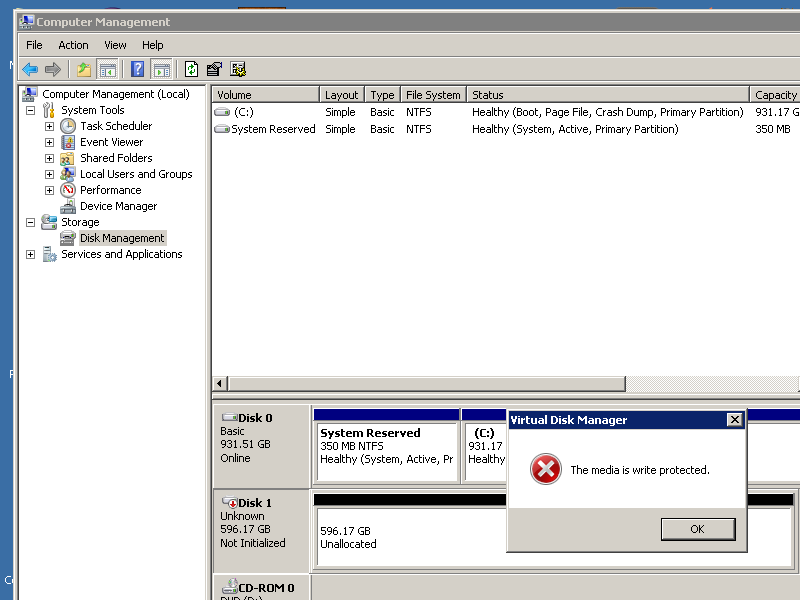
My External WD HDD 640GB not initialized, but the big problem is that when i want to initialize it i get an error message says "The media is write protected"
It is an external HDD so i don't think it has a turn on/off write protection switch, so how i can turn the write protection off?
Note that when i use DiskPart in CMD, it doesn't show the HDD because it is not initialized, also i have tried changing the value of WriteProtect from 1 to 0 in regedit but it didn't solve the problem, in addition i'v used 3rd party programs but i keep getting that frustrating error message
Here is a picture:
Please help me
Thank you for your time, Regards.
I have a problem that i couldn't find a fix to it, it is really annoying
My External WD HDD 640GB not initialized, but the big problem is that when i want to initialize it i get an error message says "The media is write protected"
It is an external HDD so i don't think it has a turn on/off write protection switch, so how i can turn the write protection off?
Note that when i use DiskPart in CMD, it doesn't show the HDD because it is not initialized, also i have tried changing the value of WriteProtect from 1 to 0 in regedit but it didn't solve the problem, in addition i'v used 3rd party programs but i keep getting that frustrating error message
Here is a picture:
Please help me
Thank you for your time, Regards.
My Computer
At a glance
Windows 7 Ultimate x64
- Computer type
- PC/Desktop
- OS
- Windows 7 Ultimate x64

 , i will try it and tell you what is the result...
