
Cannot Remove Portable App Function From Context Menu

Magnakai

New member
Member
VIP
Local time
3:34 PM
Messages
160
Hello,

i am having great difficulty removing a function from my Right-Click Context Menu, because the related program was not installed on my pc the regular way. It is sort of a PORTABLE version of the program.

i have downloaded & tested many many utilities from the net, but all fail to recognize this addition to my context menu. It must have been written to my registry first time i used and/or closed the portable app. But i have checked most shell/shellex locations and cannot find anything.

if anyone is familiar with this, in particular regarding links added by portable programs into desktop context menu, your help would be appreciated thanks. You can tell me where to look, i don't mind digging for it in regedit.

the item is actually 'Add to GOM Player'. this item only pops up whenever i right-click on a playable media file, but i have already disassociated all known media types from GOM.

i don't believe the solution is downloading and trying further utilities, because GOM would not be detected- i think i have to manually remove it from registry.

please note again, my GOM is not installed. i am using a semi-portable version and it does not appear in control panel programs, ccleaner's installed programs, in fact no other utility of mine detects it on my PC.
 

Attachments
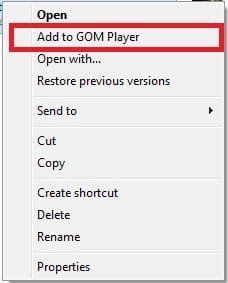
  • Add to GOM.jpg
    Add to GOM.jpg
    19.8 KB · Views: 36

My Computer

Computer type
PC/Desktop
OS
Windows 7 Ultimate x64
1) Had you scanned the machine with a registry cleaner that can repair a broken shortcut?

2) Alternatively, search with regedit for values containing the string "GOM", or "Add to GOM Player".

3) Context menu items are stored at
Code:
HKEY_CLASSES_ROOT\*\shellex\ContextMenuHandlers
.
 

My Computer

Computer type
PC/Desktop
OS
Windows 7 x64, Vista x64, 8.1 smartphone
CPU
Intel E8400 65W 64-bit
Motherboard
Gigabyte EP45-UD3LR
Memory
DDR2 2 x 2GB, 1GB x 2
Graphics Card(s)
XFX Radeon HD5750
Sound Card
AMD High Definition Audio; Realtek High Definition Audio
Monitor(s) Displays
iiyama prolite X2377HDS
Screen Resolution
1920 x 1080
Hard Drives
500GB 7200 rpm Seagate ST3500413AS 16MB, 500GB 5400 rpm Toshiba MQ02ABF050H 32MB, 200GB 7200 rpm Seagate ST3200820AS 8MB, 2TB 7200 rpm Western Digital WD20EZRX 64MB
PSU
Enermax Liberty Modular
Case
Antec P193 Midi Tower
Keyboard
Mionix ZIBAL 60
Mouse
Razer USB 2.0 Diamondback Mouse or Huion Graphics Tablet
Browser
Internet Explorer, Lunascape, Firefox, Opera, Avast Safezone
hi iko, yes i have taken those steps, but there is no GOM anywhere in the registry. and not just in \*\shellex, but also \folder\, \directory\, & \drive\ for both shell and shellex.

another thing to note it is not a broken link or shortcut, the 'Add to Gom Player' still works, so long as i specify next which .exe to be used to open it.

All utilities even nircmd ShellMenuView & ShellMenuEX fail to notice GOM is installed on my pc. in actual fact it is not, i run it off a localized folder from the .exe much like a portable. that is the problem.
 
Last edited:

My Computer

Computer type
PC/Desktop
OS
Windows 7 Ultimate x64
Is there a installable version of this software?
It sometimes works that, if you (re-)install the original program and then uninstall properly all the components, then the remnants go with it.​
 

My Computer

Computer type
PC/Desktop
OS
Windows 7 x64, Vista x64, 8.1 smartphone
CPU
Intel E8400 65W 64-bit
Motherboard
Gigabyte EP45-UD3LR
Memory
DDR2 2 x 2GB, 1GB x 2
Graphics Card(s)
XFX Radeon HD5750
Sound Card
AMD High Definition Audio; Realtek High Definition Audio
Monitor(s) Displays
iiyama prolite X2377HDS
Screen Resolution
1920 x 1080
Hard Drives
500GB 7200 rpm Seagate ST3500413AS 16MB, 500GB 5400 rpm Toshiba MQ02ABF050H 32MB, 200GB 7200 rpm Seagate ST3200820AS 8MB, 2TB 7200 rpm Western Digital WD20EZRX 64MB
PSU
Enermax Liberty Modular
Case
Antec P193 Midi Tower
Keyboard
Mionix ZIBAL 60
Mouse
Razer USB 2.0 Diamondback Mouse or Huion Graphics Tablet
Browser
Internet Explorer, Lunascape, Firefox, Opera, Avast Safezone
During the "installation" or running of this program, did it ever asked for UAC elevation? Have you ever run it as administrator?
 

My Computer

Computer type
Laptop
Computer Manufacturer/Model Number
Toshiba Sattelite A665-S6092
OS
Windows 7 Ultimate x64
CPU
Intel Core i7-740QM
Memory
8 GB DDR3
Graphics Card(s)
NVIDIA GeForce 330GT
Screen Resolution
1366x768
Hard Drives
Samsung 840 SSD 500GB
1TB USB3 external HD
Cooling
Coolermaster Notepal U3 notebook cooling pad
Internet Speed
3mbps ASDL
Antivirus
ClamWin 0.98.7
Browser
Opera 12.17 x86 (main), Firefox 38 (sec), IE11 (last resort)
my UAC is forever off & shortcut to the .exe of the portable is set to run as admin under properties. ok, i may try what iko22 suggests. yes there is a full version. i created a hybrid portable version by using universal extractor, winrar, and stuff like that. but i still created it on a removable drive connected to this pc. that might have been the cause, even if i had specified the removable disk as target to house the main program. let's experiment, that was not such a bad idea.

firstly i will copy out my current portable app. then i will use the source fully installable version, install it, and then uninstall it. then clean registry, reboot, ccleaner etc. etc. after i am sure that all context menus are gone, i will swap back in the portable, start a movie or two with the portable, exit, restart, and then see if this method ends up with no context menu.

there is also a GRETECH folder at program data, not sure what it is, but definitely not a preferences file, because GOM saves its own preferences file in the form of a .reg file. i don't think this file affects our current situation.

will let you guys know soon. thanks for all the input.
 

My Computer

Computer type
PC/Desktop
OS
Windows 7 Ultimate x64

My Computer

Computer type
Laptop
Computer Manufacturer/Model Number
Dell Precision 15 7550 Workstation
OS
Windows 10 22H2 Pro
CPU
Intel(R) Xeon W-10885M
Motherboard
Dell
Memory
2x 32 GB DDR4 ECC memory (128 GB max)
Graphics Card(s)
Intel onboard GPU 1080p - Quadro RTX 5000 Max-Q GPU 4K
Hard Drives
500 GB Corsair T500 main M2 SSD
1 TB Intel storage M2 SSD (6 TB max)
Mouse
Logitech MX-25 Bluetooth
Internet Speed
slow
Antivirus
MS
Browser
Pale Moon 33.3.x x64 AVX2 build

My Computer

Computer type
PC/Desktop
OS
Windows 7 Ultimate x64
Back
Top