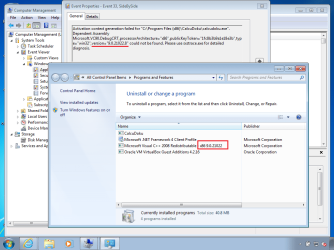
Hi All
Just downloaded Calcuduko from CalcuDoku Project Top Page - SourceForge.JP
and I get the following message when trying to run:
__________________________________________________________
C:\Program Files(x86)\CalcuDoku\calcudoku.exe
The application has failed to start because its side-by-side cofiguration is incorrect.
Please see the application event log or use the command-line sxtrace.exe tool for more detail.
__________________________________________________________
I have downloaded the Linux version from the same site and it behaves perfectly.
I am trying to help out a friend with this problem - I normally use Linux Mint so am not Windows savvy.
Many thanks in anticpation for any help or suggestions
David
Just downloaded Calcuduko from CalcuDoku Project Top Page - SourceForge.JP
and I get the following message when trying to run:
__________________________________________________________
C:\Program Files(x86)\CalcuDoku\calcudoku.exe
The application has failed to start because its side-by-side cofiguration is incorrect.
Please see the application event log or use the command-line sxtrace.exe tool for more detail.
__________________________________________________________
I have downloaded the Linux version from the same site and it behaves perfectly.
I am trying to help out a friend with this problem - I normally use Linux Mint so am not Windows savvy.
Many thanks in anticpation for any help or suggestions
David
My Computer
- Computer type
- Laptop
- Computer Manufacturer/Model Number
- HP CQ43
- OS
- windows7home 64bit