Solved Cannot save to my network public folder

meebers

Multicomplacator
Power User
Local time
12:05 PM
Messages
327
From within my W7 machine, have been trying to save a simple file to my network public folder and W7 is telling me I need permission. What am I overlooking.
 
Last edited:

My Computer

Computer type
PC/Desktop
Computer Manufacturer/Model Number
Self Build
OS
Windows 7 Professional X64 Service Pack 1
CPU
AMD Phenom II X4 955 3.20GHz
Motherboard
Gigabyte GA-MA790X-UD4P
Memory
8G
Graphics Card(s)
GX550 Ti
Sound Card
On board
Monitor(s) Displays
Asus VW246H & Syncmaster 2243swx
Screen Resolution
1920x1080 & 1920x1080
Hard Drives
M4-CT128 SSD2, Samsung 840 256GB, 1 WDC 1TB
PSU
Corsair TX750W-V2
Case
Antec
Cooling
2 120mm fan
Keyboard
Microsoft Wireless 3050
Mouse
Microsoft Wireless 5000
Internet Speed
72/6Mbs (Cable)
Other Info
Asus AC1900 router, 8 port Trendnet Switch - Logitech Webcam Pro 9000
What is it you mean by Network Public Folder?
 

My Computer

Computer type
PC/Desktop
Computer Manufacturer/Model Number
Custom Built
OS
Windows 10 Pro x64, Windows 8.1 Pro x64, Windows 7 Ultimate x64 SP1,
CPU
INTEL i9-7920X LGA 2066
Motherboard
Gigabyte X299-WU8 F3
Memory
64 GB (4 X 16 GB) G-Skill V Series DDR4 3200 Quad Channel
Graphics Card(s)
EVGA GTX 1060 SC 3 GB
Sound Card
Realtek Onboard ALC1220
Monitor(s) Displays
2 x Samsung S27E310
Screen Resolution
1920x1080
Hard Drives
Samsung 2 x 970 EVO Plus 500 GB NVMe
1 x 6TB WD 6003FZBX SATA
1 x 6TB WD 60EFRX SATA
12 x 3TB WD 30EFRX SATA
PSU
Seasonic X-1050
Case
Thermaltake Armor+
Cooling
Corsair H80i V2 Liquid AOI Cooler
Keyboard
Logitech G510s
Mouse
Logitech MX Master 2S
Internet Speed
200 Mb/s
Antivirus
ESET NOD32 13.1
Browser
EDGE (Dev, Canary, Beta), Chrome
Other Info
ASUS RT-AC68U router
Malwarebytes 4.0.4
Tell me if I am mistaken-
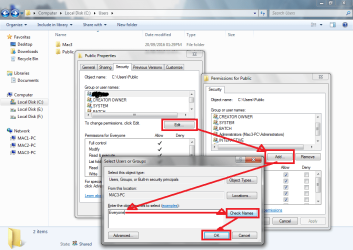
You are trying to place a file/folder in Users\public folder of a PC that is connected to your Network.

To do this you need to share the folder and the change its security setting so as to include 'Everyone' and give it Full control except special control

Go to C:\Users\Public in the machine you want to be available for writing from the network.
Right click and select properties go to sharing tab and share it.
Then go to security tab and add 'Everyone' in users and give it full control.
You may refer the screenshot.
 

Attachments

  • Untitled.png
    Untitled.png
    179.6 KB · Views: 1
Last edited:

My Computer

Computer type
Laptop
Computer Manufacturer/Model Number
Samsung
OS
Windows 7 Home Premium x64
CPU
Samsung
Motherboard
Samsung
Memory
Samsung
Graphics Card(s)
NVIDIA
Hard Drives
Samsung
Antivirus
ESET NOD32
Browser
Internet Explorer
Tell me if I am mistaken-
You are trying to place a file/folder in Users\public folder of a PC that is connected to your Network.

To do this you need to share the folder and the change its security setting so as to include 'Everyone' and give it Full control except special control

Go to C:\Users\Public in the machine you want to be available for writing from the network.
Right click and select properties go to sharing tab and share it.
Then go to security tab and add 'Everyone' in users and give it full control.
You may refer the screenshot.

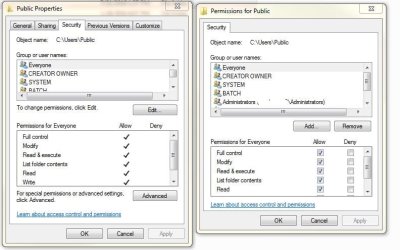
Thank you for taking the time with this. I have tried it without success and have enclosed a shot of what I have. "Write" is also checked.
 

Attachments

  • settings.JPG
    settings.JPG
    81.5 KB · Views: 1

My Computer

Computer type
PC/Desktop
Computer Manufacturer/Model Number
Self Build
OS
Windows 7 Professional X64 Service Pack 1
CPU
AMD Phenom II X4 955 3.20GHz
Motherboard
Gigabyte GA-MA790X-UD4P
Memory
8G
Graphics Card(s)
GX550 Ti
Sound Card
On board
Monitor(s) Displays
Asus VW246H & Syncmaster 2243swx
Screen Resolution
1920x1080 & 1920x1080
Hard Drives
M4-CT128 SSD2, Samsung 840 256GB, 1 WDC 1TB
PSU
Corsair TX750W-V2
Case
Antec
Cooling
2 120mm fan
Keyboard
Microsoft Wireless 3050
Mouse
Microsoft Wireless 5000
Internet Speed
72/6Mbs (Cable)
Other Info
Asus AC1900 router, 8 port Trendnet Switch - Logitech Webcam Pro 9000
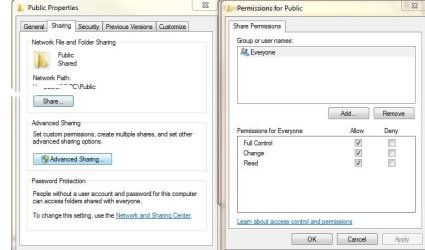
Thats the ntfs permissions what about share permissions what are they set to on advanced options by default everyone has read only
 

My Computer

Computer type
PC/Desktop
OS
win 8 32 bit
Now access the public folder through network ,i.e. Network\PCname\Users\Public and check if it is same there. If not do the same thing in security tab there.
 

My Computer

Computer type
Laptop
Computer Manufacturer/Model Number
Samsung
OS
Windows 7 Home Premium x64
CPU
Samsung
Motherboard
Samsung
Memory
Samsung
Graphics Card(s)
NVIDIA
Hard Drives
Samsung
Antivirus
ESET NOD32
Browser
Internet Explorer
View attachment 392040
Now access the public folder through network ,i.e. Network\PCname\Users\Public and check if it is same there. If not do the same thing in security tab there.

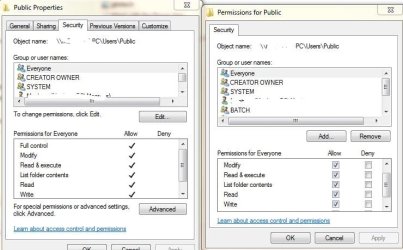
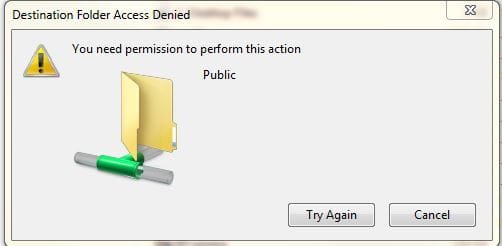
Thanks for your response! I did that the first go around, but just tried it again with the same results. This is Network\PCname\users\public. This was just doing a simple paste of a .jpg file.
 

Attachments

  • sec.JPG
    sec.JPG
    72.9 KB · Views: 2
  • denied.JPG
    denied.JPG
    22.5 KB · Views: 19

My Computer

Computer type
PC/Desktop
Computer Manufacturer/Model Number
Self Build
OS
Windows 7 Professional X64 Service Pack 1
CPU
AMD Phenom II X4 955 3.20GHz
Motherboard
Gigabyte GA-MA790X-UD4P
Memory
8G
Graphics Card(s)
GX550 Ti
Sound Card
On board
Monitor(s) Displays
Asus VW246H & Syncmaster 2243swx
Screen Resolution
1920x1080 & 1920x1080
Hard Drives
M4-CT128 SSD2, Samsung 840 256GB, 1 WDC 1TB
PSU
Corsair TX750W-V2
Case
Antec
Cooling
2 120mm fan
Keyboard
Microsoft Wireless 3050
Mouse
Microsoft Wireless 5000
Internet Speed
72/6Mbs (Cable)
Other Info
Asus AC1900 router, 8 port Trendnet Switch - Logitech Webcam Pro 9000
Thats the ntfs permissions what about share permissions what are they set to on advanced options by default everyone has read only

Tx for your suggestion. This is what is in the share.
 

Attachments

  • share.JPG
    share.JPG
    63.2 KB · Views: 1

My Computer

Computer type
PC/Desktop
Computer Manufacturer/Model Number
Self Build
OS
Windows 7 Professional X64 Service Pack 1
CPU
AMD Phenom II X4 955 3.20GHz
Motherboard
Gigabyte GA-MA790X-UD4P
Memory
8G
Graphics Card(s)
GX550 Ti
Sound Card
On board
Monitor(s) Displays
Asus VW246H & Syncmaster 2243swx
Screen Resolution
1920x1080 & 1920x1080
Hard Drives
M4-CT128 SSD2, Samsung 840 256GB, 1 WDC 1TB
PSU
Corsair TX750W-V2
Case
Antec
Cooling
2 120mm fan
Keyboard
Microsoft Wireless 3050
Mouse
Microsoft Wireless 5000
Internet Speed
72/6Mbs (Cable)
Other Info
Asus AC1900 router, 8 port Trendnet Switch - Logitech Webcam Pro 9000
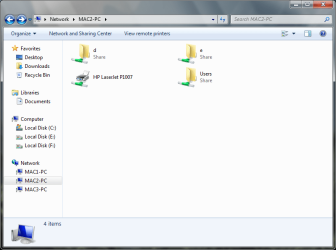
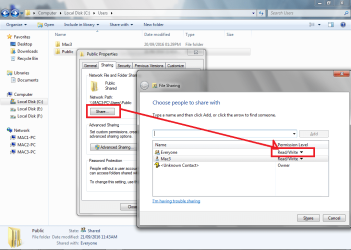
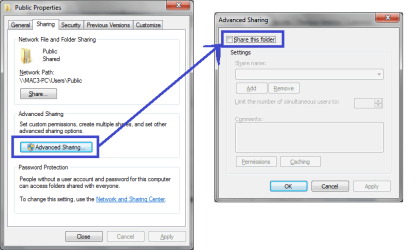
It seems that you are trying to share the Public folder itself.
Please share users folder only and public folder will only have read/write permission in share
Follow the screen shots.
 

Attachments

  • Network should look like this.png
    Network should look like this.png
    104.1 KB · Views: 1
  • Public folder sharing.png
    Public folder sharing.png
    161.6 KB · Views: 1
  • Public folder advanced sharing.png
    Public folder advanced sharing.png
    62.1 KB · Views: 1
  • Users advance sharing.png
    Users advance sharing.png
    155.6 KB · Views: 1

My Computer

Computer type
Laptop
Computer Manufacturer/Model Number
Samsung
OS
Windows 7 Home Premium x64
CPU
Samsung
Motherboard
Samsung
Memory
Samsung
Graphics Card(s)
NVIDIA
Hard Drives
Samsung
Antivirus
ESET NOD32
Browser
Internet Explorer
Tx for the help, I finally got it to work by removing my previous attempts and re-entering. :)
 

My Computer

Computer type
PC/Desktop
Computer Manufacturer/Model Number
Self Build
OS
Windows 7 Professional X64 Service Pack 1
CPU
AMD Phenom II X4 955 3.20GHz
Motherboard
Gigabyte GA-MA790X-UD4P
Memory
8G
Graphics Card(s)
GX550 Ti
Sound Card
On board
Monitor(s) Displays
Asus VW246H & Syncmaster 2243swx
Screen Resolution
1920x1080 & 1920x1080
Hard Drives
M4-CT128 SSD2, Samsung 840 256GB, 1 WDC 1TB
PSU
Corsair TX750W-V2
Case
Antec
Cooling
2 120mm fan
Keyboard
Microsoft Wireless 3050
Mouse
Microsoft Wireless 5000
Internet Speed
72/6Mbs (Cable)
Other Info
Asus AC1900 router, 8 port Trendnet Switch - Logitech Webcam Pro 9000
Back
Top