
I have a laptop with win 7 Home premium 64 bit. it is a share (T with my desktop.
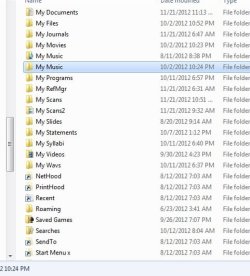
Here is a screenshot of the windows explorer from the laptop. The directory is
c:\users\me
(LAP EXPLR.JPG)
Here is the screen shot of Win Explorer on Desktop
(DESK EXPLR.JPG)
note that the folder My Scans2 is missing on the desktop explorer.
interestingly, on the laptop, the CMD window does not display it, either.
I went to the file, opened properties, and guaranteed that it was not hidden.
Any ideas?
(Edited - as I look at the thumbnails, the left TN is from the laptop [My Scans2 is present], the right TN is from the desktop on share [My Scans2 is absent])
with my desktop.Here is a screenshot of the windows explorer from the laptop. The directory is
c:\users\me
(LAP EXPLR.JPG)
Here is the screen shot of Win Explorer on Desktop
(DESK EXPLR.JPG)
note that the folder My Scans2 is missing on the desktop explorer.
interestingly, on the laptop, the CMD window does not display it, either.
I went to the file, opened properties, and guaranteed that it was not hidden.
Any ideas?
(Edited - as I look at the thumbnails, the left TN is from the laptop [My Scans2 is present], the right TN is from the desktop on share [My Scans2 is absent])
Attachments

My Computer
- OS
- win 7 64 bit home premium


