Cannot send email with Eudora 7, Eudora 8 or Thunderbird

Phlimm

New member
Local time
12:29 AM
Messages
7
I am trying to send email from TWO DIFFERENT accounts on a Windows 7 64 bit. I am running as an Administrator and always have been. I have already quintuple checked all the SMTP server settings on both accounts in regards to SSL, User Name, etc (neither are on Port 25). I can send through the Cox website email but I want to use my own local email. I thought it was them, but then I got an account with a different company I am doing work for and I also cannot send with their server (also correctly configured).

I have added Eudora 7, Eudora 8 and Thunderbird to my allowed programs on the Windows Firewall. I can receive email from both accounts on all three programs, but none of them will mail anything out. I am getting the message "The message could not be sent because the connection to SMTP server mail.and-mag.com timed out." or the same one with my Cox SMTP server name (smtp.cox.net).

I have Eudora 7 set up on an XP system back home on the Cox account (I am living away for work ATM). I called my wife and had her read me back all the settings and set mine to be exactly the same. Hers works, mine do not.

I am not on my own ISP for internet access, I am using the internet that my landlady gets because it is included in my rent (and also because Cox does not service this area). It is wired internet so my laptop is sort of a desktop for now. The ISP my landlady uses is Comcast, but I don't think that should make a difference.
 

My Computer

OS
win 7 64 bit
Phlimm, welcome to the windows 7 forum.

Could you put a screenshot of your Eudora for the mail account you want to get to work with comcast up on a message.?

Of course you can scrub the userid if you wish. to make sure that spammers won't get to you.

you do use port 2525 or 587 for your smtp server?

Rich
 

My Computer

Computer type
Laptop
Computer Manufacturer/Model Number
Toshiba Laptop Qosimo X870
OS
Windows 7 Pro x64 SP1
CPU
Intel Core I7
Motherboard
Toshiba Qosmio
Memory
16 Gigs
Graphics Card(s)
NVIDIA GeForce GTX 670M
Monitor(s) Displays
17.7" laptop
Screen Resolution
1600 x 900
Hard Drives
256 Gig SanDisk SSD for C
256 Gig Intel SSD for D
Internet Speed
50/25 FIOS
Antivirus
Vipre (all you can eat for 10 machines)
Browser
IE and FF
Other Info
I have dos 6.22, wfwg 3.11, win98, 2000 and xp VHD's available for testing. MS's Virtual PC works great.
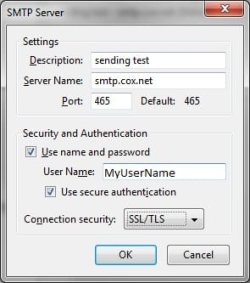
Here it is.

Please note that I have already tried using [email protected] as well. The Cox setup page says to use 465.

Also I need to change one thing. Sometimes depending on the setting I am trying, I get the error message "The mail server sent an incorrect greeting eastrmimpo209 cox connection refused from (my IP Address)."

All the other times I get the timed out message.
 

Attachments

  • Test.jpg
    Test.jpg
    16.5 KB · Views: 7

My Computer

OS
win 7 64 bit
Phlimm, You might want to use your full [email protected] as your username and also what are the options for SSL/TLS?
give port 587 a try as well as 2525

Rich
 

My Computer

Computer type
Laptop
Computer Manufacturer/Model Number
Toshiba Laptop Qosimo X870
OS
Windows 7 Pro x64 SP1
CPU
Intel Core I7
Motherboard
Toshiba Qosmio
Memory
16 Gigs
Graphics Card(s)
NVIDIA GeForce GTX 670M
Monitor(s) Displays
17.7" laptop
Screen Resolution
1600 x 900
Hard Drives
256 Gig SanDisk SSD for C
256 Gig Intel SSD for D
Internet Speed
50/25 FIOS
Antivirus
Vipre (all you can eat for 10 machines)
Browser
IE and FF
Other Info
I have dos 6.22, wfwg 3.11, win98, 2000 and xp VHD's available for testing. MS's Virtual PC works great.
Phlimm, You might want to use your full [email protected] as your username and also what are the options for SSL/TLS?
give port 587 a try as well as 2525

Rich
As I already said, I have already tried the full user name and those port numbers.

The options for SSL are:

None

STARTTLS

SSL/TLS
 

My Computer

OS
win 7 64 bit
Philimm, I use Eudora 7 and can help with that and Outlook but could you send me the screens from eudora 7 for the email that your trying to setup. I am not a thunderbird person either.

Just the send and receive setup's

Rich
 

My Computer

Computer type
Laptop
Computer Manufacturer/Model Number
Toshiba Laptop Qosimo X870
OS
Windows 7 Pro x64 SP1
CPU
Intel Core I7
Motherboard
Toshiba Qosmio
Memory
16 Gigs
Graphics Card(s)
NVIDIA GeForce GTX 670M
Monitor(s) Displays
17.7" laptop
Screen Resolution
1600 x 900
Hard Drives
256 Gig SanDisk SSD for C
256 Gig Intel SSD for D
Internet Speed
50/25 FIOS
Antivirus
Vipre (all you can eat for 10 machines)
Browser
IE and FF
Other Info
I have dos 6.22, wfwg 3.11, win98, 2000 and xp VHD's available for testing. MS's Virtual PC works great.
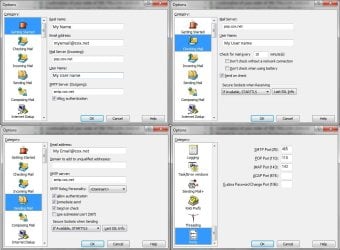
Here is what I have. To my knowledge this is exactly what my wife has set up on XP and it works fine.
 

Attachments

  • E7 Settings.jpg
    E7 Settings.jpg
    99.9 KB · Views: 8

My Computer

OS
win 7 64 bit
Phlimm, that does not look like Eurdora 7 looking at mine.
One question. did you set the username to the complete [email protected] ???

Other than that, I am at a loss unless cox is not playing according to the rules.
If I understand correctly, you can receive emails but not send emails?

Rich
 

My Computer

Computer type
Laptop
Computer Manufacturer/Model Number
Toshiba Laptop Qosimo X870
OS
Windows 7 Pro x64 SP1
CPU
Intel Core I7
Motherboard
Toshiba Qosmio
Memory
16 Gigs
Graphics Card(s)
NVIDIA GeForce GTX 670M
Monitor(s) Displays
17.7" laptop
Screen Resolution
1600 x 900
Hard Drives
256 Gig SanDisk SSD for C
256 Gig Intel SSD for D
Internet Speed
50/25 FIOS
Antivirus
Vipre (all you can eat for 10 machines)
Browser
IE and FF
Other Info
I have dos 6.22, wfwg 3.11, win98, 2000 and xp VHD's available for testing. MS's Virtual PC works great.
It is Eudora version 7.1.0.9. The last version before they went belly up a few years ago.

And are you reading my text or just looking at the images? This is the third time I said I already tried to use the full [email protected]. And yes I can receive emails but not send them. Like I said in the original post, this is not due to port settings or the like because I have already tried all of those options. I have set it up EXACTLY the same as my wife's account on the XP computer she has. It works on hers but not on mine which is Windows 7.
 

My Computer

OS
win 7 64 bit
Phlimm, I was wrong that is the same as mine on eudora 7.1.0.9. I use port 2525 for the smtp but what you have looks pretty close to what I use. I was looking at the images.

One question (sure you knew that). does your AV have a email setting?

What AV are you using and if your using a firewall product?

Sorry to be so obtuse but from what you are telling me, it looks like you have it setup correctly
and therefore, it could be something else.

Rich
 

My Computer

Computer type
Laptop
Computer Manufacturer/Model Number
Toshiba Laptop Qosimo X870
OS
Windows 7 Pro x64 SP1
CPU
Intel Core I7
Motherboard
Toshiba Qosmio
Memory
16 Gigs
Graphics Card(s)
NVIDIA GeForce GTX 670M
Monitor(s) Displays
17.7" laptop
Screen Resolution
1600 x 900
Hard Drives
256 Gig SanDisk SSD for C
256 Gig Intel SSD for D
Internet Speed
50/25 FIOS
Antivirus
Vipre (all you can eat for 10 machines)
Browser
IE and FF
Other Info
I have dos 6.22, wfwg 3.11, win98, 2000 and xp VHD's available for testing. MS's Virtual PC works great.
I use AVG Free so the email setting is actually OFF. I am using the Windows Firewall and have added all three email programs to the allowed list.

The only wonky thing is the fact that I have a Cox account but am currently using Comcast as my ISP. Unless Comcast is blocking access to the Cox SMTP server...
 

My Computer

OS
win 7 64 bit
Phlimm, that is a possibility that comcast is blocking cox. But you say your wife's xp machine allows the smtp to go thru?

Rich
 

My Computer

Computer type
Laptop
Computer Manufacturer/Model Number
Toshiba Laptop Qosimo X870
OS
Windows 7 Pro x64 SP1
CPU
Intel Core I7
Motherboard
Toshiba Qosmio
Memory
16 Gigs
Graphics Card(s)
NVIDIA GeForce GTX 670M
Monitor(s) Displays
17.7" laptop
Screen Resolution
1600 x 900
Hard Drives
256 Gig SanDisk SSD for C
256 Gig Intel SSD for D
Internet Speed
50/25 FIOS
Antivirus
Vipre (all you can eat for 10 machines)
Browser
IE and FF
Other Info
I have dos 6.22, wfwg 3.11, win98, 2000 and xp VHD's available for testing. MS's Virtual PC works great.
Well yes but she is in another state...and using Cox as the ISP. I am working out of state which is why I am on Comcast.
 

My Computer

OS
win 7 64 bit
Phlimm, that sounds like the problem is Comcast not allowing you to use the cox smtp. Give them a call and see if they can give you some help.

Rich
 

My Computer

Computer type
Laptop
Computer Manufacturer/Model Number
Toshiba Laptop Qosimo X870
OS
Windows 7 Pro x64 SP1
CPU
Intel Core I7
Motherboard
Toshiba Qosmio
Memory
16 Gigs
Graphics Card(s)
NVIDIA GeForce GTX 670M
Monitor(s) Displays
17.7" laptop
Screen Resolution
1600 x 900
Hard Drives
256 Gig SanDisk SSD for C
256 Gig Intel SSD for D
Internet Speed
50/25 FIOS
Antivirus
Vipre (all you can eat for 10 machines)
Browser
IE and FF
Other Info
I have dos 6.22, wfwg 3.11, win98, 2000 and xp VHD's available for testing. MS's Virtual PC works great.
Back
Top