Cannot send Open Office doc via email

nottaclue9

New member
Member
VIP
Local time
12:45 PM
Messages
456
Location
San Antonio, TX
I have WLM and have installed Affixa. But I still cannot email any of my Open Office documents. I get the clanging red X telling me to set up an email client. I have no idea what that means or what I should do.
 

My Computer

Computer type
PC/Desktop
Computer Manufacturer/Model Number
Custom
OS
Windows 7 Home Premium 64-bit, service pack 1
CPU
Intel box core i5 4460
Motherboard
Asus B85MECSM 1150
Memory
Kingston Hyper X Fury BLK 1866 8GB 4x2
Monitor(s) Displays
Samsung 23" wide-screen
Screen Resolution
1920 X 1080
Hard Drives
WD Passport, 1 TB
Case
Win Z583 Mini Tower w/ USB3.0
Keyboard
Microsoft ergo wave
Mouse
Logitech wireless
Antivirus
Bitdefender; Malwarebytes Pro
Browser
IE11
Did you set up live mail as default? Never used Affixa, you might need to select it.

Make Live mail default

This works for windows 7 too.
 

My Computer

Computer type
PC/Desktop
Computer Manufacturer/Model Number
Dude Build
OS
Windows 10 Pro X64
CPU
Intel(R) Core(TM) i5-3570K CPU OC@ 4.5GHZ Turbo
Motherboard
MSI Z77A-G45 Gaming
Memory
8.00 GB DDR3 1600Mhz
Graphics Card(s)
MSI Gaming X GTX 1070
Sound Card
Realtek High Definition
Monitor(s) Displays
Dell S23O9W, HP L1710
Screen Resolution
DELL-1920 x 1080 HP-1280 x1024
Hard Drives
Crucial m4 256 SSD, WD 7200RPM 500GB WD 1TB
PSU
Seasonic X650 GOLD
Case
Zalman Z12
Cooling
Antec Kuhler 920
Keyboard
Logitech
Mouse
MSI DS100 Interceptor
Internet Speed
50 down and 5 up
Antivirus
MSE
Browser
Chrome, IE 11
Other Info
Logitech X-620 Speakers
Thanks for your reply, Dude. I already have WLM set as my default mail provider. The only thing that isn't checked is the extension. Should I set Affix as a default? Is that what you meant?
 

My Computer

Computer type
PC/Desktop
Computer Manufacturer/Model Number
Custom
OS
Windows 7 Home Premium 64-bit, service pack 1
CPU
Intel box core i5 4460
Motherboard
Asus B85MECSM 1150
Memory
Kingston Hyper X Fury BLK 1866 8GB 4x2
Monitor(s) Displays
Samsung 23" wide-screen
Screen Resolution
1920 X 1080
Hard Drives
WD Passport, 1 TB
Case
Win Z583 Mini Tower w/ USB3.0
Keyboard
Microsoft ergo wave
Mouse
Logitech wireless
Antivirus
Bitdefender; Malwarebytes Pro
Browser
IE11
I would think so, I have never used it. It should have settings to set it as default.
 

My Computer

Computer type
PC/Desktop
Computer Manufacturer/Model Number
Dude Build
OS
Windows 10 Pro X64
CPU
Intel(R) Core(TM) i5-3570K CPU OC@ 4.5GHZ Turbo
Motherboard
MSI Z77A-G45 Gaming
Memory
8.00 GB DDR3 1600Mhz
Graphics Card(s)
MSI Gaming X GTX 1070
Sound Card
Realtek High Definition
Monitor(s) Displays
Dell S23O9W, HP L1710
Screen Resolution
DELL-1920 x 1080 HP-1280 x1024
Hard Drives
Crucial m4 256 SSD, WD 7200RPM 500GB WD 1TB
PSU
Seasonic X650 GOLD
Case
Zalman Z12
Cooling
Antec Kuhler 920
Keyboard
Logitech
Mouse
MSI DS100 Interceptor
Internet Speed
50 down and 5 up
Antivirus
MSE
Browser
Chrome, IE 11
Other Info
Logitech X-620 Speakers
Well, big surprise to me. The thing installed itself as a default. Any other ideas I can try?
 

My Computer

Computer type
PC/Desktop
Computer Manufacturer/Model Number
Custom
OS
Windows 7 Home Premium 64-bit, service pack 1
CPU
Intel box core i5 4460
Motherboard
Asus B85MECSM 1150
Memory
Kingston Hyper X Fury BLK 1866 8GB 4x2
Monitor(s) Displays
Samsung 23" wide-screen
Screen Resolution
1920 X 1080
Hard Drives
WD Passport, 1 TB
Case
Win Z583 Mini Tower w/ USB3.0
Keyboard
Microsoft ergo wave
Mouse
Logitech wireless
Antivirus
Bitdefender; Malwarebytes Pro
Browser
IE11
Maybe uninstall Affixa. What exactly does it do for you that you need?
 

My Computer

Computer type
PC/Desktop
Computer Manufacturer/Model Number
Dude Build
OS
Windows 10 Pro X64
CPU
Intel(R) Core(TM) i5-3570K CPU OC@ 4.5GHZ Turbo
Motherboard
MSI Z77A-G45 Gaming
Memory
8.00 GB DDR3 1600Mhz
Graphics Card(s)
MSI Gaming X GTX 1070
Sound Card
Realtek High Definition
Monitor(s) Displays
Dell S23O9W, HP L1710
Screen Resolution
DELL-1920 x 1080 HP-1280 x1024
Hard Drives
Crucial m4 256 SSD, WD 7200RPM 500GB WD 1TB
PSU
Seasonic X650 GOLD
Case
Zalman Z12
Cooling
Antec Kuhler 920
Keyboard
Logitech
Mouse
MSI DS100 Interceptor
Internet Speed
50 down and 5 up
Antivirus
MSE
Browser
Chrome, IE 11
Other Info
Logitech X-620 Speakers
I have no idea! I searched "cannot email Open Office documents," and a message board I read said that Affixa might solve the problem. So that's why I downloaded it. When I went to set it as a default, I found that it had taken it upon itself to do so for me.
 

My Computer

Computer type
PC/Desktop
Computer Manufacturer/Model Number
Custom
OS
Windows 7 Home Premium 64-bit, service pack 1
CPU
Intel box core i5 4460
Motherboard
Asus B85MECSM 1150
Memory
Kingston Hyper X Fury BLK 1866 8GB 4x2
Monitor(s) Displays
Samsung 23" wide-screen
Screen Resolution
1920 X 1080
Hard Drives
WD Passport, 1 TB
Case
Win Z583 Mini Tower w/ USB3.0
Keyboard
Microsoft ergo wave
Mouse
Logitech wireless
Antivirus
Bitdefender; Malwarebytes Pro
Browser
IE11
Hi Notty,

I think you need to get rid of Affixa.

Then use the link Dude posted to make sure WLM is still default.

From doing a little searching, it seems WLM doesn't like Open Office Doc files, if you open the doc file in Open Office, then go to File, Export as PDF.

You should then be able to attach it to your email in WLM.
 

My Computer

Computer type
PC/Desktop
Computer Manufacturer/Model Number
Self Built
OS
Win 10 Pro x64
CPU
Intel I5-2500K @3.3GHz
Motherboard
Asrock P67 Extreme4
Memory
16GB G.Skill Ripjaws X (4x4GB)
Graphics Card(s)
EVGA GeForce 750 Ti SC 2GB
Sound Card
ASUS Xonar DG 5.1 Channels 24-bit 96KHz PCI Interface Sound
Monitor(s) Displays
auria eq2367
Screen Resolution
1920 x 1080
Hard Drives
250GB Samsung 850 EVO SSD
1TB WD Blue
1TB Hitachi
PSU
SeaSonic X 650W 80 Plus Gold
Case
Corsair Obsidian 750D
Cooling
Corsair H60, Three 140mm case fans
Keyboard
Logitech Wireless Keyboard K520
Mouse
Logitech Wireless Mouse M310
Internet Speed
Wave Broadband ~ 100 dn 5 up
Antivirus
Windows Defender, Malwarebytes Premium
Browser
Edge, IE11, Chrome
Other Info
Laptop specs: HP g7-1365dx /
CPU: AMD A6-3420M APU with Radeon(tm) HD Graphics /
RAM: Crucial 8Gb (2x4Gb) /
SSD: Crucial M4-CT128M4SSD2 ATA Device/ FW 000F /
GFX: AMD Radeon HD 6520G /
OS: Windows 10 Pro x64
In addition to Derek's excellent suggestion to export as a PDF, you might want to verify how you're saving the OpenOffice documents. If I remember correctly, OpenOffice will save with the default ODT file extension. You might experiment by saving as DOC or DOCX instead which should might be compatible with Microsoft's WLM. Also, this may have some other tips.

http://wiki.openoffice.org/w/images/c/cf/0205WG3-PrintingExportingEmailing.pdf
 

My Computer

Computer type
Laptop
Computer Manufacturer/Model Number
Sony Vaio VPCEB47GM Laptop
OS
Win 7 Pro 64-bit
CPU
Intel i5 2.4 Ghz
Memory
8GB DDR3
Graphics Card(s)
Intel HD 3000
Sound Card
IDT High Definition
Monitor(s) Displays
15.6 WGXA Anti-Glare LED
Screen Resolution
1280x800
Hard Drives
640Gb 7200rpm
Antivirus
MSE
Browser
Opera (primary) with IE9 backup
OK, then. Affixa will be history. It did seem somewhat gimmicky to me. WLM is my current default email, but I can check it just to be sure. I guess WLM discriminates against Open Office because Microsoft wants to sell some of its own office products. Call me cynical.

I did try to send the dox as a PDF, but that was a no-go, too. Can I actually assign a different extension to a file that's already put an extension on it? What a terrible sentence. When I save a document I've created in OO, it just automatically uses "odt" or something like that as the extension. How would I override that?

Good to hear from you again, derekimo. :D And it's always great to find another Texan crawling around in the wee hours, marsmimar! Thank you for that link. I've saved the file to study when I'm a little more awake.
 

My Computer

Computer type
PC/Desktop
Computer Manufacturer/Model Number
Custom
OS
Windows 7 Home Premium 64-bit, service pack 1
CPU
Intel box core i5 4460
Motherboard
Asus B85MECSM 1150
Memory
Kingston Hyper X Fury BLK 1866 8GB 4x2
Monitor(s) Displays
Samsung 23" wide-screen
Screen Resolution
1920 X 1080
Hard Drives
WD Passport, 1 TB
Case
Win Z583 Mini Tower w/ USB3.0
Keyboard
Microsoft ergo wave
Mouse
Logitech wireless
Antivirus
Bitdefender; Malwarebytes Pro
Browser
IE11
Unfortunately I'm on a work computer still using XP. Sorry :(

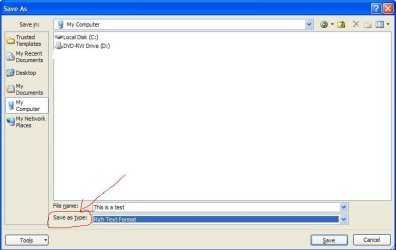
If you're creating a new document in OpenOffice you should be able to "Save as" just like you can with Word, WordPad, Notepad, etc. You'd get a dialog box similar to this:

save as.JPG

Use the drop down menu to select the file type of your choosing (DOC, DOCX, etc.)

If you want to change the file extension of an existing document the first thing I'd do is make a copy of the document so the original won't be altered. Using the copy you could follow the instructions here:

File names and file name extensions: frequently asked questions

And this may help if you want to convert multiple ODT files to DOC:

Batch Convert OpenOffice (ODT) Files to Microsoft Word (DOC/DOCX) Files
 

My Computer

Computer type
Laptop
Computer Manufacturer/Model Number
Sony Vaio VPCEB47GM Laptop
OS
Win 7 Pro 64-bit
CPU
Intel i5 2.4 Ghz
Memory
8GB DDR3
Graphics Card(s)
Intel HD 3000
Sound Card
IDT High Definition
Monitor(s) Displays
15.6 WGXA Anti-Glare LED
Screen Resolution
1280x800
Hard Drives
640Gb 7200rpm
Antivirus
MSE
Browser
Opera (primary) with IE9 backup
Some probably obvious questions: What extension should I choose for an Open Office file? DOC?
When you say make a copy, do you mean print out a physical copy?
 

My Computer

Computer type
PC/Desktop
Computer Manufacturer/Model Number
Custom
OS
Windows 7 Home Premium 64-bit, service pack 1
CPU
Intel box core i5 4460
Motherboard
Asus B85MECSM 1150
Memory
Kingston Hyper X Fury BLK 1866 8GB 4x2
Monitor(s) Displays
Samsung 23" wide-screen
Screen Resolution
1920 X 1080
Hard Drives
WD Passport, 1 TB
Case
Win Z583 Mini Tower w/ USB3.0
Keyboard
Microsoft ergo wave
Mouse
Logitech wireless
Antivirus
Bitdefender; Malwarebytes Pro
Browser
IE11
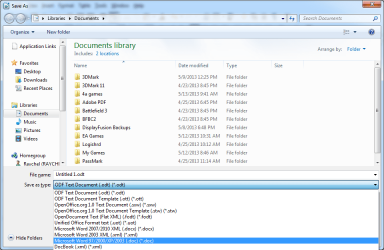
nottaclue9, save the file as .doc

saveas.png
 

My Computer

Computer type
PC/Desktop
Computer Manufacturer/Model Number
Dude Build
OS
Windows 10 Pro X64
CPU
Intel(R) Core(TM) i5-3570K CPU OC@ 4.5GHZ Turbo
Motherboard
MSI Z77A-G45 Gaming
Memory
8.00 GB DDR3 1600Mhz
Graphics Card(s)
MSI Gaming X GTX 1070
Sound Card
Realtek High Definition
Monitor(s) Displays
Dell S23O9W, HP L1710
Screen Resolution
DELL-1920 x 1080 HP-1280 x1024
Hard Drives
Crucial m4 256 SSD, WD 7200RPM 500GB WD 1TB
PSU
Seasonic X650 GOLD
Case
Zalman Z12
Cooling
Antec Kuhler 920
Keyboard
Logitech
Mouse
MSI DS100 Interceptor
Internet Speed
50 down and 5 up
Antivirus
MSE
Browser
Chrome, IE 11
Other Info
Logitech X-620 Speakers
OK, then. Here goes.

-------------------------------------------------------------------------------------------------

Saved as doc. Opened it. Selected "Send to email recipient." Got the clanging red "X" with the same message as before. :confused:

What did I do wrong?
 

My Computer

Computer type
PC/Desktop
Computer Manufacturer/Model Number
Custom
OS
Windows 7 Home Premium 64-bit, service pack 1
CPU
Intel box core i5 4460
Motherboard
Asus B85MECSM 1150
Memory
Kingston Hyper X Fury BLK 1866 8GB 4x2
Monitor(s) Displays
Samsung 23" wide-screen
Screen Resolution
1920 X 1080
Hard Drives
WD Passport, 1 TB
Case
Win Z583 Mini Tower w/ USB3.0
Keyboard
Microsoft ergo wave
Mouse
Logitech wireless
Antivirus
Bitdefender; Malwarebytes Pro
Browser
IE11
Not sure, give me a minute, I will install wlm and see if it works for me.
 

My Computer

Computer type
PC/Desktop
Computer Manufacturer/Model Number
Dude Build
OS
Windows 10 Pro X64
CPU
Intel(R) Core(TM) i5-3570K CPU OC@ 4.5GHZ Turbo
Motherboard
MSI Z77A-G45 Gaming
Memory
8.00 GB DDR3 1600Mhz
Graphics Card(s)
MSI Gaming X GTX 1070
Sound Card
Realtek High Definition
Monitor(s) Displays
Dell S23O9W, HP L1710
Screen Resolution
DELL-1920 x 1080 HP-1280 x1024
Hard Drives
Crucial m4 256 SSD, WD 7200RPM 500GB WD 1TB
PSU
Seasonic X650 GOLD
Case
Zalman Z12
Cooling
Antec Kuhler 920
Keyboard
Logitech
Mouse
MSI DS100 Interceptor
Internet Speed
50 down and 5 up
Antivirus
MSE
Browser
Chrome, IE 11
Other Info
Logitech X-620 Speakers
I just sent an email from wlm to my gmail attaching a doc and it worked. You are using open office, correct?
I'm using libre office, maybe you should try it and see if that will work.

:ar: Libre Office
 

My Computer

Computer type
PC/Desktop
Computer Manufacturer/Model Number
Dude Build
OS
Windows 10 Pro X64
CPU
Intel(R) Core(TM) i5-3570K CPU OC@ 4.5GHZ Turbo
Motherboard
MSI Z77A-G45 Gaming
Memory
8.00 GB DDR3 1600Mhz
Graphics Card(s)
MSI Gaming X GTX 1070
Sound Card
Realtek High Definition
Monitor(s) Displays
Dell S23O9W, HP L1710
Screen Resolution
DELL-1920 x 1080 HP-1280 x1024
Hard Drives
Crucial m4 256 SSD, WD 7200RPM 500GB WD 1TB
PSU
Seasonic X650 GOLD
Case
Zalman Z12
Cooling
Antec Kuhler 920
Keyboard
Logitech
Mouse
MSI DS100 Interceptor
Internet Speed
50 down and 5 up
Antivirus
MSE
Browser
Chrome, IE 11
Other Info
Logitech X-620 Speakers
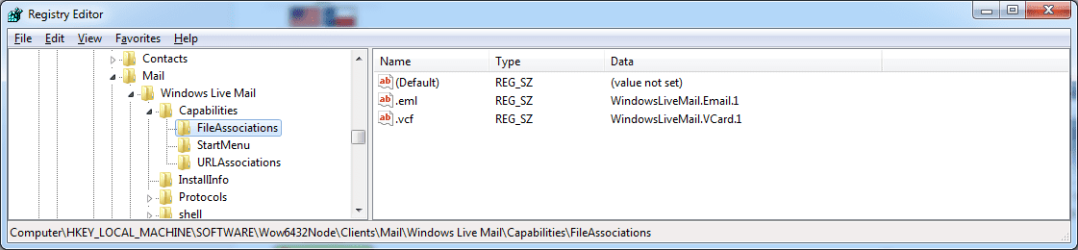
nottaclue9, go to regedit, and post a screenshot of

Code:
HKEY_LOCAL_MACHINE\SOFTWARE\Wow6432Node\Clients\Mail\Windows Live Mail\Capabilities\FileAssociations
 

My Computer

Computer type
PC/Desktop
Computer Manufacturer/Model Number
Dude Build
OS
Windows 10 Pro X64
CPU
Intel(R) Core(TM) i5-3570K CPU OC@ 4.5GHZ Turbo
Motherboard
MSI Z77A-G45 Gaming
Memory
8.00 GB DDR3 1600Mhz
Graphics Card(s)
MSI Gaming X GTX 1070
Sound Card
Realtek High Definition
Monitor(s) Displays
Dell S23O9W, HP L1710
Screen Resolution
DELL-1920 x 1080 HP-1280 x1024
Hard Drives
Crucial m4 256 SSD, WD 7200RPM 500GB WD 1TB
PSU
Seasonic X650 GOLD
Case
Zalman Z12
Cooling
Antec Kuhler 920
Keyboard
Logitech
Mouse
MSI DS100 Interceptor
Internet Speed
50 down and 5 up
Antivirus
MSE
Browser
Chrome, IE 11
Other Info
Logitech X-620 Speakers
Rededit.PNG
 

My Computer

Computer type
PC/Desktop
Computer Manufacturer/Model Number
Custom
OS
Windows 7 Home Premium 64-bit, service pack 1
CPU
Intel box core i5 4460
Motherboard
Asus B85MECSM 1150
Memory
Kingston Hyper X Fury BLK 1866 8GB 4x2
Monitor(s) Displays
Samsung 23" wide-screen
Screen Resolution
1920 X 1080
Hard Drives
WD Passport, 1 TB
Case
Win Z583 Mini Tower w/ USB3.0
Keyboard
Microsoft ergo wave
Mouse
Logitech wireless
Antivirus
Bitdefender; Malwarebytes Pro
Browser
IE11
Well, for the heck of it, I clicked on "Export," and then stumbled my way through maybe sending a PDF file. I have to send something else, but I'm not sure that the file actually got sent. There was a side bar asking me to subscribe to something after I clicked "send." but no indication of anything having been sent.

Anyway, that's more than I was able to do before! Even if I didn't do it. :o
 

My Computer

Computer type
PC/Desktop
Computer Manufacturer/Model Number
Custom
OS
Windows 7 Home Premium 64-bit, service pack 1
CPU
Intel box core i5 4460
Motherboard
Asus B85MECSM 1150
Memory
Kingston Hyper X Fury BLK 1866 8GB 4x2
Monitor(s) Displays
Samsung 23" wide-screen
Screen Resolution
1920 X 1080
Hard Drives
WD Passport, 1 TB
Case
Win Z583 Mini Tower w/ USB3.0
Keyboard
Microsoft ergo wave
Mouse
Logitech wireless
Antivirus
Bitdefender; Malwarebytes Pro
Browser
IE11
From your regedit shot it seems setting wlm to default didn't take, it should show

regformail.png


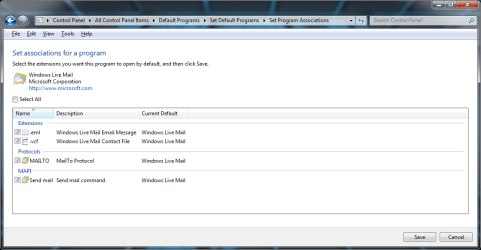
Got to control panel > default programs >Set default programs > click on windows live mail > then click choose defaults for this program.

Does it look like this


defaultwlm.png
 

My Computer

Computer type
PC/Desktop
Computer Manufacturer/Model Number
Dude Build
OS
Windows 10 Pro X64
CPU
Intel(R) Core(TM) i5-3570K CPU OC@ 4.5GHZ Turbo
Motherboard
MSI Z77A-G45 Gaming
Memory
8.00 GB DDR3 1600Mhz
Graphics Card(s)
MSI Gaming X GTX 1070
Sound Card
Realtek High Definition
Monitor(s) Displays
Dell S23O9W, HP L1710
Screen Resolution
DELL-1920 x 1080 HP-1280 x1024
Hard Drives
Crucial m4 256 SSD, WD 7200RPM 500GB WD 1TB
PSU
Seasonic X650 GOLD
Case
Zalman Z12
Cooling
Antec Kuhler 920
Keyboard
Logitech
Mouse
MSI DS100 Interceptor
Internet Speed
50 down and 5 up
Antivirus
MSE
Browser
Chrome, IE 11
Other Info
Logitech X-620 Speakers
Back
Top