Solved Cannot write to subdirectory on C: drive from Paint

mikenowo

New member
Local time
11:13 PM
Messages
3
There is a 'Screenshot' sub-directory for a game I have that I want to be able to save files into using 'Paint' but when I try to it says I don't have access. I have to save to another directory then copy it over. How can I allow the 'Paint' progam to write to this directory? The game creates screenshots there fine but I can't find a way to give Paint the correct privileges to write there.
 

My Computer My Computer

Computer type
PC/Desktop
Computer Manufacturer/Model Number
Acer AX1920 - ER20P
OS
WIndows 7 64bit - Home premium
CPU
Intel Pentium processor E5800 - Dual Core @ 3.20GHz
Memory
4GB DDR3 Memory
Graphics Card(s)
AMD Radeon HD 5450
Hard Drives
1TB - WDC Wd10EADX-22TDHBo ATA device
Antivirus
McAfee Internet Security
Browser
Firefox v37.0.2
Welcome

Open Paint by right clicking on it and selecting run as administrator.
 

My Computer My Computer

Computer type
PC/Desktop
Computer Manufacturer/Model Number
Custom Built
OS
Windows 10 Pro x64, Windows 8.1 Pro x64, Windows 7 Ultimate x64 SP1,
CPU
INTEL i9-7920X LGA 2066
Motherboard
Gigabyte X299-WU8 F3
Memory
64 GB (4 X 16 GB) G-Skill V Series DDR4 3200 Quad Channel
Graphics Card(s)
EVGA GTX 1060 SC 3 GB
Sound Card
Realtek Onboard ALC1220
Monitor(s) Displays
2 x Samsung S27E310
Screen Resolution
1920x1080
Hard Drives
Samsung 2 x 970 EVO Plus 500 GB NVMe
1 x 6TB WD 6003FZBX SATA
1 x 6TB WD 60EFRX SATA
12 x 3TB WD 30EFRX SATA
PSU
Seasonic X-1050
Case
Thermaltake Armor+
Cooling
Corsair H80i V2 Liquid AOI Cooler
Keyboard
Logitech G510s
Mouse
Logitech MX Master 2S
Internet Speed
200 Mb/s
Antivirus
ESET NOD32 13.1
Browser
EDGE (Dev, Canary, Beta), Chrome
Other Info
ASUS RT-AC68U router
Malwarebytes 4.0.4
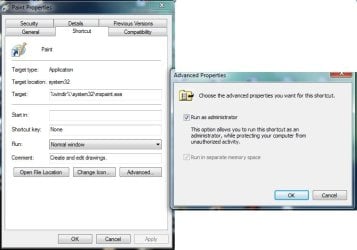
Yeah I was hoping there was an easier way, I wanted to just dbl click the JPG files that open paint automatically. I tried going into the Paint properties and setting the Shortcut properties to 'Run as Administrstr, but even though it is checked it doesn't seem to actually run as admin (see screenshot). My guess is that when I double click a JPG it uses the EXE of paint and not the shortcut. I don't see any way to force mspaint.exe to run as admin in the properties. meh
 

Attachments

  • runasadmin.jpg
    runasadmin.jpg
    39 KB · Views: 2

My Computer My Computer

Computer type
PC/Desktop
Computer Manufacturer/Model Number
Acer AX1920 - ER20P
OS
WIndows 7 64bit - Home premium
CPU
Intel Pentium processor E5800 - Dual Core @ 3.20GHz
Memory
4GB DDR3 Memory
Graphics Card(s)
AMD Radeon HD 5450
Hard Drives
1TB - WDC Wd10EADX-22TDHBo ATA device
Antivirus
McAfee Internet Security
Browser
Firefox v37.0.2
Open Paint via file association. by clicking, say, a *.jpg file. Then go to Task manager and see what user account mspaint is listed under.

Now go to the screenshot folder and check its properties under the Security tab. Make sure that user has write permissions. You might also click Advanced and see who has Ownership.
 

My Computer My Computer

Computer type
PC/Desktop
Computer Manufacturer/Model Number
dell precision t3400 tower
OS
Linux Lite 3.2 x64; Windows 7, 8.1
CPU
Core2Duo 2.4
Memory
6GB ddr2
Graphics Card(s)
nVidia
Hard Drives
120gb SSD, 1TB HD, 2TB HD; sata II
Internet Speed
12/2
Browser
Vivaldi, Slimjet (Chromium) x64
Welcome

Open Paint by right clicking on it and selecting run as administrator.

Excellent! That's exactly what I needed to know. I changed the user that I was logged in as and as such was assigned to Mspaint and changed his permissions to allow write on the directory and Bingo! Problem solved! I could save from paint with no error.

Great thing to know. Much obliged. :D
 

My Computer My Computer

Computer type
PC/Desktop
Computer Manufacturer/Model Number
Acer AX1920 - ER20P
OS
WIndows 7 64bit - Home premium
CPU
Intel Pentium processor E5800 - Dual Core @ 3.20GHz
Memory
4GB DDR3 Memory
Graphics Card(s)
AMD Radeon HD 5450
Hard Drives
1TB - WDC Wd10EADX-22TDHBo ATA device
Antivirus
McAfee Internet Security
Browser
Firefox v37.0.2
Back
Top