Canon Scanner N670U Drivers

huffman

New member
Pro User
Local time
4:43 PM
Messages
715
I am running Win 7 Pro and have a Canon Flatbet Scanner Model N670U.

I saw an old post in this forum for this model and how to install the drivers. Since it was old post I thought I might want to get more recent information.

I called Canon and they do not have drivers for Win 7, but they do have drivers for Vista. I was told by the first tech I talked to that these will work in Win 7. I download both the drivers and the Toolbox which he said I would need. He also said that all I had to do was install the drivers and then hook up the scanner and Win 7 would recognize it.

I did as he told me and that DOES NOT work, the drivers will NOT install. So then I tried "Trouble Shoot Compatibility" and nothing I did would allow the drivers to be installed. From that old post it said that if the drivers were installed in the compatibility mode, that would work. Another reason for newer info.

First is there another way to install using the "Compatibility Mode"?

Has anyone since that post been able to get this Scanner Model drivers to work.
The second tech I talked to at Canon said that under no circumstances would those drivers work. I don't always believe them because they are trying to sell me a new scanner.

Any help would be greatly appreciated.
 

My Computer

OS
Windows 7 Pro
CPU
Intel(R) Pentium(R) Duel CPU E2200 2.20 Ghz
Motherboard
GA-G41M-ES2L
Memory
4 gb 2.96 Usable
Graphics Card(s)
Onboard
Sound Card
Onboard
Hard Drives
2 - 1TB WD Sata Drives
i had a similar problem, and downloaded a vista driver, it worked great.
did you check what bit you have, 64 or 32 bit ?
 

My Computer

Computer type
PC/Desktop
Computer Manufacturer/Model Number
surface pro 1
OS
windows 8.1 pro
CPU
Intel Core i5
Memory
4096 MB
Screen Resolution
1920 x 1080 x 59 hertz
I am running Win 7 Pro and have a Canon Flatbet Scanner Model N670U.

I saw an old post in this forum for this model and how to install the drivers. Since it was old post I thought I might want to get more recent information.

I called Canon and they do not have drivers for Win 7, but they do have drivers for Vista. I was told by the first tech I talked to that these will work in Win 7. I download both the drivers and the Toolbox which he said I would need. He also said that all I had to do was install the drivers and then hook up the scanner and Win 7 would recognize it.

I did as he told me and that DOES NOT work, the drivers will NOT install. So then I tried "Trouble Shoot Compatibility" and nothing I did would allow the drivers to be installed. From that old post it said that if the drivers were installed in the compatibility mode, that would work. Another reason for newer info.

First is there another way to install using the "Compatibility Mode"?

Has anyone since that post been able to get this Scanner Model drivers to work.
The second tech I talked to at Canon said that under no circumstances would those drivers work. I don't always believe them because they are trying to sell me a new scanner.

Any help would be greatly appreciated.

I had that same scanner once. It was made in 2001. That's 9 years old. Some things should just be tossed in the trash. :sarc:
 

My Computer

OS
Windows 7 Home Premium x64
CPU
Intel Core 2 Quad Q9450 @ 3.2GHz
Motherboard
Asus P5Q PRO Turbo
Memory
4GB DDR2-800
Graphics Card(s)
MSI Radeon HD 5850
Sound Card
Creative Labs Audigy2 ZS
Monitor(s) Displays
Samsung 225BW
Hard Drives
(2) 1TB Samsung F1, (2) 1.5TB Samsung F2, 1TB Samsung F2, 2TB Samsung F3
PSU
Corsair HX650
Case
Antec Nine Hundred

My Computer

Computer Manufacturer/Model Number
XGS PII Dragon "Asus"
OS
windows 7 Pro x64
CPU
AMD Phenom II X4 955 Deneb 45nm Technology
Motherboard
ASUSTeK Computer INC. M4A78 PRO (AM2)
Memory
8.0GB Dual-Channel DDR2 @ 401MHz (5-5-5-18)
Graphics Card(s)
ATI Radeon HD 4800 Series (ATI
Sound Card
VIA High Definition Audio
Monitor(s) Displays
DELL 1908FP @ 1280x1024
Screen Resolution
1280x1024
Hard Drives
977GB SAMSUNG SAMSUNG HD103SI ATA Device (IDE)
Keyboard
HID Keyboard Device
Mouse
HID-compliant mouse
Internet Speed
2 Mb/s so far...
Thanks for the replys.

did you check what bit you have, 64 or 32 bit ?

Win 7 is 32 bit and since my scanner is old, I assume it has to be 32 bit (or perhaps 16 bits).

Hamrick VueScan

I am not sure how this can help unless I can get the drivers to install for the scanner. Can you enlighten me on how VueScan can work without the drivers?

BTW can VueScan save scans in a pdf format?

Other than what I have tried so far is there another way to install using the "Compatibility Mode". Going through the "Troubleshooting Compatibily" is the only way I know.
 

My Computer

OS
Windows 7 Pro
CPU
Intel(R) Pentium(R) Duel CPU E2200 2.20 Ghz
Motherboard
GA-G41M-ES2L
Memory
4 gb 2.96 Usable
Graphics Card(s)
Onboard
Sound Card
Onboard
Hard Drives
2 - 1TB WD Sata Drives
VueScan

I never saved as PDF format,sorry cannot say at the moment more. since I am at work and can not check the available formats to save, it does install application and I believe there is driver in it, so it does work on legacy scanners like mine (CanoScan 650U).
 

My Computer

Computer Manufacturer/Model Number
XGS PII Dragon "Asus"
OS
windows 7 Pro x64
CPU
AMD Phenom II X4 955 Deneb 45nm Technology
Motherboard
ASUSTeK Computer INC. M4A78 PRO (AM2)
Memory
8.0GB Dual-Channel DDR2 @ 401MHz (5-5-5-18)
Graphics Card(s)
ATI Radeon HD 4800 Series (ATI
Sound Card
VIA High Definition Audio
Monitor(s) Displays
DELL 1908FP @ 1280x1024
Screen Resolution
1280x1024
Hard Drives
977GB SAMSUNG SAMSUNG HD103SI ATA Device (IDE)
Keyboard
HID Keyboard Device
Mouse
HID-compliant mouse
Internet Speed
2 Mb/s so far...
Since you have 7 Pro, you can install XP mode and install the drivers and application there. My brother has this scanner and he works with it through the virtual machine. It's not very handy, but it's effective!

Hope I helped!!
 

My Computer

OS
Win 7 Pro 64bit & Win XP Home 32bit
you can install XP mode

With the motherboard and cpu I have, XP Mode will not install. As far as Virtual Machine, I have just recently unstalled it. You are right it is not very handy. It is a PITA as far as I was concerned.

Besides that I have two hard drives one with XP and the other has Win 7. After downloading and install EasyBCD, it is easy to boot into either one and with XP my scanner works fine. I am just trying to get away from XP entirely.

Thanks for the response.
 

My Computer

OS
Windows 7 Pro
CPU
Intel(R) Pentium(R) Duel CPU E2200 2.20 Ghz
Motherboard
GA-G41M-ES2L
Memory
4 gb 2.96 Usable
Graphics Card(s)
Onboard
Sound Card
Onboard
Hard Drives
2 - 1TB WD Sata Drives
With the motherboard and cpu I have, XP Mode will not install. As far as Virtual Machine, I have just recently unstalled it. You are right it is not very handy. It is a PITA as far as I was concerned.

Besides that I have two hard drives one with XP and the other has Win 7. After downloading and install EasyBCD, it is easy to boot into either one and with XP my scanner works fine. I am just trying to get away from XP entirely.

Thanks for the response.

Why not? I read that they reduced the requirement for AMD-V/VT-x.
 

My Computer

OS
Windows 7 Home Premium x64
CPU
Intel Core 2 Quad Q9450 @ 3.2GHz
Motherboard
Asus P5Q PRO Turbo
Memory
4GB DDR2-800
Graphics Card(s)
MSI Radeon HD 5850
Sound Card
Creative Labs Audigy2 ZS
Monitor(s) Displays
Samsung 225BW
Hard Drives
(2) 1TB Samsung F1, (2) 1.5TB Samsung F2, 1TB Samsung F2, 2TB Samsung F3
PSU
Corsair HX650
Case
Antec Nine Hundred
With the motherboard and cpu I have, XP Mode will not install. As far as Virtual Machine, I have just recently unstalled it. You are right it is not very handy. It is a PITA as far as I was concerned.

Besides that I have two hard drives one with XP and the other has Win 7. After downloading and install EasyBCD, it is easy to boot into either one and with XP my scanner works fine. I am just trying to get away from XP entirely.

Thanks for the response.

Why not? I read that they reduced the requirement for AMD-V/VT-x.

It's true. They have added a third file for those that hardware-assisted virtualization is not supported. I haven't tried it YET, but I suppose they wouldn't make such a big mistake!!!
 

My Computer

OS
Win 7 Pro 64bit & Win XP Home 32bit
Why not? I read that they reduced the requirement for AMD-V/VT-x.

I can not say it will not install I have Intel. When I tried to install XP Mode (following the instructions) it fails.

Regardless I would still have to installed Win XP in any Virutal PC which defeats the whole purpose of what I am trying to do.
 

My Computer

OS
Windows 7 Pro
CPU
Intel(R) Pentium(R) Duel CPU E2200 2.20 Ghz
Motherboard
GA-G41M-ES2L
Memory
4 gb 2.96 Usable
Graphics Card(s)
Onboard
Sound Card
Onboard
Hard Drives
2 - 1TB WD Sata Drives
Hi huffman. I suspect I know whats going on here, and why it won't install.

I think, either, you have ran into the "Vista Compatibility" problem, or you are trying to install 32 bit drivers on a 64 bit system (or vice versa)

The "Vista Compatibility" problem, comes when the OS doesn't report itself as Vista, and the setup file isn't smart enough to realise Vista will work, so it installs XP drivers. Which don't work. Unfortunately, once the XP drivers are installed, it won't install the Vista Drivers because it can already see drivers on your system.

So in order to fix this problem, try this:

LEAVE THE SCANNER UNPLUGGED FOR THE ENTIRETY OF THIS PROCEDURE.

1. Make sure you have downloaded the correct drivers from the manufacturors website, especially make sure you have the 32 or 64 bit version depending on your OS.
2. Either Restore a system image from before you first tried to do the Driver Install, or do a System Restore back to before you tried to install the drivers. Restoring an Image is preferable, but System Restore should do the job too.
3. Right click the "Setup" File for your drivers, and click Properties, and then "Run in Compatibility mode" with Vista (no SP) and make sure run as Admin is checked too.
4. Install Drivers.
5. Enjoy :) Or post back if it didn't work
 

My Computer

Computer type
PC/Desktop
Computer Manufacturer/Model Number
Medion Erazer (note to self: insert model number) - with custom additions
OS
Windows 10 Pro x64
CPU
Intel Core i5 7400 @ 3.00GHz
Motherboard
OEM supllied with PC
Memory
8GB 2133Mhz DDR4 (OEM supplied)
Graphics Card(s)
Gygabyte Windforce GTX 1050Ti (Factory Overclocked)
Sound Card
Realtek
Monitor(s) Displays
Acer Al1980 + HKC
Screen Resolution
1360*768(HKC) / 1280*1024(Acer)
Hard Drives
1TB Toshiba
1TB WD Caviar Green
120GB Samsung Evo 840
PSU
OEM supplied (no power rating on case)
Case
OEM Supplied
Cooling
Stock
Keyboard
Logitech Wireless
Mouse
Logitect Wireless
Internet Speed
40Mb/s Down 10Mb/s Up
Antivirus
Defender
Browser
Firefox
severedsolo here is what I have done.

The only place Win 7 could have seen drivers for the scanner is from my secondary hard drive. This is where Win XP is installed. I disconnected the secondary hard drive, then because I did not have a restore point earlier than when I first tried to install the vista drivers in Win 7, I restored an Acronis image to a date that was earlier.

make sure you have the 32 or 64 bit version depending on your OS.

The only drivers that Canon provides for this scanner are the 32 bit version.

Right click the "Setup" File for your drivers, and click Properties, and then "Run in Compatibility mode" with Vista (no SP) and make sure run as Admin is checked too.

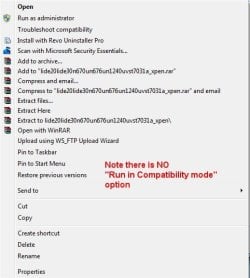
rc.jpg

Note there is NO "Run in Compatibility mode".

I went to what I thought was the next best option:
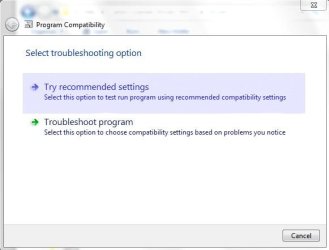
"Troubleshoot compatibility"

ts1.jpg

Here I selected "Try recommended settings"

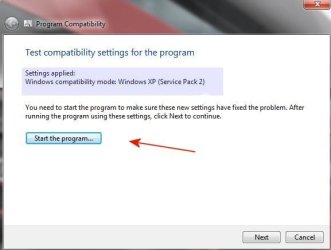
ts2.jpg

The option there is as Windows XP (sp 2). There I selected "Start the Program" with the following results:

ts3.jpg

With "Incompatible Application" I don't have a clue where to go from there.

As I see it now I have a few of options (unless you have other suggestions):

1. Reinstall Win 7. Since Win 7 is running so well I really don't care for this option.
2. Keep Win XP on the second hard driver. The scanner works fine there, but I am trying to go entirely to Win 7.
3. Buy a new scanner that is compatible with Win 7. This is more than likely what I will do in the future when I have the extra cash.

I don't see any other possibilities, do you?
 

My Computer

OS
Windows 7 Pro
CPU
Intel(R) Pentium(R) Duel CPU E2200 2.20 Ghz
Motherboard
GA-G41M-ES2L
Memory
4 gb 2.96 Usable
Graphics Card(s)
Onboard
Sound Card
Onboard
Hard Drives
2 - 1TB WD Sata Drives

My Computer

Computer type
PC/Desktop
Computer Manufacturer/Model Number
Medion Erazer (note to self: insert model number) - with custom additions
OS
Windows 10 Pro x64
CPU
Intel Core i5 7400 @ 3.00GHz
Motherboard
OEM supllied with PC
Memory
8GB 2133Mhz DDR4 (OEM supplied)
Graphics Card(s)
Gygabyte Windforce GTX 1050Ti (Factory Overclocked)
Sound Card
Realtek
Monitor(s) Displays
Acer Al1980 + HKC
Screen Resolution
1360*768(HKC) / 1280*1024(Acer)
Hard Drives
1TB Toshiba
1TB WD Caviar Green
120GB Samsung Evo 840
PSU
OEM supplied (no power rating on case)
Case
OEM Supplied
Cooling
Stock
Keyboard
Logitech Wireless
Mouse
Logitect Wireless
Internet Speed
40Mb/s Down 10Mb/s Up
Antivirus
Defender
Browser
Firefox
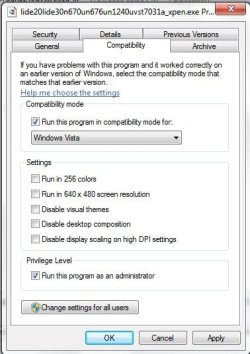
severedsolo I followed that tutorial verbatium.

Here is my Compatibility tab:

compatibilitytab.jpg

After setting according to the tutorial, I clicked OK.

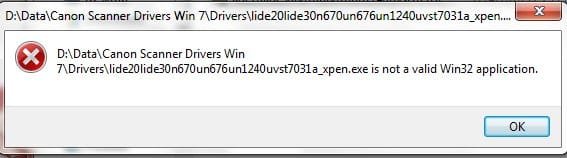
When I ran as administrator here is the message I got.

compatibilitytab2.jpg

Perhaps this is not a 32 bit file, but the tech at Canon said it was and the two files he had me download were the only two files available for my scanner.

The second file besides the drivers is for the "Toolbox" which the tech said I would need also. It will install although I have NOT installed it because he said install the drivers first. I will give them a call and ask them again and see what happens (they are closed right now).
 

My Computer

OS
Windows 7 Pro
CPU
Intel(R) Pentium(R) Duel CPU E2200 2.20 Ghz
Motherboard
GA-G41M-ES2L
Memory
4 gb 2.96 Usable
Graphics Card(s)
Onboard
Sound Card
Onboard
Hard Drives
2 - 1TB WD Sata Drives
While I was sitting with nothing better to do, I went bIack to the Canon Driver Page:

Canon U.S.A. : Support & Drivers : CanoScan N670U


cannondl.jpg

Looking at the driver file, to me it clearly says for Windows Vista32.

I will still call them for clarification.
 

My Computer

OS
Windows 7 Pro
CPU
Intel(R) Pentium(R) Duel CPU E2200 2.20 Ghz
Motherboard
GA-G41M-ES2L
Memory
4 gb 2.96 Usable
Graphics Card(s)
Onboard
Sound Card
Onboard
Hard Drives
2 - 1TB WD Sata Drives
Yeahhhhhhhhhhhhhhhhhhh

Problem solved and the drivers are installed.

I called Canon and talked to the tech there. He had me check the size of the file and for some reason when I downloaded it, I only got part of the file. It should have been 5.27 mb but I only got 3.72 mb. I downloaded it again and BINGO. It installed just like advertised.

Thanks again for the patience and all the help.
 

My Computer

OS
Windows 7 Pro
CPU
Intel(R) Pentium(R) Duel CPU E2200 2.20 Ghz
Motherboard
GA-G41M-ES2L
Memory
4 gb 2.96 Usable
Graphics Card(s)
Onboard
Sound Card
Onboard
Hard Drives
2 - 1TB WD Sata Drives
Please, translate. Bonsoir. J'avais un problème avec un scanner Canon de 1998, N670U. J'ai trouvé sur un forum une solution miracle et gratuite pour à peu près tous les scanners : VueScan.fr. J'ai W 7 x 64. Impeccable. Cordialement. Bernard.
 

My Computer

OS
W7 x 64
Back
Top