Can't access computer on my network

Clay L

New member
Local time
4:00 PM
Messages
10
Location
Traveling around the US in a motor home
I did a search but didn't find anything that applied.

I have two identical HP laptops with mine running Win7 64 bit and my wife's running Vista 64 bit - both Home Premium. They are connected to a network with a wireless router which has an usb modem (aircard) plugged in. Both laptops can connect to the internet through the router.
Until recently I could put files in her public folders. I can still see her laptop, but now all of sudden I get the following dialog box http://img.photobucket.com/albums/v425/ClayL/networkerrormsg.jpg when I try to access it.
My wife can still access my laptop and send files to it.

I don't know what the user name is it asks for - I tried "Clay" which is the only user name on my computer - and the only password we have is the one for the network which I am already connected to and it doesn't work.

In "Advanced sharing" password protected sharing is turned off.

Any ideas of what is wrong?
 
Last edited:

My Computer

OS
Win7
I would check and see if the Public sharing folder is turned on.
 

My Computer

Computer Manufacturer/Model Number
SMN-Productions
OS
Windows 7 x86/x64, Server 2008r2, Web Server 2008
CPU
i7 v2 3930K Steping stone 2
Motherboard
ASUS Rampage IV Extreme
Memory
G.SKILL Ripjaws Z Series 32GB
Graphics Card(s)
AMD HD 5770
Monitor(s) Displays
Acer 21" and Samsung 20"
Hard Drives
Patriot Pyro 80GB
PSU
1000 Watt
Case
HAF-X
Cooling
4 Fans
Keyboard
Black Widow Ultimate
I did a search but didn't find anything that applied.

I have two identical HP laptops with mine running Win7 64 bit and my wife's running Vista 64 bit - both Home Premium. They are connected to a network with a wireless router which has an usb modem (aircard) plugged in. Both laptops can connect to the internet through the router.
Until recently I could put files in her public folders. I can still see her laptop, but now all of sudden I get the following dialog box http://img.photobucket.com/albums/v425/ClayL/networkerrormsg.jpg when I try to access it.
My wife can still access my laptop and send files to it.

I don't know what the user name is it asks for - I tried "Clay" which is the only user name on my computer - and the only password we have is the one for the network which I am already connected to and it doesn't work.

In "Advanced sharing" password protected sharing is turned off.

Any ideas of what is wrong?

What A/V software do you have installed on these machines Clay?
 

My Computer

Computer type
PC/Desktop
Computer Manufacturer/Model Number
Home built
OS
Windows 7 Ult, Windows 8.1 Pro,
CPU
Q9650-4.275GHz, E8600 4.5GHz, E6750-3.8GHz
Motherboard
Evga 780i FTW
Memory
G.Skill PC2 9600 1200Mhz 5 5 5 15 2T
Graphics Card(s)
GTX480
Sound Card
Asus Xonar D2
Monitor(s) Displays
HannsG
Screen Resolution
1680X1050
Hard Drives
GSkill Phoenix Pro 120GB SSD
PSU
ThermalTake Toughpower 1000Watt modular
Case
ThermalTake XaserV
Cooling
Xigmatek S1283
Keyboard
Logitech G15
Mouse
Logitech G9
Internet Speed
T1
I believe the smart card credentials are only required if you are using WPA2 Enterprize setting for the wireless network security. Also make sure you aren't using WPA2 Enterprize setting in your routers control panel.

You shoud also check the wireless security on the Vista and Windows 7 machine and make sure it's set to use WPA2 PSK [AES] only not WPA2 Enterprize under Network and sharing center > "Manage wireless networks"

It also shows your PC as being in a Domain which might be part of the problem.

After reading more about this problem apparently Vista has problems working with WEP security on certain types of routers. If you aren't already using WPA2 PSK [AES] you should try using it instead of WEP.

Source> http://social.answers.microsoft.com...g/thread/69fcbec6-cc6b-4146-b1f9-34f644add579
 
Last edited:

My Computer

Computer type
PC/Desktop
Computer Manufacturer/Model Number
Home built
OS
Windows 7 Ult, Windows 8.1 Pro,
CPU
Q9650-4.275GHz, E8600 4.5GHz, E6750-3.8GHz
Motherboard
Evga 780i FTW
Memory
G.Skill PC2 9600 1200Mhz 5 5 5 15 2T
Graphics Card(s)
GTX480
Sound Card
Asus Xonar D2
Monitor(s) Displays
HannsG
Screen Resolution
1680X1050
Hard Drives
GSkill Phoenix Pro 120GB SSD
PSU
ThermalTake Toughpower 1000Watt modular
Case
ThermalTake XaserV
Cooling
Xigmatek S1283
Keyboard
Logitech G15
Mouse
Logitech G9
Internet Speed
T1
I am using WPA-Personal with TKIP encryption and it has been working fine until this glitch, so I think the router is compatible with the set-up.
The router is a Kyocera KR1 that is about four years old and doesn't offer WPA2 Enterprize as an option as far as I know.
 

My Computer

OS
Win7
I am using WPA-Personal with TKIP encryption and it has been working fine until this glitch, so I think the router is compatible with the set-up.
The router is a Kyocera KR1 that is about four years old and doesn't offer WPA2 Enterprize as an option as far as I know.


Clay I noticed your
Traveling around the US in a motor home
Did you by chance connect to a free hot spot somewhere like a campground or macdonalds. If so then this might have changed your network setting somehow. Thats just a hunch. I wish you good luck with your problems and your travels. Welcome to SevenForums :D
 

My Computer

Computer Manufacturer/Model Number
Gateway GT5692
OS
Windows 7 Ulti. x64
CPU
AMD Phenom 8450 triple-core 2.10 ghz
Memory
4GB
Graphics Card(s)
ATI Radion HD 3200
Monitor(s) Displays
Gateway FPD1775W
Screen Resolution
1280x720
Hard Drives
465.6613 Gibibytes
Clay I noticed your
Traveling around the US in a motor home
Did you by chance connect to a free hot spot somewhere like a campground or macdonalds. If so then this might have changed your network setting somehow. Thats just a hunch. I wish you good luck with your problems and your travels. Welcome to SevenForums :D

Nope, no WIFI anywhere.
We use a Verizon aircard for internet access and in any case we have been stationary for several months now due to family members needing some help.
As an aside, I haven't installed any software except the last Windows update a few days ago.
Thanks for the suggestion though.
 

My Computer

OS
Win7
Try entering the name of your machine such as Clay-PC or what ever it's name is.
 

My Computer

Computer type
PC/Desktop
Computer Manufacturer/Model Number
Bruce ... somewhere in his 40's
OS
Windows 7 Ultimate 32bit SP1
CPU
Intel(R) Core(TM)2 Quad CPU @ 2.40GHz, 2400 MHz
Motherboard
INTEL/D975XBX2
Memory
4 GB
Graphics Card(s)
ATI Radeon HD 2600 Pro
Monitor(s) Displays
Samsung SyncMaster 914v
Screen Resolution
1280 x 1024
Hard Drives
2/500GB each ... ST3500630AS ATA Device.
One is not connected
PSU
Rocketfish 700 W
Case
G.Skill Gigabyte Chassis
Keyboard
Standard PS/2 Keyboard
Mouse
Microsoft PS/2 Mouse
Internet Speed
DSL
Antivirus
Avira Internet Security
Browser
IE 11
Other Info
ATI HDMI Audio
Check your wife's computer to see if your computer is allowed to access hers. Something may have changed there.
 

My Computer

Computer type
PC/Desktop
Computer Manufacturer/Model Number
Bruce ... somewhere in his 40's
OS
Windows 7 Ultimate 32bit SP1
CPU
Intel(R) Core(TM)2 Quad CPU @ 2.40GHz, 2400 MHz
Motherboard
INTEL/D975XBX2
Memory
4 GB
Graphics Card(s)
ATI Radeon HD 2600 Pro
Monitor(s) Displays
Samsung SyncMaster 914v
Screen Resolution
1280 x 1024
Hard Drives
2/500GB each ... ST3500630AS ATA Device.
One is not connected
PSU
Rocketfish 700 W
Case
G.Skill Gigabyte Chassis
Keyboard
Standard PS/2 Keyboard
Mouse
Microsoft PS/2 Mouse
Internet Speed
DSL
Antivirus
Avira Internet Security
Browser
IE 11
Other Info
ATI HDMI Audio
From looking at the photo buckit snip have you tried, lees as username and no paseword or admin for password?
 

My Computer

Computer Manufacturer/Model Number
Gateway GT5692
OS
Windows 7 Ulti. x64
CPU
AMD Phenom 8450 triple-core 2.10 ghz
Memory
4GB
Graphics Card(s)
ATI Radion HD 3200
Monitor(s) Displays
Gateway FPD1775W
Screen Resolution
1280x720
Hard Drives
465.6613 Gibibytes
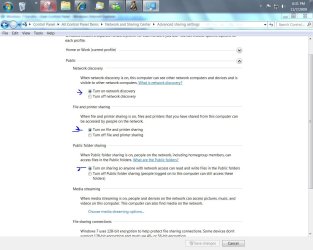
Sure you have all the public ticked yes?
advance sharing.JPG

advanced share public.JPG
 

My Computer

Computer Manufacturer/Model Number
Gateway GT5692
OS
Windows 7 Ulti. x64
CPU
AMD Phenom 8450 triple-core 2.10 ghz
Memory
4GB
Graphics Card(s)
ATI Radion HD 3200
Monitor(s) Displays
Gateway FPD1775W
Screen Resolution
1280x720
Hard Drives
465.6613 Gibibytes
I checked my wife's computer as Jaycee suggested and found a dialog box with an unchecked square that said something like "Allow all users on the network to access this computer".
I checked it and now I can access all shared folders on her computer again. She says she didn't mess with it so the gremlins must have done it.
Thanks to all for your help.
 

My Computer

OS
Win7
I checked my wife's computer as Jaycee suggested and found a dialog box with an unchecked square that said something like "Allow all users on the network to access this computer".
I checked it and now I can access all shared folders on her computer again. She says she didn't mess with it so the gremlins must have done it.
Thanks to all for your help.
Thanks Clay for telling us of your resolution to your problem. Glad that it is now working for you. Good luck to you and yours. :D
 

My Computer

Computer Manufacturer/Model Number
Gateway GT5692
OS
Windows 7 Ulti. x64
CPU
AMD Phenom 8450 triple-core 2.10 ghz
Memory
4GB
Graphics Card(s)
ATI Radion HD 3200
Monitor(s) Displays
Gateway FPD1775W
Screen Resolution
1280x720
Hard Drives
465.6613 Gibibytes
Thanks for letting us know you're problem is solved! :D
 

My Computer

Computer type
PC/Desktop
Computer Manufacturer/Model Number
Bruce ... somewhere in his 40's
OS
Windows 7 Ultimate 32bit SP1
CPU
Intel(R) Core(TM)2 Quad CPU @ 2.40GHz, 2400 MHz
Motherboard
INTEL/D975XBX2
Memory
4 GB
Graphics Card(s)
ATI Radeon HD 2600 Pro
Monitor(s) Displays
Samsung SyncMaster 914v
Screen Resolution
1280 x 1024
Hard Drives
2/500GB each ... ST3500630AS ATA Device.
One is not connected
PSU
Rocketfish 700 W
Case
G.Skill Gigabyte Chassis
Keyboard
Standard PS/2 Keyboard
Mouse
Microsoft PS/2 Mouse
Internet Speed
DSL
Antivirus
Avira Internet Security
Browser
IE 11
Other Info
ATI HDMI Audio
Back
Top