soapieKdad
New member
- Local time
- 8:11 AM
- Messages
- 14
Hi I'm having a helluva time with getting my Lenovo Y510P to recognize any USB flash drives or external HD. Laptop is virtually new. Came with Win 8 but I installed Windows 7 Pro 64 Service Pack 1. Immediately downloaded and installed all Windows updates. From Lenovo I installed all of the latest drivers and updates, including BIOS, Genesys USB mass storage device, Intel chipset driver and Intel rapid storage technology.
Laptop works great except for this issue.
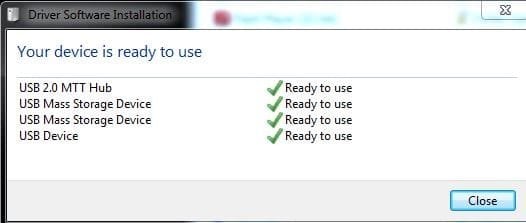
I can see the flash drive in device manager but nothing in Computer folder. Same goes for Disk Management... no flash drive appears. I have no virtual drives installed so currently no Daemon Tools or similar.
When I plug the drive into any of the 3 USB ports (2 are 3.0, 1 is 2.0) the laptop makes the typical sound that you've connected something. These flash drives and external HD work fine in my other 3 computers here at home (2 laptops and 1 desktop). Some run Win 7... the other Win 8.1.
I tried going to Device Manager and uninstalling all USB controllers and hubs (including drivers), then restarting. My OS reinstalled everything (as soon as I plugged in my mouse and/or flash drive, if I recall correctly), but same issue persists.
I also ran DriveCleanup (claims to be "command app that helps to remove orphaned entries of various drives from the device tree of your system"). Same issue persists.
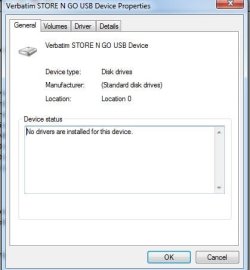
In case useful, I'm posting a few photos including one of the flash drive properties from a working computer and one from this problematic laptop. Obvious differences are that on the working computer the flash drive properties under General tab the status says "device is working properly" and location is "USB mass storage device" under Driver tab it displays the specific model of the flash drive and the MS driver information. On the bad computer the general tab says "No drivers are installed for this device" and location is "Location 0" but under the Driver tab it shows has correct model and MS driver information as when connected to the working laptop.
Any ideas or troubleshooting tips are greatly appreciated. Thanks for reading, Josh
Laptop works great except for this issue.
I can see the flash drive in device manager but nothing in Computer folder. Same goes for Disk Management... no flash drive appears. I have no virtual drives installed so currently no Daemon Tools or similar.
When I plug the drive into any of the 3 USB ports (2 are 3.0, 1 is 2.0) the laptop makes the typical sound that you've connected something. These flash drives and external HD work fine in my other 3 computers here at home (2 laptops and 1 desktop). Some run Win 7... the other Win 8.1.
I tried going to Device Manager and uninstalling all USB controllers and hubs (including drivers), then restarting. My OS reinstalled everything (as soon as I plugged in my mouse and/or flash drive, if I recall correctly), but same issue persists.
I also ran DriveCleanup (claims to be "command app that helps to remove orphaned entries of various drives from the device tree of your system"). Same issue persists.
In case useful, I'm posting a few photos including one of the flash drive properties from a working computer and one from this problematic laptop. Obvious differences are that on the working computer the flash drive properties under General tab the status says "device is working properly" and location is "USB mass storage device" under Driver tab it displays the specific model of the flash drive and the MS driver information. On the bad computer the general tab says "No drivers are installed for this device" and location is "Location 0" but under the Driver tab it shows has correct model and MS driver information as when connected to the working laptop.
Any ideas or troubleshooting tips are greatly appreciated. Thanks for reading, Josh
Attachments


My Computer
At a glance
Win 7 Pro 64i5-4200m6GB RAMdual GT 755M 1GB cards with SLI
- Computer type
- PC/Desktop
- Computer Manufacturer/Model Number
- Lenovo Y510P
- OS
- Win 7 Pro 64
- CPU
- i5-4200m
- Memory
- 6GB RAM
- Graphics Card(s)
- dual GT 755M 1GB cards with SLI