Solved Can't Access Important Partition

AC

New member
Guru
Local time
11:17 PM
Messages
897
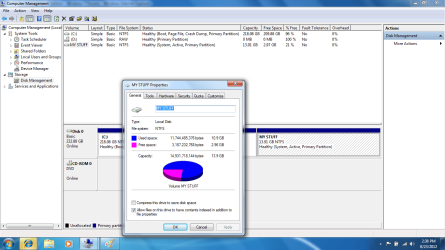
Okay, my Windows 7 Ultimate x86 decided to stop booting, and after I tried some recovery options, I just resinstalled. I did as I've done many times, and the install was fine. Now, I go to Start>My Computer> My Stuff Partition, where my drivers and IMPORTANT FILES are saved. I have reinstalled like this many times, and no problems. My data on the partition was there, without doing anything. So, I searched on the Internet, and saw that it might have to do with not being the owner, and I went to Disk Managment and did that. Still not working. The thing is, in disk managment, I can see my partition with the label, and I can right click>properties and see how much of the partition is being used. I just can't access it. So, please, amazing seven forums community, HELP ME! I am :cry: and :mad: right now.
 

Attachments

  • disk.png
    disk.png
    64.4 KB · Views: 35

My Computer

Computer type
PC/Desktop
Computer Manufacturer/Model Number
Custom Build
OS
Windows 7 Home Premium 64-Bit
CPU
Intel Core i5-4670K
Motherboard
Gigabyte GA-Z87MX-D3H
Memory
8GB HyperX BLU
Graphics Card(s)
Intel HD 4600 Graphics
Monitor(s) Displays
Vizta V24Lmh
Screen Resolution
1920x1080x32 @60Hz
Hard Drives
Toshiba 1TB
PSU
Dynex 650W
Case
Antec GX700
Keyboard
Logitech mk270
Mouse
Logitech mk270
Internet Speed
50 mbps down/5 mbps up
Antivirus
MSE
Browser
Chrome
Other Info
First custom build, saving up for a GTX770!
Give the partition a Drive letter in Disk Mgmt so Explorer can access it: Drive Letter - Add, Change, or Remove in Windows 7 - Windows 7 Forums

You need a backup solution as running without it is reckless. Sort your data into User folders, drag them to DVD, External HD, another computer on the network, or upload up to 7gb free storage to the cloud with each Windows Live ID using Skydrive. YOu can even sync your User folders to Skydrive and back down to your other machines and devices using Sync Any Folder to Your SkyDrive Account. Or access them on the internet from any computer.
http://www.pcworld.com/article/257173/sync_any_folder_to_your_skydrive_account.html
 
Give the partition a Drive letter in Disk Mgmt so Explorer can access it: Drive Letter - Add, Change, or Remove in Windows 7 - Windows 7 Forums

You need a backup solution as running without it is reckless. Sort your data into User folders, drag them to DVD, External HD, another computer on the network, or upload up to 7gb free storage to the cloud with each Windows Live ID using Skydrive. YOu can even sync your User folders to Skydrive and back down to your other machines and devices using Sync Any Folder to Your SkyDrive Account. Or access them on the internet from any computer.
My holy Lord, thank you, thank you, THANK YOU! I almost had a heart attack. Never again will I not backup my files. I just bought a 32 GB flash drive. Plan on getting an external hard drive. Once again, thank you! Rep will be given as deserved.
EDIT: Can't give you rep, as I repped you a few days ago, but, thank you.
 

My Computer

Computer type
PC/Desktop
Computer Manufacturer/Model Number
Custom Build
OS
Windows 7 Home Premium 64-Bit
CPU
Intel Core i5-4670K
Motherboard
Gigabyte GA-Z87MX-D3H
Memory
8GB HyperX BLU
Graphics Card(s)
Intel HD 4600 Graphics
Monitor(s) Displays
Vizta V24Lmh
Screen Resolution
1920x1080x32 @60Hz
Hard Drives
Toshiba 1TB
PSU
Dynex 650W
Case
Antec GX700
Keyboard
Logitech mk270
Mouse
Logitech mk270
Internet Speed
50 mbps down/5 mbps up
Antivirus
MSE
Browser
Chrome
Other Info
First custom build, saving up for a GTX770!
I notice there is no drive letter assigned to that partition. Try the followind:

  1. Open Computer Management (Local).
  2. In the console tree, click Computer Management (Local), click Storage, and then click Disk Management.
  3. Right-click a partition, logical drive, or volume, and then click Change Drive Letter and Paths.
  4. Do one of the following:
    • To assign a drive letter, click Add, click the drive letter you want to use, and then click OK.
This information is from:

Assign, change, or remove a drive letter: Storage Services; Local File Systems

Hope this helps...
 

My Computer

OS
win7 ultimate 64bit
  • Like
Reactions: AC
I notice there is no drive letter assigned to that partition. Try the followind:

  1. Open Computer Management (Local).
  2. In the console tree, click Computer Management (Local), click Storage, and then click Disk Management.
  3. Right-click a partition, logical drive, or volume, and then click Change Drive Letter and Paths.
  4. Do one of the following:
    • To assign a drive letter, click Add, click the drive letter you want to use, and then click OK.
This information is from:

Assign, change, or remove a drive letter: Storage Services; Local File Systems

Hope this helps...
It helps, (exactly what I did, see above :p) but, rep will be given.
 

My Computer

Computer type
PC/Desktop
Computer Manufacturer/Model Number
Custom Build
OS
Windows 7 Home Premium 64-Bit
CPU
Intel Core i5-4670K
Motherboard
Gigabyte GA-Z87MX-D3H
Memory
8GB HyperX BLU
Graphics Card(s)
Intel HD 4600 Graphics
Monitor(s) Displays
Vizta V24Lmh
Screen Resolution
1920x1080x32 @60Hz
Hard Drives
Toshiba 1TB
PSU
Dynex 650W
Case
Antec GX700
Keyboard
Logitech mk270
Mouse
Logitech mk270
Internet Speed
50 mbps down/5 mbps up
Antivirus
MSE
Browser
Chrome
Other Info
First custom build, saving up for a GTX770!
Back
Top