
You are using an out of date browser. It may not display this or other websites correctly.
You should upgrade or use an alternative browser.
You should upgrade or use an alternative browser.
Can't access links in e-mails with a click
- Thread starter Chris623
- Start date

- Local time
- 4:12 AM
- Messages
- 1,102
Hi:
Hmmm, that's not much information.
Firefox is a web browser.
So, when you say you cannot open a link in an email, I assume you are referring to a link in an email, and that, when you click it, nothing happens?
It suggests that your email client doesn't know to call Firefox as your default browser?
Also, it would help to know:
But, anyway, a bit more info would help us to better help you,
Cheers,
Hmmm, that's not much information.
Firefox is a web browser.
So, when you say you cannot open a link in an email, I assume you are referring to a link in an email, and that, when you click it, nothing happens?
It suggests that your email client doesn't know to call Firefox as your default browser?
Also, it would help to know:
- What version of Firefox?
- What add-ons and extensions, especially privacy extensions?
- What email client and what version (or webmail application)?
- Is the email client configured to call Firefox?
- What security programs on the computer?
- What is your default browser (Control Panel > Programs > Default Programs)?
- What sort of error message or dialog do you see when you click the link?
But, anyway, a bit more info would help us to better help you,
Cheers,
My Computer
- Computer type
- PC/Desktop
- Computer Manufacturer/Model Number
- Dell Studio XPS 8500
- OS
- OEM Windows 7 Ult (x64) SP1
- CPU
- Intel Core-i7 3770 @ 3.4 GHz
- Motherboard
- "Dell" branded
- Memory
- 16 GB DDR3 SDRAM @ 1333 MHz
- Graphics Card(s)
- NVidia GeForce GT620 1 GB
- Sound Card
- THX TruStudio PC
- Monitor(s) Displays
- Dell U2410 Full HD
- Hard Drives
- 2.0 TB SATA2 @ 7200 RPM
- PSU
- 350W
- Keyboard
- MS 4000 Ergon - Wired
- Mouse
- Logitech Anywhere MX
- Internet Speed
- Cable HSI w/Turbo (router)
- Antivirus
- KIS-MBAM Premium-MBAE Premium
- Browser
- Fx (current version); IE
- Other Info
- And a Win7/64 Pro laptop; And a Win10/64 Pro desktop.
My problem is the buttons from on-line companies, i.e. Carbonite, Consumer Cellular. When I click on a button on their e-mail, it only takes me to a blank page.
As far as your questions:
I'm using Firefox 40.0.2
Add on's:
Exif Viewer, Amazon Smile Redirect, Garmin Communicator and Ghostery.
My e-mail is AT&T/Yahoo
Can't answer your 4th question. It's been working fine for years and then just in the past week or so it's started this problem.
I use Viper Security.
My Default browser is Firefox.
There are no error messages when I click on a link..............just a blank page.
As far as your questions:
I'm using Firefox 40.0.2
Add on's:
Exif Viewer, Amazon Smile Redirect, Garmin Communicator and Ghostery.
My e-mail is AT&T/Yahoo
Can't answer your 4th question. It's been working fine for years and then just in the past week or so it's started this problem.
I use Viper Security.
My Default browser is Firefox.
There are no error messages when I click on a link..............just a blank page.
My Computer
- Computer type
- PC/Desktop
- OS
- Windows 7
- Local time
- 3:12 AM
- Messages
- 8,138
I'm not sure what the problem is, but I would like to ask something:
When you place your mouse over the link/button in question, do you see the URL in the status area?
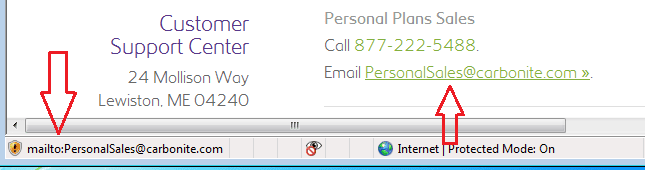
If you do see the URL, does that URL start with MAILTO:?
Sorry - I did not have Firefox installed to get a screenshot using that.
When you place your mouse over the link/button in question, do you see the URL in the status area?
If you do see the URL, does that URL start with MAILTO:?
Sorry - I did not have Firefox installed to get a screenshot using that.
My Computer
- Computer type
- Laptop
- Computer Manufacturer/Model Number
- Employer provided Dell Latitude
- OS
- W7 Pro SP1 64bit
- CPU
- i7
- Memory
- 8GB
- Graphics Card(s)
- Intel HD Graphics
- Hard Drives
- crappy SSD
- Antivirus
- Employer mandated Symantec Endpoint Protection
- Browser
- Pale Moon 64bit, IE11 64bit & Chrome 64bit
Yes..........yes I do. And what's funny is some sites links work for me..........but very few. When I get a notification of a UPS shipment, the "tracking" button works just fine. But when Carbonite tells me to "click here" to get two months of free coverage added to my account, I get a blank page.
My Computer
- Computer type
- PC/Desktop
- OS
- Windows 7
- Local time
- 3:12 AM
- Messages
- 8,138
Perhaps Ghostery is blocking stuff that is required for some websites.
My Computer
- Computer type
- Laptop
- Computer Manufacturer/Model Number
- Employer provided Dell Latitude
- OS
- W7 Pro SP1 64bit
- CPU
- i7
- Memory
- 8GB
- Graphics Card(s)
- Intel HD Graphics
- Hard Drives
- crappy SSD
- Antivirus
- Employer mandated Symantec Endpoint Protection
- Browser
- Pale Moon 64bit, IE11 64bit & Chrome 64bit
I disabled Ghostery and still couldn't access with one click. I can stilll access any link with a "r-click and open in new window", but I can't figure out why I can't find a way to make it work properly.
My Computer
- Computer type
- PC/Desktop
- OS
- Windows 7
- Local time
- 3:12 AM
- Messages
- 8,138
Some web pages will not display via right-click and open in new window. You must allow popup.
My Computer
- Computer type
- Laptop
- Computer Manufacturer/Model Number
- Employer provided Dell Latitude
- OS
- W7 Pro SP1 64bit
- CPU
- i7
- Memory
- 8GB
- Graphics Card(s)
- Intel HD Graphics
- Hard Drives
- crappy SSD
- Antivirus
- Employer mandated Symantec Endpoint Protection
- Browser
- Pale Moon 64bit, IE11 64bit & Chrome 64bit
- Local time
- 4:12 AM
- Messages
- 1,102
TBH, I'm not sure what the exact problem is either.
Your original post mentions links in emails, but you are using webmail (I guess that doesn't matter, per se).
So, this seems to be Firefox (browser) issue, and unrelated to "links in emails" or email itself?
BTW, some web sites are still using Flash.
Firefox now blocks Flash by default.
Perhaps these various radio buttons need to have Flash enabled in order to function.
For example, on radioparadise.com, the "PSD" button requires Flash.
As another example, when I log in to my Hightail account (a cloud sharing service like Dropbox), I need to enable Flash in order to see and use the button to select a file for uploading.
So, do you have the current version of Flash Player for Firefox installed?
If so, are you seeing prompts to enable it when you visit the websites in question?
Just a thought,
Your original post mentions links in emails, but you are using webmail (I guess that doesn't matter, per se).
So, this seems to be Firefox (browser) issue, and unrelated to "links in emails" or email itself?
BTW, some web sites are still using Flash.
Firefox now blocks Flash by default.
Perhaps these various radio buttons need to have Flash enabled in order to function.
For example, on radioparadise.com, the "PSD" button requires Flash.
As another example, when I log in to my Hightail account (a cloud sharing service like Dropbox), I need to enable Flash in order to see and use the button to select a file for uploading.
So, do you have the current version of Flash Player for Firefox installed?
If so, are you seeing prompts to enable it when you visit the websites in question?
Just a thought,
My Computer
- Computer type
- PC/Desktop
- Computer Manufacturer/Model Number
- Dell Studio XPS 8500
- OS
- OEM Windows 7 Ult (x64) SP1
- CPU
- Intel Core-i7 3770 @ 3.4 GHz
- Motherboard
- "Dell" branded
- Memory
- 16 GB DDR3 SDRAM @ 1333 MHz
- Graphics Card(s)
- NVidia GeForce GT620 1 GB
- Sound Card
- THX TruStudio PC
- Monitor(s) Displays
- Dell U2410 Full HD
- Hard Drives
- 2.0 TB SATA2 @ 7200 RPM
- PSU
- 350W
- Keyboard
- MS 4000 Ergon - Wired
- Mouse
- Logitech Anywhere MX
- Internet Speed
- Cable HSI w/Turbo (router)
- Antivirus
- KIS-MBAM Premium-MBAE Premium
- Browser
- Fx (current version); IE
- Other Info
- And a Win7/64 Pro laptop; And a Win10/64 Pro desktop.
I just downloaded the most recent Flash. (don't know the number) Check again and still couldn't use the website's "click here" button. How do I make sure it's not being blocked by Firefox?
My Computer
- Computer type
- PC/Desktop
- OS
- Windows 7
- Local time
- 4:12 AM
- Messages
- 1,102
Yep, I can confirm what you report, @UNI.
I am in Firefox 40.0.2 with ABP and NS.
When I mouse over the link (1) , I see the email address link in the lower left (2).
When I click the link (3), it opens an email in my default email client, Thunderbird 38.2.0, addressed to "[email protected]".
So, @Chris263, it appears that it's the call to your email client/webmail program that is not working?
I use an email client (Thunderbird) installed locally on the system as my default.
I don't know what behavior to expect when using webmail. Sorry. Perhaps one has to be already logged in to the webmail (in your case Yahoomail) in order for the blank email to open????
BTW, what happens when you try to replicate the behavior in a different browser, such as IE or Chrome or Opera?
Thanks,
I am in Firefox 40.0.2 with ABP and NS.
When I mouse over the link (1) , I see the email address link in the lower left (2).
When I click the link (3), it opens an email in my default email client, Thunderbird 38.2.0, addressed to "[email protected]".
So, @Chris263, it appears that it's the call to your email client/webmail program that is not working?
I use an email client (Thunderbird) installed locally on the system as my default.
I don't know what behavior to expect when using webmail. Sorry. Perhaps one has to be already logged in to the webmail (in your case Yahoomail) in order for the blank email to open????
BTW, what happens when you try to replicate the behavior in a different browser, such as IE or Chrome or Opera?
Thanks,
Attachments

My Computer
- Computer type
- PC/Desktop
- Computer Manufacturer/Model Number
- Dell Studio XPS 8500
- OS
- OEM Windows 7 Ult (x64) SP1
- CPU
- Intel Core-i7 3770 @ 3.4 GHz
- Motherboard
- "Dell" branded
- Memory
- 16 GB DDR3 SDRAM @ 1333 MHz
- Graphics Card(s)
- NVidia GeForce GT620 1 GB
- Sound Card
- THX TruStudio PC
- Monitor(s) Displays
- Dell U2410 Full HD
- Hard Drives
- 2.0 TB SATA2 @ 7200 RPM
- PSU
- 350W
- Keyboard
- MS 4000 Ergon - Wired
- Mouse
- Logitech Anywhere MX
- Internet Speed
- Cable HSI w/Turbo (router)
- Antivirus
- KIS-MBAM Premium-MBAE Premium
- Browser
- Fx (current version); IE
- Other Info
- And a Win7/64 Pro laptop; And a Win10/64 Pro desktop.
- Local time
- 4:12 AM
- Messages
- 1,102
I don't have either of those on my machine.........
Hmmmmmm, well, if you have Microsoft Windows 7 for an Operating System, then you must have Internet Explorer on the computer (it comes with Windows).
The suggestion to try a different browser was merely a troubleshooting step, to narrow the problem down to Firefox.
Internet Explorer is already on your computer (or it ought to be).
Chrome and Opera could be installed, just for testing purposes.
OK, I'm sorry, but I don't quite understand.and wouldn't know how to access my Yahoo e-mail even if I did.
You wrote:
I misunderstood that to mean that you use Yahoo mail as a webmail application to write and receive email.My e-mail is AT&T/Yahoo
So, I think we may be back to the drawing board.
What email "client" or program or webmail application do you use for your email?
IOW how do you access your email messages?
That seems to be the "missing link" hangup in the behavior you report.

Thank you,
My Computer
- Computer type
- PC/Desktop
- Computer Manufacturer/Model Number
- Dell Studio XPS 8500
- OS
- OEM Windows 7 Ult (x64) SP1
- CPU
- Intel Core-i7 3770 @ 3.4 GHz
- Motherboard
- "Dell" branded
- Memory
- 16 GB DDR3 SDRAM @ 1333 MHz
- Graphics Card(s)
- NVidia GeForce GT620 1 GB
- Sound Card
- THX TruStudio PC
- Monitor(s) Displays
- Dell U2410 Full HD
- Hard Drives
- 2.0 TB SATA2 @ 7200 RPM
- PSU
- 350W
- Keyboard
- MS 4000 Ergon - Wired
- Mouse
- Logitech Anywhere MX
- Internet Speed
- Cable HSI w/Turbo (router)
- Antivirus
- KIS-MBAM Premium-MBAE Premium
- Browser
- Fx (current version); IE
- Other Info
- And a Win7/64 Pro laptop; And a Win10/64 Pro desktop.
You'll have to forgive me, MoxieMamma, for I am computer illiterate............if that wasn't already obvious.
I just looked at my programs, and you are correct, I have Internet Explorer..........didn't know that until just now! I don't use it for anything that I know of. And, yes, I use AT&T Yahoo Mail for my e-mailing. I simply click on my AT&T desktop link to access it. Just used my old foggy noggin and figured out how to access Yahoo Mail from Internet Explorer. (a first!) It worked! I could click on the link and it went directly to the websites intended location. So what might be set up incorrectly in Firefox that won't allow me to do the same?
I just looked at my programs, and you are correct, I have Internet Explorer..........didn't know that until just now! I don't use it for anything that I know of. And, yes, I use AT&T Yahoo Mail for my e-mailing. I simply click on my AT&T desktop link to access it. Just used my old foggy noggin and figured out how to access Yahoo Mail from Internet Explorer. (a first!) It worked! I could click on the link and it went directly to the websites intended location. So what might be set up incorrectly in Firefox that won't allow me to do the same?
My Computer
- Computer type
- PC/Desktop
- OS
- Windows 7
- Local time
- 4:12 AM
- Messages
- 1,102
Hi:
Ah, OK, thanks for the clarification.
I guess your ISP provides a "branded" version of Yahoo webmail.
And thanks for confirming that IE works OK.
That narrows it down to a Firefox problem.
It's really not a problem with "opening links in emails", as first described. That's what had me confused.
The problem seems instead to be that a link to an email address on a web page in Firefox is not opening a new email in your Yahoo mail.
1) One entirely reversible step would be to try "Mozilla Safe Mode".
(NOTE: this is NOT the same thing as "Windows Safe Mode").
It's just a way to temporarily and generically debug Firefox by starting it with certain add-ons and extensions disabled. Be sure NOT to check anything that sounds like "Reset Firefox" or "Permanent Changes" -- you only want to do this reversibly for testing. And it might be good idea to back up your profile first, and/or to print out and read the instructions carefully before proceeding.
See here: Safe Mode
or here: Troubleshoot Firefox issues using Safe Mode
2) Another step to try would be TEMPORARILY pause real-time protection of your VIPRE AV/Firewall and test again. If that resolves the issue, then it might be some setting in your AV or firewall. Be sure to enable your VIPRE AV/firewall immediately after you try this.
3) There may be other, more specific help here: Fix problems with websites (Facebook, YouTube, webmail etc.)
Hope this helps,
Ah, OK, thanks for the clarification.
I guess your ISP provides a "branded" version of Yahoo webmail.
And thanks for confirming that IE works OK.
That narrows it down to a Firefox problem.
It's really not a problem with "opening links in emails", as first described. That's what had me confused.
The problem seems instead to be that a link to an email address on a web page in Firefox is not opening a new email in your Yahoo mail.
1) One entirely reversible step would be to try "Mozilla Safe Mode".
(NOTE: this is NOT the same thing as "Windows Safe Mode").
It's just a way to temporarily and generically debug Firefox by starting it with certain add-ons and extensions disabled. Be sure NOT to check anything that sounds like "Reset Firefox" or "Permanent Changes" -- you only want to do this reversibly for testing. And it might be good idea to back up your profile first, and/or to print out and read the instructions carefully before proceeding.
See here: Safe Mode
or here: Troubleshoot Firefox issues using Safe Mode
2) Another step to try would be TEMPORARILY pause real-time protection of your VIPRE AV/Firewall and test again. If that resolves the issue, then it might be some setting in your AV or firewall. Be sure to enable your VIPRE AV/firewall immediately after you try this.
3) There may be other, more specific help here: Fix problems with websites (Facebook, YouTube, webmail etc.)
Hope this helps,
My Computer
- Computer type
- PC/Desktop
- Computer Manufacturer/Model Number
- Dell Studio XPS 8500
- OS
- OEM Windows 7 Ult (x64) SP1
- CPU
- Intel Core-i7 3770 @ 3.4 GHz
- Motherboard
- "Dell" branded
- Memory
- 16 GB DDR3 SDRAM @ 1333 MHz
- Graphics Card(s)
- NVidia GeForce GT620 1 GB
- Sound Card
- THX TruStudio PC
- Monitor(s) Displays
- Dell U2410 Full HD
- Hard Drives
- 2.0 TB SATA2 @ 7200 RPM
- PSU
- 350W
- Keyboard
- MS 4000 Ergon - Wired
- Mouse
- Logitech Anywhere MX
- Internet Speed
- Cable HSI w/Turbo (router)
- Antivirus
- KIS-MBAM Premium-MBAE Premium
- Browser
- Fx (current version); IE
- Other Info
- And a Win7/64 Pro laptop; And a Win10/64 Pro desktop.
Thanks, MoxieMomma. Not sure when, but I'll give your suggestions a try. We had an emergency with our little Pomeranian last night and it's going to take a while for me to get my mind back on this stupid computer problem. Thanks again for all your help.
My Computer
- Computer type
- PC/Desktop
- OS
- Windows 7
- Local time
- 4:12 AM
- Messages
- 1,102
OK, take care of your furry friend first.
The computer problem can wait.
Regards,
The computer problem can wait.
Regards,
My Computer
- Computer type
- PC/Desktop
- Computer Manufacturer/Model Number
- Dell Studio XPS 8500
- OS
- OEM Windows 7 Ult (x64) SP1
- CPU
- Intel Core-i7 3770 @ 3.4 GHz
- Motherboard
- "Dell" branded
- Memory
- 16 GB DDR3 SDRAM @ 1333 MHz
- Graphics Card(s)
- NVidia GeForce GT620 1 GB
- Sound Card
- THX TruStudio PC
- Monitor(s) Displays
- Dell U2410 Full HD
- Hard Drives
- 2.0 TB SATA2 @ 7200 RPM
- PSU
- 350W
- Keyboard
- MS 4000 Ergon - Wired
- Mouse
- Logitech Anywhere MX
- Internet Speed
- Cable HSI w/Turbo (router)
- Antivirus
- KIS-MBAM Premium-MBAE Premium
- Browser
- Fx (current version); IE
- Other Info
- And a Win7/64 Pro laptop; And a Win10/64 Pro desktop.
Similar threads

- Replies
- 0
- Views
- 370

- Replies
- 0
- Views
- 1K
- Replies
- 6
- Views
- 4K