Solved Can't access microsoft websites or Windows Updates

Hellriser

New member
Power User
Local time
6:02 PM
Messages
145
For quite some time now (months), sometimes I can't access any microsoft related website or make a connection with the Windows Update servers. The rest of the internet, if I may say so, works perfect. Occasionally, it works for some time and everything is normal. But the it reverts, the browser showing me Server not found - the browser can't find the server at *insert microsoft site here*

I checked my PC for viruses and malware with Kaspersky 2012, Spyware Doctor, Malwarebytes and Combofix - I have none.

Any ideas how to fix this problem? Is there any chance that microsoft would sometimes block some countries or have bad connectivity? Or it could be a problem with my Romanian ISP?
 

My Computer My Computer

Computer type
PC/Desktop
Computer Manufacturer/Model Number
Custom Build
OS
Windows 7 Ultimate x64 SP1
CPU
QuadCore Intel Core i5-4440, 3100 MHz
Motherboard
ASRock B85 Pro4
Memory
Kingston HyperX Black 8GB DDR3 1600MHz CL9 Dual Channel
Graphics Card(s)
Gigabyte GeForce GTX 770 OC WindForce 3X 2GB DDR5 256-bit
Sound Card
On Board
Monitor(s) Displays
BenQ +VA GW2460HM 24 inch 4 ms GTG
Screen Resolution
1920x1080
Hard Drives
Samsung SSD 840 EVO 120GB
WD Black 500GB SATA III 64MB - 7200 RPM
PSU
Super Flower Golden Green SF-600P14XE(HX) 600W
Case
Zalman Z3 Plus
Browser
Palemoon
Sometimes times you have to go into internet options on IE and the security tab and enter the site as trusted sites maybe that is the problem and it sometimes has to be set manually...
 

My Computer My Computer

Computer Manufacturer/Model Number
Alienware
OS
Windows 7 Ultimate x64
CPU
I7
Motherboard
GA-X58-USB3
Memory
6 x 1.5V DDR3 DIMM sockets supporting up to 24 GB of system
Graphics Card(s)
GeForce GTX 580
Sound Card
Realtek ALC892 codec 2/4/5.1/7.1-channel
Monitor(s) Displays
NEC Display Solutions E321 Black 32"
Screen Resolution
1366 x 768
Hard Drives
OCZ Colossus LT Series OCZSSD2-1CLSLT1T 3.5" 1TB SATA II MLC Internal Solid State Drive
PSU
XFX Black Edition XPS-850W-BES 850W ATX12V
Case
Antec
Cooling
Zalman
Keyboard
Microsoft
Mouse
Microsoft
I'm using Palemoon, but this problem occurs in every browser I have installed - IE 9, Chrome, Palemoon, Firefox and Chrome. And I doubt that mirosoft would block their own website on IE.

I ran a Diagnostics check with IE 9 and is says that the DNS server isn't responding.
 

My Computer My Computer

Computer type
PC/Desktop
Computer Manufacturer/Model Number
Custom Build
OS
Windows 7 Ultimate x64 SP1
CPU
QuadCore Intel Core i5-4440, 3100 MHz
Motherboard
ASRock B85 Pro4
Memory
Kingston HyperX Black 8GB DDR3 1600MHz CL9 Dual Channel
Graphics Card(s)
Gigabyte GeForce GTX 770 OC WindForce 3X 2GB DDR5 256-bit
Sound Card
On Board
Monitor(s) Displays
BenQ +VA GW2460HM 24 inch 4 ms GTG
Screen Resolution
1920x1080
Hard Drives
Samsung SSD 840 EVO 120GB
WD Black 500GB SATA III 64MB - 7200 RPM
PSU
Super Flower Golden Green SF-600P14XE(HX) 600W
Case
Zalman Z3 Plus
Browser
Palemoon
Hi,

What firewall are you using? Can you disable it temporarily, then try access an MS site?

   Tip
Don't forget to turn it back on again after the test


Regards,
Golden
 

My Computer My Computer

Computer type
PC/Desktop
Computer Manufacturer/Model Number
Golden Mk. I.4
OS
Windows 10 Pro x64 ; Xubuntu x64
CPU
Intel i7 860 @ 2.80 GHz O/C'ed to 4.0GHz
Motherboard
Gigabyte P55A-UD3R Rev.1. Award BIOS F13
Memory
16GB Corsair Vengance DDR3 @ 661 MHz Dual Channel (9-9-9-24)
Graphics Card(s)
EVGA NVidia GTX 560 1024MB
Sound Card
Realtek Integrated
Monitor(s) Displays
Dual Samsung SyncMaster 2494HS
Screen Resolution
1920*1080 and 1920*1080
Hard Drives
1*Samsung 840 EVO 120GB SSD;
1*OCZ Vertex 2 60GB SSD;
2*Samsung F3 SpinPoint 1TB in RAID0;
1*Samsung F1 SpinPoint 1TB;
2*Western Digital 1TB External USB 3.0
1*Western Digital 500GB External USB 3.0
1*Seagate 500GB External USB 2.0
PSU
Thermaltake ToughPower QFan 750W
Case
Thermaltake Element S VK60001W2Z
Cooling
Corsair H60 Water Cooling, 2*230mm and 2*80mm case fans
Keyboard
Logitech G110
Mouse
Logitech MX518
Using default Windows Firewall. Tried it, no change.
 

My Computer My Computer

Computer type
PC/Desktop
Computer Manufacturer/Model Number
Custom Build
OS
Windows 7 Ultimate x64 SP1
CPU
QuadCore Intel Core i5-4440, 3100 MHz
Motherboard
ASRock B85 Pro4
Memory
Kingston HyperX Black 8GB DDR3 1600MHz CL9 Dual Channel
Graphics Card(s)
Gigabyte GeForce GTX 770 OC WindForce 3X 2GB DDR5 256-bit
Sound Card
On Board
Monitor(s) Displays
BenQ +VA GW2460HM 24 inch 4 ms GTG
Screen Resolution
1920x1080
Hard Drives
Samsung SSD 840 EVO 120GB
WD Black 500GB SATA III 64MB - 7200 RPM
PSU
Super Flower Golden Green SF-600P14XE(HX) 600W
Case
Zalman Z3 Plus
Browser
Palemoon
What does your hosts file read like?

and what DNS servers are you using?
 

My Computer My Computer

Computer Manufacturer/Model Number
Too many to describe...
OS
Windows 7 x64 pro/ Windows 7 x86 Pro/ XP SP3 x86
:O only 1 line:
127.0.0.1 localhost

I guess this is the work of Combofix. Don't see a problem here.
 

My Computer My Computer

Computer type
PC/Desktop
Computer Manufacturer/Model Number
Custom Build
OS
Windows 7 Ultimate x64 SP1
CPU
QuadCore Intel Core i5-4440, 3100 MHz
Motherboard
ASRock B85 Pro4
Memory
Kingston HyperX Black 8GB DDR3 1600MHz CL9 Dual Channel
Graphics Card(s)
Gigabyte GeForce GTX 770 OC WindForce 3X 2GB DDR5 256-bit
Sound Card
On Board
Monitor(s) Displays
BenQ +VA GW2460HM 24 inch 4 ms GTG
Screen Resolution
1920x1080
Hard Drives
Samsung SSD 840 EVO 120GB
WD Black 500GB SATA III 64MB - 7200 RPM
PSU
Super Flower Golden Green SF-600P14XE(HX) 600W
Case
Zalman Z3 Plus
Browser
Palemoon
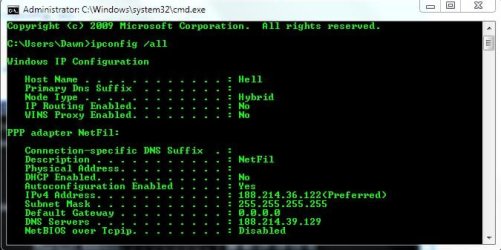
What dns servers?
 

My Computer My Computer

Computer Manufacturer/Model Number
Too many to describe...
OS
Windows 7 x64 pro/ Windows 7 x86 Pro/ XP SP3 x86
Here's a screenshot:
 

Attachments

  • Capture.JPG
    Capture.JPG
    44.3 KB · Views: 276

My Computer My Computer

Computer type
PC/Desktop
Computer Manufacturer/Model Number
Custom Build
OS
Windows 7 Ultimate x64 SP1
CPU
QuadCore Intel Core i5-4440, 3100 MHz
Motherboard
ASRock B85 Pro4
Memory
Kingston HyperX Black 8GB DDR3 1600MHz CL9 Dual Channel
Graphics Card(s)
Gigabyte GeForce GTX 770 OC WindForce 3X 2GB DDR5 256-bit
Sound Card
On Board
Monitor(s) Displays
BenQ +VA GW2460HM 24 inch 4 ms GTG
Screen Resolution
1920x1080
Hard Drives
Samsung SSD 840 EVO 120GB
WD Black 500GB SATA III 64MB - 7200 RPM
PSU
Super Flower Golden Green SF-600P14XE(HX) 600W
Case
Zalman Z3 Plus
Browser
Palemoon
Try changing to opendns or google dns. These are opendns addresses

208.67.222.222
208.67.220.220

and these are google dns

8.8.8.8
8.8.4.4
 

My Computer My Computer

Computer Manufacturer/Model Number
Too many to describe...
OS
Windows 7 x64 pro/ Windows 7 x86 Pro/ XP SP3 x86
Changing the DNS with the opendns addressees worked. Thanks a lot!

Can you explain to me what was the problem? Why didn't my original DNS work?
 

My Computer My Computer

Computer type
PC/Desktop
Computer Manufacturer/Model Number
Custom Build
OS
Windows 7 Ultimate x64 SP1
CPU
QuadCore Intel Core i5-4440, 3100 MHz
Motherboard
ASRock B85 Pro4
Memory
Kingston HyperX Black 8GB DDR3 1600MHz CL9 Dual Channel
Graphics Card(s)
Gigabyte GeForce GTX 770 OC WindForce 3X 2GB DDR5 256-bit
Sound Card
On Board
Monitor(s) Displays
BenQ +VA GW2460HM 24 inch 4 ms GTG
Screen Resolution
1920x1080
Hard Drives
Samsung SSD 840 EVO 120GB
WD Black 500GB SATA III 64MB - 7200 RPM
PSU
Super Flower Golden Green SF-600P14XE(HX) 600W
Case
Zalman Z3 Plus
Browser
Palemoon
Nice work Bill.
 

My Computer My Computer

Computer type
PC/Desktop
Computer Manufacturer/Model Number
Golden Mk. I.4
OS
Windows 10 Pro x64 ; Xubuntu x64
CPU
Intel i7 860 @ 2.80 GHz O/C'ed to 4.0GHz
Motherboard
Gigabyte P55A-UD3R Rev.1. Award BIOS F13
Memory
16GB Corsair Vengance DDR3 @ 661 MHz Dual Channel (9-9-9-24)
Graphics Card(s)
EVGA NVidia GTX 560 1024MB
Sound Card
Realtek Integrated
Monitor(s) Displays
Dual Samsung SyncMaster 2494HS
Screen Resolution
1920*1080 and 1920*1080
Hard Drives
1*Samsung 840 EVO 120GB SSD;
1*OCZ Vertex 2 60GB SSD;
2*Samsung F3 SpinPoint 1TB in RAID0;
1*Samsung F1 SpinPoint 1TB;
2*Western Digital 1TB External USB 3.0
1*Western Digital 500GB External USB 3.0
1*Seagate 500GB External USB 2.0
PSU
Thermaltake ToughPower QFan 750W
Case
Thermaltake Element S VK60001W2Z
Cooling
Corsair H60 Water Cooling, 2*230mm and 2*80mm case fans
Keyboard
Logitech G110
Mouse
Logitech MX518
Well I wont know the specifics but perhaps your ISP's dns servers are slow or overloaded. OTOH, logically speaking if that were the case all web access would be slower. Certain ISPs also block certain websites though theres no reason why MS sites should be blocked. Only the ISP will be able to give an accurate answer.
 

My Computer My Computer

Computer Manufacturer/Model Number
Too many to describe...
OS
Windows 7 x64 pro/ Windows 7 x86 Pro/ XP SP3 x86
I understand now. Thank you very much!
 

My Computer My Computer

Computer type
PC/Desktop
Computer Manufacturer/Model Number
Custom Build
OS
Windows 7 Ultimate x64 SP1
CPU
QuadCore Intel Core i5-4440, 3100 MHz
Motherboard
ASRock B85 Pro4
Memory
Kingston HyperX Black 8GB DDR3 1600MHz CL9 Dual Channel
Graphics Card(s)
Gigabyte GeForce GTX 770 OC WindForce 3X 2GB DDR5 256-bit
Sound Card
On Board
Monitor(s) Displays
BenQ +VA GW2460HM 24 inch 4 ms GTG
Screen Resolution
1920x1080
Hard Drives
Samsung SSD 840 EVO 120GB
WD Black 500GB SATA III 64MB - 7200 RPM
PSU
Super Flower Golden Green SF-600P14XE(HX) 600W
Case
Zalman Z3 Plus
Browser
Palemoon
Back
Top