Can't access my documents

braddie77

New member
Local time
2:59 PM
Messages
4
I have searched for an answer to this question and noone seems to have this exact problem. I have copied from XP my "my documents" folder, it is all there and in a previous install of windows 7 i was able to access all the files contained in it. Since then I have deleted both copies on XP and previous win7 and re-installed win7. Now I can't access the files in my documents except for "all users - application data" and the files contained there. I have tried adding ownership of the file and everything I have read, but for some reason i can't access it. I just want the files inside so i can move them as there was things on my desktop that I now want on my win7 desktop. How the F do I access it? Please help! the folder is located on a separate drive to the win7 install.
 

My Computer

OS
Windows 7
CPU
core 2 duo
Motherboard
asus p5kpl-cm
Memory
4gb
Graphics Card(s)
Radeon x850
Sound Card
soundblaster x-fi
Monitor(s) Displays
dual monitor
Hard Drives
1tb, 500gb, 120gb, 40gb
Cooling
loud
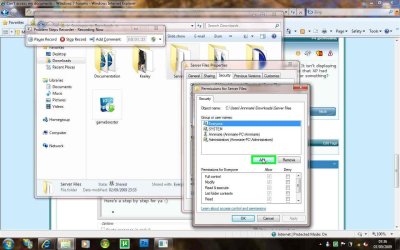
What error message do you get? Please post the exact message.
 

My Computer

Computer Manufacturer/Model Number
Dell XPS 15 L502x
OS
Windows 7 Ultimate x64 SP1
CPU
Core i7-2670QM
Memory
8GB DDR3 PC3-10600
Graphics Card(s)
Intel HD Graphics 3000 + GeForce GT 540M
Screen Resolution
1920x1080
Hard Drives
1TB 5400RPM Seagate
I have searched for an answer to this question and noone seems to have this exact problem. I have copied from XP my "my documents" folder, it is all there and in a previous install of windows 7 i was able to access all the files contained in it. Since then I have deleted both copies on XP and previous win7 and re-installed win7. Now I can't access the files in my documents except for "all users - application data" and the files contained there. I have tried adding ownership of the file and everything I have read, but for some reason i can't access it. I just want the files inside so i can move them as there was things on my desktop that I now want on my win7 desktop. How the F do I access it? Please help! the folder is located on a separate drive to the win7 install.

That's an easy one.

When you copied the folders, the NTFS rights were adopted from the then current OS.
Taking ownership isn't enough, need to add your username too, and give it full permissions.
To have it apply to all your folders the best thing is to do it on the partition.

Do this:

1. Right click the partition and chose properties
2. goto security tab
3. take ownership (like you did before, but now it will apply to whole partition)
4. after a few ok's take you back to explorer, rightclick partition again
5. chose properties, and security tab again
6. click the "edit" button under the user list
7. click add
8. in the next box type your username, and click ok
9. check the full permissions checkbox and click ok again.

that's all

good luck
 

My Computer

OS
Win7 Build 7600 x86
CPU
Pentium II 300MHz
Motherboard
Asus
Memory
32mb EDO RAM
Graphics Card(s)
Diamond Viper
Sound Card
Soundblaster 16
Monitor(s) Displays
14" AOC CRT 16K color
Screen Resolution
800x600
Hard Drives
300mb Quantum fireball
PSU
110 Watts
Cooling
Passive
Keyboard
Trust Ergonomic
Mouse
Generic
Internet Speed
256K u 128K d
Thanks squonksc, but it didn't work. I think I need a step by step on the permissions bit. It isn't displaying the folders inside that I know are there, but it is displaying application data. Is it possible that XP had ownership, then another win7 did so now there are conflicting ownership problems or something?

Also, no error messages. Files just don't appear, even with "show hidden files" checked...
 

My Computer

OS
Windows 7
CPU
core 2 duo
Motherboard
asus p5kpl-cm
Memory
4gb
Graphics Card(s)
Radeon x850
Sound Card
soundblaster x-fi
Monitor(s) Displays
dual monitor
Hard Drives
1tb, 500gb, 120gb, 40gb
Cooling
loud
Hi braddie, welcome to the forums.

Here's a step by step for ya :)

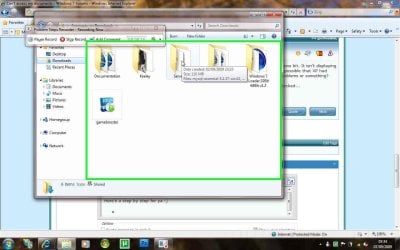
1, Open up explorer and navigate to where the 'My Documents' folder is
step 1.jpg

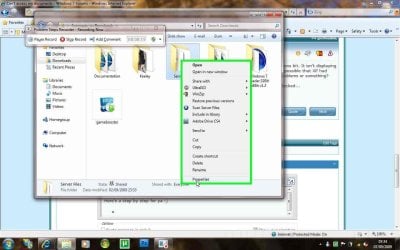
2, Right-Click the folder and select 'Properties'
step 2.jpg

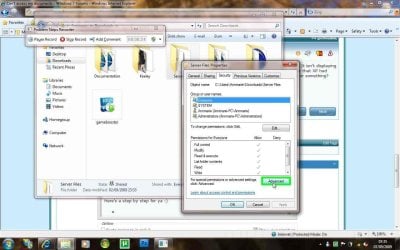
3, Click the 'Security' tab then click 'Advanced'
step 3.jpg

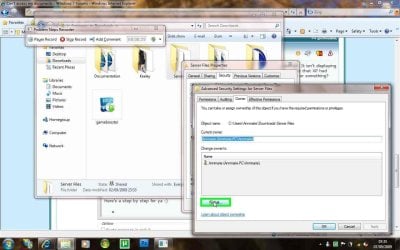
4, Click the 'Owner' tab then 'Edit'
step 4.jpg

5, Click 'Other Users or Groups'
step 5.jpg

Next: Type in your username (or "everyone") and hit 'Enter'. Now select the user you wish to give 'Ownership' to, the check the 'Replace owner on subcontainers and objects' then click 'OK'

6, Click the 'Edit' button
step 6.jpg

followed by the 'Add' button
step 7.jpg

then follow the (Next:) section and click 'OK' until the 'Properties' box is gone.


You should now be able to access all the files within the folder

Hope it helps :)


OS​
 

My Computer

Computer Manufacturer/Model Number
Compaq Desktop
OS
Windows 7 Ultimate x64
CPU
AMD Sempron Dual Core
Memory
3GB
Graphics Card(s)
NVIDIA GeForce 6150SE nForce 430
Screen Resolution
1024x768
Hard Drives
150GB Sata
Ok, Thanks heaps for that. But I think I've worked it out. All my files aren't there anymore. They've been deleted. Does windows do that? It is 564mb, I think it used to be more like 3gb...
 

My Computer

OS
Windows 7
CPU
core 2 duo
Motherboard
asus p5kpl-cm
Memory
4gb
Graphics Card(s)
Radeon x850
Sound Card
soundblaster x-fi
Monitor(s) Displays
dual monitor
Hard Drives
1tb, 500gb, 120gb, 40gb
Cooling
loud
Windows would not delete the files, it could be that not all files were copied due to the security issue. You might want to try copying them again but after you've changed the ownership to 'Everyone' in XP, then again to your username within Se7ev
 

My Computer

Computer Manufacturer/Model Number
Compaq Desktop
OS
Windows 7 Ultimate x64
CPU
AMD Sempron Dual Core
Memory
3GB
Graphics Card(s)
NVIDIA GeForce 6150SE nForce 430
Screen Resolution
1024x768
Hard Drives
150GB Sata
I think that is what has happened. I "moved" the files without correct permissions thus deleting them. I think they are gone. The original was on a drive I formatted. Maybe I can recover them with a program? any suggestions?
 

My Computer

OS
Windows 7
CPU
core 2 duo
Motherboard
asus p5kpl-cm
Memory
4gb
Graphics Card(s)
Radeon x850
Sound Card
soundblaster x-fi
Monitor(s) Displays
dual monitor
Hard Drives
1tb, 500gb, 120gb, 40gb
Cooling
loud
There are various free 'Undelete' programs out there but i'd advise searching for "Undelete software" and check to see which is best for you
   Note
Some are free to download but require registration/activation in order to actually undelete something, so check that the software is 100% free :)


OS
 

My Computer

Computer Manufacturer/Model Number
Compaq Desktop
OS
Windows 7 Ultimate x64
CPU
AMD Sempron Dual Core
Memory
3GB
Graphics Card(s)
NVIDIA GeForce 6150SE nForce 430
Screen Resolution
1024x768
Hard Drives
150GB Sata
I think that is what has happened. I "moved" the files without correct permissions thus deleting them. I think they are gone. The original was on a drive I formatted. Maybe I can recover them with a program? any suggestions?

If you move files without the right permissions they don't disappear.

You'll get a notification.
The process stops as soon as a file without proper perms is detected.

The rest of the files that were not yet moved, remain where they are.

What I imagine is that you thought they were moved, and then deleted the source files.

Like Orbital shark said, find an undelete tool asap.

Don't save, copy or move anything on the affected disk, because that could overwrite the sectors containing the files.

Good luck.

PS. Most undelete tools that are free to try can only salvage a limited number of files.
You need to find a real freeware tool, or buy a full version.
 

My Computer

OS
Win7 Build 7600 x86
CPU
Pentium II 300MHz
Motherboard
Asus
Memory
32mb EDO RAM
Graphics Card(s)
Diamond Viper
Sound Card
Soundblaster 16
Monitor(s) Displays
14" AOC CRT 16K color
Screen Resolution
800x600
Hard Drives
300mb Quantum fireball
PSU
110 Watts
Cooling
Passive
Keyboard
Trust Ergonomic
Mouse
Generic
Internet Speed
256K u 128K d
Back
Top