Can't Access Network after Laptop goes to snooze

ashleyv

New member
Local time
10:34 AM
Messages
1
Hi all,

I hope someone can assist here as I am at my wits end. Basically what happens is that I leave my laptop alone for a while and then when I get back it is in snooze mode - when I hit the power button to wake it up - I have no internet access.

My wireless is dead and even LAN cable doesn't activate network. I have switched off the wireless and switched it back on but still nothing.

The only way I get back onto the wireless or even LAN cable network is if I reboot my machine.


Does anyone have a way of activating networks again after laptop has been in snooze mode?

Regards
Ashley
 

My Computer My Computer

At a glance

Windows 7 Ultimate x64
OS
Windows 7 Ultimate x64
Hi all,

I hope someone can assist here as I am at my wits end. Basically what happens is that I leave my laptop alone for a while and then when I get back it is in snooze mode - when I hit the power button to wake it up - I have no internet access.

My wireless is dead and even LAN cable doesn't activate network. I have switched off the wireless and switched it back on but still nothing.

The only way I get back onto the wireless or even LAN cable network is if I reboot my machine.


Does anyone have a way of activating networks again after laptop has been in snooze mode?

Regards
Ashley

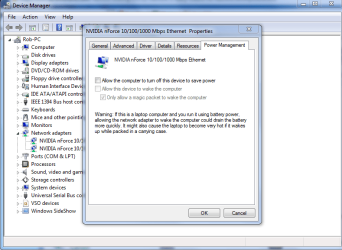
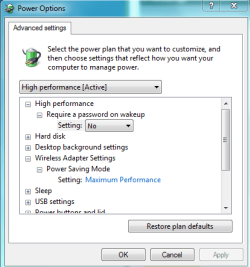
Certain drivers have problems in this area. You can try a different driver for your network adaptor which may solve the problem or you can go into power options and relax the power saving settings on the driver.

There are two settings you can adjust, one is for the adaptor itself which you can access through device manager, you just need to uncheck the setting, and the other is adjusted by using the power options settings "pictures below".
 

Attachments

  • network adaptor turn off to save power.PNG
    network adaptor turn off to save power.PNG
    34.6 KB · Views: 20
  • power plan network adaptor settings.PNG
    power plan network adaptor settings.PNG
    13.3 KB · Views: 7

My Computer My Computer

At a glance

Windows 7 Ult, Windows 8.1 Pro,Q9650-4.275GHz, E8600 4.5GHz, E6750-3.8GHzG.Skill PC2 9600 1200Mhz 5 5 5 15 2TGTX480
Computer type
PC/Desktop
Computer Manufacturer/Model Number
Home built
OS
Windows 7 Ult, Windows 8.1 Pro,
CPU
Q9650-4.275GHz, E8600 4.5GHz, E6750-3.8GHz
Motherboard
Evga 780i FTW
Memory
G.Skill PC2 9600 1200Mhz 5 5 5 15 2T
Graphics Card(s)
GTX480
Sound Card
Asus Xonar D2
Monitor(s) Displays
HannsG
Screen Resolution
1680X1050
Hard Drives
GSkill Phoenix Pro 120GB SSD
PSU
ThermalTake Toughpower 1000Watt modular
Case
ThermalTake XaserV
Cooling
Xigmatek S1283
Keyboard
Logitech G15
Mouse
Logitech G9
Internet Speed
T1
Back
Top