Can't access shared folder between two Win7 Pro 32bit machines.

liszega

New member
Local time
2:53 PM
Messages
2
Can't access shared folder between two Win7 Pro 32bit machines. I have read through the forums. What I have done so far (on both machines) is disabled Homegroup (inc. leaving the homegroup and disabling services), set up the advanced network sharing options (network discovery on, file sharing on, password sharing off, use user accounts...). Added "Everyone" in the folders advanced security options... Also tried connecting through IP instead of computer name.

Unfortunately, I still receive the You do not have permission.... (see attachment).

The are many posts regarding Win7/Vista or Win7/XP issues.

Could not find much about the problem I am having.

Any help would be appreciated.
 

Attachments

  • Capture.JPG
    Capture.JPG
    21.6 KB · Views: 8

My Computer My Computer

OS
Windows 7 Professional 32bit

My Computer My Computer

Computer Manufacturer/Model Number
HP Pavilion Elite 495UK
OS
Windows 7 Ultimate SP1 64-Bit
CPU
Intel Core i7 870 @ 2.93GHz
Motherboard
MSI 2A9C (CPU1)
Memory
8Gb Dual-Channel DDR3 @ 664MHz
Graphics Card(s)
nVidia GeForce GTX 460 1024MB dedicated RAM
Sound Card
Realtek HD Audio
Monitor(s) Displays
HP2310i
Screen Resolution
1920 x 1080
Hard Drives
1x1954GB Hitachi HDS22020ALA 330 (RAID), 1x1954GB Hitachi External for backup and storage
PSU
460W
Case
HP Elite
Cooling
Air cooled
Keyboard
Logitech K750 solar-powered keyboard
Mouse
Logitech Wireless M180 mouse
Internet Speed
2Mb
Other Info
Pure Avanti Flow Internet Radio with iPod Dock, 64Gb iPod, HP USB Speakers, Sony MDR-V500 Headphones, Sony Vaio F-Series Laptop
Thank you for your replies.

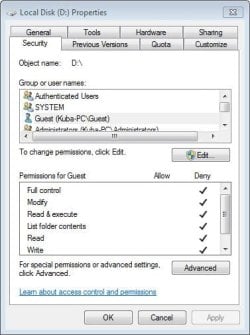
seavixen32, I have followed your tutorial on the folder I had problems with and had no success. But then I decided to create a new folder on a different partition for testing purposes and I could access that new folder without problems. This lead me to identifying the problems. The root of the partition where the problematic share was located had a full control denied for Guest account (see attachment) and all folders were inheriting that permission. It's something I must have set up in past to prevent any guests using my PC to access my D: partition as I used to keep all my private stuff on it. This setting was causing the issue. So thanks again for your help.

I have one more question as this is puzzling me:

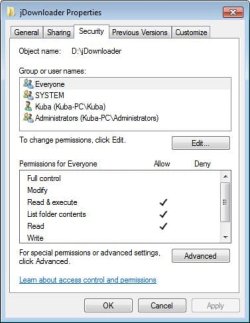
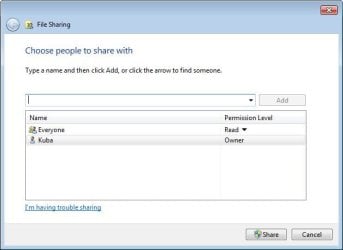
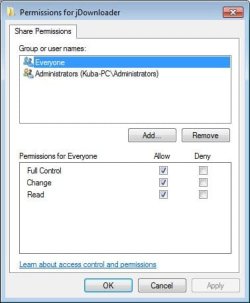
In the folder I am sharing I have added Everyone with Read & execute permissions in the Security tab (1.jpg). Then I have shared the folder as per seavixen32's tutorial. Now when I click Share... in the Sharing tab I see Everyone with Read permission (2.jpg). But when I enter Advanced Sharing... in the security tab and then click Permissions, Everyone seems to have Full Control (3.jpg). This is confusing.... Which is actually the correct permission...?
 

Attachments

  • Capture.JPG
    Capture.JPG
    36.7 KB · Views: 14
  • 1.JPG
    1.JPG
    35.8 KB · Views: 11
  • 2.JPG
    2.JPG
    30.4 KB · Views: 9
  • 3.JPG
    3.JPG
    28 KB · Views: 10

My Computer My Computer

OS
Windows 7 Professional 32bit
Back
Top