Solved Can't access the BIOS with my GTX1080Ti

vesperdesign

New member
Local time
3:05 PM
Messages
13
Hi Everyone I recently purchased a 1080Ti and it is great but I have found that ever since I installed the GC the windows Logo no longer appears. I also find I find that I am unable to access the boot menu either. I have the 1080Ti installed along my 970GTX in my rig. When I plug my screens into the GTX970 all those issues I mentioned dissapear, and I can see the windows logo and can access the boot menu.

I turned off fastboot by MSI, ultimately I want to access the boot menu while plugged into the 1080Ti.

If anyone can shed any light on this issue I would really appreciate it.
 

My Computer My Computer

At a glance

Windows 7 64BitIntel I732nvidia GTX 1080ti
Computer type
PC/Desktop
Computer Manufacturer/Model Number
Custom
OS
Windows 7 64Bit
CPU
Intel I7
Motherboard
MSI Z
Memory
32
Graphics Card(s)
nvidia GTX 1080ti
Hard Drives
Samsung ssd
Browser
chrome
Well first you need to fill out your specs for us better so we know what motherboard you have. Why do you want both cards in there at the same time, does taking out the 970 and using just the ti in the same slot the 970 was in change anything, and what PSU?

System Info - See Your System Specs - Windows 7 Help Forums
 

My Computer My Computer

At a glance

10 Pro x64Ryzen 9 3900X64GB(4x16GB) DDR4EVGA 1080ti FTW3
Computer type
PC/Desktop
Computer Manufacturer/Model Number
Custom
OS
10 Pro x64
CPU
Ryzen 9 3900X
Motherboard
Asrock x370 Tachi
Memory
64GB(4x16GB) DDR4
Graphics Card(s)
EVGA 1080ti FTW3
Sound Card
ASUS Xonar Essence STX (V4 Bursons), ODAC rev B, NFB-11, O2
Monitor(s) Displays
3xASUS PB278Q/R, Optoma HD142X
Screen Resolution
3x1440p, 1080p
Hard Drives
512GB 850 EVO(OS, Programs)
4TB (Movies)
3TB (Downloads)
3TB (Programs)
1TB HDD (Games)
2x6TB R1 (videos)
PSU
AX760
Case
Fractal Define R5
Cooling
NH-D15S
Keyboard
Massdrop Ctrl with Box Navy's
Mouse
G903, Alioth XXL Mat
Internet Speed
280/40
Antivirus
MBAM, ESET
Browser
Canary 64 Bit
Other Info
I also own a Thinkpad P50 Xeon 4K, X220T, X1C5
Hey there, yeah
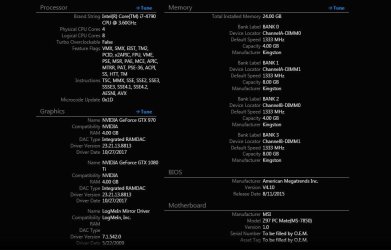
Specs check out attachment

Win7 Enterprise

The reason I have two cards is cause I use software that allows for cumulative GPU Ram. It also unburdens the 1080 from taking on all the processing in other applications.

The 1080Ti is in the secondary slot because of space restrictions in my case
The GTX 970 fits perfectly in the primary slot.

I already flashed the CMOS by removing the battery and reinserting, no change. I Tried to clean uninstall the drivers and it just wouldn't boot. I had to remove it and only leave the 970 and the Windows icon returned and was able to now access the boot menu.
 

Attachments

  • computer info.JPG
    computer info.JPG
    61.2 KB · Views: 3

My Computer My Computer

At a glance

Windows 7 64BitIntel I732nvidia GTX 1080ti
Computer type
PC/Desktop
Computer Manufacturer/Model Number
Custom
OS
Windows 7 64Bit
CPU
Intel I7
Motherboard
MSI Z
Memory
32
Graphics Card(s)
nvidia GTX 1080ti
Hard Drives
Samsung ssd
Browser
chrome
It looks like motherboard might only support booting off the primary slot for video. Your case will not let you put the ti by it self for testing in the first x16 slot? Also you still have not listed what PSU you have as that might be a factor as well. If you are just trying to just POST at this point unplug your hdd power so that you take windows out the equation for the time being. you want to be able to get into the bios first with the card even in there to make sure it is not DOA.
 

My Computer My Computer

At a glance

10 Pro x64Ryzen 9 3900X64GB(4x16GB) DDR4EVGA 1080ti FTW3
Computer type
PC/Desktop
Computer Manufacturer/Model Number
Custom
OS
10 Pro x64
CPU
Ryzen 9 3900X
Motherboard
Asrock x370 Tachi
Memory
64GB(4x16GB) DDR4
Graphics Card(s)
EVGA 1080ti FTW3
Sound Card
ASUS Xonar Essence STX (V4 Bursons), ODAC rev B, NFB-11, O2
Monitor(s) Displays
3xASUS PB278Q/R, Optoma HD142X
Screen Resolution
3x1440p, 1080p
Hard Drives
512GB 850 EVO(OS, Programs)
4TB (Movies)
3TB (Downloads)
3TB (Programs)
1TB HDD (Games)
2x6TB R1 (videos)
PSU
AX760
Case
Fractal Define R5
Cooling
NH-D15S
Keyboard
Massdrop Ctrl with Box Navy's
Mouse
G903, Alioth XXL Mat
Internet Speed
280/40
Antivirus
MBAM, ESET
Browser
Canary 64 Bit
Other Info
I also own a Thinkpad P50 Xeon 4K, X220T, X1C5
Sorry about that I have an EVGA Gold 650. I Definitely know the 1080 is not a DOA, I already use it in my software. But you are right I cant install in the primary slot. Any advice about getting a new motherboard, which do you recommend if indeed the issue is that it should be seated in the primary, something better set up for space?
 

My Computer My Computer

At a glance

Windows 7 64BitIntel I732nvidia GTX 1080ti
Computer type
PC/Desktop
Computer Manufacturer/Model Number
Custom
OS
Windows 7 64Bit
CPU
Intel I7
Motherboard
MSI Z
Memory
32
Graphics Card(s)
nvidia GTX 1080ti
Hard Drives
Samsung ssd
Browser
chrome
Is the issue of space the motherboard, heatsink or your case? Does the 970 by itself work in the second slot or no post?
 

My Computer My Computer

At a glance

10 Pro x64Ryzen 9 3900X64GB(4x16GB) DDR4EVGA 1080ti FTW3
Computer type
PC/Desktop
Computer Manufacturer/Model Number
Custom
OS
10 Pro x64
CPU
Ryzen 9 3900X
Motherboard
Asrock x370 Tachi
Memory
64GB(4x16GB) DDR4
Graphics Card(s)
EVGA 1080ti FTW3
Sound Card
ASUS Xonar Essence STX (V4 Bursons), ODAC rev B, NFB-11, O2
Monitor(s) Displays
3xASUS PB278Q/R, Optoma HD142X
Screen Resolution
3x1440p, 1080p
Hard Drives
512GB 850 EVO(OS, Programs)
4TB (Movies)
3TB (Downloads)
3TB (Programs)
1TB HDD (Games)
2x6TB R1 (videos)
PSU
AX760
Case
Fractal Define R5
Cooling
NH-D15S
Keyboard
Massdrop Ctrl with Box Navy's
Mouse
G903, Alioth XXL Mat
Internet Speed
280/40
Antivirus
MBAM, ESET
Browser
Canary 64 Bit
Other Info
I also own a Thinkpad P50 Xeon 4K, X220T, X1C5
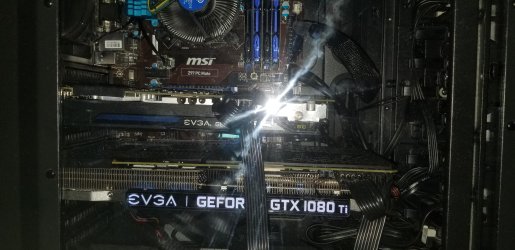
Not sure anymore, I uploaded a Pic tell me what you think? You know the more I think about it it makes sense that the primary video location is what would give you access to the BIOS. I have tried it with 1080 unseated and it works the 970 and the bios access also works well too. It never occurred to me that the primary is what dictates the entrance into the bios.

You see the 3 monitors I have hooked up are to the 1080, but its seated on the secondary slot, it makes sense therefore that the computer lights up but I can't see the windows icon, and can't enter the bios. Cause the 970 is not hooked up to anything. It also now makes sense that when the 970 is hooked to the monitors, that that's when It works.

QUESTION> Do all motherboards behave like this?
 

Attachments

  • 20180131_145138.jpg
    20180131_145138.jpg
    843.7 KB · Views: 3

My Computer My Computer

At a glance

Windows 7 64BitIntel I732nvidia GTX 1080ti
Computer type
PC/Desktop
Computer Manufacturer/Model Number
Custom
OS
Windows 7 64Bit
CPU
Intel I7
Motherboard
MSI Z
Memory
32
Graphics Card(s)
nvidia GTX 1080ti
Hard Drives
Samsung ssd
Browser
chrome
Yes the one closest to the cpu will be the main as that is how it is wired in the motherboard and how the bios understands it. I see now reason in the picture space wise why you can not swap the two cards spots then hook up your video to the ti like you want. The way it is in the pic it will possibly post but will show video off the first card (970 in the pic) That second card can only be used for computational stuff or physics based stuff and not SLI for instance. Install the drivers for the 1080ti though as they will work for the 970 as well.
 

My Computer My Computer

At a glance

10 Pro x64Ryzen 9 3900X64GB(4x16GB) DDR4EVGA 1080ti FTW3
Computer type
PC/Desktop
Computer Manufacturer/Model Number
Custom
OS
10 Pro x64
CPU
Ryzen 9 3900X
Motherboard
Asrock x370 Tachi
Memory
64GB(4x16GB) DDR4
Graphics Card(s)
EVGA 1080ti FTW3
Sound Card
ASUS Xonar Essence STX (V4 Bursons), ODAC rev B, NFB-11, O2
Monitor(s) Displays
3xASUS PB278Q/R, Optoma HD142X
Screen Resolution
3x1440p, 1080p
Hard Drives
512GB 850 EVO(OS, Programs)
4TB (Movies)
3TB (Downloads)
3TB (Programs)
1TB HDD (Games)
2x6TB R1 (videos)
PSU
AX760
Case
Fractal Define R5
Cooling
NH-D15S
Keyboard
Massdrop Ctrl with Box Navy's
Mouse
G903, Alioth XXL Mat
Internet Speed
280/40
Antivirus
MBAM, ESET
Browser
Canary 64 Bit
Other Info
I also own a Thinkpad P50 Xeon 4K, X220T, X1C5
I do have a question however is there a motherboard where it's configuration allows for better spacing? Thanks in advance btw
 

My Computer My Computer

At a glance

Windows 7 64BitIntel I732nvidia GTX 1080ti
Computer type
PC/Desktop
Computer Manufacturer/Model Number
Custom
OS
Windows 7 64Bit
CPU
Intel I7
Motherboard
MSI Z
Memory
32
Graphics Card(s)
nvidia GTX 1080ti
Hard Drives
Samsung ssd
Browser
chrome
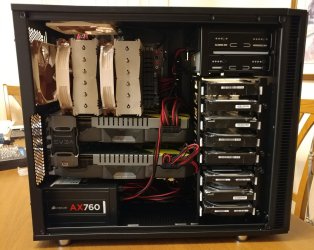
Your spacing is one more then normal and should be fine, normally you have them right next to each other if they are bigger then 2 slot cards. Mine are the same spacing as yours air wise but they would still be fine right next to each other if my board was laid out that way. In your board there would be no spacing and still be fine just the first card sometimes runs a little hotter but not by much.
 

Attachments

  • Y1ajnpc.jpg
    Y1ajnpc.jpg
    200.8 KB · Views: 1

My Computer My Computer

At a glance

10 Pro x64Ryzen 9 3900X64GB(4x16GB) DDR4EVGA 1080ti FTW3
Computer type
PC/Desktop
Computer Manufacturer/Model Number
Custom
OS
10 Pro x64
CPU
Ryzen 9 3900X
Motherboard
Asrock x370 Tachi
Memory
64GB(4x16GB) DDR4
Graphics Card(s)
EVGA 1080ti FTW3
Sound Card
ASUS Xonar Essence STX (V4 Bursons), ODAC rev B, NFB-11, O2
Monitor(s) Displays
3xASUS PB278Q/R, Optoma HD142X
Screen Resolution
3x1440p, 1080p
Hard Drives
512GB 850 EVO(OS, Programs)
4TB (Movies)
3TB (Downloads)
3TB (Programs)
1TB HDD (Games)
2x6TB R1 (videos)
PSU
AX760
Case
Fractal Define R5
Cooling
NH-D15S
Keyboard
Massdrop Ctrl with Box Navy's
Mouse
G903, Alioth XXL Mat
Internet Speed
280/40
Antivirus
MBAM, ESET
Browser
Canary 64 Bit
Other Info
I also own a Thinkpad P50 Xeon 4K, X220T, X1C5
Nice rig there, rvcjew. Got enough hard drives? Or is it a part time server?

No, I guess it wouldn't be with two GPUs like that.

Anyway, very nice job. Looks great. :geek:
 

My Computer My Computer

At a glance

Win 7 Pro x64/Win 10 Pro x64 dual bootAMD FX 8350 Vishera @ 420016 GB Mushkin Blackline DDR3-2400 @ 1866 (9-1...XFX Radeon R9 280 Double D Black Edition
Computer type
PC/Desktop
Computer Manufacturer/Model Number
Mellon Labs (custom build)
OS
Win 7 Pro x64/Win 10 Pro x64 dual boot
CPU
AMD FX 8350 Vishera @ 4200
Motherboard
ASUS M5A97 R2.0
Memory
16 GB Mushkin Blackline DDR3-2400 @ 1866 (9-10-10-10-31)
Graphics Card(s)
XFX Radeon R9 280 Double D Black Edition
Sound Card
Realtek HD Audio on MB. Sounds great.
Monitor(s) Displays
Acer 24", Acer 22"
Screen Resolution
3840 x 1080
Hard Drives
1 x Mushkin Chronos 120 GB SSD (Win 10)
1 x Samsung 850 EVO 250 GB SSD (Win 7)
1 x WD 1TB SATA Blue
1 x WD 1TB SATA Green
PSU
Corsair TX-750
Case
CoolerMaster HAF 912+
Cooling
Coolermaster Seidon 240M Liquid AIO. 6 case fans
Keyboard
Logitech G710+
Mouse
Logitech G500s
Internet Speed
Much better since I got fiber, but still way overpriced.
Antivirus
MSE, Malware Bytes for scanning
Browser
Firefox
Other Info
Corsair VOID USB headphones.

A Mellon Labs X-1 - LCD Smartie driven system status display.

Brought to you by the letter E
Back
Top