
Can't boot into Windows unless I do something counterintuitive

DCSeven

New member
Local time
9:43 AM
Messages
19
I THINK I have all of this spelled out as it goes. It's gotten to be a blur.

I created a Windows repair disk and now my laptop won't boot into Windows (7 Pro 32-bit) unless the repair disk is in the optical drive. I ran the repair option three times (as instructed elsewhere on here) to where it says there are no problems. But now the only way for me to get into Windows is - and here's the part that's driving me totally crazy - is to leave the disk in the optical drive but change the boot order to hard drive first, optical drive second. If I leave it to boot from the optical first, I get a BOOTMGR missing error.

I also tried using the AOMEI Partition Assistant (also as instructed elsewhere) but, when I right click on the system drive, there is no option to Rebuild MBR. And, as always seems to be the case these days, I don't have the install disk.

I'm at a total loss here. HELP!

(PS - I know it says I'm running 7 Ultimate-64 bit under my avatar but this is my laptop which is Pro 32-bit)
 

My Computer

Computer type
PC/Desktop
Computer Manufacturer/Model Number
Custom
OS
Windows 7 Ultimate x64
CPU
Intel Core i5-7500 CPU @ 3.40GHz (4 CPUs), ~3.4GHz
Motherboard
Asus Maximus VIII Hero
Memory
Crucial Ballistix Sport LT 16GB 2 x 8GB DDR4-2400
Hard Drives
Crucial 512GB 2.5 MX100 SSD Boot drive
2x Seagate 10TB SATA 6Gb/s 64MB
4x Seagate 12TB SATA 6Gb/s 64MB

My Computer

Computer type
PC/Desktop
Computer Manufacturer/Model Number
HP Desktop & Compaq Laptop
OS
Win 10 x64, Linux Lite, Win 7 x64, BlackArch, & Kali
Hard Drives
Samsung 850 Pro 256Gb,
Hitachi HDD 1Tb,
Crucial MX SSD 250Gb
Segate 3Tb USB 3.0 Ext. Backup HDD
Internet Speed
150Mbps dn, 20Mbps up
Antivirus
Avast Free, Malwarebytes Anti-Exploit & Anti-Ransomware
Browser
Firefox, Chrome, Opera, & VPN
free and fee Macrium Reflect offers a function to repair boot files and process -- maybe take a look and try it?
 

My Computer

Computer type
PC/Desktop
Computer Manufacturer/Model Number
Antec desktop; Acer Aspire laptops
OS
Windows 7 Professional 64-bit
CPU
Desktop i5; Acers i5 & i7
Memory
desktop 16GB; 1 Acer 8GB & 1 Acer 16GB
Hard Drives
1TB split into 2 equal partitions [OS and data] usable by RJS
Internet Speed
AT&T DSL
Browser
FF, GChrome, msIE
Other Info
Windows 7 Firewall, Emsisoft AM/AV, MSE [scan-only], SpywareBlaster, Ruiware/BillP combine
DCSeven

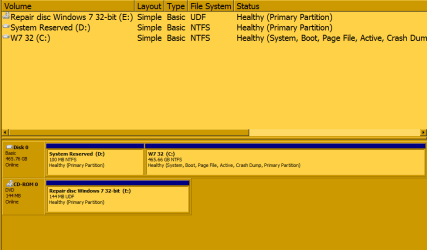
post a screenshot of disk management window and/or Aomei main window so we can see all the disks and partitions.


when I right click on the system drive, there is no option to Rebuild MBR.

Unlikely there is anything wrong with the mbr code, but fyi you need to select the disk (not a partition ) to get the rebuild option
 

My Computers

System One System Two

  • Computer type
    PC/Desktop
    OS
    7 X64
    CPU
    i5 8400
    Motherboard
    gigabyte b365m ds3h
    Memory
    2x8gb 3200mhz
    Hard Drives
    various
    PSU
    pure power 11 400w cm
    Case
    Coolermaster
    Cooling
    cryorig m9i
  • Computer type
    PC/Desktop
    OS
    7x64
    CPU
    g5400
    Motherboard
    ga b365m ds3h
    Memory
    8gb ddr4 2400
    PSU
    xfx pro 450w
I'd forgotten about Last Known Good Config. Tried it - I noted changes in my desktop so it did go back, but it hasn't affected the boot problem. Still have to play with the repair disk boot sequence thing to get in.
(I could very well be wrong but I'm willing to bet you've got to be the same Snick I knew from WinMX LOL)

I couldn't find anything free on the Macrium Reflect software and don't have the $$$ to put out for a possible fix.

Here's the screenshot:
 

Attachments

  • Disk Management.png
    Disk Management.png
    11.5 KB · Views: 0

My Computer

Computer type
PC/Desktop
Computer Manufacturer/Model Number
Custom
OS
Windows 7 Ultimate x64
CPU
Intel Core i5-7500 CPU @ 3.40GHz (4 CPUs), ~3.4GHz
Motherboard
Asus Maximus VIII Hero
Memory
Crucial Ballistix Sport LT 16GB 2 x 8GB DDR4-2400
Hard Drives
Crucial 512GB 2.5 MX100 SSD Boot drive
2x Seagate 10TB SATA 6Gb/s 64MB
4x Seagate 12TB SATA 6Gb/s 64MB
admin cmd prompt:

bcdboot c:\windows /s c:
then press enter
bootsect /nt60 all /mbr
then press enter
 

My Computers

System One System Two

  • Computer type
    PC/Desktop
    OS
    7 X64
    CPU
    i5 8400
    Motherboard
    gigabyte b365m ds3h
    Memory
    2x8gb 3200mhz
    Hard Drives
    various
    PSU
    pure power 11 400w cm
    Case
    Coolermaster
    Cooling
    cryorig m9i
  • Computer type
    PC/Desktop
    OS
    7x64
    CPU
    g5400
    Motherboard
    ga b365m ds3h
    Memory
    8gb ddr4 2400
    PSU
    xfx pro 450w
admin cmd prompt:

bcdboot c:\windows /s c:
then press enter
bootsect /nt60 all /mbr
then press enter
Boot files were successfully created, but I got a "bootsect is not recognized as an internal or external command" message.
 

My Computer

Computer type
PC/Desktop
Computer Manufacturer/Model Number
Custom
OS
Windows 7 Ultimate x64
CPU
Intel Core i5-7500 CPU @ 3.40GHz (4 CPUs), ~3.4GHz
Motherboard
Asus Maximus VIII Hero
Memory
Crucial Ballistix Sport LT 16GB 2 x 8GB DDR4-2400
Hard Drives
Crucial 512GB 2.5 MX100 SSD Boot drive
2x Seagate 10TB SATA 6Gb/s 64MB
4x Seagate 12TB SATA 6Gb/s 64MB
My Computer

Computer type
PC/Desktop
Computer Manufacturer/Model Number
HP p6-2020t
OS
Win 7 Ult 64-bit
CPU
G620 2.6GHZ Pentium R
Memory
6 GB
Monitor(s) Displays
25" HPLV2311
Screen Resolution
1920 x 1200
Hard Drives
1 SATA, 1 exterior SATA
Case
HP
Cooling
PSU
Antivirus
Glasswire
Browser
Waterfox; Firefox; Chrome for work
Other Info
Firewall--Glasswire
Similar specs in Gateway DX4200
Verizon FIOS Wired network

1 other Win7 computer-- has SSD

My Computer

Computer type
PC/Desktop
Computer Manufacturer/Model Number
Custom
OS
Windows 7 Ultimate x64
CPU
Intel Core i5-7500 CPU @ 3.40GHz (4 CPUs), ~3.4GHz
Motherboard
Asus Maximus VIII Hero
Memory
Crucial Ballistix Sport LT 16GB 2 x 8GB DDR4-2400
Hard Drives
Crucial 512GB 2.5 MX100 SSD Boot drive
2x Seagate 10TB SATA 6Gb/s 64MB
4x Seagate 12TB SATA 6Gb/s 64MB

My Computer

Computer type
PC/Desktop
Computer Manufacturer/Model Number
HP Desktop & Compaq Laptop
OS
Win 10 x64, Linux Lite, Win 7 x64, BlackArch, & Kali
Hard Drives
Samsung 850 Pro 256Gb,
Hitachi HDD 1Tb,
Crucial MX SSD 250Gb
Segate 3Tb USB 3.0 Ext. Backup HDD
Internet Speed
150Mbps dn, 20Mbps up
Antivirus
Avast Free, Malwarebytes Anti-Exploit & Anti-Ransomware
Browser
Firefox, Chrome, Opera, & VPN

My Computers

System One System Two

  • Computer type
    PC/Desktop
    OS
    7 X64
    CPU
    i5 8400
    Motherboard
    gigabyte b365m ds3h
    Memory
    2x8gb 3200mhz
    Hard Drives
    various
    PSU
    pure power 11 400w cm
    Case
    Coolermaster
    Cooling
    cryorig m9i
  • Computer type
    PC/Desktop
    OS
    7x64
    CPU
    g5400
    Motherboard
    ga b365m ds3h
    Memory
    8gb ddr4 2400
    PSU
    xfx pro 450w
I want to thank everyone for their contributions and suggestions. But, this #$@% thing almost got tossed into the fire pit. Instead of watching what probably would have been an interesting demise, it's going back to the seller on Amazon.
 

My Computer

Computer type
PC/Desktop
Computer Manufacturer/Model Number
Custom
OS
Windows 7 Ultimate x64
CPU
Intel Core i5-7500 CPU @ 3.40GHz (4 CPUs), ~3.4GHz
Motherboard
Asus Maximus VIII Hero
Memory
Crucial Ballistix Sport LT 16GB 2 x 8GB DDR4-2400
Hard Drives
Crucial 512GB 2.5 MX100 SSD Boot drive
2x Seagate 10TB SATA 6Gb/s 64MB
4x Seagate 12TB SATA 6Gb/s 64MB
Back
Top