Can't boot Windows 7 after cloning

pianista

New member
Local time
11:34 PM
Messages
4
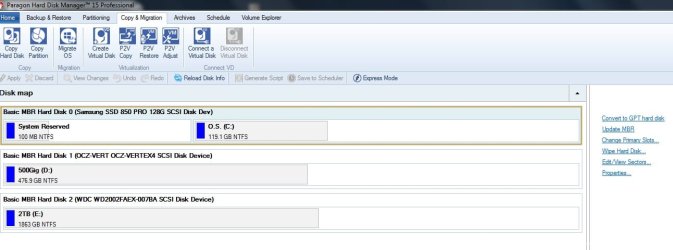
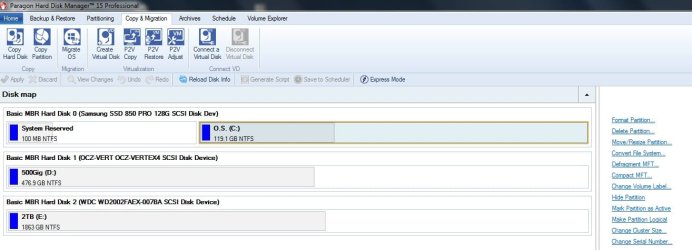
I cloned to an SSD the windows partition and I'm able to see its content via Ubuntu, or using the Windows Recovery Disk.

The problem is when I boot using Windows I have the following error:

Windows failed to start. A Recent hardware or software change might be the cause. To fix the problem:
1. Insert your windows installation disc and restart your computer.
2. Choose your langugae settings, and then click next
3. Click "repair your computer."

If I use the recovery CD, or a Windows 7 CD Installation, It don't recognize my partition as a windows installation. If I use the prompt from the CD, I'm able to see the harddrive letter using diskpart, and also I can navigate through my folders (Program Files..., Program Files (x86)...) but I don't know why is not detecting as a valid W7 installation.

What can I do before lose all the data in this partition making a reinstall?

Thank you
 

My Computer

Computer type
PC/Desktop
OS
Windows 7 Professional x64
I've followed the attempt two from https://neosmart.net/wiki/recovering-windows-bootloader/

Executing all the commands in the C: (volume that has Windows 7 with this results):

IMG_20160712_195706265.jpg


Also I notice that my MBR from my other harddrive was reinstalled (not the one with the Windows 7 partition) having another time this on boot time:

IMG_20160712_195756875.jpg


May be should I try method 3???

Thank you
 

My Computer

Computer type
PC/Desktop
OS
Windows 7 Professional x64
What did you use to clone the disk with?
 

My Computer

Computer type
PC/Desktop
Computer Manufacturer/Model Number
Mellon Labs (custom build)
OS
Win 7 Pro x64/Win 10 Pro x64 dual boot
CPU
AMD FX 8350 Vishera @ 4200
Motherboard
ASUS M5A97 R2.0
Memory
16 GB Mushkin Blackline DDR3-2400 @ 1866 (9-10-10-10-31)
Graphics Card(s)
XFX Radeon R9 280 Double D Black Edition
Sound Card
Realtek HD Audio on MB. Sounds great.
Monitor(s) Displays
Acer 24", Acer 22"
Screen Resolution
3840 x 1080
Hard Drives
1 x Mushkin Chronos 120 GB SSD (Win 10)
1 x Samsung 850 EVO 250 GB SSD (Win 7)
1 x WD 1TB SATA Blue
1 x WD 1TB SATA Green
PSU
Corsair TX-750
Case
CoolerMaster HAF 912+
Cooling
Coolermaster Seidon 240M Liquid AIO. 6 case fans
Keyboard
Logitech G710+
Mouse
Logitech G500s
Internet Speed
Much better since I got fiber, but still way overpriced.
Antivirus
MSE, Malware Bytes for scanning
Browser
Firefox
Other Info
Corsair VOID USB headphones.

A Mellon Labs X-1 - LCD Smartie driven system status display.

Brought to you by the letter E

My Computer

Computer type
PC/Desktop
OS
Windows 7 Professional x64
No ideas?
 

My Computer

Computer type
PC/Desktop
OS
Windows 7 Professional x64
Hi, when Cloning you need encapsulate the whole drive I.E. the MBR and the O.S. data together.
Perhaps you only selected the O.S. data without the MBR I.E. not the whole drive.
 

Attachments

  • A.jpg
    A.jpg
    66.1 KB · Views: 3
  • B.jpg
    B.jpg
    69.3 KB · Views: 1

My Computer

Computer type
PC/Desktop
Computer Manufacturer/Model Number
Owner Builder
OS
Windows 7 Ultimate x64 SP1 OEM
CPU
Intel i7 3930K
Motherboard
Asus X79 Deluxe
Memory
Kingston Genesis KHX2133C11D3K4/32G
Graphics Card(s)
Asus RTX 2070 Ti Turbo fan series
Sound Card
Creative Sound Blaster ZXR
Monitor(s) Displays
Samsung U32J39 UHD
Screen Resolution
3840 x 2160
Hard Drives
Samsung 860 Pro 256 GB
OCZ Vertex 4 512GB
Western Digital Black 4TB
PSU
Corsair AX850
Case
Gigabyte
Cooling
Push - Pull 120 mm Noctua PWM, Scythe Big Shuriken 2 Rev. B
Keyboard
Logitech K800 Backlit
Mouse
Logitech MX2 Master
Internet Speed
NBN 25 Mbps
Antivirus
Kaspersky Internet Security
Browser
Mozilla FireFox
Other Info
TP-Link Archer VR600v
Sennheiser TR220 WiFi Head Phones.
With any GOOD cloning program, there should be just one easy to answer question...
"where to put the clone". Obviously, it would have to be another hard drive of great enough
size to hold all of the files from the original drive. The two drives in this operation, do not have to be identical.

In a true clone, every BIT of information from the source drive is copied. Of course, that must include the boot sector, MBR, and everything else.

Using the DOS based program "Ghost"* I've cloned a standard hard drive to an SSD, and an SSD to a standard hard drive, with never a problem.

So from what I've read here, it would seem that at least some folks are using the wrong program. ??

Just one observation.

Cheers Mates,
TechnoMage :cool:

* Symantec no longer sells or supports the DOS Based "GhOST" program, but it's in the wild.;)
 

My Computer

Computer type
PC/Desktop
Computer Manufacturer/Model Number
Various
OS
Win 7 Pro, SP1, x86, Win-11/Pro/64
CPU
AMD
Motherboard
Various
Memory
8GB Crucial
Graphics Card(s)
Various
Sound Card
OnBoard
Monitor(s) Displays
Acer 21.5"
Hard Drives
Crucial SSD, 500 GB
PSU
OEM
Case
SFF Slim Line Case
Cooling
OEM
Keyboard
eMachines
Mouse
Logitech Wireless
Internet Speed
varies
Antivirus
Windows Defender/Super Anti-Spyware
Browser
Firefox
Back
Top