Solved Can't burn any disk (DVD or CD) with any program.

rowheel

New member
Local time
5:40 AM
Messages
7
This has been going on for a couple of months and I am trying to find a solution without the last resort of a clean install of windows. Whenever I try to burn something to DVD (files, movies, etc.) I get a error of no writable media present - please insert a writable disc. The only thing I can write to disk without this error is if I burn an .iso file. I have done a lot of research, updated DVD firmware, uninstalled & reinstalled my burning software (Roxio Pro, DVD Next Copt Next Tech, Alcohol 120%, etc).
I know this is a Windows problem - not a hardware problem. I recently Installed Windows 8 pro on another drive to make my system dual boot. (Win 7 or 8)
All my programs burn discs with no problem in Windows 8.
My only workaround to this problem is to create an .iso of the data I want and then I can burn it using Roxio.
This is a pain in the neck.
Any suggestions?
 

My Computer My Computer

Computer type
PC/Desktop
Computer Manufacturer/Model Number
Custom
OS
Windows 7 Ultimate x64
CPU
AMD Phenom II x6 1090T 3.2GHZ
Motherboard
Gigabyte 890FXA-UD5
Memory
8gb (2x4gb) Corsair XMS3
Graphics Card(s)
EVGA Nvidia GTS 450 1gb DDR5
Hard Drives
Seagate 1.5tb SATA (Main drive)
Seagate 1tb Sata (Secondary drive)
Antivirus
MSS
Browser
IE9, Firefox 19
Id personally remove Alcohol 120% uninstall that software . Once you're done run this tool

The SPTD standalone installer and execute the downloaded file as guided below :

Download


Double click to open it.
Click this button only:
2012-12-13_224441.jpg


   Note
If the program finds any SPTD files you will able to click on uninstall
 

My Computer My Computer

Computer Manufacturer/Model Number
Custom Built
OS
Windows 7 Ultimate 32-Bit & Windows 7 Ultimate 64-Bit
CPU
Intel Core i7 CPU 950 @ 3.07GHz
Motherboard
ASUS P6T DELUXE V2
Memory
OCZ 6GB (3 x 2GB) 240-Pin DDR3 SDRAM DDR3 1600 OCZ3X1600R2
Graphics Card(s)
ATI Radeon HD 5700 Series
Sound Card
OnBoard
Hard Drives
WD6400AACS-00M3B0 (640GB SATA )
PSU
CORSAIR 850w
Case
NZXT LEXA
Cooling
Intel Stock Heatsink Fan
Keyboard
Microsoft Wireless Laser Keyboard 7000
Mouse
Microsoft Wireless Laser Mouse 7000
Still can't burn

VistaKing,

I tried what you said but no luck. I tried to copy a movie. I still get a no blank disc or no writable media available but in "My Computer" Windows shows the drive as having a blank DVD-R. When I go to open the drive Windows asks me what I want to do with it but 1 of the 2 options is greyed out. Here is a picture.
 

Attachments

  • DVD Burn.jpg
    DVD Burn.jpg
    56.5 KB · Views: 6

My Computer My Computer

Computer type
PC/Desktop
Computer Manufacturer/Model Number
Custom
OS
Windows 7 Ultimate x64
CPU
AMD Phenom II x6 1090T 3.2GHZ
Motherboard
Gigabyte 890FXA-UD5
Memory
8gb (2x4gb) Corsair XMS3
Graphics Card(s)
EVGA Nvidia GTS 450 1gb DDR5
Hard Drives
Seagate 1.5tb SATA (Main drive)
Seagate 1tb Sata (Secondary drive)
Antivirus
MSS
Browser
IE9, Firefox 19
Try the manual method of removing all Alcohol 120 related registry entries and drivers in System 32 Folders as detailed in Alcohol Soft Product Support

( Please backup the Registry/Registry keys you will be deleting. You can also create a System Restore point before manipulating the registry and restore if necessary.)

But before doing that I would try this first.

1. Reinstall Alcohol 120.

2. Use Revo uninstaller (freeware) to uninstall.
Download Revo Uninstaller Freeware - Free and Full Download - Uninstall software, remove programs, solve uninstall problems

It can, after running the program's uninstaller, deep search/ scan the registry and remove the entries. There are two modes. First try moderate. If it does not fix the problem, then start from 1 again :) and do a severe/deep scan.

After this you may also need to delete the driver files mentioned in the first support article from System32/drivers folder.

Again create a System Restore point before trying anything. Increase space available for System restore points temporarily till you finish all these trials, so that you don't lose them for want of space.( I am assuming that your system is otherwise stable and System Restore works in your PC.)
 
Last edited:

My Computer My Computer

OS
Windows 7 Home Premium 32 bit
Still won't burn

jumanji,

I tried everything you suggestions with no luck.
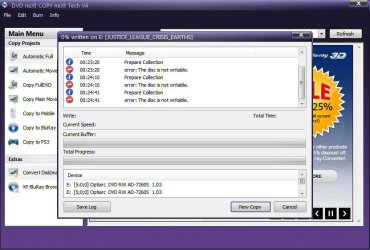
Here is the error log from DVD Next Copy
I am also posting a photo

20:36:44 Initializing
20:36:44 System information
Windows 6.1.7601(2) Service Pack 1
Processor: 6 CPU(s), architecture: IA32, processor type: Pentium
20:36:44 Devices found: 2
E: [1:0:0] Optiarc DVD RW AD-7260S 1.03
F: [0:0:0] Optiarc DVD RW AD-7260S 1.03

20:36:44 PhysicalDevice(E: Optiarc DVD RW AD-7260S)::ReadDiscInformation failed : 00/00/00
20:36:44 PhysicalDevice(E: Optiarc DVD RW AD-7260S)::GetFeature failed : no feature 0041
20:36:44 PhysicalDevice(E: Optiarc DVD RW AD-7260S)::GetFeature failed : no feature 0051
20:36:44 PhysicalDevice(F: Optiarc DVD RW AD-7260S)::GetFeature failed : no feature 0041
20:36:44 PhysicalDevice(F: Optiarc DVD RW AD-7260S)::GetFeature failed : no feature 0051
20:36:48 PhysicalDevice(E: Optiarc DVD RW AD-7260S)::ReadDiscInformation failed : 00/00/00
20:36:48 PhysicalDevice(E: Optiarc DVD RW AD-7260S)::ReadTrackInformation failed : 05/24/00
20:36:48 PhysicalDevice(E: Optiarc DVD RW AD-7260S)::ReadDiscInformation failed : 00/00/00
 

Attachments

  • DVD Burn2.jpg
    DVD Burn2.jpg
    64.8 KB · Views: 6

My Computer My Computer

Computer type
PC/Desktop
Computer Manufacturer/Model Number
Custom
OS
Windows 7 Ultimate x64
CPU
AMD Phenom II x6 1090T 3.2GHZ
Motherboard
Gigabyte 890FXA-UD5
Memory
8gb (2x4gb) Corsair XMS3
Graphics Card(s)
EVGA Nvidia GTS 450 1gb DDR5
Hard Drives
Seagate 1.5tb SATA (Main drive)
Seagate 1tb Sata (Secondary drive)
Antivirus
MSS
Browser
IE9, Firefox 19
This "Burns" me - no pun intended

I am a computer tech with my own business and it burns me that I can't figure this out.
I have a system image from 3 months ago that I can go back to without having to do a new install
but that is besides the point. I am very stubborn and I NEED to figure this out!!!!!
I have scoured the internet on & off for the last 8 weeks and 99% of the fixes & suggestions I find are things that I have already tried.
I am not ready to give up yet - but getting close.
Thanks for your help.
Any more ideas would be appreciated.
If I happen to figure it out myself I will post it ASAP!
 

My Computer My Computer

Computer type
PC/Desktop
Computer Manufacturer/Model Number
Custom
OS
Windows 7 Ultimate x64
CPU
AMD Phenom II x6 1090T 3.2GHZ
Motherboard
Gigabyte 890FXA-UD5
Memory
8gb (2x4gb) Corsair XMS3
Graphics Card(s)
EVGA Nvidia GTS 450 1gb DDR5
Hard Drives
Seagate 1.5tb SATA (Main drive)
Seagate 1tb Sata (Secondary drive)
Antivirus
MSS
Browser
IE9, Firefox 19
How about deleting the upper filters and lower filters inside the registry

HKEY_LOCAL_MACHINE\SYSTEM\CurrentControlSet\Control\Class

Look for this key {4D36E965-E325-11CE-BFC1-08002BE10318} resets the DVD burner .
 

My Computer My Computer

Computer Manufacturer/Model Number
Custom Built
OS
Windows 7 Ultimate 32-Bit & Windows 7 Ultimate 64-Bit
CPU
Intel Core i7 CPU 950 @ 3.07GHz
Motherboard
ASUS P6T DELUXE V2
Memory
OCZ 6GB (3 x 2GB) 240-Pin DDR3 SDRAM DDR3 1600 OCZ3X1600R2
Graphics Card(s)
ATI Radeon HD 5700 Series
Sound Card
OnBoard
Hard Drives
WD6400AACS-00M3B0 (640GB SATA )
PSU
CORSAIR 850w
Case
NZXT LEXA
Cooling
Intel Stock Heatsink Fan
Keyboard
Microsoft Wireless Laser Keyboard 7000
Mouse
Microsoft Wireless Laser Mouse 7000
Been there done that

Like I said in my previous post 99% of the typical things you would think to try I have done.
Also, the odd thing is if I try to burn an .iso file I have no problems at all.
Windows recognizes the drives as burners, recognizes that blank media is in them.
All the software I try to use says that there is no writable media when it comes time to burn the disc.
I've used Revo to uninstall the programs, I've manually searched the registry for all leftover file.
Nothing has worked.
 

My Computer My Computer

Computer type
PC/Desktop
Computer Manufacturer/Model Number
Custom
OS
Windows 7 Ultimate x64
CPU
AMD Phenom II x6 1090T 3.2GHZ
Motherboard
Gigabyte 890FXA-UD5
Memory
8gb (2x4gb) Corsair XMS3
Graphics Card(s)
EVGA Nvidia GTS 450 1gb DDR5
Hard Drives
Seagate 1.5tb SATA (Main drive)
Seagate 1tb Sata (Secondary drive)
Antivirus
MSS
Browser
IE9, Firefox 19
I know this sound a little silly but did you try using Windows 7 built in Media Player.
Have you also made sure what you are trying to coping is not copyright protected.
With all the things you have tried it's hard to come up with and other thoughts.
 

My Computer My Computer

Computer type
PC/Desktop
Computer Manufacturer/Model Number
Home made Desktop
OS
Windows 10 Pro. 64/ version 1709 Windows 7 Pro/64
CPU
Intel i7-6800K @ 4.3
Motherboard
ASUS X-99 Deluxe II
Memory
Corsair Platinum 16 gig @2400
Graphics Card(s)
EVGA GTX 1070 OC
Monitor(s) Displays
Asus 27" LED LCD/VE278Q
Screen Resolution
1920-1080 or 1280-720 HDMI
Hard Drives
INTEL SSD 730-240 Gb Sata 3.0/
PSU
EVGA Platium 1200W
Case
Phanteks Luxe Tempered Glass 8 fans/ one radiator
Cooling
XSPC/ Water Cooled CPU
Keyboard
Das 4 Professional
Mouse
Logitech M705/MX Anywhere 2-S
Internet Speed
100 mbits
Antivirus
Microsoft Security Essentials/ Malwarebytes Premium 3.0/ SAS
Browser
I.E. 11 default/Firefox/ ISP Time Warner Cable/Spectrum
Other Info
LG BluRay Burner/
Sound system-KLipsch-THX/
Icy Dock ssd Hot Swap bays.
Copyright protection is not the problem. My software copies the material just fine to my hard drive. When it tries to burn I get the "no writable media" error. Funny thing is if I tell my software to copy the data to an .iso file that works. Then I double click the .iso file and Roxio launches and burns the .iso to a blank DVD just fine. I can burn to DVD all day long if it is an .iso file. Anything else says "no writable media"
 

My Computer My Computer

Computer type
PC/Desktop
Computer Manufacturer/Model Number
Custom
OS
Windows 7 Ultimate x64
CPU
AMD Phenom II x6 1090T 3.2GHZ
Motherboard
Gigabyte 890FXA-UD5
Memory
8gb (2x4gb) Corsair XMS3
Graphics Card(s)
EVGA Nvidia GTS 450 1gb DDR5
Hard Drives
Seagate 1.5tb SATA (Main drive)
Seagate 1tb Sata (Secondary drive)
Antivirus
MSS
Browser
IE9, Firefox 19
I'd swap another burner in there to test...
 

My Computer My Computer

Computer Manufacturer/Model Number
Self-Built
OS
Vista Ultimate X64/ Windows 7 Dual-boot
CPU
Q6600
Motherboard
ASUS P5K
Memory
4G OCZ PC2 8500 Platinum
Graphics Card(s)
EVGA 8800GTS Vid Card
Hard Drives
500G Seagate SATA
200G Seagate SATA
100G WD Caviar SATA
80G WD Caviar IDE
PSU
OCZ Elite 800W PSU
Case
RaidMax Smilodon Case
Okay rowheel
Are these things you are trying to burn copyright protected?
 

My Computer My Computer

Computer type
PC/Desktop
Computer Manufacturer/Model Number
Home made Desktop
OS
Windows 10 Pro. 64/ version 1709 Windows 7 Pro/64
CPU
Intel i7-6800K @ 4.3
Motherboard
ASUS X-99 Deluxe II
Memory
Corsair Platinum 16 gig @2400
Graphics Card(s)
EVGA GTX 1070 OC
Monitor(s) Displays
Asus 27" LED LCD/VE278Q
Screen Resolution
1920-1080 or 1280-720 HDMI
Hard Drives
INTEL SSD 730-240 Gb Sata 3.0/
PSU
EVGA Platium 1200W
Case
Phanteks Luxe Tempered Glass 8 fans/ one radiator
Cooling
XSPC/ Water Cooled CPU
Keyboard
Das 4 Professional
Mouse
Logitech M705/MX Anywhere 2-S
Internet Speed
100 mbits
Antivirus
Microsoft Security Essentials/ Malwarebytes Premium 3.0/ SAS
Browser
I.E. 11 default/Firefox/ ISP Time Warner Cable/Spectrum
Other Info
LG BluRay Burner/
Sound system-KLipsch-THX/
Icy Dock ssd Hot Swap bays.
Just to let everyone know that I finally solved the problem.
It appears that during one of windows updates the drivers for the sata controller that my DVD drives are connected to were updated and that is when the problem started. I went to Gigabytes website and they posted updated drivers last year. I downloaded & installed the drivers, rebooted & the problem was fixed.
Of course not before I went out and bought a Multi format Blue Ray Burner & DVD burner.
At least I finally put a Blue Ray Burner in my computer!

Just another reminder not to always trust driver updates from Microsoft!
 

My Computer My Computer

Computer type
PC/Desktop
Computer Manufacturer/Model Number
Custom
OS
Windows 7 Ultimate x64
CPU
AMD Phenom II x6 1090T 3.2GHZ
Motherboard
Gigabyte 890FXA-UD5
Memory
8gb (2x4gb) Corsair XMS3
Graphics Card(s)
EVGA Nvidia GTS 450 1gb DDR5
Hard Drives
Seagate 1.5tb SATA (Main drive)
Seagate 1tb Sata (Secondary drive)
Antivirus
MSS
Browser
IE9, Firefox 19
Thank you rowheel. Your fix for the problem will probably help many. Thanks again for getting back to us.
Happy Blue Ray.
 

My Computer My Computer

Computer type
PC/Desktop
Computer Manufacturer/Model Number
Home made Desktop
OS
Windows 10 Pro. 64/ version 1709 Windows 7 Pro/64
CPU
Intel i7-6800K @ 4.3
Motherboard
ASUS X-99 Deluxe II
Memory
Corsair Platinum 16 gig @2400
Graphics Card(s)
EVGA GTX 1070 OC
Monitor(s) Displays
Asus 27" LED LCD/VE278Q
Screen Resolution
1920-1080 or 1280-720 HDMI
Hard Drives
INTEL SSD 730-240 Gb Sata 3.0/
PSU
EVGA Platium 1200W
Case
Phanteks Luxe Tempered Glass 8 fans/ one radiator
Cooling
XSPC/ Water Cooled CPU
Keyboard
Das 4 Professional
Mouse
Logitech M705/MX Anywhere 2-S
Internet Speed
100 mbits
Antivirus
Microsoft Security Essentials/ Malwarebytes Premium 3.0/ SAS
Browser
I.E. 11 default/Firefox/ ISP Time Warner Cable/Spectrum
Other Info
LG BluRay Burner/
Sound system-KLipsch-THX/
Icy Dock ssd Hot Swap bays.
Back
Top