
Aloha All,
My issue started when I tried to delete files in the hidden cache of Dropbox.
I went into "my computer", clicked on my C drive, scrolled down to "Users" and found file "All Users" with a "locked" icon attached. I clicked on it and up popped an error message that I don't have permission to access this folder. I rightclicked on properties, followed by the security tab. The security tab lists 3 user groups; everyone, system, administrator. When highlited, none of these groups contained "permissions". I tried to "edit" the "permissions", which opened another "permissions" dialogue box. I clicked on each permission in the "allow" list for each group, to no avail. I went back the the main "users" folder and found "locked" icons on 2 other folders, "default user" and "administrator" (which is my wifes and my names.)
I've read with interest some of the 2012 & 2013 threads of a similar nature, but none of the problems were quite the same and the fixes didn't help me.
Sure hope the community can help me resolve the issue...
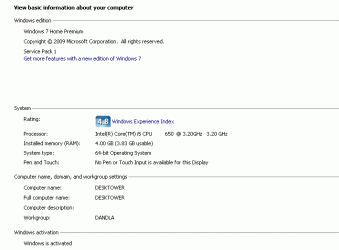
I've provided a screenshot of the "System" page from Control Panel.
Mahalo for all the help.
Konadon
My issue started when I tried to delete files in the hidden cache of Dropbox.
I went into "my computer", clicked on my C drive, scrolled down to "Users" and found file "All Users" with a "locked" icon attached. I clicked on it and up popped an error message that I don't have permission to access this folder. I rightclicked on properties, followed by the security tab. The security tab lists 3 user groups; everyone, system, administrator. When highlited, none of these groups contained "permissions". I tried to "edit" the "permissions", which opened another "permissions" dialogue box. I clicked on each permission in the "allow" list for each group, to no avail. I went back the the main "users" folder and found "locked" icons on 2 other folders, "default user" and "administrator" (which is my wifes and my names.)
I've read with interest some of the 2012 & 2013 threads of a similar nature, but none of the problems were quite the same and the fixes didn't help me.
Sure hope the community can help me resolve the issue...
I've provided a screenshot of the "System" page from Control Panel.
Mahalo for all the help.
Konadon
Attachments
My Computer
At a glance
Win7 Home Premium x64Intel CORE i5-6504GBONBOARD
- Computer Manufacturer/Model Number
- Custom
- OS
- Win7 Home Premium x64
- CPU
- Intel CORE i5-650
- Motherboard
- ASUS P7H55-M LX
- Memory
- 4GB
- Graphics Card(s)
- ONBOARD
- Sound Card
- ONBOARD
- Monitor(s) Displays
- NEC AccuSync LCD92VX
- Hard Drives
- 1 X MAXTOR 80GB O/S
2 X HITACHI 160GB DATA
- PSU
- 500w
- Cooling
- 1 X CPU, 3 X CASE FANS

