cant change drive letter

superqaz

New member
Local time
12:29 PM
Messages
35
would appreciate some help with this if anyone has the time

i cant change drive letter to c on system drive, i messed it up ages ago trying to change letters around and have had problems ever since. Its been suggested that i reinstall win7 but i want to avoid that if at all possible .

its win 7 installation with one hd [no extra partitions] and one usb drive

some problems are:

if i right click on system drive windows explorer stops working

if i try to change system drive letter i get parameter is incorrect

also [recently] system drive was not set as active, it is now corrected

cant get permission [after reading several articles on the subject] to do windows updates or install MS Word and a few others but not all installations are blocked

cant install iTunes [no reason given]

cant get Windows Tweaks all in one repair tool to effect repairs [runs all night]


thanks
 
Last edited:

My Computer My Computer

Computer type
PC/Desktop
OS
win 7 64 bit
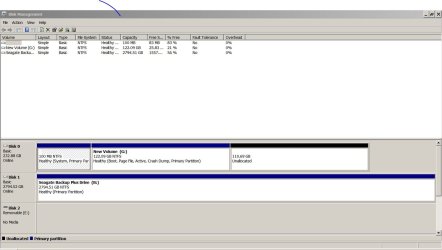
Please post a full clear shot of Disk Management, and we`ll go from there.

FYI, the windows install drive or partition`s letter, or even another drive with programs installed on it should never have it`s letter changed, only a data drive or partition`s letter can safely be changed.
 

My Computer My Computer

Computer type
PC/Desktop
Computer Manufacturer/Model Number
Skylake Special #666
OS
Windows 10 Pro x64
CPU
Intel Core i7 6700K
Motherboard
Asus Sabertooth Z170 Mark 1
Memory
GSkill TridentZ RGB 16GB 3600 16-16-16-36
Graphics Card(s)
EVGA GTX 980 Ti SC x2
Sound Card
Realtek High Definition
Monitor(s) Displays
AOC G2460PG
Screen Resolution
1920 x 1080 144Hz
Hard Drives
Samsung 860 Pro 256GB, Seagate Barracuda 4TB x2
PSU
EVGA 1000 P2, EVGA White Custom Braided Cables
Case
Corsair Vengeance C70 Gunmetal Black
Cooling
Corsair H100i v2, Corsair ML120 x2, Thermal Grizzly Kryonaut
Keyboard
Logitech G910 Orion Spectrum
Mouse
Logitech G700s
Internet Speed
Verizon Fios Quantum Gateway 75/75
Antivirus
Windows Defender, Malwarebytes Free 3.8.3
Browser
Chrome
Other Info
Corsair SP120 x4, LG Blu-ray Drive, Durabrand HT-395 100 Watt Dolby Digital Amp, Corsair H2100 Wireless 7.1 Headset
thanks
 

Attachments

  • Capture.JPG
    Capture.JPG
    91.6 KB · Views: 7

My Computer My Computer

Computer type
PC/Desktop
OS
win 7 64 bit
If you were to change the drive letter nothing would work lots of registry entries will refence the current disk as will many other files and windows will look for a lot of files on current drive so the only effective option is a clean install this will give you the extra 119 gig of disk space you sent using now be sure to delete all partitions during install
 

My Computer My Computer

Computer type
PC/Desktop
OS
win 8 32 bit
If you were to change the drive letter nothing would work lots of registry entries will refence the current disk as will many other files and windows will look for a lot of files on current drive so the only effective option is a clean install this will give you the extra 119 gig of disk space you sent using now be sure to delete all partitions during install

well yes i can see that but when i originally changed the drive letter only a few things wouldnt work for that reason, it was not too much work re associate them. I could do that again

thanks
 

My Computer My Computer

Computer type
PC/Desktop
OS
win 7 64 bit
Have a look at this Microsoft article:

How to restore the system/boot drive letter in Windows

https://support.microsoft.com/en-in/kb/223188

Note:

1. This article gives sufficient warning on the risks associated with this procedure and precautionary processes. I am also not sure whether this procedure is applicable to Windows 7. You will be doing it at your own risk.

2. Please backup all important data before you try to execute these instructions. If need be boot from a Live Linux USB boot drive to copy all such files - if in the present configuration you are unable to accesss those important files.

http://www.sevenforums.com/hardware...ly-unrecognisable-hard-drive.html#post2936753
 

My Computer My Computer

OS
Windows 7 Home Premium 32 bit
Have a look at this Microsoft article:

How to restore the system/boot drive letter in Windows

https://support.microsoft.com/en-in/kb/223188

Note:

1. This article gives sufficient warning on the risks associated with this procedure and precautionary processes. I am also not sure whether this procedure is applicable to Windows 7. You will be doing it at your own risk.

2. Please backup all important data before you try to execute these instructions. If need be boot from a Live Linux USB boot drive to copy all such files - if in the present configuration you are unable to accesss those important files.

http://www.sevenforums.com/hardware...ly-unrecognisable-hard-drive.html#post2936753

thanks for that, i will take a look
 

My Computer My Computer

Computer type
PC/Desktop
OS
win 7 64 bit
looked at that. It seems straight forward and will try it soon and post results

thanks again
 

My Computer My Computer

Computer type
PC/Desktop
OS
win 7 64 bit
Back
Top