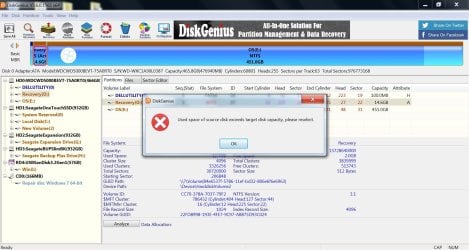
Solved Can't clone my OS to a smaller drive with Disk Genius or Hasleo.

Danny S

New member
Local time
3:41 PM
Messages
30
I'm trying to clone/migrate my OS, Win 7 Pro x64, to a 60GB flash drive. I've searched SevenForums for existing threads on this problem and have tried two suggested programs, Disk Genius and Hasleo. Both tout the ability to let the user clone just the OS, not entire disk. But when the moment comes, neither program lives up to its promise. They both refuse to let me clone my OS to a smaller drive. I've added up the sizes of all the top level folders except for "users". The total is less than 29GB. So there's plenty of room on the flash drive for my OS and installed programs.

Can anyone suggest a free (not trial version) program that actually does what it claims?


Thank you!
 

My Computers My Computers

  • At a glance

    Windows 7 64-bitIntel Core i7-26004 GB
    Computer type
    PC/Desktop
    Computer Manufacturer/Model Number
    HP Compaq 8200 Elite SFF
    OS
    Windows 7 64-bit
    CPU
    Intel Core i7-2600
    Memory
    4 GB
    Browser
    Chrome
  • Computer type
    PC/Desktop
provide screenshots of the program windows and that will probably give a clue
 

My Computers My Computers

  • At a glance

    7 X64i5 84002x8gb 3200mhz
    Computer type
    PC/Desktop
    OS
    7 X64
    CPU
    i5 8400
    Motherboard
    gigabyte b365m ds3h
    Memory
    2x8gb 3200mhz
    Hard Drives
    various
    PSU
    pure power 11 400w cm
    Case
    Coolermaster
    Cooling
    cryorig m9i
  • At a glance

    7x64g54008gb ddr4 2400
    Computer type
    PC/Desktop
    OS
    7x64
    CPU
    g5400
    Motherboard
    ga b365m ds3h
    Memory
    8gb ddr4 2400
    PSU
    xfx pro 450w
You need the users folder otherwise you won't be able to log into the computer upon restore. If that folder is too large try off loading pictures, videos, music, and your downloads folders for every account. You can also try cleaning up the profiles with ccleaner.
 

My Computers My Computers

  • At a glance

    Windows 7 pro/Windows 10 ProIntel i7 860 Quad core 2.8 ghz8 gbATI Radeon HD 5770 1 gb ram
    Computer type
    PC/Desktop
    Computer Manufacturer/Model Number
    HP Pavillion Elite HPE-250f
    OS
    Windows 7 pro/Windows 10 Pro
    CPU
    Intel i7 860 Quad core 2.8 ghz
    Memory
    8 gb
    Graphics Card(s)
    ATI Radeon HD 5770 1 gb ram
    Monitor(s) Displays
    Alienware 25 AW2521HF & Viewsonic
    Screen Resolution
    1920 x1080 & 1680x1050
    Hard Drives
    WD blue 1 tb & 500 gb.
    Browser
    FF of course.
    Other Info
    https://www.bestbuy.com/site/hp-pavilion-elite-desktop-intel-core-i7-processor-8gb-memory-1tb-hard-drive/9921493.p?skuId=9921493
  • At a glance

    Windows 2012 R2 Data center/Linux Minti3 9100 3.6GHz, 8M cache, 4C/4T8GB 2666MT/s DDR4 ECC UDIMM
    Computer type
    PC/Desktop
    System Manufacturer/Model Number
    Dell Poweredge T140
    OS
    Windows 2012 R2 Data center/Linux Mint
    CPU
    i3 9100 3.6GHz, 8M cache, 4C/4T
    Memory
    8GB 2666MT/s DDR4 ECC UDIMM
    Monitor(s) Displays
    Viewsonic
    Screen Resolution
    1680x1050
    Hard Drives
    1 TB & 750 GB
    Other Info
    https://www.dell.com/en-us/work/shop/productdetailstxn/poweredge-t140?~ck=bt
To SIW2,

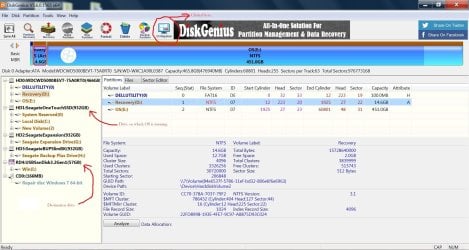
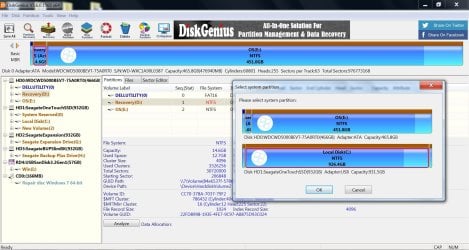
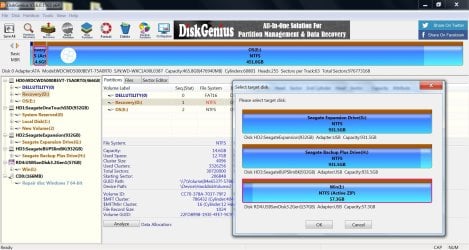
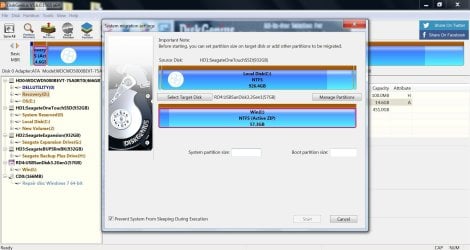
Here are the screenshots. Hopefully, I'm just not using Disk Genius correctly.

Disk Genius 1.jpgDisk Genius 2.jpgDisk Genius 3.jpgDisk Genius 4.jpgDisk Genius 5.jpg


To townsbg,

I'm not trying to exclude system files associated with the "users" folder and subfolders during migration. I merely excluded its size from my calculations for the needed disk space as I believe it is the only folder that contains my personal files. And it is my understanding that a system migration does not migrate personal files but perhaps I'm wrong.


Thank you both!
 

My Computers My Computers

  • At a glance

    Windows 7 64-bitIntel Core i7-26004 GB
    Computer type
    PC/Desktop
    Computer Manufacturer/Model Number
    HP Compaq 8200 Elite SFF
    OS
    Windows 7 64-bit
    CPU
    Intel Core i7-2600
    Memory
    4 GB
    Browser
    Chrome
  • Computer type
    PC/Desktop
Os Migration will migrate all the used space on the selected source partitions.

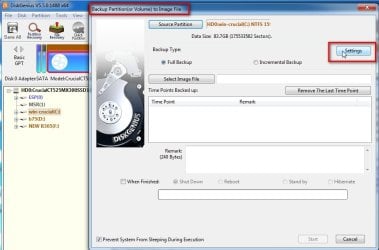
You could try a partition image. That will allow you to exclude any files/folders you don't want from the image. But you have to know what you are doing, don't exclude any windows system files.

Then you restore the image to the target disk


dg-exclude1.jpg

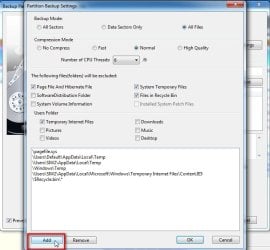
tick the system volume information box to exclude it and click ADD to browse to any other files/folders you want to exclude


dg-exclude2.jpg
 

My Computers My Computers

  • At a glance

    7 X64i5 84002x8gb 3200mhz
    Computer type
    PC/Desktop
    OS
    7 X64
    CPU
    i5 8400
    Motherboard
    gigabyte b365m ds3h
    Memory
    2x8gb 3200mhz
    Hard Drives
    various
    PSU
    pure power 11 400w cm
    Case
    Coolermaster
    Cooling
    cryorig m9i
  • At a glance

    7x64g54008gb ddr4 2400
    Computer type
    PC/Desktop
    OS
    7x64
    CPU
    g5400
    Motherboard
    ga b365m ds3h
    Memory
    8gb ddr4 2400
    PSU
    xfx pro 450w
I guess I'll go ahead and try that. I'm pretty much down to just the two drives now. So I'll have to first put the image on the destination drive, copy and paste it to the system drive, then recover to the destination drive.

I was really looking forward to the whole cloning thing since (from what I've heard) that bypasses the whole image creation step. I sure thought everywhere I read and listened, migrating the OS was cloning the OS, and cloning the OS was not cloning the whole disk. So I guess all of that is crap. Don't know how I kept getting that wrong in so many places. Is there not a free program that will just clone the OS and installed programs without creating an image first?

- - - Updated - - -

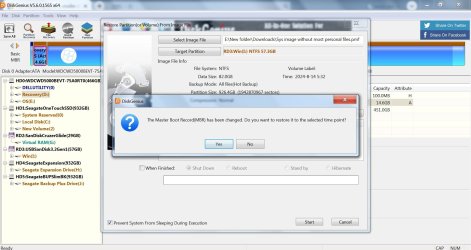
I'm now trying to recover the partition image, but I'm getting a prompt asking, "The Master Boot Record(MBR) has been changed. Do you want to restore it to the selected time point?" Sounds like I need to get this one right on the first time, but I don't know what the answer is. I'm guessing that I should want to swap the MBR in the image file for the MBR on the flash drive, which would mean I should select, No. I think selecting, Yes, would change the MBR on the flash drive to whatever is in the image file, which I don't think is what I should want. Do I have any of that right?
 

My Computers My Computers

  • At a glance

    Windows 7 64-bitIntel Core i7-26004 GB
    Computer type
    PC/Desktop
    Computer Manufacturer/Model Number
    HP Compaq 8200 Elite SFF
    OS
    Windows 7 64-bit
    CPU
    Intel Core i7-2600
    Memory
    4 GB
    Browser
    Chrome
  • Computer type
    PC/Desktop
You don't say what flash drive as 7 wont natively boot from flash drive
 

My Computer My Computer

At a glance

win 8 32 bit
Computer type
PC/Desktop
OS
win 8 32 bit
To townsbg,

I'm not trying to exclude system files associated with the "users" folder and subfolders during migration. I merely excluded its size from my calculations for the needed disk space as I believe it is the only folder that contains my personal files. And it is my understanding that a system migration does not migrate personal files but perhaps I'm wrong.


Thank you both!


users folder contains more than your personal files. It contains login information, application settings, and saved passwords for your account. If you leave that folder off completely you won't have an account to log into. Yes you can exclude folders like music, pics, documents, downloads, IE bookmarks within each profile but most of the other other folders beneath each profile are necessary. You also need need the default and public folders beneath users.
 
Last edited:

My Computers My Computers

  • At a glance

    Windows 7 pro/Windows 10 ProIntel i7 860 Quad core 2.8 ghz8 gbATI Radeon HD 5770 1 gb ram
    Computer type
    PC/Desktop
    Computer Manufacturer/Model Number
    HP Pavillion Elite HPE-250f
    OS
    Windows 7 pro/Windows 10 Pro
    CPU
    Intel i7 860 Quad core 2.8 ghz
    Memory
    8 gb
    Graphics Card(s)
    ATI Radeon HD 5770 1 gb ram
    Monitor(s) Displays
    Alienware 25 AW2521HF & Viewsonic
    Screen Resolution
    1920 x1080 & 1680x1050
    Hard Drives
    WD blue 1 tb & 500 gb.
    Browser
    FF of course.
    Other Info
    https://www.bestbuy.com/site/hp-pavilion-elite-desktop-intel-core-i7-processor-8gb-memory-1tb-hard-drive/9921493.p?skuId=9921493
  • At a glance

    Windows 2012 R2 Data center/Linux Minti3 9100 3.6GHz, 8M cache, 4C/4T8GB 2666MT/s DDR4 ECC UDIMM
    Computer type
    PC/Desktop
    System Manufacturer/Model Number
    Dell Poweredge T140
    OS
    Windows 2012 R2 Data center/Linux Mint
    CPU
    i3 9100 3.6GHz, 8M cache, 4C/4T
    Memory
    8GB 2666MT/s DDR4 ECC UDIMM
    Monitor(s) Displays
    Viewsonic
    Screen Resolution
    1680x1050
    Hard Drives
    1 TB & 750 GB
    Other Info
    https://www.dell.com/en-us/work/shop/productdetailstxn/poweredge-t140?~ck=bt
It is possible to boot win7 via usb but it needs a couple of registry changes.
 

My Computers My Computers

  • At a glance

    7 X64i5 84002x8gb 3200mhz
    Computer type
    PC/Desktop
    OS
    7 X64
    CPU
    i5 8400
    Motherboard
    gigabyte b365m ds3h
    Memory
    2x8gb 3200mhz
    Hard Drives
    various
    PSU
    pure power 11 400w cm
    Case
    Coolermaster
    Cooling
    cryorig m9i
  • At a glance

    7x64g54008gb ddr4 2400
    Computer type
    PC/Desktop
    OS
    7x64
    CPU
    g5400
    Motherboard
    ga b365m ds3h
    Memory
    8gb ddr4 2400
    PSU
    xfx pro 450w
To samuria and SIW2,

I'm not yet at the point of trying to boot from the flash drive. I'm still just trying to recover the partition, but DiskGenius wants to know, "Do you want to restore [the MBR] to the selected time point?" before it will recover the image. But I can tell you that my active OS is running from an external SSD via USB thanks to the code provided by SIW2, so as far as I know the computer should be able to boot from the flash drive once the image has been recovered. And the flash drive currently holds bootable installation files for Windows 7 Pro x64. I just need to know if I should restore the MBR. I presume it means to restore the MBR on the flash drive to a setting in the image. But the setting in the image is for the OS on the external SSD. I'll also mention that DiskGenius made me boot from another drive just to create the image.

Disk Genius 6.jpg


To townsbg,

I'm not disputing that "
users folder contains more than your personal files". And as I said before, I'm not trying to exclude system files associated with the users folder and subfolders. Nor am I trying to exclude the folders themselves. But thank you.
 

My Computers My Computers

  • At a glance

    Windows 7 64-bitIntel Core i7-26004 GB
    Computer type
    PC/Desktop
    Computer Manufacturer/Model Number
    HP Compaq 8200 Elite SFF
    OS
    Windows 7 64-bit
    CPU
    Intel Core i7-2600
    Memory
    4 GB
    Browser
    Chrome
  • Computer type
    PC/Desktop
Dont know. It is very long time since I used mbr disks. Try it and see if it boots up
 

My Computers My Computers

  • At a glance

    7 X64i5 84002x8gb 3200mhz
    Computer type
    PC/Desktop
    OS
    7 X64
    CPU
    i5 8400
    Motherboard
    gigabyte b365m ds3h
    Memory
    2x8gb 3200mhz
    Hard Drives
    various
    PSU
    pure power 11 400w cm
    Case
    Coolermaster
    Cooling
    cryorig m9i
  • At a glance

    7x64g54008gb ddr4 2400
    Computer type
    PC/Desktop
    OS
    7x64
    CPU
    g5400
    Motherboard
    ga b365m ds3h
    Memory
    8gb ddr4 2400
    PSU
    xfx pro 450w
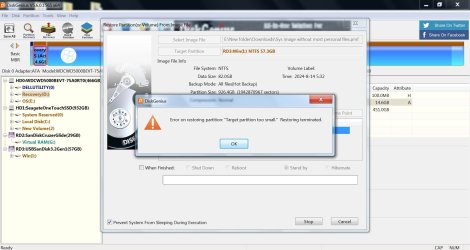
It still says "Target partition too small". The size on disk (on the source partition) of the image is 28.6GB. Does the size more than double upon recovery?

Disk Genius 7.jpg
 

My Computers My Computers

  • At a glance

    Windows 7 64-bitIntel Core i7-26004 GB
    Computer type
    PC/Desktop
    Computer Manufacturer/Model Number
    HP Compaq 8200 Elite SFF
    OS
    Windows 7 64-bit
    CPU
    Intel Core i7-2600
    Memory
    4 GB
    Browser
    Chrome
  • Computer type
    PC/Desktop
The size on disk (on the source partition) of the image is 28.6GB. Does the size more than double upon recovery?

In your photo it says data size 82.0gb
 

My Computers My Computers

  • At a glance

    7 X64i5 84002x8gb 3200mhz
    Computer type
    PC/Desktop
    OS
    7 X64
    CPU
    i5 8400
    Motherboard
    gigabyte b365m ds3h
    Memory
    2x8gb 3200mhz
    Hard Drives
    various
    PSU
    pure power 11 400w cm
    Case
    Coolermaster
    Cooling
    cryorig m9i
  • At a glance

    7x64g54008gb ddr4 2400
    Computer type
    PC/Desktop
    OS
    7x64
    CPU
    g5400
    Motherboard
    ga b365m ds3h
    Memory
    8gb ddr4 2400
    PSU
    xfx pro 450w
Yeah, I know. Don't know what that's about.
 

My Computers My Computers

  • At a glance

    Windows 7 64-bitIntel Core i7-26004 GB
    Computer type
    PC/Desktop
    Computer Manufacturer/Model Number
    HP Compaq 8200 Elite SFF
    OS
    Windows 7 64-bit
    CPU
    Intel Core i7-2600
    Memory
    4 GB
    Browser
    Chrome
  • Computer type
    PC/Desktop
You need to clone the drive to another external HDD or SSD. It doesn't make sense to do anything like that with a flash drive.

The only way to easily clone a large system partition to a smaller drive is to first resize it so that will fit on the smaller drive.

A few days ago I cloned my laptop HDD with a dual boot of Windows 7 and 10 to an external SSD. When done I removed the HDD and replaced it with the SSD.

To clone the drive I booted a flash drive with the cloning program on it. The HDD was 250GB while the SSD was 500GB. It must have taken 1-2 hours to do the clone. Note this cloning program automatically resized the partitions so both Windows 7 and 10 partitions were larger and together filled the new drive.
 

My Computers My Computers

  • At a glance

    Windows 7 Professional 64bit / Windows 10 Hom...AMD FX-8350GSKILL Ripjaw-X PC3 12800 12GB (2x4GB, 2x2GB)ASUS ENGTX560 DCII OC/2DI/1GD5 1GB
    Computer type
    PC/Desktop
    Computer Manufacturer/Model Number
    Custom build
    OS
    Windows 7 Professional 64bit / Windows 10 Home 64bit
    CPU
    AMD FX-8350
    Motherboard
    Gigabyte GA-990FXA-UD3 (AM3+) Rev. 4.0
    Memory
    GSKILL Ripjaw-X PC3 12800 12GB (2x4GB, 2x2GB)
    Graphics Card(s)
    ASUS ENGTX560 DCII OC/2DI/1GD5 1GB
    Sound Card
    Integrated
    Monitor(s) Displays
    Asus VE228H (21.5-in)
    Screen Resolution
    1920x1080 60Hz
    Hard Drives
    SAMSUNG 870 EVO 1TB (2.5" SATA SSD)
    SAMSUNG 870 EVO 500GB (2.5" SATA SSD)
    PSU
    Antec TruePower (new) TP-650 (650 watts)
    Case
    Antec Three Hundred
    Cooling
    AMD stock (plan to upgrade to Cooler Master Hyper 212 EVO)
    Keyboard
    Logitech K540 (wireless)
    Mouse
    Logitech M310 (wireless)
    Internet Speed
    Comcast Gigabit X2 Internet (2100Mbps down / 300Mbps up)
    Browser
    Firefox, Edge, Chrome
    Other Info
    Optical drive: ASUS DRW-24B3ST/BLK/G (Black) (24X)
    External hard drives: 2TB & 6TB
    Internet Gateway: Comcast XB8
  • Computer type
    PC/Desktop

My Computers My Computers

  • At a glance

    7 X64i5 84002x8gb 3200mhz
    Computer type
    PC/Desktop
    OS
    7 X64
    CPU
    i5 8400
    Motherboard
    gigabyte b365m ds3h
    Memory
    2x8gb 3200mhz
    Hard Drives
    various
    PSU
    pure power 11 400w cm
    Case
    Coolermaster
    Cooling
    cryorig m9i
  • At a glance

    7x64g54008gb ddr4 2400
    Computer type
    PC/Desktop
    OS
    7x64
    CPU
    g5400
    Motherboard
    ga b365m ds3h
    Memory
    8gb ddr4 2400
    PSU
    xfx pro 450w
To MisterEd,

"The only way to easily clone a large system partition to a smaller drive is to first resize it so that will fit on the smaller drive."

Could you please elaborate on what you mean by resize? Do you mean delete all my personal files from the source drive?


To SIW2,

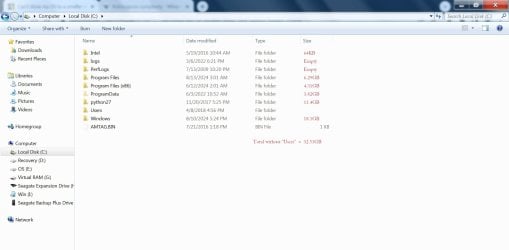
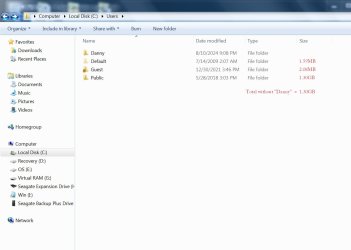
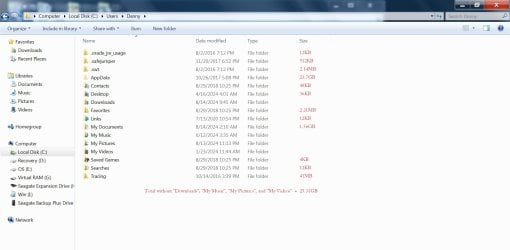
I thought the original uncompressed files didn't even add up to 32GB, but upon redoing the calculations I've discovered that the AppData folder in my user profile amounts to about 24GB. I can also account for a few more GB simply by being more exact this time, instead of estimating, so that still leaves 23GB unaccounted for. I'm providing screenshots of what I'm including in my calculations. The sizes are based on "Size on disk" in "Properties" for each folder. In the first screenshot, I'm showing the total for all items in the C: folder, except for "Users". The second screen shot shows the total for all folders in C:\Users, except for my user profile, Danny. The third pic shows the total for all folders in C:\Users\Danny, except for Downloads, My Music, My Pictures, and My Videos. In DiskGenius, I tick the box next to these folders to exclude their contents, shown in the fourth screenshot.

Any suggestions as to where to find the unaccounted for 23GB?

OS Size Calculation 1.jpgOS Size Calculation 2.jpgOS Size Calculation 3.jpgDisk Genius 8.jpg
 

My Computers My Computers

  • At a glance

    Windows 7 64-bitIntel Core i7-26004 GB
    Computer type
    PC/Desktop
    Computer Manufacturer/Model Number
    HP Compaq 8200 Elite SFF
    OS
    Windows 7 64-bit
    CPU
    Intel Core i7-2600
    Memory
    4 GB
    Browser
    Chrome
  • Computer type
    PC/Desktop
To MisterEd,
"The only way to easily clone a large system partition to a smaller drive is to first resize it so that will fit on the smaller drive."
Could you please elaborate on what you mean by resize? Do you mean delete all my personal files from the source drive?
I assume that if you add up all the used space it is much smaller than the size of the partition. If so you might be able to reduce the partitions size to just a little more than is needed to hold the files.

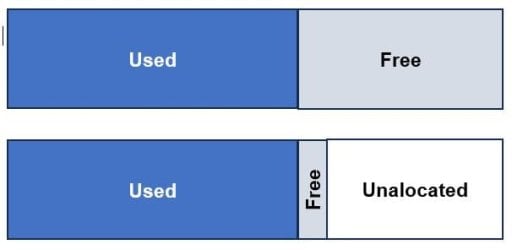
Normally the parts of a files are scattered all over the drive unless the drive is defragmented. Even if this is done then certain system might not to be easily moved. In the past I have used a partitioning program that automatically defragments the drive and then reduces the partition down to just enough to hold the files. The process reduces the free space with the now unused space call unallocated.

Here is a simple diagram that shows the process. Note that partition contains both used and free space. Now the partition contains the same data but is much smaller.

reduce free space.jpg
 

My Computers My Computers

  • At a glance

    Windows 7 Professional 64bit / Windows 10 Hom...AMD FX-8350GSKILL Ripjaw-X PC3 12800 12GB (2x4GB, 2x2GB)ASUS ENGTX560 DCII OC/2DI/1GD5 1GB
    Computer type
    PC/Desktop
    Computer Manufacturer/Model Number
    Custom build
    OS
    Windows 7 Professional 64bit / Windows 10 Home 64bit
    CPU
    AMD FX-8350
    Motherboard
    Gigabyte GA-990FXA-UD3 (AM3+) Rev. 4.0
    Memory
    GSKILL Ripjaw-X PC3 12800 12GB (2x4GB, 2x2GB)
    Graphics Card(s)
    ASUS ENGTX560 DCII OC/2DI/1GD5 1GB
    Sound Card
    Integrated
    Monitor(s) Displays
    Asus VE228H (21.5-in)
    Screen Resolution
    1920x1080 60Hz
    Hard Drives
    SAMSUNG 870 EVO 1TB (2.5" SATA SSD)
    SAMSUNG 870 EVO 500GB (2.5" SATA SSD)
    PSU
    Antec TruePower (new) TP-650 (650 watts)
    Case
    Antec Three Hundred
    Cooling
    AMD stock (plan to upgrade to Cooler Master Hyper 212 EVO)
    Keyboard
    Logitech K540 (wireless)
    Mouse
    Logitech M310 (wireless)
    Internet Speed
    Comcast Gigabit X2 Internet (2100Mbps down / 300Mbps up)
    Browser
    Firefox, Edge, Chrome
    Other Info
    Optical drive: ASUS DRW-24B3ST/BLK/G (Black) (24X)
    External hard drives: 2TB & 6TB
    Internet Gateway: Comcast XB8
  • Computer type
    PC/Desktop
To MisterEd,

Thank you! I genuinely enjoyed learning that bit of information.

It looks, though, that DiskGenius did at least create an image that is significantly smaller (82GB) than the used space on my hard drive (780GB). Perhaps, if I just go out and buy a larger flash drive, say 100GB, then it'll finally recover that image, if it really is 82GB, to the 100GB flash drive.

I no longer want to store so many personal files on the same drive as my OS, so the drive running my OS doesn't need to be 500+ GB. But I don't want to start over with a fresh install of Windows either. So that's why it makes sense to me to try to clone only my OS and installed programs to a smaller drive. I'm trying to move everything except my personal files. And I'm now realizing that my initial attempts might have been successful had I just used a 100GB flash drive, but somehow I've miscalculated the capacity that I need.
 

My Computers My Computers

  • At a glance

    Windows 7 64-bitIntel Core i7-26004 GB
    Computer type
    PC/Desktop
    Computer Manufacturer/Model Number
    HP Compaq 8200 Elite SFF
    OS
    Windows 7 64-bit
    CPU
    Intel Core i7-2600
    Memory
    4 GB
    Browser
    Chrome
  • Computer type
    PC/Desktop
Got a new flash drive, 128GB nominal (114GB actual).

Recovered partition image.

Went to "Computer". Went to "Properties" for the flash drive. It says, "Used space: 52.6GB; Free space: 61.9GB".

What happened to 82GB?

If it only used 52.6GB, then why the f*** didn't it let me recover to the 57GB flash drive?


Oh, and the computer won't boot from it either. Re-ran (as administrator) the .bat file provided by SIW2 in another thread that makes it possible to boot from a USB drive (which has worked in other cases), but I did have to change the target drive letter within the code. Still won't boot. I can access the files on the drive, though.

Perhaps tomorrow I'll try to recover the partition again, only selecting "Yes" to the question about the MBR this time.
 

My Computers My Computers

  • At a glance

    Windows 7 64-bitIntel Core i7-26004 GB
    Computer type
    PC/Desktop
    Computer Manufacturer/Model Number
    HP Compaq 8200 Elite SFF
    OS
    Windows 7 64-bit
    CPU
    Intel Core i7-2600
    Memory
    4 GB
    Browser
    Chrome
  • Computer type
    PC/Desktop
Back
Top