Solved Cant connect to the Internet

Nettlewarbler

New member
Member
Local time
4:29 PM
Messages
72
Mornin all , another problem i'm afraid . Windows 7 installed ok , but I cant get online . I phoned PlusNet this morning my broadband provider , they said I would have to get someone to look at my computer . The plusnet advisor said as they would have to be looking at my PC to install the software or get the problem sorted , that's why they don't do such actions now .( I thought all I would have to do is phone them up and they would install some drivers or software , and everything would be ok ) . I went to a site about installing wifi on windows 7 which went Start / Computer / Properties / Device Manager / click the arrow next to Network Adaptors to see if theres a Wifi adaptor listed . But I couldn't find Netwaork adaptors listed .Looks like I'm up the creek again .
 

My Computer My Computer

Computer type
PC/Desktop
Computer Manufacturer/Model Number
Custom build
OS
Microsoft Windows 10 Pro 64-bit 17134 Multiprocessor Free
CPU
Intel(R) Core(TM) i7-4790K CPU @ 4.00GHz
Motherboard
MSI Z97 PC Mate(MS-7850)
Memory
16.00 GB
Graphics Card(s)
Intel(R) HD Graphics 4600
Sound Card
(1) High Definition Audio Device (2) USB Audio Device
Screen Resolution
1920 x 1080 x 32 bits (4294967296 colors) @ 60 Hz
Hard Drives
ST10000VN0004-2GS11L
Antivirus
Kaspersky
Browser
Plusnet
PlusNet can`t help you if you aren`t connected to the net.

You have to download the network drivers and install them. Use the computer you`re on now to do it, save them to a flash drive.

There has to be a network adapterr listed in Device Manager, check again.

Don`t you have the motherboard cd that came with your board ???
 

Attachments

  • smashing-laptop.gif
    smashing-laptop.gif
    880.3 KB · Views: 71

My Computer My Computer

Computer type
PC/Desktop
Computer Manufacturer/Model Number
Skylake Special #666
OS
Windows 10 Pro x64
CPU
Intel Core i7 6700K
Motherboard
Asus Sabertooth Z170 Mark 1
Memory
GSkill TridentZ RGB 16GB 3600 16-16-16-36
Graphics Card(s)
EVGA GTX 980 Ti SC x2
Sound Card
Realtek High Definition
Monitor(s) Displays
AOC G2460PG
Screen Resolution
1920 x 1080 144Hz
Hard Drives
Samsung 860 Pro 256GB, Seagate Barracuda 4TB x2
PSU
EVGA 1000 P2, EVGA White Custom Braided Cables
Case
Corsair Vengeance C70 Gunmetal Black
Cooling
Corsair H100i v2, Corsair ML120 x2, Thermal Grizzly Kryonaut
Keyboard
Logitech G910 Orion Spectrum
Mouse
Logitech G700s
Internet Speed
Verizon Fios Quantum Gateway 75/75
Antivirus
Windows Defender, Malwarebytes Free 3.8.3
Browser
Chrome
Other Info
Corsair SP120 x4, LG Blu-ray Drive, Durabrand HT-395 100 Watt Dolby Digital Amp, Corsair H2100 Wireless 7.1 Headset
You should be able to see network adapters as that motherboard comes with a built-in Lan, and you should have gotten an ethernet cable from Plusnet just plug it into the router.
As for your wifi drivers which wifi card did you buy/install?

Roy
 

My Computer My Computer

Computer type
PC/Desktop
Computer Manufacturer/Model Number
medionl/Aspire 6930G/acer x55a
OS
W7 home premium 32bit/W7HP 64bit/w10 tp insider ring
CPU
E5300 dual core
Motherboard
medion MS7366
Memory
3gb
Graphics Card(s)
Nvidia Geforce 7100 Nforce 630i
Monitor(s) Displays
avixc
Internet Speed
n (isp resticted to 72)
Antivirus
mse/pands
Browser
palemoon
Other Info
Belkin Fd7050 n USB using Railink RT2870 drivers, more upto date
Hello AddRAM , I cant access device manager there's a blue and yellow coloured shield covering device manager . When I click device manager I get a round red circle with a white cross in it saying , Windows cannot access the specified device, path or file . You may not have the appropriate permissions to access the items . all of my admin rights are redundant on Windows 10 . That's why I was hoping to get windows 7 connected to the internet so I could Load another version of Windows 10 on here , a clean install to start again . Yes there's a DVD in the motherboard box that say's Intel Motherboard Driver's & Utilities .
 

My Computer My Computer

Computer type
PC/Desktop
Computer Manufacturer/Model Number
Custom build
OS
Microsoft Windows 10 Pro 64-bit 17134 Multiprocessor Free
CPU
Intel(R) Core(TM) i7-4790K CPU @ 4.00GHz
Motherboard
MSI Z97 PC Mate(MS-7850)
Memory
16.00 GB
Graphics Card(s)
Intel(R) HD Graphics 4600
Sound Card
(1) High Definition Audio Device (2) USB Audio Device
Screen Resolution
1920 x 1080 x 32 bits (4294967296 colors) @ 60 Hz
Hard Drives
ST10000VN0004-2GS11L
Antivirus
Kaspersky
Browser
Plusnet
You should be able to see network adapters as that motherboard comes with a built-in Lan, and you should have gotten an ethernet cable from Plusnet just plug it into the router.
As for your wifi drivers which wifi card did you buy/install?

Roy
The BT engineer put the wifi modem down stairs next to the phone , which according to him was the best place for it . I would have rather had it upstairs next to the computer . I dont have an Ethernet cable that would stretch that far .The BT engineer installed the wifi I pay monthly to Plusnet for the Broadband and phone line rental .
 

My Computer My Computer

Computer type
PC/Desktop
Computer Manufacturer/Model Number
Custom build
OS
Microsoft Windows 10 Pro 64-bit 17134 Multiprocessor Free
CPU
Intel(R) Core(TM) i7-4790K CPU @ 4.00GHz
Motherboard
MSI Z97 PC Mate(MS-7850)
Memory
16.00 GB
Graphics Card(s)
Intel(R) HD Graphics 4600
Sound Card
(1) High Definition Audio Device (2) USB Audio Device
Screen Resolution
1920 x 1080 x 32 bits (4294967296 colors) @ 60 Hz
Hard Drives
ST10000VN0004-2GS11L
Antivirus
Kaspersky
Browser
Plusnet
The BT Openreach engineer placed the Router where it was Best - For Him!!! not You.
You could try complaining to either BT Openreach, (unlikely to help), or PlusNet, (It's possible they will be as good they advertise).

The other alternative is to sort the issue yourself, (definite success, and warm glow inside).

Unfortunately the best way in your case will cost money :(

Powerline networking: what you need to know | TechRadar

A basic system ...
TP-LINK PA411KIT AV500 500 Mbps Powerline Adapter Starter Kit- Twin Pack: Amazon.co.uk: Computers & Accessories

If you let us know the things you use your network for, we may be able to advise on more specific set-ups
 

My Computers My Computers

System One System Two

  • Computer type
    PC/Desktop
    Computer Manufacturer/Model Number
    ChillBlast - Custom to my design
    OS
    Windows 11 Pro x64 [Latest Release and Release Preview]
    CPU
    Ryzen 9 5950X, 3.8 - 5.2 MHz
    Motherboard
    Asus Prime X570-Pro
    Memory
    64GB [2 x 32GB] DDR4 3200MHz
    Graphics Card(s)
    4GB NVIDIA GEFORCE GTX 1650 Ti
    Sound Card
    On-board SPDIF to 5.1 System + HDMI [5.1 system]
    Monitor(s) Displays
    32" UHD 32 Bit HDR Monitor + 43" UHD 4K 32Bit HDR TV
    Screen Resolution
    2 x 3840 x 2160 @60Hz
    Hard Drives
    1TB M2 SSD OS, 500GB Fast Access SSD, 2 x 8TB Data + Various Externals from 1TB to 4TB, 10TB NAS
    PSU
    NZXT C750 80 PLUS Gold 750W Modular PSU
    Case
    Workstation Case [Matt Black]
    Cooling
    NZXT Kraken X63 280mm CPU Cooler +2x Quiet Case fans
    Keyboard
    Logitech Wireless MX Keys & K400 + others
    Mouse
    Logitech Wireless MX Master 3S
    Internet Speed
    920 MB Down 50 MB Up
    Antivirus
    BitDefender Total Security Pro
    Browser
    Chrome (always run latest Non-Beta)
    Other Info
    Also run ...
    Laptop - Quad 8GB - Windows 10 Pro x64
    Nexus 7 Android tablet x2
    Samsung 10.2" tablet
    Blackview TAB 8 4G Android Tablet c/w Keyboard
    Wacom Intuos Pro Medium Pen Pad
    Wacom Intuos Pro Small Pen Pad
    Wacom Expresskeys Remote
    Loopdeck+ Graphics Controller
    Shuttle Pro v2 Control
  • Computer type
    Laptop
    System Manufacturer/Model Number
    Dell XPS 17 10750H
    OS
    Windows 11 Pro x64 Latest RP
    CPU
    Intel I7 10750H 5.0GHz
    Motherboard
    Dell XPS
    Memory
    32GB [2x16GB] DDR4 2933 MHz
    Graphics Card(s)
    nVidia GTX1650Ti 4 GB GDDR6
    Sound Card
    Stock [Realtek] 4 Speaker
    Monitor(s) Displays
    17" IPS UHD+ Infinity Edge Touchscreen
    Screen Resolution
    3840 x 2400
    Hard Drives
    2TB M2 NVMe, 4TB External + various 500GB & 1TB External NVMe (also have access to spinner HDD from
    PSU
    Stock
    Case
    Stock XPS Aluminium & Carbon Fibre
    Cooling
    Stock - Active Fan Control
    Keyboard
    Backlit + Various Logitech
    Mouse
    Stock Track Pad + Logitech MX Trackball
    Internet Speed
    72 MB Down 18MB Up
    Browser
    Chrome
    Other Info
    Also run ...
    Laptop - Quad 8GB - Windows 10 Pro x64
    Nexus 7 Android tablet x2
    10.2" tablet
    Sony Z3 Android Smartphone
    Wacom Intuos Pro Medium Pen Pad
    Wacom Intuos Pro Small Pen Pad
    Wacom Expresskeys Remote
    Loopdeck+ Graphics Controller
    Shuttle Pro v2 Control Pad
    10TB NAS
When I go to Network on windows 10 I can see an icon titled PlusNet hub one . I don't know if that's what I need
 

My Computer My Computer

Computer type
PC/Desktop
Computer Manufacturer/Model Number
Custom build
OS
Microsoft Windows 10 Pro 64-bit 17134 Multiprocessor Free
CPU
Intel(R) Core(TM) i7-4790K CPU @ 4.00GHz
Motherboard
MSI Z97 PC Mate(MS-7850)
Memory
16.00 GB
Graphics Card(s)
Intel(R) HD Graphics 4600
Sound Card
(1) High Definition Audio Device (2) USB Audio Device
Screen Resolution
1920 x 1080 x 32 bits (4294967296 colors) @ 60 Hz
Hard Drives
ST10000VN0004-2GS11L
Antivirus
Kaspersky
Browser
Plusnet
Another question , I have a Netgear Nighthawk AC1900 wifi modem router . I bought it in November 2015 as I was planning on upgrading my broadband connection , but with plusnet having its own router Ive never used it .Would that add a wifi connector to the harddrive . Only thing is I opened the box to check the contents when it arrived , I don't know if I have mislaid the CD/DVD that came with it or maybe there isn't one , why is nothing easy .
 

My Computer My Computer

Computer type
PC/Desktop
Computer Manufacturer/Model Number
Custom build
OS
Microsoft Windows 10 Pro 64-bit 17134 Multiprocessor Free
CPU
Intel(R) Core(TM) i7-4790K CPU @ 4.00GHz
Motherboard
MSI Z97 PC Mate(MS-7850)
Memory
16.00 GB
Graphics Card(s)
Intel(R) HD Graphics 4600
Sound Card
(1) High Definition Audio Device (2) USB Audio Device
Screen Resolution
1920 x 1080 x 32 bits (4294967296 colors) @ 60 Hz
Hard Drives
ST10000VN0004-2GS11L
Antivirus
Kaspersky
Browser
Plusnet
Hi,

The Plusnet Hub, is the actual router that should be used for your connection.

There is a Guide to accessing and setting up this device here ...

Router setup guides

Have a look at this guide and follow the instructions. If you do not understand anything or if you hit any snags, post back and we'll try to sort things.

The Netgear Nighthawk AC1900is a far superior router than the PlusNet one, and once we have everything set-up I should be possible to transfer to that unit
 

My Computers My Computers

System One System Two

  • Computer type
    PC/Desktop
    Computer Manufacturer/Model Number
    ChillBlast - Custom to my design
    OS
    Windows 11 Pro x64 [Latest Release and Release Preview]
    CPU
    Ryzen 9 5950X, 3.8 - 5.2 MHz
    Motherboard
    Asus Prime X570-Pro
    Memory
    64GB [2 x 32GB] DDR4 3200MHz
    Graphics Card(s)
    4GB NVIDIA GEFORCE GTX 1650 Ti
    Sound Card
    On-board SPDIF to 5.1 System + HDMI [5.1 system]
    Monitor(s) Displays
    32" UHD 32 Bit HDR Monitor + 43" UHD 4K 32Bit HDR TV
    Screen Resolution
    2 x 3840 x 2160 @60Hz
    Hard Drives
    1TB M2 SSD OS, 500GB Fast Access SSD, 2 x 8TB Data + Various Externals from 1TB to 4TB, 10TB NAS
    PSU
    NZXT C750 80 PLUS Gold 750W Modular PSU
    Case
    Workstation Case [Matt Black]
    Cooling
    NZXT Kraken X63 280mm CPU Cooler +2x Quiet Case fans
    Keyboard
    Logitech Wireless MX Keys & K400 + others
    Mouse
    Logitech Wireless MX Master 3S
    Internet Speed
    920 MB Down 50 MB Up
    Antivirus
    BitDefender Total Security Pro
    Browser
    Chrome (always run latest Non-Beta)
    Other Info
    Also run ...
    Laptop - Quad 8GB - Windows 10 Pro x64
    Nexus 7 Android tablet x2
    Samsung 10.2" tablet
    Blackview TAB 8 4G Android Tablet c/w Keyboard
    Wacom Intuos Pro Medium Pen Pad
    Wacom Intuos Pro Small Pen Pad
    Wacom Expresskeys Remote
    Loopdeck+ Graphics Controller
    Shuttle Pro v2 Control
  • Computer type
    Laptop
    System Manufacturer/Model Number
    Dell XPS 17 10750H
    OS
    Windows 11 Pro x64 Latest RP
    CPU
    Intel I7 10750H 5.0GHz
    Motherboard
    Dell XPS
    Memory
    32GB [2x16GB] DDR4 2933 MHz
    Graphics Card(s)
    nVidia GTX1650Ti 4 GB GDDR6
    Sound Card
    Stock [Realtek] 4 Speaker
    Monitor(s) Displays
    17" IPS UHD+ Infinity Edge Touchscreen
    Screen Resolution
    3840 x 2400
    Hard Drives
    2TB M2 NVMe, 4TB External + various 500GB & 1TB External NVMe (also have access to spinner HDD from
    PSU
    Stock
    Case
    Stock XPS Aluminium & Carbon Fibre
    Cooling
    Stock - Active Fan Control
    Keyboard
    Backlit + Various Logitech
    Mouse
    Stock Track Pad + Logitech MX Trackball
    Internet Speed
    72 MB Down 18MB Up
    Browser
    Chrome
    Other Info
    Also run ...
    Laptop - Quad 8GB - Windows 10 Pro x64
    Nexus 7 Android tablet x2
    10.2" tablet
    Sony Z3 Android Smartphone
    Wacom Intuos Pro Medium Pen Pad
    Wacom Intuos Pro Small Pen Pad
    Wacom Expresskeys Remote
    Loopdeck+ Graphics Controller
    Shuttle Pro v2 Control Pad
    10TB NAS
Mornin all , I put the Intel Motherboard Driver's & Utilities DVD in the drive and installed intel chipset drivers - intel SVGA drivers - Realtek PCIe network drivers - Sound blaster cinema - Intel ME drivers - Intel USB 3.0 drivers - Intel smart connect technology - Super charger . I didn't bother with about 3 Google items and Norton internet security . I restarted the PC and Network Adapter was among the items , it definitely wasn't there before I installed them drivers Believe me it WASN'T . When I checked network adapter I think it now shows Realtek PCIe family controller . Also I tried last night and a few times today to install - Intel smart connect technology it wouldn't install there was some writing under the install item which read - Windows update is needed to successfully install this driver under Win 7 32/64 bit . I tried to enable Realtek PCIe family controller icon , first I had to disable it then enable it but still couldn't get online I don't think there was any Wifi symbol showing in the Network adapter or the icon at the bottom left of the toolbar .
 

My Computer My Computer

Computer type
PC/Desktop
Computer Manufacturer/Model Number
Custom build
OS
Microsoft Windows 10 Pro 64-bit 17134 Multiprocessor Free
CPU
Intel(R) Core(TM) i7-4790K CPU @ 4.00GHz
Motherboard
MSI Z97 PC Mate(MS-7850)
Memory
16.00 GB
Graphics Card(s)
Intel(R) HD Graphics 4600
Sound Card
(1) High Definition Audio Device (2) USB Audio Device
Screen Resolution
1920 x 1080 x 32 bits (4294967296 colors) @ 60 Hz
Hard Drives
ST10000VN0004-2GS11L
Antivirus
Kaspersky
Browser
Plusnet
Do you have a wireless connection on this system? They would not normally come as standard for a desktop. If not see if you can borrow a USB Wi-Fi dongle to check if the signal is usable upstairs. (My Main Router is available in my car parked about 50m from the unit, but coverage is dependent on many things

With your set-up the wireless route may be the best way to proceed.
It's also possible to use something like power-line adaptors as I previously suggested, or purchase and run an Ethernet cable upstairs.

These could either allow direct connection to your system or to run the Netgear Nighthawkas a remote router local to your system and give wireless signal upstairs with the PlusNet Router providing Wi-Fi services on the ground floor.
 

My Computers My Computers

System One System Two

  • Computer type
    PC/Desktop
    Computer Manufacturer/Model Number
    ChillBlast - Custom to my design
    OS
    Windows 11 Pro x64 [Latest Release and Release Preview]
    CPU
    Ryzen 9 5950X, 3.8 - 5.2 MHz
    Motherboard
    Asus Prime X570-Pro
    Memory
    64GB [2 x 32GB] DDR4 3200MHz
    Graphics Card(s)
    4GB NVIDIA GEFORCE GTX 1650 Ti
    Sound Card
    On-board SPDIF to 5.1 System + HDMI [5.1 system]
    Monitor(s) Displays
    32" UHD 32 Bit HDR Monitor + 43" UHD 4K 32Bit HDR TV
    Screen Resolution
    2 x 3840 x 2160 @60Hz
    Hard Drives
    1TB M2 SSD OS, 500GB Fast Access SSD, 2 x 8TB Data + Various Externals from 1TB to 4TB, 10TB NAS
    PSU
    NZXT C750 80 PLUS Gold 750W Modular PSU
    Case
    Workstation Case [Matt Black]
    Cooling
    NZXT Kraken X63 280mm CPU Cooler +2x Quiet Case fans
    Keyboard
    Logitech Wireless MX Keys & K400 + others
    Mouse
    Logitech Wireless MX Master 3S
    Internet Speed
    920 MB Down 50 MB Up
    Antivirus
    BitDefender Total Security Pro
    Browser
    Chrome (always run latest Non-Beta)
    Other Info
    Also run ...
    Laptop - Quad 8GB - Windows 10 Pro x64
    Nexus 7 Android tablet x2
    Samsung 10.2" tablet
    Blackview TAB 8 4G Android Tablet c/w Keyboard
    Wacom Intuos Pro Medium Pen Pad
    Wacom Intuos Pro Small Pen Pad
    Wacom Expresskeys Remote
    Loopdeck+ Graphics Controller
    Shuttle Pro v2 Control
  • Computer type
    Laptop
    System Manufacturer/Model Number
    Dell XPS 17 10750H
    OS
    Windows 11 Pro x64 Latest RP
    CPU
    Intel I7 10750H 5.0GHz
    Motherboard
    Dell XPS
    Memory
    32GB [2x16GB] DDR4 2933 MHz
    Graphics Card(s)
    nVidia GTX1650Ti 4 GB GDDR6
    Sound Card
    Stock [Realtek] 4 Speaker
    Monitor(s) Displays
    17" IPS UHD+ Infinity Edge Touchscreen
    Screen Resolution
    3840 x 2400
    Hard Drives
    2TB M2 NVMe, 4TB External + various 500GB & 1TB External NVMe (also have access to spinner HDD from
    PSU
    Stock
    Case
    Stock XPS Aluminium & Carbon Fibre
    Cooling
    Stock - Active Fan Control
    Keyboard
    Backlit + Various Logitech
    Mouse
    Stock Track Pad + Logitech MX Trackball
    Internet Speed
    72 MB Down 18MB Up
    Browser
    Chrome
    Other Info
    Also run ...
    Laptop - Quad 8GB - Windows 10 Pro x64
    Nexus 7 Android tablet x2
    10.2" tablet
    Sony Z3 Android Smartphone
    Wacom Intuos Pro Medium Pen Pad
    Wacom Intuos Pro Small Pen Pad
    Wacom Expresskeys Remote
    Loopdeck+ Graphics Controller
    Shuttle Pro v2 Control Pad
    10TB NAS
Do you have a wireless connection on this system? They would not normally come as standard for a desktop. If not see if you can borrow a USB Wi-Fi dongle to check if the signal is usable upstairs. (My Main Router is available in my car parked about 50m from the unit, but coverage is dependent on many things

With your set-up the wireless route may be the best way to proceed.
It's also possible to use something like power-line adaptors as I previously suggested, or purchase and run an Ethernet cable upstairs.

These could either allow direct connection to your system or to run the Netgear Nighthawkas a remote router local to your system and give wireless signal upstairs with the PlusNet Router providing Wi-Fi services on the ground floor.

I was a PlusNet broadband user , and decided to upgrade to Fibre . The BT engineer called one day in Dec 2015 , he didn't have a spare modem ( I think he was a contractor ) cos he couldn't leave the modem he had to test things with it . He said he only got one out of the store each day . He done some work on the phone , then I had to wait a bit longer cos I think they must have just been starting with the Hub one . Another BT engineer called a bit later and sorted that out for me getting online etc .I have a wireless icon down the bottom left side of my toolbar .When I go to All settings - Network & Internet there are 5 listings PLUSNET - BTHUB5 -BTWIFI-X - BTWIFI -WITH - FON - HIDDEN NETWORK Open so there is a Wifi connection . Also when I click on This PC , then on Network down the left hand side I get in Other Devices a PlusNet Hub One ICON .
 

My Computer My Computer

Computer type
PC/Desktop
Computer Manufacturer/Model Number
Custom build
OS
Microsoft Windows 10 Pro 64-bit 17134 Multiprocessor Free
CPU
Intel(R) Core(TM) i7-4790K CPU @ 4.00GHz
Motherboard
MSI Z97 PC Mate(MS-7850)
Memory
16.00 GB
Graphics Card(s)
Intel(R) HD Graphics 4600
Sound Card
(1) High Definition Audio Device (2) USB Audio Device
Screen Resolution
1920 x 1080 x 32 bits (4294967296 colors) @ 60 Hz
Hard Drives
ST10000VN0004-2GS11L
Antivirus
Kaspersky
Browser
Plusnet
If you click the start Globe and immediately type windows update this will bring up access to the update program, select the search options and if it shows the driver for the Intel smart connect technology you can then load it.

As you can now see the router :) , please follow the first section of the guide that I posted previously PlusNet Router setup guides Once you have the basic connection I would suggest you see how that meets your needs, and if there are issues they can be solved
 

My Computers My Computers

System One System Two

  • Computer type
    PC/Desktop
    Computer Manufacturer/Model Number
    ChillBlast - Custom to my design
    OS
    Windows 11 Pro x64 [Latest Release and Release Preview]
    CPU
    Ryzen 9 5950X, 3.8 - 5.2 MHz
    Motherboard
    Asus Prime X570-Pro
    Memory
    64GB [2 x 32GB] DDR4 3200MHz
    Graphics Card(s)
    4GB NVIDIA GEFORCE GTX 1650 Ti
    Sound Card
    On-board SPDIF to 5.1 System + HDMI [5.1 system]
    Monitor(s) Displays
    32" UHD 32 Bit HDR Monitor + 43" UHD 4K 32Bit HDR TV
    Screen Resolution
    2 x 3840 x 2160 @60Hz
    Hard Drives
    1TB M2 SSD OS, 500GB Fast Access SSD, 2 x 8TB Data + Various Externals from 1TB to 4TB, 10TB NAS
    PSU
    NZXT C750 80 PLUS Gold 750W Modular PSU
    Case
    Workstation Case [Matt Black]
    Cooling
    NZXT Kraken X63 280mm CPU Cooler +2x Quiet Case fans
    Keyboard
    Logitech Wireless MX Keys & K400 + others
    Mouse
    Logitech Wireless MX Master 3S
    Internet Speed
    920 MB Down 50 MB Up
    Antivirus
    BitDefender Total Security Pro
    Browser
    Chrome (always run latest Non-Beta)
    Other Info
    Also run ...
    Laptop - Quad 8GB - Windows 10 Pro x64
    Nexus 7 Android tablet x2
    Samsung 10.2" tablet
    Blackview TAB 8 4G Android Tablet c/w Keyboard
    Wacom Intuos Pro Medium Pen Pad
    Wacom Intuos Pro Small Pen Pad
    Wacom Expresskeys Remote
    Loopdeck+ Graphics Controller
    Shuttle Pro v2 Control
  • Computer type
    Laptop
    System Manufacturer/Model Number
    Dell XPS 17 10750H
    OS
    Windows 11 Pro x64 Latest RP
    CPU
    Intel I7 10750H 5.0GHz
    Motherboard
    Dell XPS
    Memory
    32GB [2x16GB] DDR4 2933 MHz
    Graphics Card(s)
    nVidia GTX1650Ti 4 GB GDDR6
    Sound Card
    Stock [Realtek] 4 Speaker
    Monitor(s) Displays
    17" IPS UHD+ Infinity Edge Touchscreen
    Screen Resolution
    3840 x 2400
    Hard Drives
    2TB M2 NVMe, 4TB External + various 500GB & 1TB External NVMe (also have access to spinner HDD from
    PSU
    Stock
    Case
    Stock XPS Aluminium & Carbon Fibre
    Cooling
    Stock - Active Fan Control
    Keyboard
    Backlit + Various Logitech
    Mouse
    Stock Track Pad + Logitech MX Trackball
    Internet Speed
    72 MB Down 18MB Up
    Browser
    Chrome
    Other Info
    Also run ...
    Laptop - Quad 8GB - Windows 10 Pro x64
    Nexus 7 Android tablet x2
    10.2" tablet
    Sony Z3 Android Smartphone
    Wacom Intuos Pro Medium Pen Pad
    Wacom Intuos Pro Small Pen Pad
    Wacom Expresskeys Remote
    Loopdeck+ Graphics Controller
    Shuttle Pro v2 Control Pad
    10TB NAS
If you click the start Globe and immediately type windows update this will bring up access to the update program, select the search options and if it shows the driver for the Intel smart connect technology you can then load it.

As you can now see the router :) , please follow the first section of the guide that I posted previously PlusNet Router setup guides Once you have the basic connection I would suggest you see how that meets your needs, and if there are issues they can be solved

What do you mean now see the router .
 

My Computer My Computer

Computer type
PC/Desktop
Computer Manufacturer/Model Number
Custom build
OS
Microsoft Windows 10 Pro 64-bit 17134 Multiprocessor Free
CPU
Intel(R) Core(TM) i7-4790K CPU @ 4.00GHz
Motherboard
MSI Z97 PC Mate(MS-7850)
Memory
16.00 GB
Graphics Card(s)
Intel(R) HD Graphics 4600
Sound Card
(1) High Definition Audio Device (2) USB Audio Device
Screen Resolution
1920 x 1080 x 32 bits (4294967296 colors) @ 60 Hz
Hard Drives
ST10000VN0004-2GS11L
Antivirus
Kaspersky
Browser
Plusnet
Going back to your earlier post :)
... ... ...

When I go to All settings - Network & Internet there are 5 listings PLUSNET - BTHUB5 -BTWIFI-X - BTWIFI -WITH - FON - HIDDEN NETWORK Open so there is a Wifi connection . Also when I click on This PC , then on Network down the left hand side I get in Other Devices a PlusNet Hub One ICON .

If you click on the network icon at the far right end of the taskbar you should see a list of available networks, the available routers at your location

Your local router will be PlusNet..... (random letters & Numbers) Click on this it will ask for a Key, enter the key and you will be connected to the router, and hopefully the internet :)

The actual Name of the router, and the key is printed on the back of the router, so you might want to write these down due to the distance between the router and the computer
 

My Computers My Computers

System One System Two

  • Computer type
    PC/Desktop
    Computer Manufacturer/Model Number
    ChillBlast - Custom to my design
    OS
    Windows 11 Pro x64 [Latest Release and Release Preview]
    CPU
    Ryzen 9 5950X, 3.8 - 5.2 MHz
    Motherboard
    Asus Prime X570-Pro
    Memory
    64GB [2 x 32GB] DDR4 3200MHz
    Graphics Card(s)
    4GB NVIDIA GEFORCE GTX 1650 Ti
    Sound Card
    On-board SPDIF to 5.1 System + HDMI [5.1 system]
    Monitor(s) Displays
    32" UHD 32 Bit HDR Monitor + 43" UHD 4K 32Bit HDR TV
    Screen Resolution
    2 x 3840 x 2160 @60Hz
    Hard Drives
    1TB M2 SSD OS, 500GB Fast Access SSD, 2 x 8TB Data + Various Externals from 1TB to 4TB, 10TB NAS
    PSU
    NZXT C750 80 PLUS Gold 750W Modular PSU
    Case
    Workstation Case [Matt Black]
    Cooling
    NZXT Kraken X63 280mm CPU Cooler +2x Quiet Case fans
    Keyboard
    Logitech Wireless MX Keys & K400 + others
    Mouse
    Logitech Wireless MX Master 3S
    Internet Speed
    920 MB Down 50 MB Up
    Antivirus
    BitDefender Total Security Pro
    Browser
    Chrome (always run latest Non-Beta)
    Other Info
    Also run ...
    Laptop - Quad 8GB - Windows 10 Pro x64
    Nexus 7 Android tablet x2
    Samsung 10.2" tablet
    Blackview TAB 8 4G Android Tablet c/w Keyboard
    Wacom Intuos Pro Medium Pen Pad
    Wacom Intuos Pro Small Pen Pad
    Wacom Expresskeys Remote
    Loopdeck+ Graphics Controller
    Shuttle Pro v2 Control
  • Computer type
    Laptop
    System Manufacturer/Model Number
    Dell XPS 17 10750H
    OS
    Windows 11 Pro x64 Latest RP
    CPU
    Intel I7 10750H 5.0GHz
    Motherboard
    Dell XPS
    Memory
    32GB [2x16GB] DDR4 2933 MHz
    Graphics Card(s)
    nVidia GTX1650Ti 4 GB GDDR6
    Sound Card
    Stock [Realtek] 4 Speaker
    Monitor(s) Displays
    17" IPS UHD+ Infinity Edge Touchscreen
    Screen Resolution
    3840 x 2400
    Hard Drives
    2TB M2 NVMe, 4TB External + various 500GB & 1TB External NVMe (also have access to spinner HDD from
    PSU
    Stock
    Case
    Stock XPS Aluminium & Carbon Fibre
    Cooling
    Stock - Active Fan Control
    Keyboard
    Backlit + Various Logitech
    Mouse
    Stock Track Pad + Logitech MX Trackball
    Internet Speed
    72 MB Down 18MB Up
    Browser
    Chrome
    Other Info
    Also run ...
    Laptop - Quad 8GB - Windows 10 Pro x64
    Nexus 7 Android tablet x2
    10.2" tablet
    Sony Z3 Android Smartphone
    Wacom Intuos Pro Medium Pen Pad
    Wacom Intuos Pro Small Pen Pad
    Wacom Expresskeys Remote
    Loopdeck+ Graphics Controller
    Shuttle Pro v2 Control Pad
    10TB NAS
Hello Barman58 the PlusNet icons are on windows 10 drive theres nowt on windows 7 .,They wernt there till i I put the Intel Motherboard Driver's & Utilities DVD in the drive and installed them . Now its showing Realtek PCIe family controller in network adapter . My whole point of this question was how could I transfer those wifi icons from windows 10 to windows 7 so I could maybe get online .
 

My Computer My Computer

Computer type
PC/Desktop
Computer Manufacturer/Model Number
Custom build
OS
Microsoft Windows 10 Pro 64-bit 17134 Multiprocessor Free
CPU
Intel(R) Core(TM) i7-4790K CPU @ 4.00GHz
Motherboard
MSI Z97 PC Mate(MS-7850)
Memory
16.00 GB
Graphics Card(s)
Intel(R) HD Graphics 4600
Sound Card
(1) High Definition Audio Device (2) USB Audio Device
Screen Resolution
1920 x 1080 x 32 bits (4294967296 colors) @ 60 Hz
Hard Drives
ST10000VN0004-2GS11L
Antivirus
Kaspersky
Browser
Plusnet
Hi Nettlewarbler,
in my screenshot attached you can see the PCI card and my network adapter,
Yours shound have the same entries, (although different makes/model no's)

You stated you can see them on your your 10 >>drive<<, you should have the identical devices on the W7.
when you are in device manager are there any problem devices showing small down black arrow or ! mark
(note are they seperate drives, or a partition on the same drive)

Roy
 

Attachments

  • wifidrive.PNG
    wifidrive.PNG
    21.1 KB · Views: 22

My Computer My Computer

Computer type
PC/Desktop
Computer Manufacturer/Model Number
medionl/Aspire 6930G/acer x55a
OS
W7 home premium 32bit/W7HP 64bit/w10 tp insider ring
CPU
E5300 dual core
Motherboard
medion MS7366
Memory
3gb
Graphics Card(s)
Nvidia Geforce 7100 Nforce 630i
Monitor(s) Displays
avixc
Internet Speed
n (isp resticted to 72)
Antivirus
mse/pands
Browser
palemoon
Other Info
Belkin Fd7050 n USB using Railink RT2870 drivers, more upto date
Hello Barman58 the PlusNet icons are on windows 10 drive theres nowt on windows 7 .,They wernt there till i I put the Intel Motherboard Driver's & Utilities DVD in the drive and installed them . Now its showing Realtek PCIe family controller in network adapter . My whole point of this question was how could I transfer those wifi icons from windows 10 to windows 7 so I could maybe get online .

Have you ran the disk while you are in windows 7? this should install any required drivers on the windows 7 install
 

My Computers My Computers

System One System Two

  • Computer type
    PC/Desktop
    Computer Manufacturer/Model Number
    ChillBlast - Custom to my design
    OS
    Windows 11 Pro x64 [Latest Release and Release Preview]
    CPU
    Ryzen 9 5950X, 3.8 - 5.2 MHz
    Motherboard
    Asus Prime X570-Pro
    Memory
    64GB [2 x 32GB] DDR4 3200MHz
    Graphics Card(s)
    4GB NVIDIA GEFORCE GTX 1650 Ti
    Sound Card
    On-board SPDIF to 5.1 System + HDMI [5.1 system]
    Monitor(s) Displays
    32" UHD 32 Bit HDR Monitor + 43" UHD 4K 32Bit HDR TV
    Screen Resolution
    2 x 3840 x 2160 @60Hz
    Hard Drives
    1TB M2 SSD OS, 500GB Fast Access SSD, 2 x 8TB Data + Various Externals from 1TB to 4TB, 10TB NAS
    PSU
    NZXT C750 80 PLUS Gold 750W Modular PSU
    Case
    Workstation Case [Matt Black]
    Cooling
    NZXT Kraken X63 280mm CPU Cooler +2x Quiet Case fans
    Keyboard
    Logitech Wireless MX Keys & K400 + others
    Mouse
    Logitech Wireless MX Master 3S
    Internet Speed
    920 MB Down 50 MB Up
    Antivirus
    BitDefender Total Security Pro
    Browser
    Chrome (always run latest Non-Beta)
    Other Info
    Also run ...
    Laptop - Quad 8GB - Windows 10 Pro x64
    Nexus 7 Android tablet x2
    Samsung 10.2" tablet
    Blackview TAB 8 4G Android Tablet c/w Keyboard
    Wacom Intuos Pro Medium Pen Pad
    Wacom Intuos Pro Small Pen Pad
    Wacom Expresskeys Remote
    Loopdeck+ Graphics Controller
    Shuttle Pro v2 Control
  • Computer type
    Laptop
    System Manufacturer/Model Number
    Dell XPS 17 10750H
    OS
    Windows 11 Pro x64 Latest RP
    CPU
    Intel I7 10750H 5.0GHz
    Motherboard
    Dell XPS
    Memory
    32GB [2x16GB] DDR4 2933 MHz
    Graphics Card(s)
    nVidia GTX1650Ti 4 GB GDDR6
    Sound Card
    Stock [Realtek] 4 Speaker
    Monitor(s) Displays
    17" IPS UHD+ Infinity Edge Touchscreen
    Screen Resolution
    3840 x 2400
    Hard Drives
    2TB M2 NVMe, 4TB External + various 500GB & 1TB External NVMe (also have access to spinner HDD from
    PSU
    Stock
    Case
    Stock XPS Aluminium & Carbon Fibre
    Cooling
    Stock - Active Fan Control
    Keyboard
    Backlit + Various Logitech
    Mouse
    Stock Track Pad + Logitech MX Trackball
    Internet Speed
    72 MB Down 18MB Up
    Browser
    Chrome
    Other Info
    Also run ...
    Laptop - Quad 8GB - Windows 10 Pro x64
    Nexus 7 Android tablet x2
    10.2" tablet
    Sony Z3 Android Smartphone
    Wacom Intuos Pro Medium Pen Pad
    Wacom Intuos Pro Small Pen Pad
    Wacom Expresskeys Remote
    Loopdeck+ Graphics Controller
    Shuttle Pro v2 Control Pad
    10TB NAS
All you do is right click on the network icon down the bottom right of the taskbar, and you should see the Plusnet wireless router, then you simply connect to it.

You can`t transfer icons from windows 10.

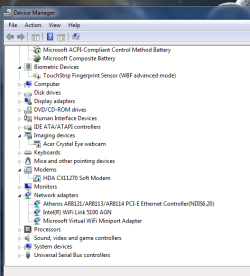
Please post a shot of Device Manager with the network adapter heading expanded, like Torch has shown you.

Another example:
 

Attachments

  • Capture.JPG
    Capture.JPG
    43.1 KB · Views: 2

My Computer My Computer

Computer type
PC/Desktop
Computer Manufacturer/Model Number
Skylake Special #666
OS
Windows 10 Pro x64
CPU
Intel Core i7 6700K
Motherboard
Asus Sabertooth Z170 Mark 1
Memory
GSkill TridentZ RGB 16GB 3600 16-16-16-36
Graphics Card(s)
EVGA GTX 980 Ti SC x2
Sound Card
Realtek High Definition
Monitor(s) Displays
AOC G2460PG
Screen Resolution
1920 x 1080 144Hz
Hard Drives
Samsung 860 Pro 256GB, Seagate Barracuda 4TB x2
PSU
EVGA 1000 P2, EVGA White Custom Braided Cables
Case
Corsair Vengeance C70 Gunmetal Black
Cooling
Corsair H100i v2, Corsair ML120 x2, Thermal Grizzly Kryonaut
Keyboard
Logitech G910 Orion Spectrum
Mouse
Logitech G700s
Internet Speed
Verizon Fios Quantum Gateway 75/75
Antivirus
Windows Defender, Malwarebytes Free 3.8.3
Browser
Chrome
Other Info
Corsair SP120 x4, LG Blu-ray Drive, Durabrand HT-395 100 Watt Dolby Digital Amp, Corsair H2100 Wireless 7.1 Headset
Hello Barman58 the PlusNet icons are on windows 10 drive theres nowt on windows 7 .,They wernt there till i I put the Intel Motherboard Driver's & Utilities DVD in the drive and installed them . Now its showing Realtek PCIe family controller in network adapter . My whole point of this question was how could I transfer those wifi icons from windows 10 to windows 7 so I could maybe get online .

Have you ran the disk while you are in windows 7? this should install any required drivers on the windows 7 install

I ran the Motherboard \\\Drivers & Utilities disc in windows 7 , I installed windows 7 with a USB drive .
 

My Computer My Computer

Computer type
PC/Desktop
Computer Manufacturer/Model Number
Custom build
OS
Microsoft Windows 10 Pro 64-bit 17134 Multiprocessor Free
CPU
Intel(R) Core(TM) i7-4790K CPU @ 4.00GHz
Motherboard
MSI Z97 PC Mate(MS-7850)
Memory
16.00 GB
Graphics Card(s)
Intel(R) HD Graphics 4600
Sound Card
(1) High Definition Audio Device (2) USB Audio Device
Screen Resolution
1920 x 1080 x 32 bits (4294967296 colors) @ 60 Hz
Hard Drives
ST10000VN0004-2GS11L
Antivirus
Kaspersky
Browser
Plusnet
Back
Top