Solved Can't connect using DHCP

But they didn't just get there by themselves. They either became part of that list automatically placed there (by the router) when you manually configured your laptop's two adapters with these addresses to get things to work, or you manually "pre-assigned" them yourself into that router list at some time in the past.
I never said they got there themselves. i thought i had been clear that i set these up for my past settings. on reverting back to dhcp i tried both erasing the settings and resetting to default/rebooting the router.
 

My Computer

Computer type
Laptop
Computer Manufacturer/Model Number
Asus K52N
OS
Windows 7 Ultimate x64 SP1
CPU
AMD Turion II P540
Motherboard
Asus
Memory
6 GB
Graphics Card(s)
ATI Radeon HD 4200
Antivirus
Avast
Browser
Chrome
If an IP address is dynamically assigned by DHCP, I wouldn't expect it to appear in the "pre-assigned" list. That's only for manually reserved IP addresses for specific devices identified by their MAC address.
That's why the dhcp is listed as active and the other(s) listed as static.
 

My Computer

Computer type
Laptop
Computer Manufacturer/Model Number
Asus K52N
OS
Windows 7 Ultimate x64 SP1
CPU
AMD Turion II P540
Motherboard
Asus
Memory
6 GB
Graphics Card(s)
ATI Radeon HD 4200
Antivirus
Avast
Browser
Chrome
i will try again, using the power on/off instructions you suggested. in the adapters tcp/ipv4 properties should i have the "obtain dns server address automatically" checked, or should i fill in my routers dns settings?
As i said, i'm happy to try this one more time, just let me know which dns settings to use.
 

My Computer

Computer type
Laptop
Computer Manufacturer/Model Number
Asus K52N
OS
Windows 7 Ultimate x64 SP1
CPU
AMD Turion II P540
Motherboard
Asus
Memory
6 GB
Graphics Card(s)
ATI Radeon HD 4200
Antivirus
Avast
Browser
Chrome
That's why the dhcp is listed as active and the other(s) listed as static.
I understand. Kind of varies in presentation based on the manufacturer. In my opinion, the Netgear user interface is least confusing and most intuitive of them all. I've had very bad experiences with Motorola and Verizon equipment.

Anyway, my point is simply that the presence of a MAC item in the "pre-assigned/reserved" list and showing as "reserved" would seem to suggest preventing it from being used by DHCP to be given any other address than this. After all, its presence in that list says to the router that if discovered you want that MAC address to be assigned that particular address. That's why I suggested deleting these entries using the other desktop machine (i.e. when the laptop is not actively using these IP addresses or connected to the router at all), and then seeing what happens when you power on the laptop with DHCP enabled.

Do these same entries reappear on their own when the laptop connects with DHCP enabled? Or do they never reappear until you manually configure those IP address on the laptop?

I'm just trying to come to some understanding why these two IP addresses should ever appear in this pre-assigned/reserved list if you don't WANT those specific IP addresses assigned to that adapter's MAC address instead of assigning any old DHCP-determined IP address? And if you delete them, do they come back on their own or not, and regardless does DHCP now work or still not?
 

My Computer

Computer type
PC/Desktop
Computer Manufacturer/Model Number
Home-built, two systems (1) and (2)
OS
Windows 7 Pro x64 (1), Win7 Pro X64 (2)
CPU
i5-3350p 3.1Ghz/6MB-cache (1); E8400 3.0Ghz/6MB-cache (2)
Motherboard
ASUS P8Z77-V Pro (1); ASUS P5Q3 (2)
Memory
8GB PC3-12800 DDR3 (1); 4GB PC3-10600 DDR3 (2)
Graphics Card(s)
ATI HD7750 (1), (see TV cards); ATI R7 250 (2)
Sound Card
Realtek ALC892 HD Audio (1); Realtek ALC1200 HD Audio (2)
Monitor(s) Displays
Eizo HD2441W LCD, Eizo S2433W (1); Eizo 24" S2433W (2)
Screen Resolution
1920x1200, 1920x1200 (1); 1920x1200 (2)
Hard Drives
(1) 1TB SATA-II (7200RPM), 2x2TB SATA-III (7200RPM), 250GB SATA-III (10000RPM) for OS; 2x2TB external USB 3.0

(2) 320GB SATA-II (7200RPM), 750GB SATA-II (7200RPM), 150GB SATA-II (10000RPM) for OS; 2TB external USB 3.0
PSU
Nesteq ECS-6001 600W (1); Nesteq ECS-5001 500W (2)
Case
Acousti-Case 360 (1) and (2)
Cooling
Noctua NH-U12P SE2 for CPU, 2x120mm case fans (1) and (2)
Keyboard
IBM PS/2 (1) and (2)
Mouse
Logitech MX Revolution wireless (1); Microsoft wired (2)
Internet Speed
100mbps down / 10mbps up
Antivirus
Microsoft Security Essentials; Malwarebyte Anti-Malware Pro
Browser
Firefox
Other Info
Ceton InfiniTV 4-tuner cablecard-enabled TV card as well as Hauppauge HVR-2250 OTA/ATSC 2-tuner TV card in (1), running under Win7 WMC
know which dns settings to use.
The router should provide its own 192.168.0.1 address for use as the "default gateway", which also is what is used for DNS servers. You should not have to specify DNS addresses.

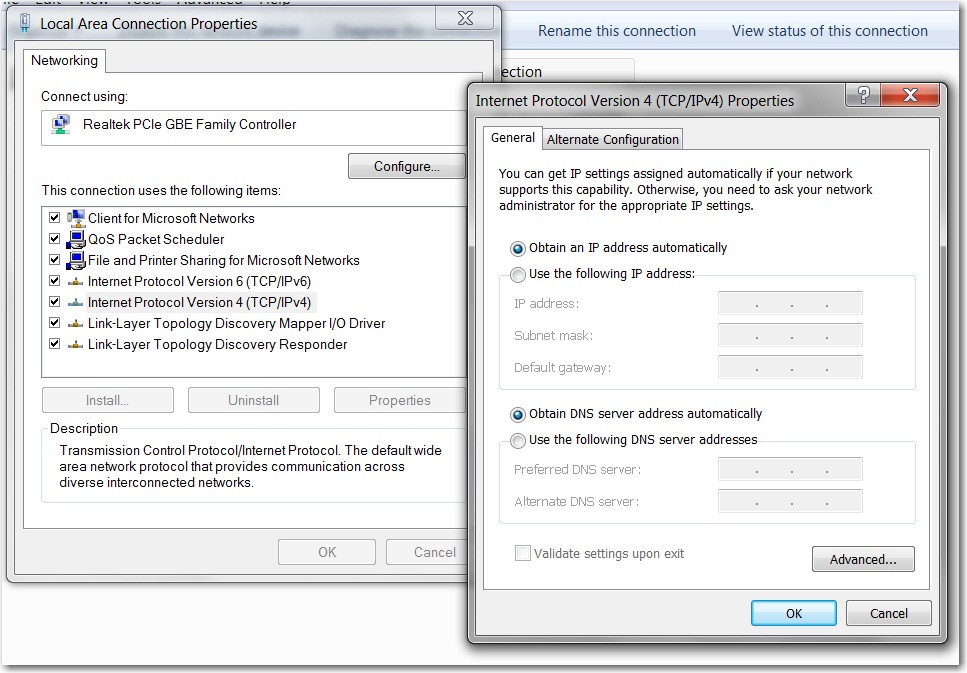
BOTH of those check boxes in the TCPIP Properties dialog should be checked, requesting "obtain addresses automatically", both for the PC's IP address as well as for the DNS servers.

4tiwQL.jpg


And obviously IPCONFIG /ALL will show something essentially identical for the laptop as it does right now for your desktop. I would think you'd only see "default gateway" of 192.168.0.1, and no DNS items at all.

DHXJO0.jpg
 

My Computer

Computer type
PC/Desktop
Computer Manufacturer/Model Number
Home-built, two systems (1) and (2)
OS
Windows 7 Pro x64 (1), Win7 Pro X64 (2)
CPU
i5-3350p 3.1Ghz/6MB-cache (1); E8400 3.0Ghz/6MB-cache (2)
Motherboard
ASUS P8Z77-V Pro (1); ASUS P5Q3 (2)
Memory
8GB PC3-12800 DDR3 (1); 4GB PC3-10600 DDR3 (2)
Graphics Card(s)
ATI HD7750 (1), (see TV cards); ATI R7 250 (2)
Sound Card
Realtek ALC892 HD Audio (1); Realtek ALC1200 HD Audio (2)
Monitor(s) Displays
Eizo HD2441W LCD, Eizo S2433W (1); Eizo 24" S2433W (2)
Screen Resolution
1920x1200, 1920x1200 (1); 1920x1200 (2)
Hard Drives
(1) 1TB SATA-II (7200RPM), 2x2TB SATA-III (7200RPM), 250GB SATA-III (10000RPM) for OS; 2x2TB external USB 3.0

(2) 320GB SATA-II (7200RPM), 750GB SATA-II (7200RPM), 150GB SATA-II (10000RPM) for OS; 2TB external USB 3.0
PSU
Nesteq ECS-6001 600W (1); Nesteq ECS-5001 500W (2)
Case
Acousti-Case 360 (1) and (2)
Cooling
Noctua NH-U12P SE2 for CPU, 2x120mm case fans (1) and (2)
Keyboard
IBM PS/2 (1) and (2)
Mouse
Logitech MX Revolution wireless (1); Microsoft wired (2)
Internet Speed
100mbps down / 10mbps up
Antivirus
Microsoft Security Essentials; Malwarebyte Anti-Malware Pro
Browser
Firefox
Other Info
Ceton InfiniTV 4-tuner cablecard-enabled TV card as well as Hauppauge HVR-2250 OTA/ATSC 2-tuner TV card in (1), running under Win7 WMC
update:

And obviously IPCONFIG /ALL will show something essentially identical for the laptop as it does right now for your desktop. I would think you'd only see "default gateway" of 192.168.0.1, and no DNS items at all.
well if you look at the ipconfig i posted earlier it does display the dns servers.

well anyways i ended up shutting down both pcs and reset the router to default again.

started the desktop - everything worked fine
started the laptop - and it worked!
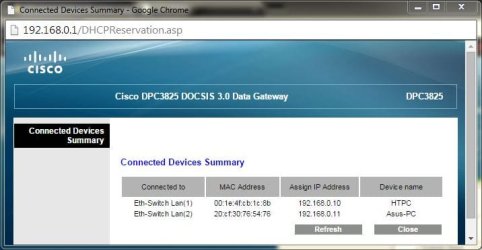
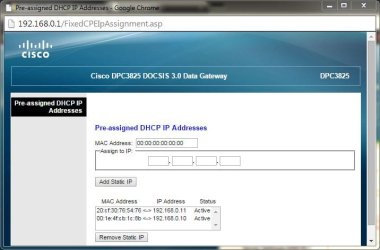
the router lists both pc's in the connected devices list and in the pre-assigned address list as 'active'.
Capture3.JPG
Capture4.JPG

then, when disabling the wired and enabling the wireless, i got the same problem. so i restarted everything again, this time enabling the wireless first, and it worked fine again. the same problem occurred again when trying to switch back to wired. when looking at the router settings, it appears that the 'connected device' listing doesn't always remove itself after the adapter is disabled. anyway, at least now i know that i can get it to work. what's odd is that this never happens with the desktop. if i disable the adapter, it is removed from the list and reappears once connected.

now i'm having a problem with the laptop connecting to shared folders on the desktop. from the desktop, i can access shared folders on the laptop just fine. it never ends. :cry:
 

My Computer

Computer type
Laptop
Computer Manufacturer/Model Number
Asus K52N
OS
Windows 7 Ultimate x64 SP1
CPU
AMD Turion II P540
Motherboard
Asus
Memory
6 GB
Graphics Card(s)
ATI Radeon HD 4200
Antivirus
Avast
Browser
Chrome
And obviously IPCONFIG /ALL will show something essentially identical for the laptop as it does right now for your desktop. I would think you'd only see "default gateway" of 192.168.0.1, and no DNS items at all.
well if you look at the ipconfig i posted earlier it does display the dns servers.
Yes, I saw that, but I assumed you had manually entered that information in the TCPIP setup of the laptop, rather than letting them get "obtained automatically" through DHCP same as the PC's IP address gets "obtained automatically" through DHCP.

My own experience is that I've not seen specific DNS servers in IPCONFIG, unless they're manually set. My own experience is that the router's 192.168.1.1 shows up as the DNS server, as well as the default gateway.

But... who knows how this Cisco device works.


well anyways i ended up shutting down both pcs and reset the router to default again.

started the desktop - everything worked fine
started the laptop - and it worked!
the router lists both pc's in the connected devices list and in the pre-assigned address list as 'active'.
Ok... that makes more sense. There's a big difference conceptually between the word "active" and "reserved", and "active" I can accept in this second list as a benign description of why the IP address is shown.

Yes, I've not ever seen this in Netgear routers, but again who knows about this Cisco router. Nevertheless, at least it's not "reserved".


then, when disabling the wired and enabling the wireless, i got the same problem.
Did you power the laptop off do do this? On my Lenovo W530 I can switch the wireless radio off through a slide switch, so if I want to alternate between wired and wireless I first power the machine off and then remove the ethernet cable and then push the radio slide switch to ON. Then I re-boot.

And, with my Netgear routers I've never had any problem getting an IP address assigned through DHCP no matter whether I'm wired or wireless (two separate MAC addresses of course, corresponding to the two separate adapters)... but then I never try to "hot swap". I always power down first and then do the hardware change, and then power back up.


so i restarted everything again, this time enabling the wireless first, and it worked fine again. the same problem occurred again when trying to switch back to wired.
Again, I'm just curious as to what actual steps you go through to accomplish this switch, and did you power the laptop off first before switching.


when looking at the router settings, it appears that the 'connected device' listing doesn't always remove itself after the adapter is disabled.
I saw this "retained entry for a now disconnected device" constantly with a Motorola SB6580 (modem plus router), along with address reservation entries that I'd set but which then seemed to disappear of their own volition.

I finally got so exasperated with this POS that I discarded it, replacing it with a discrete Netgear CMD31T modem and Netgear WNDR4000 router. Never ever see ANY anomalies or inexplicable and harmful behavior.


anyway, at least now i know that i can get it to work. what's odd is that this never happens with the desktop. if i disable the adapter, it is removed from the list and reappears once connected.
But the desktop doesn't have two separate NICs with two separate MAC addresses but with a common "host machine name" (i.e. both appearing as ASUS-PC) to confuse the firmware. The desktop is only seen as HTPC for its one-and-only wired connection.

My feeling is that it's likely a problem with the Cisco unit that's the culprit.


now i'm having a problem with the laptop connecting to shared folders on the desktop. from the desktop, i can access shared folders on the laptop just fine. it never ends. :cry:
I know.

What's the symptom? "Access denied"? Shared folders on the desktop not even visible from the laptop?

Do you have username and password (i.e. for Windows welcome) on both machines?

 

My Computer

Computer type
PC/Desktop
Computer Manufacturer/Model Number
Home-built, two systems (1) and (2)
OS
Windows 7 Pro x64 (1), Win7 Pro X64 (2)
CPU
i5-3350p 3.1Ghz/6MB-cache (1); E8400 3.0Ghz/6MB-cache (2)
Motherboard
ASUS P8Z77-V Pro (1); ASUS P5Q3 (2)
Memory
8GB PC3-12800 DDR3 (1); 4GB PC3-10600 DDR3 (2)
Graphics Card(s)
ATI HD7750 (1), (see TV cards); ATI R7 250 (2)
Sound Card
Realtek ALC892 HD Audio (1); Realtek ALC1200 HD Audio (2)
Monitor(s) Displays
Eizo HD2441W LCD, Eizo S2433W (1); Eizo 24" S2433W (2)
Screen Resolution
1920x1200, 1920x1200 (1); 1920x1200 (2)
Hard Drives
(1) 1TB SATA-II (7200RPM), 2x2TB SATA-III (7200RPM), 250GB SATA-III (10000RPM) for OS; 2x2TB external USB 3.0

(2) 320GB SATA-II (7200RPM), 750GB SATA-II (7200RPM), 150GB SATA-II (10000RPM) for OS; 2TB external USB 3.0
PSU
Nesteq ECS-6001 600W (1); Nesteq ECS-5001 500W (2)
Case
Acousti-Case 360 (1) and (2)
Cooling
Noctua NH-U12P SE2 for CPU, 2x120mm case fans (1) and (2)
Keyboard
IBM PS/2 (1) and (2)
Mouse
Logitech MX Revolution wireless (1); Microsoft wired (2)
Internet Speed
100mbps down / 10mbps up
Antivirus
Microsoft Security Essentials; Malwarebyte Anti-Malware Pro
Browser
Firefox
Other Info
Ceton InfiniTV 4-tuner cablecard-enabled TV card as well as Hauppauge HVR-2250 OTA/ATSC 2-tuner TV card in (1), running under Win7 WMC
And obviously IPCONFIG /ALL will show something essentially identical for the laptop as it does right now for your desktop. I would think you'd only see "default gateway" of 192.168.0.1, and no DNS items at all.
well if you look at the ipconfig i posted earlier it does display the dns servers.
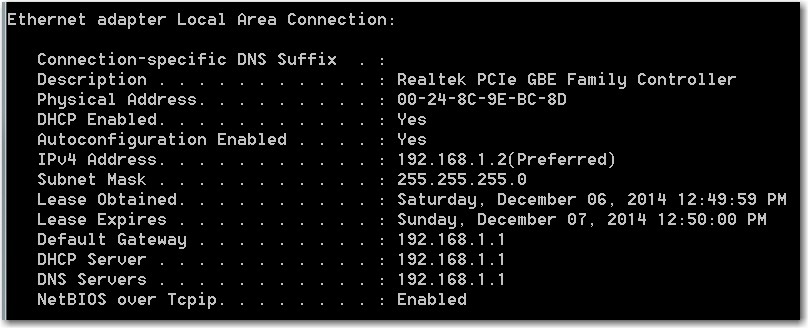
Just out of curiosity, now that you've demonstrated DHCP works for the laptop (but fails if you try to switch between wired and wireless, although this may be a direct result of trying to "hot swap" rather than power down first and then power up), what does IPCONFIG /ALL now show for the DNS servers when DHCP is in effect for the laptop?

Is it again still the specific DNS addresses as before? Or is it now shown as 192.168.0.1, as it is with my Netgear setup?

If it's still the specific DNS addresses, I wonder if this is due to the combined modem+router nature of your Cisco box, and how your ISP tells it to operate? It really doesn't matter I guess, as long as this happened fully under the control of DHCP.

Nevertheless, as long as you've got "obtain addresses automatically" (aka DHCP) set in the laptop's TCPIP properties for both the PC itself as well as the DNS servers, I don't care what shows up in IPCONFIG. As far as I'm concerned the laptop is now operating successfully through DHCP when either the wired or wireless adapter is in use (individually, not simultaneously or through "dynamic hot-switching"), and you're not manually setting any IP addresses anywhere for anything. It's all done by the router acting as the DHCP server for everything, whatever it wants to do.
 

My Computer

Computer type
PC/Desktop
Computer Manufacturer/Model Number
Home-built, two systems (1) and (2)
OS
Windows 7 Pro x64 (1), Win7 Pro X64 (2)
CPU
i5-3350p 3.1Ghz/6MB-cache (1); E8400 3.0Ghz/6MB-cache (2)
Motherboard
ASUS P8Z77-V Pro (1); ASUS P5Q3 (2)
Memory
8GB PC3-12800 DDR3 (1); 4GB PC3-10600 DDR3 (2)
Graphics Card(s)
ATI HD7750 (1), (see TV cards); ATI R7 250 (2)
Sound Card
Realtek ALC892 HD Audio (1); Realtek ALC1200 HD Audio (2)
Monitor(s) Displays
Eizo HD2441W LCD, Eizo S2433W (1); Eizo 24" S2433W (2)
Screen Resolution
1920x1200, 1920x1200 (1); 1920x1200 (2)
Hard Drives
(1) 1TB SATA-II (7200RPM), 2x2TB SATA-III (7200RPM), 250GB SATA-III (10000RPM) for OS; 2x2TB external USB 3.0

(2) 320GB SATA-II (7200RPM), 750GB SATA-II (7200RPM), 150GB SATA-II (10000RPM) for OS; 2TB external USB 3.0
PSU
Nesteq ECS-6001 600W (1); Nesteq ECS-5001 500W (2)
Case
Acousti-Case 360 (1) and (2)
Cooling
Noctua NH-U12P SE2 for CPU, 2x120mm case fans (1) and (2)
Keyboard
IBM PS/2 (1) and (2)
Mouse
Logitech MX Revolution wireless (1); Microsoft wired (2)
Internet Speed
100mbps down / 10mbps up
Antivirus
Microsoft Security Essentials; Malwarebyte Anti-Malware Pro
Browser
Firefox
Other Info
Ceton InfiniTV 4-tuner cablecard-enabled TV card as well as Hauppauge HVR-2250 OTA/ATSC 2-tuner TV card in (1), running under Win7 WMC
Did you power the laptop off do do this? On my Lenovo W530 I can switch the wireless radio off through a slide switch, so if I want to alternate between wired and wireless I first power the machine off and then remove the ethernet cable and then push the radio slide switch to ON. Then I re-boot.
No. I just disabled the wired adapter then switched on the wireless - no poweroff. when i restart the laptop everything works fine. in the past if i needed to take the laptop into another room, i just disabled the wired and 'switched' over without any problems. i'm not concerned though, both are functioning well if i power down first.


I saw this "retained entry for a now disconnected device" constantly with a Motorola SB6580 (modem plus router), along with address reservation entries that I'd set but which then seemed to disappear of their own volition.

I finally got so exasperated with this POS that I discarded it, replacing it with a discrete Netgear CMD31T modem and Netgear WNDR4000 router. Never ever see ANY anomalies or inexplicable and harmful behavior.
yep, i'm thinking it's probably time to get something better. maybe a netgear system as you mentioned.


Just out of curiosity, now that you've demonstrated DHCP works for the laptop (but fails if you try to switch between wired and wireless, although this may be a direct result of trying to "hot swap" rather than power down first and then power up), what does IPCONFIG /ALL now show for the DNS servers when DHCP is in effect for the laptop?

Is it again still the specific DNS addresses as before? Or is it now shown as 192.168.0.1, as it is with my Netgear setup?
Yeah, they're still there:
ipconfig.JPG


I ended up solving the other problem. another program was blocking the connection. never had a problem until now so i assumed it was the router. all fixed now. :)

anyway, thanks for all your patience and insight. as shitty as it is to have these things happen, i always end up learning something new. :geek:
 

My Computer

Computer type
Laptop
Computer Manufacturer/Model Number
Asus K52N
OS
Windows 7 Ultimate x64 SP1
CPU
AMD Turion II P540
Motherboard
Asus
Memory
6 GB
Graphics Card(s)
ATI Radeon HD 4200
Antivirus
Avast
Browser
Chrome
Back
Top