Solved Can't Copy Text From pdf Document!

technomann

New member
I have a pdf document that I downloaded from the internet. I just want to copy the text of a paragraph or two to cite as a quotation in another work--fair use and the source is duly noted. However I am unable to highlight any of the text in order to copy it to the clipboard. I have downloaded the trial version of a dozen or more so-called "pdf copy text protection removal" programs, but so far nothing seems to work. What am I missing? Does anyone have a clue?

Thanks for any and all responses!
 

My Computer

OS
Windows 7 64-bit
Capture it with the snipping tool and print it, Then scan it into Word. Might work!
 

My Computer

Computer type
PC/Desktop
Computer Manufacturer/Model Number
Custom Build
OS
Windows 7 Ultimate x64
CPU
Intel i7 2600K
Motherboard
Gigabyte Technology Co. - Model GA-Z68X-UD5-B3
Memory
G.SKILL Sniper Series 16GB (4 x 4GB) 1866
Graphics Card(s)
Gigabyte AMD Radeon HD 7870 GV-R787OC-2GD
Sound Card
Asus Xonar Essence STX
Monitor(s) Displays
HP 2711x 27 inch
Screen Resolution
1920x1080
Hard Drives
SSD OCZ Vertex 4 256 GB
Western Digital WD3001FAEX 3TB 7200 SATA 6Gb/s 64MB
HDD 1.5T|HITACHI 7K3000
PSU
CORSAIR Professional Series HX650 (Modular)
Case
CASE ZALMAN | Z9 R
Cooling
COOLER MASTER Hyper 212 EVO
Keyboard
Logitech K800 Illuminated Wireless
Mouse
Logitech M600 Touch Mouse
Antivirus
Norton Internet Security
Browser
WaterFox 64 bit
Other Info
Audioengine A5+ w/S8 sub and Audio-Technica ATH M50 headphones
If the PDF document is copy-protected, then the only way round it is to manually copy the section(s) you require. If the either of the section(s) is/are long, it might be better just to quote a teaser (the first couple of sentences or so), and then provide a link to the original document giving its location within that document. Remember that you might need permission for this, and that the source should be cited.
 

My Computer

Computer type
PC/Desktop
Computer Manufacturer/Model Number
Dwarf Dwf/11/2012 r09/2013
OS
Windows 8.1 Pro RTM x64
CPU
Intel Core-i5-3570K 4-core @ 3.4GHz (Ivy Bridge) (OC 4.4GHz)
Motherboard
ASRock Z77 Extreme4-M
Memory
4 x 4GB DDR3-1600 Corsair Vengeance CMZ8GX3M2A1600C9B (16GB)
Graphics Card(s)
MSI GeForce GTX770 Gaming OC 2GB
Sound Card
Realtek High Definition on board solution (ALC 898)
Monitor(s) Displays
ViewSonic VA1912w Widescreen (VGA)
Screen Resolution
1440x900
Hard Drives
OCZ Agility 3 SSD 120GB SATA III x2 (RAID 0)
Samsung HD501LJ 500GB SATA II x2
Hitachi HDS721010CLA332 1TB SATA II
Iomega 1.5TB Ext USB 2.0
WD 2.0TB Ext USB 3.0
PSU
XFX Pro Series 850W Semi-Modular
Case
Gigabyte IF233
Cooling
1 x 120mm Front Inlet 1 x 120mm Rear Exhaust
Keyboard
Microsoft Comfort Curve Keyboard 3000 (USB)
Mouse
Microsoft Comfort Mouse 3000 for Business (USB)
Internet Speed
NetGear DG834Gv3 ADSL Modem/Router (Ethernet) ~4.0 Mb/s (O2)
Antivirus
Avast! 8.0.1497
Browser
IE 11
Other Info
Optical Drive: HL-DT-ST BD-RE BH10LS30 SATA Bluray
Lexmark S305 Printer/Scanner/Copier (USB)
WEI Score: 8.1/8.1/8.5/8.5/8.25
Asus Eee PC 1011PX Netbook (Windows 7 x86 Starter)

My Computer

Computer type
Laptop
Computer Manufacturer/Model Number
Acer Aspire 5750G
OS
Windows 7 Home Premium x64, Windows 8 Pro
CPU
i5-2430M
Motherboard
Acer JE50_HR
Memory
8 Gb
Graphics Card(s)
nVidia GeForce 610M
Sound Card
Realtek High Definition Audio
Antivirus
Avast
Browser
Chrome
The reason why a paragraph can not be selected in a PDF is that it is a scanned page containing bitmapped image and not text.

If the paragraph is a small one, you can type it again in Microsoft Word or any text editor.
 

My Computer

Computer Manufacturer/Model Number
Toshiba Satellite P775-S7232
OS
MS Windows 7 Ultimate 64-bit SP1
CPU
i5-2410M 2.3GHz (2.9GHz Turbo-Boost) Sandy Bridge 32nm
Motherboard
Toshiba PHRAA ver. PSBY1U-00F003
Memory
4GB+4GB Samsung DDR3 PC3-10700 (1333 MHz)
Graphics Card(s)
Video Intel(R) HD Graphics Family, 1696MB available memory
Sound Card
Realtek High Definition Audio version=6.0.1.6323
Monitor(s) Displays
17.3 " Trubrite TFT LCD, LED Backlit
Screen Resolution
1600x900 32 bit, Native support for 720P content
Hard Drives
TOSHIBA MK6476GSXN
580.614 [GB] partitioned C: 80GB and D: 500GB with hidden recovery partitons.

Spare bay for 2nd HDD but no SATA connector :-(
PSU
Toshiba AC/DC Adapter
Case
Notebook
Cooling
Built-in Fan
Keyboard
Premium Raised Tile keyboard
Mouse
Logitech M215 wireless mouse
Internet Speed
Not fast enough
Other Info
Built-in Harman Kardon speakers with Dolby Advanced Audio, Waves MaxxAudio® 3. HDMI, 1xUSB3+3xUSB2 ports, WebCam, Battery life 4hrs 11mins, 4GB Readyboost SDHC card, WD My Book Essential Ext HDDs 2 TB, 2x1TB, My Passport SE 1TB and WDTV 1st Gen for Multimedia playing on a Sony Wega 32" LCD.
Recent addition to my toys are Asus Transformer Pad TF300T with 32GB onboard sd card + 32GB microsd card.
Hi there


If it IS a scanned document then OK there are problems since as the previous guy says its bitmapped and you'll need some sort of OCR type program -- however if it's a REGULAR PDF file then this should work fine

1) Just select the text in the PDF file when opening the PDF reader (I'm using Adobe Reader version X and use COPY from the menu bar).

To select the text just position the mouse against the text you want to copy and hold the CTRL button and move the mouse down through the lines of text).

2) Then Paste to a Notepad file (use wordwrap)

3) Now you can copy the text into a Word document or whatever.

Diagram enc.


Cheers
jimbo.
 

Attachments

  • pdf2text.png
    pdf2text.png
    296.3 KB · Views: 565

My Computer

Computer type
PC/Desktop
Computer Manufacturer/Model Number
Custom built, several laptops HP/ASUS
OS
Linux CENTOS 7 / various Windows OS'es and servers
CPU
Intel i7 Intel i5
Memory
8GB, 16GB
Graphics Card(s)
On Motherboard
Sound Card
Realtek HD audio
Monitor(s) Displays
Apple Cinema display, Samsung LCD
Screen Resolution
1920 X 1080
Hard Drives
4 X 1TB SATA
Mouse
Toshiba wireless laser
Internet Speed
> 20MB up

My Computer

Computer Manufacturer/Model Number
DIY
OS
Windows 7 home premium x64
CPU
AMD FX-4100 AM3+ 3.6GHz 12MB Black Edition
Motherboard
Asus M5A97 Pro
Memory
Crsair vengeance 12Gb DDR3 1600MHz CL9
Graphics Card(s)
Asus GTX 560 1GB
Sound Card
Realtek onboard
Monitor(s) Displays
Hanns G 1680x1050 native
Hard Drives
OCZ 128Gb Petrol ssd
2x500 Gb Samsung
PSU
OCZ StealthXstream II 500W
Internet Speed
8Mb or better
i use Foxit Reader 5.1 i can select and copy text.
 

My Computer

Computer Manufacturer/Model Number
Intel DG31PR (Intel Dual core 2.5 E5200 @ 2.5GHz)
OS
windows7 Ultimate SP1 x32bit
CPU
Intel
Motherboard
Intel DG31PR
Memory
Kinsgton 1GB an Transcend 2GB
Graphics Card(s)
Intel- onboard
Sound Card
Intel- onboard
Monitor(s) Displays
ViewSonic LCD Widescreen 19
Screen Resolution
1400x900
Hard Drives
Samsung 256GB
PSU
Legend
Case
Legend
Cooling
Intel
Keyboard
Seemo
Mouse
Prolink
Internet Speed
Download Speed-512Kbps, Upload Speed-128Kbps (ADSL wired)
Other Info
UPS- Prolink Pro650s
Router Prolink H5201
Sub Woofer - Creative 2.1
There are lot of free online PDF to Docs/text converter, you can try them. ex:-http://www.convertpdftotext.net/
 

My Computer

Computer Manufacturer/Model Number
Intel DG31PR (Intel Dual core 2.5 E5200 @ 2.5GHz)
OS
windows7 Ultimate SP1 x32bit
CPU
Intel
Motherboard
Intel DG31PR
Memory
Kinsgton 1GB an Transcend 2GB
Graphics Card(s)
Intel- onboard
Sound Card
Intel- onboard
Monitor(s) Displays
ViewSonic LCD Widescreen 19
Screen Resolution
1400x900
Hard Drives
Samsung 256GB
PSU
Legend
Case
Legend
Cooling
Intel
Keyboard
Seemo
Mouse
Prolink
Internet Speed
Download Speed-512Kbps, Upload Speed-128Kbps (ADSL wired)
Other Info
UPS- Prolink Pro650s
Router Prolink H5201
Sub Woofer - Creative 2.1
I do not know what PDF reader you use. But in Foxit you have to go to the Tools button and click on "Select Text". Only then you can highlight anything. I believe it is similar in Adobe.
 

My Computer

Computer Manufacturer/Model Number
HP, Dell, Gateway, Toshiba - 4 laptops and 2 desktops
OS
Vista, Windows7, Mint Mate, Zorin, Windows 8
CPU
from 1.6GHz Duo to i7
Monitor(s) Displays
2x HP w2207
Hard Drives
5x HDD, 7x SSD, 12x Externals
Keyboard
with trackball - no mices
Mouse
Trackball mice
Internet Speed
DSL 6000
I would suggest that you consider Dwarf's suggestion to link the document if no editing is required or Jimbo45's suggestion and use the freeware versions if you are going to only need it for the onesy twosy needs.

For those times when you need a heavy duty conversion tool and you don't want to spend a lot of time reformatting spreadsheets and documents check out Adobe Acrobat Pro X.

If you have or can get access to Adobe Acrobat Pro X, then it is really flexible because it not only converts the document but it also keeps the formatting of the document (less retyping - less reformatting). It can do a whole host of options for you including digital signing and protecting your document library of files. It is also compatible with a host of types of files, doc,docx,xls,xlsx and so on. Just too many things AAPX can do to list here.

If you do go the AAPX route, get your company to pay for it. It could be a tax write off for business or operating expense. Before you buy, and do this... gander over to the Adobe forums to see when the next 'Version' (note i did not say update) release is estimated to come out and if that Version release is expected after the 'free upgrade' period of your purchase. Make sure you invest the 20-25% additional cost estimate for Upgrade Protection to ensure you get a real free upgrade. Could save hundreds and you will look smart to the company because you care about the company's future. (Btw - Nope, I don't need another shovel). Always include the cost of the media disk when you purchase any software. Screw the media download option, it's just bad juju there.

Note also that Adobe allows that certain products can be freely installed on one 'home computer' if the product is used at that person's place of business. Hint -Hint - thats why you get the company to pay for it. There is limited language for what you use it for when it is installed on home computer. ;)
 
Last edited:

My Computer

Computer type
PC/Desktop
Computer Manufacturer/Model Number
Asus CG1330
OS
Win7 64bit Home Premium
CPU
AMD Phenom(tm) II X6 1035T Processor
Motherboard
ASUSTeK Computer INC. CG1330 Rev X.0x
Memory
8GB Installed - 7.75 Usable
Graphics Card(s)
ATI Radeon HD 5700 Series & ATI Radeon 3000 Graphic
Sound Card
AMD High Definition Audio
Monitor(s) Displays
LG E2350 23" LED & Viewsonic VX2035wm 20"
Screen Resolution
LG ~ 1920x1080 60Hz; Viewsonic 1680x1050 60Hz
Hard Drives
(1) WD - WD1001FALS-99Y6A0 SATA 1TB, (1) 1.5TB USB HDD (2) Seagate 1TB USB HDDs
PSU
450WT
Case
Factory ASUS CG1330
Cooling
Factory ASUS with modified 120MM Inlet 180MM Exhaust
Keyboard
Logitech G15 Gamer
Mouse
Logitech MX500 IE Gamer
Internet Speed
RoadRunner ~ There is never Enough Speed!
Antivirus
Sym Ent 12.x
Browser
IE10 Build 10.0.9200.16635 ~ Ver 10.0.7
Other Info
BIOS Date: 01/28/2011 Ver: 05.01
The reason why a paragraph can not be selected in a PDF is that it is a scanned page containing bitmapped image and not text.

If the paragraph is a small one, you can type it again in Microsoft Word or any text editor.

That's exactly what I discovered. I dragged the pdf into my OCR program (ReadIRIS) and then saved it to a Word doc file and voila! I can now manipulate the text!

Thanks to all who responded! :D
 

My Computer

OS
Windows 7 64-bit
there is another solution to this problem ,
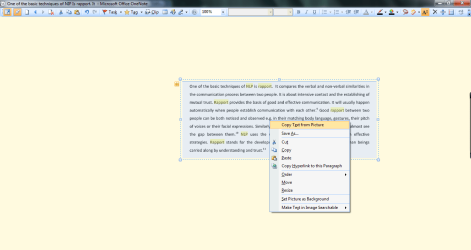
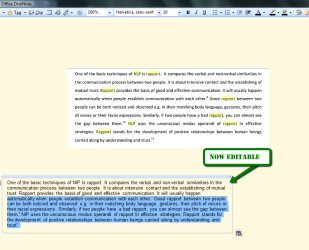
if you have microsoft office with the OneNote app then you can take a screenshot of the pdf and paste it into a new page in OneNote ,then right click it and select " copy text from picture"

then paste it into word ,OneNote or notepad etc.

2011-11-13_2015.png

2011-11-13_2015_001.png
 

My Computer

Computer Manufacturer/Model Number
Hewlett packard/p6512uk
OS
Microsoft Windows 7 Home Premium 64-bit 7600
CPU
IIx4 amd athelon 635 processor
Motherboard
FOXCONN 2AA9
Memory
2x2gb
Graphics Card(s)
ati radeon HD 5450
Sound Card
(1) Realtek High Definition Audio (2) AMD High Definition
Monitor(s) Displays
samsung lcd tv 32"
Screen Resolution
1360x 768
Hard Drives
(1) WDC WD10 01FAES-60Z2A0 SATA Disk Device (2) Maxtor OneTouch USB Device (3) ST310003 33AS USB Device (4) WD My Book 1111 USB Device
PSU
?
Cooling
air!
Keyboard
wireless hp
Mouse
wireless Hp,optical
Internet Speed
1.10mb/s
Antivirus
MSE
Browser
Firefox
The reason why a paragraph can not be selected in a PDF is that it is a scanned page containing bitmapped image and not text.

That's exactly what the problem was. I dragged the .pdf file to my OCR program and opened it there, then saved it as a Word document and voila! I can now manipulate the text. :D

Thanks to all who responded!
 

My Computer

OS
Windows 7 64-bit
Hi there


If it IS a scanned document then OK there are problems since as the previous guy says its bitmapped and you'll need some sort of OCR type program -- however if it's a REGULAR PDF file then this should work fine

1) Just select the text in the PDF file when opening the PDF reader (I'm using Adobe Reader version X and use COPY from the menu bar).

To select the text just position the mouse against the text you want to copy and hold the CTRL button and move the mouse down through the lines of text).

2) Then Paste to a Notepad file (use wordwrap)

3) Now you can copy the text into a Word document or whatever.

Diagram enc.


Cheers
jimbo.

hey, can you please explain step by step a little better how do you do this? i have a problem with copy from pdf and i have found this post and i successful copied some text once but i cant repeat that again. i tried many ways but i just cant make it, like it is broken now and i cant do that again ( but with this post once i did it so it is a good solution) ...
 

My Computer

OS
windows 7 64bit
A work around

I personally had this problem. I found a fix for this. Email the document to yourself in gmail. View the message and view the attachment. While viewing the pdf, select the text and paste it to notepad. It will be fine. :)
 

My Computer

OS
Windows 7
i don't know why do we need pdf to text converter , mostly the browser is responsible for some problems in copying from pdf ...i couldn't properly copy and paste a pdf file as text by firefox , then i went to my google chrome , everything was fine ...just highlight pdf or select all the pdf and copy and then paste it to word pad or whatever...i have a hunch if i uninstall my firefox and reinstall it , firefox will be fine too ....just to tell you about my experience
 

My Computer

Computer type
PC/Desktop
Computer Manufacturer/Model Number
dell
OS
windows 7 home x64
Antivirus
avg
Browser
firefox
Mark text you want to copy
right click, choose copy
Paste it in google search.

done.
 

My Computer

Computer type
PC/Desktop
OS
Windows 7 Ultimate x64
Back
Top