
Can't cut and paste text from IE9 webpages

bigfire45

New member
Local time
10:07 PM
Messages
9
I use IE9 for the "Globe & mail" website (because I can get past their article limit with it), but I can't cut and paste with my mouse in the usual way. When I click the right mouse button, instead of the usual "copy/cut/paste/delete options, I get this: (see attachment)
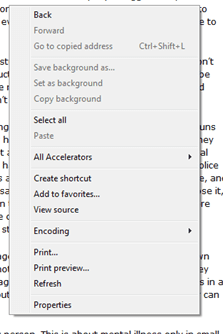
CUT&PAST.PNG

This only happens on my PC with IE9 at the Globe and Mail website only (if I goto any other web site, IE9 cuts and pasts as usual) . On my laptop or using another browser, on the same website, I can cut and paste with no problems.

Is this something related to the G&M website or IE9. With the minimal controls on IE9, I'm finding it very hard to add the tool bars for IE9 help (how do you change the viewing of tool bars on IE9)?

Please advise.

Thanks

:sarc:
 
Last edited by a moderator:

My Computer My Computer

At a glance

Windows7 Professional 64 bit
OS
Windows7 Professional 64 bit
Can you try Firefox browser and see if you can copy and paste on that website.? Have you tried the shortcut key cntrl C. To copy Then cntrl v? To paste? Instead of cutting?
 

My Computer My Computer

At a glance

Windows 7 Pro 32/64 bit and Windows 10 Pro 32...4gigsAMD Radeon HD and Nvidia
Computer type
PC/Desktop
Computer Manufacturer/Model Number
Dell Computers
OS
Windows 7 Pro 32/64 bit and Windows 10 Pro 32 Bit/64bit
Memory
4gigs
Graphics Card(s)
AMD Radeon HD and Nvidia
Monitor(s) Displays
Samsung 24". INC 19". Dell 22 ". Dell 17" & 19"
You must select what you want by dragging the cursor over it then right click it and select 'Copy'
 

My Computer My Computer

At a glance

Win7 H.Prem. 32bit+SP1
Computer Manufacturer/Model Number
Look in my Signature.
OS
Win7 H.Prem. 32bit+SP1
You must select what you want by dragging the cursor over it then right click it and select 'Copy'

or using the short cut keys :) either way works
 

My Computer My Computer

At a glance

Windows 7 Pro 32/64 bit and Windows 10 Pro 32...4gigsAMD Radeon HD and Nvidia
Computer type
PC/Desktop
Computer Manufacturer/Model Number
Dell Computers
OS
Windows 7 Pro 32/64 bit and Windows 10 Pro 32 Bit/64bit
Memory
4gigs
Graphics Card(s)
AMD Radeon HD and Nvidia
Monitor(s) Displays
Samsung 24". INC 19". Dell 22 ". Dell 17" & 19"
You are getting the context menu you would get if you right click with no text selected. You are getting that menu when you right click on highlighted text? A Guy
 

My Computer My Computer

At a glance

Windows 10 Home x64INTEL Core i5-750 Quad-Core 3.37GHzHyperX Fury Black Series 8GB (2 x 4GB) 1866MhzEVGA GeForce GTX 750 Superclocked 1GB 128-Bit...
Computer type
PC/Desktop
OS
Windows 10 Home x64
CPU
INTEL Core i5-750 Quad-Core 3.37GHz
Motherboard
ASUS P7P55D
Memory
HyperX Fury Black Series 8GB (2 x 4GB) 1866Mhz
Graphics Card(s)
EVGA GeForce GTX 750 Superclocked 1GB 128-Bit GDDR5
Monitor(s) Displays
LG 32MA68HY 32" IPS
Screen Resolution
1920 x 1080
Hard Drives
Samsung 840 Evo 120GB, SEAGATE 500GB Barracuda® 7200.12, SATA 3 Gb/s, 7200 RPM, 16MB cache
PSU
ANTEC TruePower New TP-550, 80 PLUS, 550W
Case
ANTEC Three Hundred Illusion
Cooling
COOLER MASTER Hyper 212 Plus, 4 x 120mm 1 x 140mm Noctua's
Internet Speed
85 + Mbps
Antivirus
Avast
Browser
Vivaldi
Back
Top