
Solved Can't Delete Folder

jamiedolan

New member
Member
Local time
5:50 AM
Messages
88
Location
Neenah, WI
I keep getting this error when I try to deleted the folder;
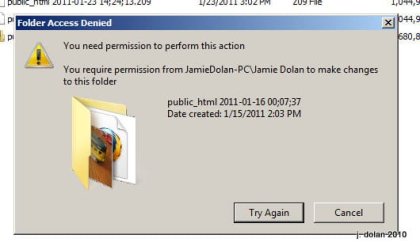
Fullscreen capture 1232011 85231 PM.jpg

I unchecked and applied Read Only, but the box stayed checked like that.
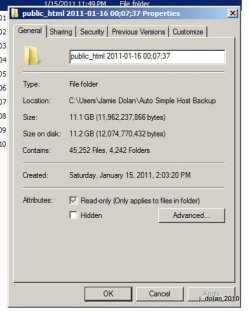
Fullscreen capture 1232011 85318 PM.jpg

I'm logged in as myself, which is an administrator account

Fullscreen capture 1232011 85708 PM.jpg

Any I have full permissions for the folder I am trying to delete:
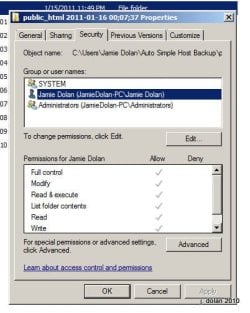
Fullscreen capture 1232011 85309 PM.jpg

Any idea what I am missing and why I can't delete this folder?

Thanks

Jamie
 

My Computer

Computer type
PC/Desktop
Computer Manufacturer/Model Number
Custom Build by CPU Solutions
OS
windows 8 64
CPU
i7-3820
Motherboard
Intel® Desktop Board DX79TO
Memory
32GB
Graphics Card(s)
GTX 650
Sound Card
Built in
Monitor(s) Displays
24" and 27" Asus; with a 24" LG
Screen Resolution
1900X1080
Hard Drives
240 Intel Cherryville internal. 8 ext drives on my other computer accessed over the network.
PSU
700 watt
Case
CoolerMaster
Keyboard
Logitech Wireless
Mouse
Logitech M505
Internet Speed
24Mbps down - 3Mbps up
Browser
Chrome
Other Info
Also have a Vaio VPCCW17FX Laptop. & Dell Studio XPS 8100 with 16GB of Ram running W8.

My Computer

OS
Windows 7 Ultimate x64
CPU
P4 3.2
Motherboard
Intel 815GM
Memory
DDR 400
Graphics Card(s)
ATI HD3850
Sound Card
C-Media 7.1
Monitor(s) Displays
SyncMaster 244T
Screen Resolution
1920*1200
Hard Drives
Several
PSU
500
Case
PowerSpec $24
Cooling
ThermalTake copper
Internet Speed
Blazing
Have you tried deleting it in safe mode? We can then move further with other options.
 

My Computer

Computer Manufacturer/Model Number
HCL
OS
Winbdows 7 ultimate x64 | Ubuntu 12.04 x64 LTS
CPU
Core 2 Duo e7400 @ 2.90GHz
Motherboard
Gigabyte G31M-ES2L
Memory
3GB DDR2
Graphics Card(s)
Asus Nvidia GTX 560Ti 1GB
Sound Card
On-board
Monitor(s) Displays
HCL eZeeBee 18.5" LCD
Screen Resolution
1366x768 @ 60Hz
Hard Drives
Western Digital 320GB
PSU
Corsair CX500 V2 500W
Cooling
Stock
Keyboard
Stock
Mouse
Stock
Internet Speed
15-25kBps D/L | 10kBps U/L | Hey Don't laugh

Thanks.

I followed all the steps, and in step 18, I was unable to check the box for Full Control, it was checked, but gray.

I was still unable to deleted it so, then I read in the tips:

"If you are trying to delete a folder, then sometimes you will need to delete the contents within the subfolders first before you will be able to delete the main folder itself."

I had to go several levels deep in a number of folders to be able to delete the contents and the folders, but I was eventually able to delete the entire thing.

This was created here by my Backup program, Cobian Backup. Since these are going to be written on a regular basis (and they can't be done as a incremental backup due to the source being a FTP server), I will have to remove the older copies on a regular basis.

Should I try adding in the Take Ownership option that I read about here? Will that work with Win7?

Thanks,

Jamie
 

My Computer

Computer type
PC/Desktop
Computer Manufacturer/Model Number
Custom Build by CPU Solutions
OS
windows 8 64
CPU
i7-3820
Motherboard
Intel® Desktop Board DX79TO
Memory
32GB
Graphics Card(s)
GTX 650
Sound Card
Built in
Monitor(s) Displays
24" and 27" Asus; with a 24" LG
Screen Resolution
1900X1080
Hard Drives
240 Intel Cherryville internal. 8 ext drives on my other computer accessed over the network.
PSU
700 watt
Case
CoolerMaster
Keyboard
Logitech Wireless
Mouse
Logitech M505
Internet Speed
24Mbps down - 3Mbps up
Browser
Chrome
Other Info
Also have a Vaio VPCCW17FX Laptop. & Dell Studio XPS 8100 with 16GB of Ram running W8.
The Take Ownership menu option can be quite helpful.

.net and a handful of other apps leave junk behind that require this process for removal.
 

My Computer

OS
Windows 7 Ultimate x64
CPU
P4 3.2
Motherboard
Intel 815GM
Memory
DDR 400
Graphics Card(s)
ATI HD3850
Sound Card
C-Media 7.1
Monitor(s) Displays
SyncMaster 244T
Screen Resolution
1920*1200
Hard Drives
Several
PSU
500
Case
PowerSpec $24
Cooling
ThermalTake copper
Internet Speed
Blazing
Have you tried deleting it in safe mode? We can then move further with other options.

No, I had not tried that, I was rather puzzled when it was giving me that error even after I checked and saw I had full permissions to it.

I can try to delete it in safe mode next time I need to remove a folder, but really would like to find a way for the regular delete to function. I'll need to remove the old backups on a regular basis.

Is there a setting in Cobian Backup I might be able to change that could fix this? I just looked; It is setup to run as a service. It wouldn't tell me what account it was running under, but I just changed it so that it runs under my account. Not sure if this will help.

Thanks

Jamie
 

My Computer

Computer type
PC/Desktop
Computer Manufacturer/Model Number
Custom Build by CPU Solutions
OS
windows 8 64
CPU
i7-3820
Motherboard
Intel® Desktop Board DX79TO
Memory
32GB
Graphics Card(s)
GTX 650
Sound Card
Built in
Monitor(s) Displays
24" and 27" Asus; with a 24" LG
Screen Resolution
1900X1080
Hard Drives
240 Intel Cherryville internal. 8 ext drives on my other computer accessed over the network.
PSU
700 watt
Case
CoolerMaster
Keyboard
Logitech Wireless
Mouse
Logitech M505
Internet Speed
24Mbps down - 3Mbps up
Browser
Chrome
Other Info
Also have a Vaio VPCCW17FX Laptop. & Dell Studio XPS 8100 with 16GB of Ram running W8.
The Take Ownership menu option can be quite helpful.

.net and a handful of other apps leave junk behind that require this process for removal.

That "Take Ownership" edit to the registry file is compatible with Windows 7 Correct?

Thanks
 

My Computer

Computer type
PC/Desktop
Computer Manufacturer/Model Number
Custom Build by CPU Solutions
OS
windows 8 64
CPU
i7-3820
Motherboard
Intel® Desktop Board DX79TO
Memory
32GB
Graphics Card(s)
GTX 650
Sound Card
Built in
Monitor(s) Displays
24" and 27" Asus; with a 24" LG
Screen Resolution
1900X1080
Hard Drives
240 Intel Cherryville internal. 8 ext drives on my other computer accessed over the network.
PSU
700 watt
Case
CoolerMaster
Keyboard
Logitech Wireless
Mouse
Logitech M505
Internet Speed
24Mbps down - 3Mbps up
Browser
Chrome
Other Info
Also have a Vaio VPCCW17FX Laptop. & Dell Studio XPS 8100 with 16GB of Ram running W8.

My Computer

Computer type
PC/Desktop
Computer Manufacturer/Model Number
Dell XPS 420
OS
Windows 10, Home Clean Install
CPU
Intel Core2 processsor Q8200(2.33Ghz 1333FSB) Quad Core Tech
Motherboard
Dell
Memory
6 gb
Graphics Card(s)
ATI Radeon 256MB HD3650
Sound Card
Intergrated 7.1 Channel Audio
Monitor(s) Displays
Dell SP2009W 20"
Hard Drives
640 GB Serial ATA Hard drive
Cooling
Fan
Keyboard
Dell USB Keyboard
Mouse
Dell Premium Optical USB
Internet Speed
DSL 2.85

My Computer

OS
Windows 7 Ultimate x64
CPU
P4 3.2
Motherboard
Intel 815GM
Memory
DDR 400
Graphics Card(s)
ATI HD3850
Sound Card
C-Media 7.1
Monitor(s) Displays
SyncMaster 244T
Screen Resolution
1920*1200
Hard Drives
Several
PSU
500
Case
PowerSpec $24
Cooling
ThermalTake copper
Internet Speed
Blazing
Thanks Guys for the help, sorry your team didn't win. Since I changed that setting in Cobian, I'm going to let a backup run overnight, and see if I have problems deleting folders in the new backup in the morning, if I do, I will proceed with the Take Ownership Menu option.

Thanks again for the help
Jamie
 

My Computer

Computer type
PC/Desktop
Computer Manufacturer/Model Number
Custom Build by CPU Solutions
OS
windows 8 64
CPU
i7-3820
Motherboard
Intel® Desktop Board DX79TO
Memory
32GB
Graphics Card(s)
GTX 650
Sound Card
Built in
Monitor(s) Displays
24" and 27" Asus; with a 24" LG
Screen Resolution
1900X1080
Hard Drives
240 Intel Cherryville internal. 8 ext drives on my other computer accessed over the network.
PSU
700 watt
Case
CoolerMaster
Keyboard
Logitech Wireless
Mouse
Logitech M505
Internet Speed
24Mbps down - 3Mbps up
Browser
Chrome
Other Info
Also have a Vaio VPCCW17FX Laptop. & Dell Studio XPS 8100 with 16GB of Ram running W8.
Well, at least the Packers won.
 

My Computer

OS
Windows 7 Ultimate x64
CPU
P4 3.2
Motherboard
Intel 815GM
Memory
DDR 400
Graphics Card(s)
ATI HD3850
Sound Card
C-Media 7.1
Monitor(s) Displays
SyncMaster 244T
Screen Resolution
1920*1200
Hard Drives
Several
PSU
500
Case
PowerSpec $24
Cooling
ThermalTake copper
Internet Speed
Blazing
Have you tried deleting it in safe mode? We can then move further with other options.
Is there a setting in Cobian Backup I might be able to change that could fix this? I just looked; It is setup to run as a service. It wouldn't tell me what account it was running under, but I just changed it so that it runs under my account. Not sure if this will help. Thanks Jamie
That could be a reason. The same thing happens with me in case of Nokia PC suite. I can't delete some files related to it unless i stop its service 'ServiceLayer'.
 

My Computer

Computer Manufacturer/Model Number
HCL
OS
Winbdows 7 ultimate x64 | Ubuntu 12.04 x64 LTS
CPU
Core 2 Duo e7400 @ 2.90GHz
Motherboard
Gigabyte G31M-ES2L
Memory
3GB DDR2
Graphics Card(s)
Asus Nvidia GTX 560Ti 1GB
Sound Card
On-board
Monitor(s) Displays
HCL eZeeBee 18.5" LCD
Screen Resolution
1366x768 @ 60Hz
Hard Drives
Western Digital 320GB
PSU
Corsair CX500 V2 500W
Cooling
Stock
Keyboard
Stock
Mouse
Stock
Internet Speed
15-25kBps D/L | 10kBps U/L | Hey Don't laugh

My Computer

Computer type
PC/Desktop
Computer Manufacturer/Model Number
Custom Build by CPU Solutions
OS
windows 8 64
CPU
i7-3820
Motherboard
Intel® Desktop Board DX79TO
Memory
32GB
Graphics Card(s)
GTX 650
Sound Card
Built in
Monitor(s) Displays
24" and 27" Asus; with a 24" LG
Screen Resolution
1900X1080
Hard Drives
240 Intel Cherryville internal. 8 ext drives on my other computer accessed over the network.
PSU
700 watt
Case
CoolerMaster
Keyboard
Logitech Wireless
Mouse
Logitech M505
Internet Speed
24Mbps down - 3Mbps up
Browser
Chrome
Other Info
Also have a Vaio VPCCW17FX Laptop. & Dell Studio XPS 8100 with 16GB of Ram running W8.
I ran a backup today with the modified setting in Cobian (having it run as a service as my login) and I was able to access / move the backup file just fine today. So it looks like corrected the problem going forward.

Thanks again for the help.

Jamie
 

My Computer

Computer type
PC/Desktop
Computer Manufacturer/Model Number
Custom Build by CPU Solutions
OS
windows 8 64
CPU
i7-3820
Motherboard
Intel® Desktop Board DX79TO
Memory
32GB
Graphics Card(s)
GTX 650
Sound Card
Built in
Monitor(s) Displays
24" and 27" Asus; with a 24" LG
Screen Resolution
1900X1080
Hard Drives
240 Intel Cherryville internal. 8 ext drives on my other computer accessed over the network.
PSU
700 watt
Case
CoolerMaster
Keyboard
Logitech Wireless
Mouse
Logitech M505
Internet Speed
24Mbps down - 3Mbps up
Browser
Chrome
Other Info
Also have a Vaio VPCCW17FX Laptop. & Dell Studio XPS 8100 with 16GB of Ram running W8.
As we thought, the whole problem was due to the service thingy. ;)
Glad its sorted. :)
 

My Computer

Computer Manufacturer/Model Number
HCL
OS
Winbdows 7 ultimate x64 | Ubuntu 12.04 x64 LTS
CPU
Core 2 Duo e7400 @ 2.90GHz
Motherboard
Gigabyte G31M-ES2L
Memory
3GB DDR2
Graphics Card(s)
Asus Nvidia GTX 560Ti 1GB
Sound Card
On-board
Monitor(s) Displays
HCL eZeeBee 18.5" LCD
Screen Resolution
1366x768 @ 60Hz
Hard Drives
Western Digital 320GB
PSU
Corsair CX500 V2 500W
Cooling
Stock
Keyboard
Stock
Mouse
Stock
Internet Speed
15-25kBps D/L | 10kBps U/L | Hey Don't laugh
Unlocker 1.9.0 Will delete any file

This little program is great, used it for years. It is now compatible with Windows 7 and most other operating systems. It is simple to use, after installing you just have to right click on the file or folder you want to delete, but are unable to, you will be shown a drop down menu and just choose what you want to do with it.

I am new here so if this link is a no no I apologise.

Download

Download starting... - Softpedia
 

My Computer

OS
Windows 7 Home Premium 64bit
CPU
Intel(R) Core(TM) i7 860 @ 2.80GHz 2.79GHz
Motherboard
Gigabyte P55-UD3
Memory
4.00GB
Graphics Card(s)
ATI Radeon HD 5800 Series
Sound Card
ATI High Definition and Realtek High Definition
Monitor(s) Displays
LG 23' Digital
Hard Drives
ST31000528AS ATA Device
WD 10EAVS External USB
Cooling
Cooler Master 3 fans

My Computer

Computer Manufacturer/Model Number
HP Pavillion dv5t (generation 1)
OS
Vista 64 bit and 32 bit (SP2)
CPU
Intel(R) Core(TM)2 Duo Processor T9400 (2.53 GHz
Memory
4GB DDR2 System Memory (2 Dimm)
Graphics Card(s)
512 MB NVIDIA GeForce 9600M GT
Monitor(s) Displays
15.4" diagonal WSXGA+ High-Definition HP BrightView Widescre
Screen Resolution
1680 x 1050
Hard Drives
320GB 5400RPM SATA Hard Drive with HP ProtectSmart Hard Drive Protection
Keyboard
Built-in HP
Mouse
Built in - Synaptics TouchPad V6.5 on PS/2 Port
Internet Speed
Max
Other Info
~ Intel Next-Gen Wireless-N Mini-card w/Bluetooth ~ Blu-Ray ROM DVD+/-R/RW ~ Integ. HDTV Hybrid Tuner ~ 12 Cell Battery ~ MS Office (Home Premium) 2007 ~
Another thing to try is enabling the built-in Administrator account.

  1. Open command prompt as administrator
  2. type net user administrator active:yes
  3. restart your machine
  4. Try deleting the folder
Once done, repeat steps 1 thru 3, replacing the yes with no

Hope it helps people with future issues.


OS
 

My Computer

Computer Manufacturer/Model Number
Compaq Desktop
OS
Windows 7 Ultimate x64
CPU
AMD Sempron Dual Core
Memory
3GB
Graphics Card(s)
NVIDIA GeForce 6150SE nForce 430
Screen Resolution
1024x768
Hard Drives
150GB Sata
Back
Top