Can't drag a window by the title bar

Geezup

New member
Local time
9:27 AM
Messages
5
So I am having the weirdest issue. I am building machines via mdt and pixie booting them via wds. I have a standard image and all seems well. The issue is the following.

If I open any window , wether its aim or windows explorer or ie the top bar of the window should be drag able by pressing and holding the mouse button and moving the whole window around. It works except the area of about half a inch from the minimize button on the title bar. It won't even recognize a click there , it's only a half a inch or so directly left of the minimize button. It's really strange.
 

My Computer My Computer

At a glance

Win7 64bit ent
Computer type
PC/Desktop
OS
Win7 64bit ent
Change to the classic theme and see if that changes where click/drag works/fails in a title bar.

Can to select multiple files or desktop shortcuts via click/drag?
 

My Computer My Computer

At a glance

W7 Pro SP1 64biti78GBIntel HD Graphics
Computer type
Laptop
Computer Manufacturer/Model Number
Employer provided Dell Latitude
OS
W7 Pro SP1 64bit
CPU
i7
Memory
8GB
Graphics Card(s)
Intel HD Graphics
Hard Drives
crappy SSD
Antivirus
Employer mandated Symantec Endpoint Protection
Browser
Pale Moon 64bit, IE11 64bit & Chrome 64bit
It happens in classic view or aero. Its on more than pne machine but not all of them
 

My Computer My Computer

At a glance

Win7 64bit ent
Computer type
PC/Desktop
OS
Win7 64bit ent
Can to select multiple files or desktop shortcuts via click/drag?
 

My Computer My Computer

At a glance

W7 Pro SP1 64biti78GBIntel HD Graphics
Computer type
Laptop
Computer Manufacturer/Model Number
Employer provided Dell Latitude
OS
W7 Pro SP1 64bit
CPU
i7
Memory
8GB
Graphics Card(s)
Intel HD Graphics
Hard Drives
crappy SSD
Antivirus
Employer mandated Symantec Endpoint Protection
Browser
Pale Moon 64bit, IE11 64bit & Chrome 64bit
Yes I can manipulate the desktop environment fine. let me give you more info.

1) If I remove the video drivers the problem goes away , but there is more to this as I dont have to remove the drivers see below.


2) If I run a program or a system utility and it prompts for UAC and I put in the admin credentials the application or window will open and I will be able to click anywhere on the title bar of that window and move it. But if I open it as the user that is logged on about a 1/2 inch directly left of the minimize button on the top of anywindow will have a dead area thats unclickable.
 

My Computer My Computer

At a glance

Win7 64bit ent
Computer type
PC/Desktop
OS
Win7 64bit ent
I cant seem to understand whats going on , for instance the antivirus scan just started ( scheduled scan at midnight) and that window I can click there and move it around , or you can double click to maximize or minimize. You know the whole title bar is clickable or should be at least.
 

My Computer My Computer

At a glance

Win7 64bit ent
Computer type
PC/Desktop
OS
Win7 64bit ent
As you may know, the basic window is there all of the time. Themes (as I understand them) are just overlays to the original/basic window. I've seen themes running on some really weak hardware and when you close a window, the theme for that window goes away and a few seconds later, the basic window goes away.

I also do some scripting where a script must click in a very small/precise location in a window - themes can mess up those locations. That is why I asked that you try the basic theme. Thanks for testing that for me.

The second test that I asked for (drag/select desktop items) was just to make sure that the mouse/hardware was not acting weird - that the left click really would stay down as expected. Thanks for testing that too.

You might have a bad set of video drivers or the wrong ones.

Are you running a custom theme?


The part about the UAC is interesting.
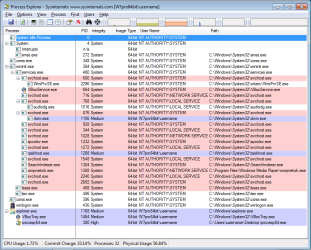
You might want to download/use (nothing to install) Process Explorer.

Download the zipped (compressed) file
Open the zipped (compressed) file (folder)
Copy the files somewhere
Run the exe as admin
Agree to the EULA

Change the columns to look something like this:
(View > Select Columns...)

PM1.png

See if Process Monitor will help you to figure out why the integrity level matters to your problem.
 

My Computer My Computer

At a glance

W7 Pro SP1 64biti78GBIntel HD Graphics
Computer type
Laptop
Computer Manufacturer/Model Number
Employer provided Dell Latitude
OS
W7 Pro SP1 64bit
CPU
i7
Memory
8GB
Graphics Card(s)
Intel HD Graphics
Hard Drives
crappy SSD
Antivirus
Employer mandated Symantec Endpoint Protection
Browser
Pale Moon 64bit, IE11 64bit & Chrome 64bit
Where are my manners?

A belated welcome to the Seven Forums!
 

My Computer My Computer

At a glance

W7 Pro SP1 64biti78GBIntel HD Graphics
Computer type
Laptop
Computer Manufacturer/Model Number
Employer provided Dell Latitude
OS
W7 Pro SP1 64bit
CPU
i7
Memory
8GB
Graphics Card(s)
Intel HD Graphics
Hard Drives
crappy SSD
Antivirus
Employer mandated Symantec Endpoint Protection
Browser
Pale Moon 64bit, IE11 64bit & Chrome 64bit
So after reading your comment about the drivers I revisited that idea a little bit more and noticed that its a ati 6350. I dug around and used a version previous to the latest drivers and that has resolved the issue. I just make sure windows update doesn't install the latest drivers. I must say I have seen bad drivers bsod machines and hang machines but this takes the cake. Thanks for that comment it forced me to look at the drivers one more time. They have beta drivers out wonder if that would fix it. It's just that these are production machines and the users would kill me if a beta driver caused other issues. By the way we use dell optiplex 9020.
 

My Computer My Computer

At a glance

Win7 64bit ent
Computer type
PC/Desktop
OS
Win7 64bit ent
I figured that it would be the video drivers, but that UAC part is a mystery. Glad you got it solved.
 

My Computer My Computer

At a glance

W7 Pro SP1 64biti78GBIntel HD Graphics
Computer type
Laptop
Computer Manufacturer/Model Number
Employer provided Dell Latitude
OS
W7 Pro SP1 64bit
CPU
i7
Memory
8GB
Graphics Card(s)
Intel HD Graphics
Hard Drives
crappy SSD
Antivirus
Employer mandated Symantec Endpoint Protection
Browser
Pale Moon 64bit, IE11 64bit & Chrome 64bit
Whilst it's 2019, I'm still using Windows 7 and experienced this exact problem.

The solution for me was to remove the AMD Hydravision application that is installed by default as part of the Catalyst Drivers package! Removing this fixed the issue whereby about a space 100px to the left of the minimise button does not recognise clicks or drags! Very annoying!

2012 HP Laptop still going strong with Windows 7, although I recently re-installed the O/S and drivers so this problem re-appeared.
 

My Computer My Computer

At a glance

Windows 7 Ultimate x64i5-2540mATI Radeon HD 5000
Computer type
PC/Desktop
Computer Manufacturer/Model Number
HP
OS
Windows 7 Ultimate x64
CPU
i5-2540m
Motherboard
HP
Graphics Card(s)
ATI Radeon HD 5000
See if Process Monitor will help you to figure out why the integrity level matters to your problem.

This bit made we want to comment (on a years old resurrected thread!).

I also have a non cooperating window problem! I have a game application (No Man's Sky) that when in windowed mode refuses to let me move the window around (it sits 'centered' in the screen at the given windowed resolution). In the earliest version of the game you could do it, but not since it's been updated. The devs of the game are very selective around giving help to users, so i have had no luck in trying to get a solution via them or the games community itself.

I generally play my games windowed (and it is an option within the specific game settings) so i can monitor temps at the same time.

I have tried a few things (from run as admin to specific windowing tools like dxwnd.exe) to try to be able to move the window, but for these last few years nothing has worked. This is the only game i have this problem with, all the rest i can move around as normal.

The basic setup is a native 1920x1080 display with games usually set to run windowed at 1600x1024 (or less), with my hardware monitoring tools on the right and the windowed game dragged to position from the top left of the display, this allows me to see all the relevant data from the hardware monitoring tools and play the games.

So what can Process Explorer (which i have) show me to maybe get back control of my windowed program here as i had not heard of this approach before? Can i force the damn window to behave like a window (in windows) is meant to behave?!
 

My Computer My Computer

At a glance

Windows 7 Pro 64-bit
Computer type
PC/Desktop
OS
Windows 7 Pro 64-bit
i just used DXWind today --- if you want to move your games windowed SIMPLE, just = press Windows Key (hold) + arrow key (left/r/u/d)

i've played many game in windowed mode (dxwind) thats all working well ~big thanks to developer!
 

Attachments

  • Screen Shot 06-16-22 at 02.26 PM.PNG
    Screen Shot 06-16-22 at 02.26 PM.PNG
    50.6 KB · Views: 1

My Computers My Computers

  • At a glance

    7 ultimate 32bitintel E2200china 4GBno
    Computer type
    PC/Desktop
    Computer Manufacturer/Model Number
    acer
    OS
    7 ultimate 32bit
    CPU
    intel E2200
    Motherboard
    biostar B41D3+
    Memory
    china 4GB
    Graphics Card(s)
    no
    Hard Drives
    650 GB
    Antivirus
    smadav indo
    Browser
    palemoon
  • Computer type
    PC/Desktop
    Antivirus
    smadav
Back
Top