Can't drag/copy or paste

badboy

New member
Local time
9:31 AM
Messages
15
I'm banging my head trying to figure out what I'm doing wrong. I can't drag and drop, or copy and paste files into or out of virtual pc.
First, I tested wih the app compatability programs on the MS virtual-pc download page. It was all thumbs up.
Then I downloaded XP Mode - virutual pc on my new desktop w/ Win7.
Everything was copestetic.
Next, I tried to move a simple text file from my desktop to the virtual pc.
No go.
I dug around in Tools and found settings, then found Intergration Features. I checked all the boxes, including "Enable on startup", Turned Off and rebooted.
Still no success.

What am I doing wrong? What did I do to deserve this?
 

My Computer

Computer Manufacturer/Model Number
microsoft
OS
windows7 pro 64 bit
CPU
ADM Phenom II X4 965 3.4GHZ
Motherboard
MSI 790GX-G65
Memory
8 ram
Monitor(s) Displays
accer p244w lcd
Hard Drives
Western Digital Caviar Black 1 TB Bulk/OEM Hard Drive 3.5 Inch, 32 MB Cache, 7200 RPM SATA II WD1001FALS
PSU
Thermaltake W0117RU ToughPower 750W Black PFC Power Supply w
Case
Antec Three Hundred Gaming Case
this might sound stupid... did you reboot after installing virtual pc?
 

My Computer

OS
7 Pro
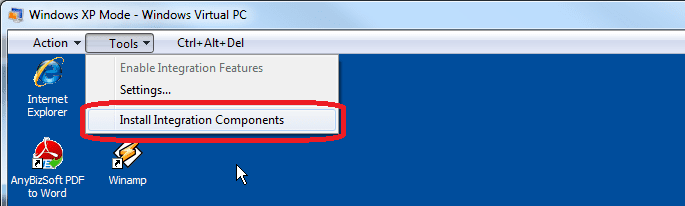
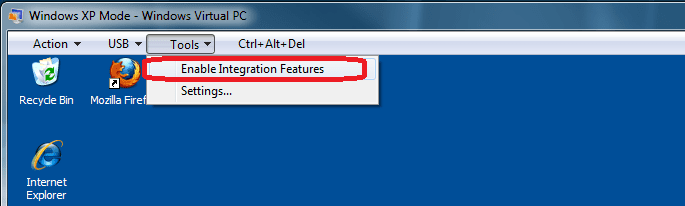
Like Brady told here above, you have to first install the integration features and then enable them.

First, install integration features:

IC_1.png

When XP Mode has rebooted, enable newly installed integration features:

IC_2.png

After one more reboot you can copy and paste between 7 and XP Mode using bidirectional integrated clipboard. You can not drag and drop between XP Mode and host system.

Kari
 

My Computer

Computer type
Laptop
Computer Manufacturer/Model Number
HP ENVY 17-1150eg
OS
Windows 10 Pro x64 EN-GB
CPU
1.6 GHz Intel Core i7-720QM Processor
Memory
6 GB
Graphics Card(s)
ATI Mobility Radeon HD 5850 Graphics
Sound Card
Beats sound system with integrated subwoofer
Monitor(s) Displays
17" laptop display, 22" LED and 32" Full HD TV through HDMI
Screen Resolution
1600*900 (1), 1920*1080 (2&3)
Hard Drives
Internal: 2 x 500 GB SATA Hard Disk Drive 7200 rpm
External: 2TB for backups, 3TB USB3 network drive for media
Cooling
As Envy runs a bit warm, I have it on a Cooler Master pad
Keyboard
Logitech diNovo Media Desktop Laser (bluetooth)
Mouse
Logitech Performance Mouse MX
Internet Speed
50/10 Mbps VDSL
Antivirus
Windows Defender 4.3.9431.0
Browser
Maxthon 3.5.2., IE11
after posting, i realized that i was going into hibernation rather than shutting down. after rebooting several time, i found i could copy and paste - though i do miss the drag option.

one more thing. can i take an old virtual pc 2007 from a non-Win7 evironment, paste it into Win7,and get it to copy and paste inside of Win7? i have a vpc that has an app in it that i can't easily get my hands on. it's running on win2003.
 

My Computer

Computer Manufacturer/Model Number
microsoft
OS
windows7 pro 64 bit
CPU
ADM Phenom II X4 965 3.4GHZ
Motherboard
MSI 790GX-G65
Memory
8 ram
Monitor(s) Displays
accer p244w lcd
Hard Drives
Western Digital Caviar Black 1 TB Bulk/OEM Hard Drive 3.5 Inch, 32 MB Cache, 7200 RPM SATA II WD1001FALS
PSU
Thermaltake W0117RU ToughPower 750W Black PFC Power Supply w
Case
Antec Three Hundred Gaming Case
Back
Top