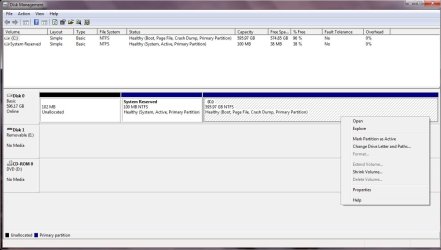
Can't extend partition volume

Guest93

New member
Local time
7:57 AM
Messages
3
Hi guys, is there a third party app that would allow me to extend the volume of my C: partition from the 102 MB Unallocated partition?
 

Attachments

  • Disk Management.jpg
    Disk Management.jpg
    175.7 KB · Views: 18

My Computer

OS
Windows 7 Home Premuim 64bits
Hi !

I'm not completely sure, but I think Windows cannot extend the partition hosting the system.

However, you could try with a boot CD like Gparted, wich should be able to do shuch a thing. It would of course require a CD or DVD.

Best regards,
DocteurQui

 

My Computer

OS
Windows 7 Home Premium 64 bits
CPU
Intel Core i3 2100 3.10 GHz
Motherboard
MSI P67A-C45
Memory
2x2Go Kingston DDR3
Graphics Card(s)
PNY NVIDIA Geforce GTX 460 768MB
Sound Card
None
Monitor(s) Displays
Asus VH226 (21.5") and Proview PA788KG (17")
Screen Resolution
1920*1080 and 1280*1024
Hard Drives
Hitachi Deskstar SATA II 640GB
PSU
High Power HPC-500-G12S 500W
Case
Cooler Master Elite 371
Cooling
Basic
Keyboard
Ideazon Merc (ZBoard) ZU-0453
Mouse
Logitech MX Laser M-RAG97
Internet Speed
About 3.5 Mbps (Download)
So if I try to resize it with Partition Wizard what is the worst that could happen? Or am I better leaving it alone? But I really need the partition :(
 

My Computer

OS
Windows 7 Home Premuim 64bits
What do you need 100mb for? It's not a partition so doesn't count against maximum four Primary before you must convert one to Logical to add even more.

If you want it then use the PW Extend function from C, have DVD or Repair CD standing by in case you need to run Startup Repair after resizing on the boot sector which happens in about 10% of these cases.
 
I thought it counted as a primary, silly me. Thanks for clarifying that! :)
 

My Computer

OS
Windows 7 Home Premuim 64bits
Hi guys, is there a third party app that would allow me to extend the volume of my C: partition from the 102 MB Unallocated partition?

Try MiniTool Partition Wizard;

Best Free Partition Manager Freeware and free partition magic for Windows 7, Windows 8, Windows Vista and Windows XP 32 bit & 64 bit. MiniTool Free Partition Manager Software Home Edition.

You can view the video or read the section on how to extend a volume;

Extend partition with partition magic software ? MiniTool Partition Wizard.

HTH
 

My Computer

Computer type
PC/Desktop
Computer Manufacturer/Model Number
Custom Built
OS
Windows 7 Professional x64
CPU
Intel i5 quad processor
Motherboard
DP67BG
Memory
16 GB
Graphics Card(s)
Radeon HD 5770
Sound Card
Realtek High Definition Audio
Monitor(s) Displays
Samsung SyncMaster
Screen Resolution
1920X1080
Hard Drives
WD 2TB (SATA Internal)
WD 1TB (USB External)
PSU
Corsair GS800
Case
Tower (Generic)
Cooling
3 Internal Fans
Keyboard
MS Wireless
Mouse
MS Optical Wired
Internet Speed
54 mbps
Antivirus
Emsisoft
Browser
IE-Version 9, Palemoon-Version 24.2.0
In Disk Management, you can only extend partition using the unallocated behind the partition to be extended.The Extend Volume option will be greyed out when the unallocated space before C drive. In your case, you can use free edition of AOMEI Partition Assistant to add the unallocated space to C drive.
 

My Computer

Computer type
PC/Desktop
OS
Windows 10 32bit
Back
Top