Can't extend unallocated space, system crashes [PLEASE HELP]

winhelper

New member
Local time
8:14 PM
Messages
1
Ok, I am reinstalling win7 ultimate x64 on my C because it just crashed due to partitioning. I have my C and my unallocated space, I am trying to extend my C with unallocated space using a tool call minitool partition wizard. The tool says the C "Operation 'Resize partition' cannot be completed because drive C: is being used now" and a reboot is required, so I rebooted and BSOD. This already happen twice, this is my second time reinstalling win7 because of the partition issue, so how do I properly extend my c with unallocated space? I don't want to crash again and resinstall again, does a manually restore point fix BSOD if my third try fails?
 

My Computer

Computer type
PC/Desktop
OS
win 7 ultimate x64
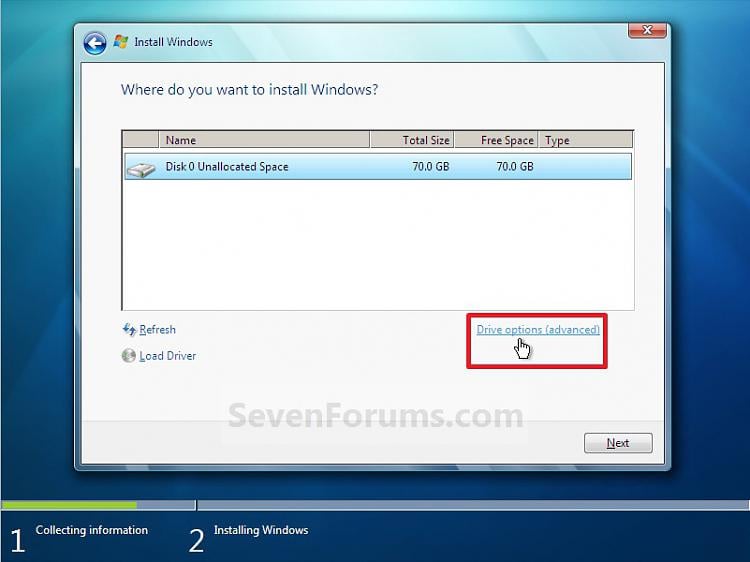
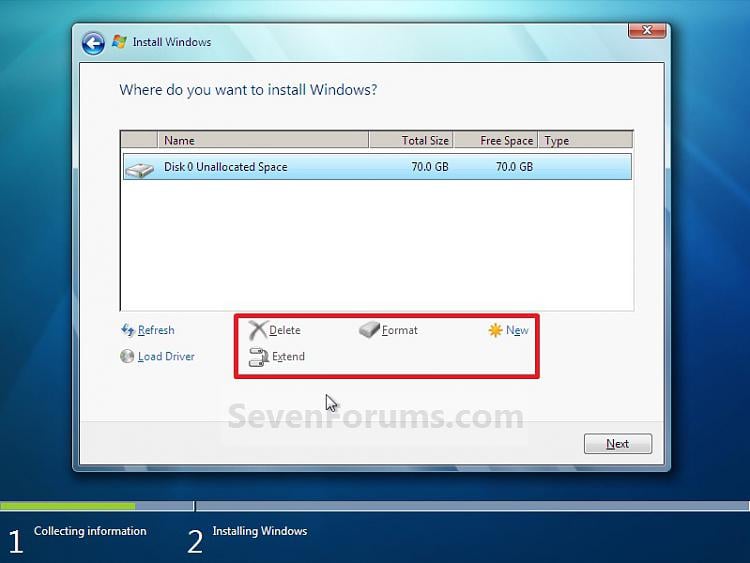
Welcome to the forum. If it's a clean install when it asks were to install it gives an option to delete partition remove them all let Windows create what it needs
 

My Computer

Computer type
PC/Desktop
OS
win 8 32 bit

My Computers

System One System Two

  • Computer type
    PC/Desktop
    Computer Manufacturer/Model Number
    custom build
    OS
    Windows 7 HP 64
    CPU
    i5 6600K - 800MHz to 4200MHz
    Motherboard
    GA-Z170-HD3P
    Memory
    4+4G GSkill DDR4 3000
    Graphics Card(s)
    IG - Intel 530
    Monitor(s) Displays
    Samsung 226BW
    Screen Resolution
    1680x1050
    Hard Drives
    (1) -1 SM951 – 128GB M.2 AHCI PCIe SSD drive for Windows 7 and Lubuntu
    (2) -1 WD SATA 3 - 1T for Data
    (3) -1 WD SATA 3 - 1T for backup
    PSU
    Thermaltake 450W TR2 gold
    Keyboard
    Old and good Chicony mechanical keyboard
    Mouse
    Logitech mX performance - 9 buttons (had to disable some)
    Internet Speed
    500Mb/s
    Browser
    Firefox 64
    Other Info
    TinyWall firewall
  • Computer type
    Laptop
    System Manufacturer/Model Number
    Asus Q550LF
    OS
    Windows 7 Pro
    CPU
    i7-4500U 800MHz to 3.0GHz
    Motherboard
    Asus Q550LF
    Memory
    (4+4)G DDR3 1600
    Graphics Card(s)
    IG intel 4400 + NVIDIA GeForce GT 745M
    Sound Card
    Realtek
    Monitor(s) Displays
    LG Display LP156WF4-SPH1
    Screen Resolution
    1920 x 1080
    Hard Drives
    BX500 120G SSD for Windows and programs +
    1T HDD for data
    Internet Speed
    500 Mb/s
    Browser
    Firefox
    Other Info
    TinyWall firewall
If the third party software asks you to restart the computer, don't because that's where something goes wrong. if there is unallocated space behind C drive, you can just use Disk Management, Windows built-in tool. to open it, you can press Windows key and R key, and then type "diskmgmt.msc" in the Run box. if the unallocated space are not contiguous, use third party software to move it and then use Disk Management to extend system drive.
 

My Computer

Computer type
PC/Desktop
OS
Windows 10 32bit
I think you need to post the screenshot of the disk management.
 

My Computer

Computer type
Laptop
Computer Manufacturer/Model Number
Toshiba L630 and L735
OS
Windows 7 x64
Hard Drives
240 GB SSD
Back
Top