
I'm yet another possible casualty of the dreaded KB3004394 update. However, in spite of my Installed History Log saying my computer had downloaded and installed it, I can't find it in my Installed Updates window, like so:
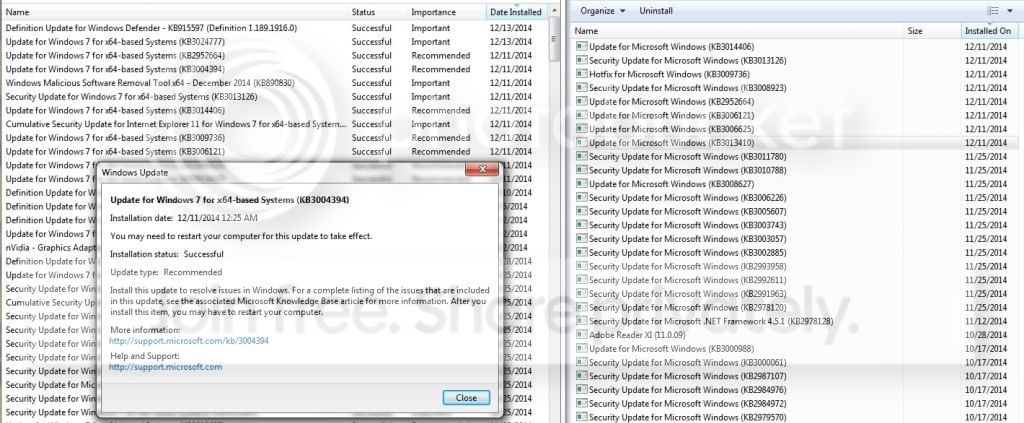
I've run SURT through an elevated command prompt and found no issues. This update's been keeping me from installing my new wacom tablet, and this computer's been the only one that I haven't been able to simply uninstall directly from the update menu to resolve my issues with installing my wacom tablet.
Let me know if there's any other information I can give! I had to edit my log package down to just a few items because of the file size cap.
I've run SURT through an elevated command prompt and found no issues. This update's been keeping me from installing my new wacom tablet, and this computer's been the only one that I haven't been able to simply uninstall directly from the update menu to resolve my issues with installing my wacom tablet.
Let me know if there's any other information I can give! I had to edit my log package down to just a few items because of the file size cap.
Last edited:
My Computer
At a glance
Microsoft Windows 7 Home Premium 64-bit 7601 ...Intel(R) Core(TM) i7-4770 CPU @ 3.40GHz8.00 GBNVIDIA GeForce GTX 645
- Computer type
- PC/Desktop
- Computer Manufacturer/Model Number
- Dell
- OS
- Microsoft Windows 7 Home Premium 64-bit 7601 Multiprocessor Free Service Pack 1
- CPU
- Intel(R) Core(TM) i7-4770 CPU @ 3.40GHz
- Motherboard
- Dell Inc. 0KWVT8
- Memory
- 8.00 GB
- Graphics Card(s)
- NVIDIA GeForce GTX 645
- Sound Card
- (1) Realtek High Definition Audio (2) NVIDIA High Definiti
- Monitor(s) Displays
- SyncMaster 226BW
- Screen Resolution
- 1680 x 1050
- Keyboard
- Standard
- Mouse
- Standard
- Antivirus
- Avast!
- Browser
- Firefox


