can't find virtual PC or XP mode after uninstall/reinstall of them

ApeMan

New member
Local time
11:12 AM
Messages
15
Hi. :) I think i bungled my XP Mode and Virtual PC - was working until i re-installed.

After re-installing XP Mode & virtual PC i am unable to find them listed in start/programs, so i think am unable to run XP mode - no Virtual PC folder any more.

I do see 'Windows XP Mode' in the control panel/programs and features. However i do not see 'Virtual PC' there.

Then when i tired to install them again, without un-installing them first [this time], windows alerted me that XP Mode "WindowsXPMode_en-us.exe" is already installed - Good. However it alerted me that 'this application is not applicable to your computer' when i attempted to re-install Virtual PC "Windows6.1-KB958559-x64-RefreshPkg.msu" - the program that is missing in control panel/programs and features.

Please can you help?

I got the XP Mode and Virtual PC from this web page:
Download Windows XP Mode

Some background:
>>>>>>>>>>>>>>>
Now, in case you are wondering why i would re-install these - although i was able to get the two working on the first install, i was unable to get my winXP application to run, and instead got an error message about a missing DLL, so i did the following:
Thinking that the problem might be permissions or password, i selected to use a blank password. From that point on i was not able to get past the permissions and use XP Mode because neither a blank password or my previous password was accepted. After massing around for hours with permissions and password stuff i decided my only recourse would be to simply re-install XP Mode. When i read up on removing XP Mode, the author said to remove Virtual PC too, so i did.

>>>>>>>>>>>>>>>

More info: When i un-installed the programs the first time i also deleted the Virtual PC folders in start/all programs/ [presumably empty folders that might mess with a re-install]

I hope and pray someone knows how to help me get back to normal! :shock:
Thanks.


UPDATE: I found another instance of virtual PC [KB958559] in the 'updates' tab of control panel/programs & Features section dated 2007. It was at the end of the chronological list and the one i installed and re-installed was at the top of the list, but is no longer there after latest install.
Should i try un-installing the 2010 instance and then re-installing my DLed Virtual PC?
 
Last edited:

My Computer My Computer

At a glance

Windows 7 Pro 64 bitIntel core i74gigNVIDIA Gforce 240
Computer Manufacturer/Model Number
EverGreen
OS
Windows 7 Pro 64 bit
CPU
Intel core i7
Motherboard
Intel
Memory
4gig
Graphics Card(s)
NVIDIA Gforce 240
Sound Card
onboard realtek
Monitor(s) Displays
Generic PnP
Hard Drives
western digital sata
C:
D:
E:
OK, i see a lot people have read this thread, but can't help, so let me ask the following:

XP Mode was working fine before i foolishly decided to un-install them.

Is it possible for one to re-install them, after un-installing them?

If so how? My PC now says "the update is not applicable to my computer", when i try to run Windows6.1-KB958559-x64-RefreshPkg.msu. [Virtual PC]
It's as if i need to install something else before 'this undate'....
 

My Computer My Computer

At a glance

Windows 7 Pro 64 bitIntel core i74gigNVIDIA Gforce 240
Computer Manufacturer/Model Number
EverGreen
OS
Windows 7 Pro 64 bit
CPU
Intel core i7
Motherboard
Intel
Memory
4gig
Graphics Card(s)
NVIDIA Gforce 240
Sound Card
onboard realtek
Monitor(s) Displays
Generic PnP
Hard Drives
western digital sata
C:
D:
E:
Hello ApeMan Welcome to SF!

Have you restarted the system since you uninstalled the original XP Mode install before trying to get it back on again? This is a requirement seen during the initial install as well as when going to uninstall. That finishes up the removal process.

There are also two different types of downloads available for the XP and VPC. The beta and first release are two separate downloads while the updated release sees both conbined together in one setup file. When at the page you linked notice the "Don't need XP Mode and want VPC only? Download Windows Virtual PC without Windows XP Mode" link above the OS and language selections.

When going to the next page for that you will also find another link for downloading the XP Mode without VPC. You may have to go that route by downloading the two separate packages to see the VPC go on first as it was originally followed by a full system restart before running the installer for the separate XP Mode download.

The alternative option for the XP Mode besides the MS VPC is the VMLite Workstation for XP Mode that runs well on the Windows 8 Release Preview as well as on 7 without even needing the Virtualization Detection tool since the VMLite program will run on an old single core cpu that lacks any virtualzation support! VMLite XP Mode Overview

If success attempts fail to see the VPC go back on checking the sub folders under your user account>AppData>Local this would be the working solution for getting the XP Mode back on there.
 

My Computers My Computers

  • At a glance

    W7 Ultimate x64/W10 Pro x64/W11 Pro Triple Bo...AMD Phenom II X4 975 Deneb 3.6ghz - 965 2nd r...Kingston Hyper X DDR3 1600 1.5v 16gb - Hyper ...MSI HD Radeon 5750 1gb - MSI HD Radeon 6450 o...
    Computer type
    PC/Desktop
    Computer Manufacturer/Model Number
    Custom builds = 2
    OS
    W7 Ultimate x64/W10 Pro x64/W11 Pro Triple Boot - Main PC W7 Remote PC Micro ATX W7 Pro x64/W11 Pro
    CPU
    AMD Phenom II X4 975 Deneb 3.6ghz - 965 2nd remote pc
    Motherboard
    Gigabyte GA-790XTA-UD4-Gigabyte GA-880GM-D2H remote pc
    Memory
    Kingston Hyper X DDR3 1600 1.5v 16gb - Hyper X Fury 8gb 2nd
    Graphics Card(s)
    MSI HD Radeon 5750 1gb - MSI HD Radeon 6450 on mini tower
    Sound Card
    Creative Labs X-Fi Xtreme Audio P - Realtek onooard 2nd case
    Monitor(s) Displays
    ASUS VW199T-P 19" HP 2082a Main-HP 2082a 20" remote pc
    Screen Resolution
    Asus 1440x900 - HP 1600x900
    Hard Drives
    WD Black 1TB HD per OS W7, W10, and pending W11 presently on 500gb OS Drive - Pending Triple 1TB HDs for Spanned Storage/backup volume
    Single 2TB external USB enclosure, single 1TB System 7 Host/Boot drive, Pending 8TB external HD for system image b
    PSU
    Corsair 750TX - primary / Corsair CX600 - second
    Case
    Antec 900-2 - SSD compatible / NZXT Vulcan mini tower
    Cooling
    Zalman CNPS9900A
    Keyboard
    AZIO L70 Backlit Letters Gaming - ONN Cordless/USB
    Mouse
    MSI DS200 Programmable, Logitech Cordless
    Internet Speed
    30mbps upgrade - primary hard wired - mini tower usb WiFi
    Antivirus
    GFI VIPRE Internet Security 2014 on W7 2016 beta on W10,
    Browser
    Cyberfox, WaterFox 64bit FF variants, FireFox x64, Pale Moon
    Other Info
    Accomdata fan cooled usb 2.0 PIDE/Sata II, III external enclosure.
    Sambient usb/eSata PATA/Sata II, III external enclosure.
  • At a glance

    W7 Pro x64/W11 ProAMD Deneb 3.6ghz - 965Kingston Hyper X Fury 8gbMSI HD Radeon 6450 DVI Output
    Computer type
    PC/Desktop
    System Manufacturer/Model Number
    CUSTOM ASSEMBLY
    OS
    W7 Pro x64/W11 Pro
    CPU
    AMD Deneb 3.6ghz - 965
    Motherboard
    Gigabyte GA-880GM-D2H remote pc
    Memory
    Kingston Hyper X Fury 8gb
    Graphics Card(s)
    MSI HD Radeon 6450 DVI Output
    Sound Card
    Realtek onooard Creative or Other separate PENDING
    Monitor(s) Displays
    VIZIO 32" LCD TV Separate LCD Pending
    Screen Resolution
    1600x1080
    Hard Drives
    WD 500GB OS Host/Boot WD Green 1TB Storage/Backup
    PSU
    Corsair 600W - THERMALTAKE 600W spare case
    Case
    NZXT Vulcan mini tower
    Cooling
    Twin 120mm Top Fans - 240mm Side Cover
    Keyboard
    ONN Cordless/USB Logitech Cordless
    Mouse
    ONN USB/Cordless - Logitech Cordless
    Internet Speed
    DSL 5G
    Browser
    MS Edge, FireFox, WaterFox x64, FireFox Nightly
    Other Info
    OS Testing-Remote Access to Main TeamViewer
Hello! Night Hawk, Thanks for the welcome. Good to be here. :party:

I just read this at the Virtual PC only link you suggested:

"In order to download Virtual PC only, please follow the steps below. Supported guest operating systems include Windows XP Service Pack (SP3) Professional, Windows Vista Enterprise and Ultimate, and Windows 7 Enterprise and Ultimate."

I am running windows7 Professional 64 bit. It looks like this Virtual PC is incompatible with my system - just as my error message indicated.

I did DL the Virtual PC only file though, as you suggested, and it looks like it is the same file as on the link i originally used - the difference being that XP mode file is not offered on the Virtual PC only page.

I am guessing i should do a search for Virtual PC for Windows7 Pro 64 bit?
Do you know if there is a version of Virtual PC for win7 pro 64bit?

Thanks for the alternative - VMLite Workstation for XP Mode, i'll check it out.
 

My Computer My Computer

At a glance

Windows 7 Pro 64 bitIntel core i74gigNVIDIA Gforce 240
Computer Manufacturer/Model Number
EverGreen
OS
Windows 7 Pro 64 bit
CPU
Intel core i7
Motherboard
Intel
Memory
4gig
Graphics Card(s)
NVIDIA Gforce 240
Sound Card
onboard realtek
Monitor(s) Displays
Generic PnP
Hard Drives
western digital sata
C:
D:
E:
The other thing I should mention here is that you likely downloaded the 32bit not the 64bit XP Mode installer! That would immediately result in a failed install. Once I get booted back in the 7 host I can look that up since there was a release for each. Presently I am replying here on a 7 VM but not on a Windows host! :D
 

My Computers My Computers

  • At a glance

    W7 Ultimate x64/W10 Pro x64/W11 Pro Triple Bo...AMD Phenom II X4 975 Deneb 3.6ghz - 965 2nd r...Kingston Hyper X DDR3 1600 1.5v 16gb - Hyper ...MSI HD Radeon 5750 1gb - MSI HD Radeon 6450 o...
    Computer type
    PC/Desktop
    Computer Manufacturer/Model Number
    Custom builds = 2
    OS
    W7 Ultimate x64/W10 Pro x64/W11 Pro Triple Boot - Main PC W7 Remote PC Micro ATX W7 Pro x64/W11 Pro
    CPU
    AMD Phenom II X4 975 Deneb 3.6ghz - 965 2nd remote pc
    Motherboard
    Gigabyte GA-790XTA-UD4-Gigabyte GA-880GM-D2H remote pc
    Memory
    Kingston Hyper X DDR3 1600 1.5v 16gb - Hyper X Fury 8gb 2nd
    Graphics Card(s)
    MSI HD Radeon 5750 1gb - MSI HD Radeon 6450 on mini tower
    Sound Card
    Creative Labs X-Fi Xtreme Audio P - Realtek onooard 2nd case
    Monitor(s) Displays
    ASUS VW199T-P 19" HP 2082a Main-HP 2082a 20" remote pc
    Screen Resolution
    Asus 1440x900 - HP 1600x900
    Hard Drives
    WD Black 1TB HD per OS W7, W10, and pending W11 presently on 500gb OS Drive - Pending Triple 1TB HDs for Spanned Storage/backup volume
    Single 2TB external USB enclosure, single 1TB System 7 Host/Boot drive, Pending 8TB external HD for system image b
    PSU
    Corsair 750TX - primary / Corsair CX600 - second
    Case
    Antec 900-2 - SSD compatible / NZXT Vulcan mini tower
    Cooling
    Zalman CNPS9900A
    Keyboard
    AZIO L70 Backlit Letters Gaming - ONN Cordless/USB
    Mouse
    MSI DS200 Programmable, Logitech Cordless
    Internet Speed
    30mbps upgrade - primary hard wired - mini tower usb WiFi
    Antivirus
    GFI VIPRE Internet Security 2014 on W7 2016 beta on W10,
    Browser
    Cyberfox, WaterFox 64bit FF variants, FireFox x64, Pale Moon
    Other Info
    Accomdata fan cooled usb 2.0 PIDE/Sata II, III external enclosure.
    Sambient usb/eSata PATA/Sata II, III external enclosure.
  • At a glance

    W7 Pro x64/W11 ProAMD Deneb 3.6ghz - 965Kingston Hyper X Fury 8gbMSI HD Radeon 6450 DVI Output
    Computer type
    PC/Desktop
    System Manufacturer/Model Number
    CUSTOM ASSEMBLY
    OS
    W7 Pro x64/W11 Pro
    CPU
    AMD Deneb 3.6ghz - 965
    Motherboard
    Gigabyte GA-880GM-D2H remote pc
    Memory
    Kingston Hyper X Fury 8gb
    Graphics Card(s)
    MSI HD Radeon 6450 DVI Output
    Sound Card
    Realtek onooard Creative or Other separate PENDING
    Monitor(s) Displays
    VIZIO 32" LCD TV Separate LCD Pending
    Screen Resolution
    1600x1080
    Hard Drives
    WD 500GB OS Host/Boot WD Green 1TB Storage/Backup
    PSU
    Corsair 600W - THERMALTAKE 600W spare case
    Case
    NZXT Vulcan mini tower
    Cooling
    Twin 120mm Top Fans - 240mm Side Cover
    Keyboard
    ONN Cordless/USB Logitech Cordless
    Mouse
    ONN USB/Cordless - Logitech Cordless
    Internet Speed
    DSL 5G
    Browser
    MS Edge, FireFox, WaterFox x64, FireFox Nightly
    Other Info
    OS Testing-Remote Access to Main TeamViewer
Thanks again Night Hawk.

I just remembered something - The Microsoft DL page did have a OS selection panel where i selected "windows Pro 64 bit" before the page offered up the DL.
 

My Computer My Computer

At a glance

Windows 7 Pro 64 bitIntel core i74gigNVIDIA Gforce 240
Computer Manufacturer/Model Number
EverGreen
OS
Windows 7 Pro 64 bit
CPU
Intel core i7
Motherboard
Intel
Memory
4gig
Graphics Card(s)
NVIDIA Gforce 240
Sound Card
onboard realtek
Monitor(s) Displays
Generic PnP
Hard Drives
western digital sata
C:
D:
E:
Since you remember selecting the OS as well as language the next thing to look back at is which download button did you click on? Step 2 =XP Mode/VPC 500mb, Step 3 = VPC,only plus Step 4 XP Mode stand alone SP1 installed option.

If you installed the XP Mode before SP1 you would have needed both the VPC and XP Mode being two separate items seeing the VPC go on first with restart before going to install the XP Mode itself. Following the SP1 release virtualization support was then already on 7 no longer needing the two with a different installer there.

With the beta and later the first final release you used to see two links for each, one for the 32bit and the second for the 64bit without any edition selector since you needed Pro or Ultimate to use it anyways. Hardly anyone would be running the Enterprise edition for single user home desktop use anyways.

The other thing is to look in the "C:\users\user account\AppData\Local\Microsoft\Windows Virtual PC\Virtual Appliations\" to see if the XP Mode folder is present as well as loooking in the Virtual Machines folder.Those will have the files where you can grab the VHD and back that up. The vmc app file however will be made new once you see a fresh install of the XP Mode itself.
 

My Computers My Computers

  • At a glance

    W7 Ultimate x64/W10 Pro x64/W11 Pro Triple Bo...AMD Phenom II X4 975 Deneb 3.6ghz - 965 2nd r...Kingston Hyper X DDR3 1600 1.5v 16gb - Hyper ...MSI HD Radeon 5750 1gb - MSI HD Radeon 6450 o...
    Computer type
    PC/Desktop
    Computer Manufacturer/Model Number
    Custom builds = 2
    OS
    W7 Ultimate x64/W10 Pro x64/W11 Pro Triple Boot - Main PC W7 Remote PC Micro ATX W7 Pro x64/W11 Pro
    CPU
    AMD Phenom II X4 975 Deneb 3.6ghz - 965 2nd remote pc
    Motherboard
    Gigabyte GA-790XTA-UD4-Gigabyte GA-880GM-D2H remote pc
    Memory
    Kingston Hyper X DDR3 1600 1.5v 16gb - Hyper X Fury 8gb 2nd
    Graphics Card(s)
    MSI HD Radeon 5750 1gb - MSI HD Radeon 6450 on mini tower
    Sound Card
    Creative Labs X-Fi Xtreme Audio P - Realtek onooard 2nd case
    Monitor(s) Displays
    ASUS VW199T-P 19" HP 2082a Main-HP 2082a 20" remote pc
    Screen Resolution
    Asus 1440x900 - HP 1600x900
    Hard Drives
    WD Black 1TB HD per OS W7, W10, and pending W11 presently on 500gb OS Drive - Pending Triple 1TB HDs for Spanned Storage/backup volume
    Single 2TB external USB enclosure, single 1TB System 7 Host/Boot drive, Pending 8TB external HD for system image b
    PSU
    Corsair 750TX - primary / Corsair CX600 - second
    Case
    Antec 900-2 - SSD compatible / NZXT Vulcan mini tower
    Cooling
    Zalman CNPS9900A
    Keyboard
    AZIO L70 Backlit Letters Gaming - ONN Cordless/USB
    Mouse
    MSI DS200 Programmable, Logitech Cordless
    Internet Speed
    30mbps upgrade - primary hard wired - mini tower usb WiFi
    Antivirus
    GFI VIPRE Internet Security 2014 on W7 2016 beta on W10,
    Browser
    Cyberfox, WaterFox 64bit FF variants, FireFox x64, Pale Moon
    Other Info
    Accomdata fan cooled usb 2.0 PIDE/Sata II, III external enclosure.
    Sambient usb/eSata PATA/Sata II, III external enclosure.
  • At a glance

    W7 Pro x64/W11 ProAMD Deneb 3.6ghz - 965Kingston Hyper X Fury 8gbMSI HD Radeon 6450 DVI Output
    Computer type
    PC/Desktop
    System Manufacturer/Model Number
    CUSTOM ASSEMBLY
    OS
    W7 Pro x64/W11 Pro
    CPU
    AMD Deneb 3.6ghz - 965
    Motherboard
    Gigabyte GA-880GM-D2H remote pc
    Memory
    Kingston Hyper X Fury 8gb
    Graphics Card(s)
    MSI HD Radeon 6450 DVI Output
    Sound Card
    Realtek onooard Creative or Other separate PENDING
    Monitor(s) Displays
    VIZIO 32" LCD TV Separate LCD Pending
    Screen Resolution
    1600x1080
    Hard Drives
    WD 500GB OS Host/Boot WD Green 1TB Storage/Backup
    PSU
    Corsair 600W - THERMALTAKE 600W spare case
    Case
    NZXT Vulcan mini tower
    Cooling
    Twin 120mm Top Fans - 240mm Side Cover
    Keyboard
    ONN Cordless/USB Logitech Cordless
    Mouse
    ONN USB/Cordless - Logitech Cordless
    Internet Speed
    DSL 5G
    Browser
    MS Edge, FireFox, WaterFox x64, FireFox Nightly
    Other Info
    OS Testing-Remote Access to Main TeamViewer
I DLed step 2, then step 3. My system Properties indicated that i already had/have SP1 so i did not DL step 4.

I installed step 2, followed by step 3, and i'm not sure if i restarted before installing step 3.

I didn't find a 'user account' folder under my C:\users folder. However i did find two AppData folders in a search - yet unable to find where they are - so far.

I found a 'virtual machines' folder under C:\users\owner , and it is empty.

I can confirm that i did end up with two Virtual PCs in my programs & Features/ Installed Updates list, then after un-installing Virtual PC, i had one - the old one from 2010, then i un-installed that one also - no more virtual PC anywhere now.

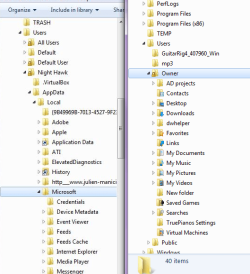
Here is my Users folder tree attached...
 

Attachments

  • Users tree .png
    Users tree .png
    9.8 KB · Views: 20

My Computer My Computer

At a glance

Windows 7 Pro 64 bitIntel core i74gigNVIDIA Gforce 240
Computer Manufacturer/Model Number
EverGreen
OS
Windows 7 Pro 64 bit
CPU
Intel core i7
Motherboard
Intel
Memory
4gig
Graphics Card(s)
NVIDIA Gforce 240
Sound Card
onboard realtek
Monitor(s) Displays
Generic PnP
Hard Drives
western digital sata
C:
D:
E:
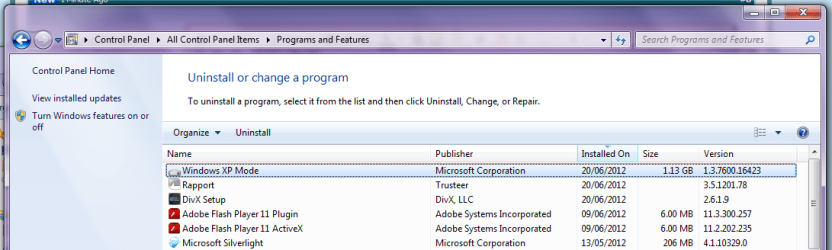
Also, here is my programs 'control panel'

As you can see i have XP Mode showing as installed.
I have tried to run it from here, but can't figure out how, and it doesn't show up anywhere else i have looked...
 

Attachments

  • programs .png
    programs .png
    39.4 KB · Views: 33

My Computer My Computer

At a glance

Windows 7 Pro 64 bitIntel core i74gigNVIDIA Gforce 240
Computer Manufacturer/Model Number
EverGreen
OS
Windows 7 Pro 64 bit
CPU
Intel core i7
Motherboard
Intel
Memory
4gig
Graphics Card(s)
NVIDIA Gforce 240
Sound Card
onboard realtek
Monitor(s) Displays
Generic PnP
Hard Drives
western digital sata
C:
D:
E:
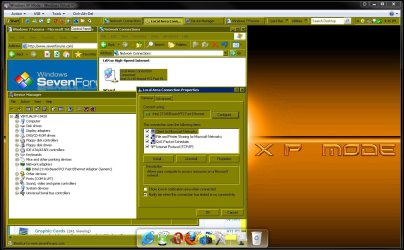
You wouldn't run it from the Control Panel to begin with. You go to Start>Progams>Windows Virtual PC to see the XP Mode item there and click on that. Once you click there the initial setup begins.

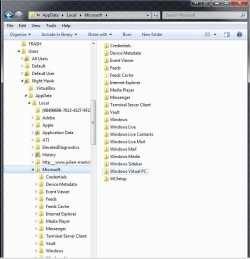
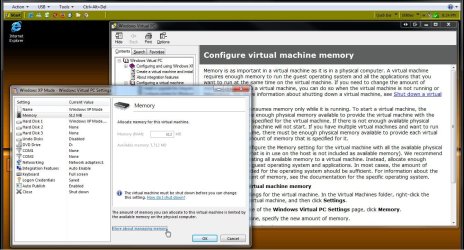
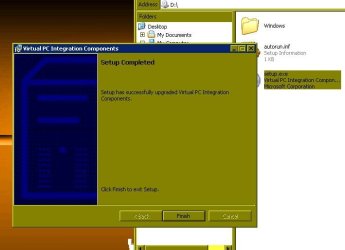
That will take you through the configuration wizard until finished before the VM will run. I have a few screens to show how the main folder under your user account should be found with a complete install as well as a few from the setup to look over. I think you know how that goes already having had it on before.
 

Attachments

  • XP Mode folders.jpg
    XP Mode folders.jpg
    61 KB · Views: 35
  • XP Mode Configure Memory.jpg
    XP Mode Configure Memory.jpg
    176 KB · Views: 28
  • XP Mode IComponents Update.jpg
    XP Mode IComponents Update.jpg
    35.5 KB · Views: 15
  • XP Mode Network Properties.jpg
    XP Mode Network Properties.jpg
    151.6 KB · Views: 13

My Computers My Computers

  • At a glance

    W7 Ultimate x64/W10 Pro x64/W11 Pro Triple Bo...AMD Phenom II X4 975 Deneb 3.6ghz - 965 2nd r...Kingston Hyper X DDR3 1600 1.5v 16gb - Hyper ...MSI HD Radeon 5750 1gb - MSI HD Radeon 6450 o...
    Computer type
    PC/Desktop
    Computer Manufacturer/Model Number
    Custom builds = 2
    OS
    W7 Ultimate x64/W10 Pro x64/W11 Pro Triple Boot - Main PC W7 Remote PC Micro ATX W7 Pro x64/W11 Pro
    CPU
    AMD Phenom II X4 975 Deneb 3.6ghz - 965 2nd remote pc
    Motherboard
    Gigabyte GA-790XTA-UD4-Gigabyte GA-880GM-D2H remote pc
    Memory
    Kingston Hyper X DDR3 1600 1.5v 16gb - Hyper X Fury 8gb 2nd
    Graphics Card(s)
    MSI HD Radeon 5750 1gb - MSI HD Radeon 6450 on mini tower
    Sound Card
    Creative Labs X-Fi Xtreme Audio P - Realtek onooard 2nd case
    Monitor(s) Displays
    ASUS VW199T-P 19" HP 2082a Main-HP 2082a 20" remote pc
    Screen Resolution
    Asus 1440x900 - HP 1600x900
    Hard Drives
    WD Black 1TB HD per OS W7, W10, and pending W11 presently on 500gb OS Drive - Pending Triple 1TB HDs for Spanned Storage/backup volume
    Single 2TB external USB enclosure, single 1TB System 7 Host/Boot drive, Pending 8TB external HD for system image b
    PSU
    Corsair 750TX - primary / Corsair CX600 - second
    Case
    Antec 900-2 - SSD compatible / NZXT Vulcan mini tower
    Cooling
    Zalman CNPS9900A
    Keyboard
    AZIO L70 Backlit Letters Gaming - ONN Cordless/USB
    Mouse
    MSI DS200 Programmable, Logitech Cordless
    Internet Speed
    30mbps upgrade - primary hard wired - mini tower usb WiFi
    Antivirus
    GFI VIPRE Internet Security 2014 on W7 2016 beta on W10,
    Browser
    Cyberfox, WaterFox 64bit FF variants, FireFox x64, Pale Moon
    Other Info
    Accomdata fan cooled usb 2.0 PIDE/Sata II, III external enclosure.
    Sambient usb/eSata PATA/Sata II, III external enclosure.
  • At a glance

    W7 Pro x64/W11 ProAMD Deneb 3.6ghz - 965Kingston Hyper X Fury 8gbMSI HD Radeon 6450 DVI Output
    Computer type
    PC/Desktop
    System Manufacturer/Model Number
    CUSTOM ASSEMBLY
    OS
    W7 Pro x64/W11 Pro
    CPU
    AMD Deneb 3.6ghz - 965
    Motherboard
    Gigabyte GA-880GM-D2H remote pc
    Memory
    Kingston Hyper X Fury 8gb
    Graphics Card(s)
    MSI HD Radeon 6450 DVI Output
    Sound Card
    Realtek onooard Creative or Other separate PENDING
    Monitor(s) Displays
    VIZIO 32" LCD TV Separate LCD Pending
    Screen Resolution
    1600x1080
    Hard Drives
    WD 500GB OS Host/Boot WD Green 1TB Storage/Backup
    PSU
    Corsair 600W - THERMALTAKE 600W spare case
    Case
    NZXT Vulcan mini tower
    Cooling
    Twin 120mm Top Fans - 240mm Side Cover
    Keyboard
    ONN Cordless/USB Logitech Cordless
    Mouse
    ONN USB/Cordless - Logitech Cordless
    Internet Speed
    DSL 5G
    Browser
    MS Edge, FireFox, WaterFox x64, FireFox Nightly
    Other Info
    OS Testing-Remote Access to Main TeamViewer
The first thing i notices here is that i have no AppData Folder to look in.
At least not where you have yours...
 

Attachments

  • no AppData Folder .png
    no AppData Folder .png
    61.3 KB · Views: 7

My Computer My Computer

At a glance

Windows 7 Pro 64 bitIntel core i74gigNVIDIA Gforce 240
Computer Manufacturer/Model Number
EverGreen
OS
Windows 7 Pro 64 bit
CPU
Intel core i7
Motherboard
Intel
Memory
4gig
Graphics Card(s)
NVIDIA Gforce 240
Sound Card
onboard realtek
Monitor(s) Displays
Generic PnP
Hard Drives
western digital sata
C:
D:
E:
I'm running the 64bit Ultimate edition while you have the x64 Pro there. This is probably due to the difference in editions. But you should find an MS folder once the XP Mode is on again.

The image there is from a fresh install of the XP Mode just seen to following the latest clean install of 7. The Windows Virtual PC sub folder under that will have two or three more subs for Virtual Machines and Virtual Applications. You may find a VMC Backup folder present as well.
 

My Computers My Computers

  • At a glance

    W7 Ultimate x64/W10 Pro x64/W11 Pro Triple Bo...AMD Phenom II X4 975 Deneb 3.6ghz - 965 2nd r...Kingston Hyper X DDR3 1600 1.5v 16gb - Hyper ...MSI HD Radeon 5750 1gb - MSI HD Radeon 6450 o...
    Computer type
    PC/Desktop
    Computer Manufacturer/Model Number
    Custom builds = 2
    OS
    W7 Ultimate x64/W10 Pro x64/W11 Pro Triple Boot - Main PC W7 Remote PC Micro ATX W7 Pro x64/W11 Pro
    CPU
    AMD Phenom II X4 975 Deneb 3.6ghz - 965 2nd remote pc
    Motherboard
    Gigabyte GA-790XTA-UD4-Gigabyte GA-880GM-D2H remote pc
    Memory
    Kingston Hyper X DDR3 1600 1.5v 16gb - Hyper X Fury 8gb 2nd
    Graphics Card(s)
    MSI HD Radeon 5750 1gb - MSI HD Radeon 6450 on mini tower
    Sound Card
    Creative Labs X-Fi Xtreme Audio P - Realtek onooard 2nd case
    Monitor(s) Displays
    ASUS VW199T-P 19" HP 2082a Main-HP 2082a 20" remote pc
    Screen Resolution
    Asus 1440x900 - HP 1600x900
    Hard Drives
    WD Black 1TB HD per OS W7, W10, and pending W11 presently on 500gb OS Drive - Pending Triple 1TB HDs for Spanned Storage/backup volume
    Single 2TB external USB enclosure, single 1TB System 7 Host/Boot drive, Pending 8TB external HD for system image b
    PSU
    Corsair 750TX - primary / Corsair CX600 - second
    Case
    Antec 900-2 - SSD compatible / NZXT Vulcan mini tower
    Cooling
    Zalman CNPS9900A
    Keyboard
    AZIO L70 Backlit Letters Gaming - ONN Cordless/USB
    Mouse
    MSI DS200 Programmable, Logitech Cordless
    Internet Speed
    30mbps upgrade - primary hard wired - mini tower usb WiFi
    Antivirus
    GFI VIPRE Internet Security 2014 on W7 2016 beta on W10,
    Browser
    Cyberfox, WaterFox 64bit FF variants, FireFox x64, Pale Moon
    Other Info
    Accomdata fan cooled usb 2.0 PIDE/Sata II, III external enclosure.
    Sambient usb/eSata PATA/Sata II, III external enclosure.
  • At a glance

    W7 Pro x64/W11 ProAMD Deneb 3.6ghz - 965Kingston Hyper X Fury 8gbMSI HD Radeon 6450 DVI Output
    Computer type
    PC/Desktop
    System Manufacturer/Model Number
    CUSTOM ASSEMBLY
    OS
    W7 Pro x64/W11 Pro
    CPU
    AMD Deneb 3.6ghz - 965
    Motherboard
    Gigabyte GA-880GM-D2H remote pc
    Memory
    Kingston Hyper X Fury 8gb
    Graphics Card(s)
    MSI HD Radeon 6450 DVI Output
    Sound Card
    Realtek onooard Creative or Other separate PENDING
    Monitor(s) Displays
    VIZIO 32" LCD TV Separate LCD Pending
    Screen Resolution
    1600x1080
    Hard Drives
    WD 500GB OS Host/Boot WD Green 1TB Storage/Backup
    PSU
    Corsair 600W - THERMALTAKE 600W spare case
    Case
    NZXT Vulcan mini tower
    Cooling
    Twin 120mm Top Fans - 240mm Side Cover
    Keyboard
    ONN Cordless/USB Logitech Cordless
    Mouse
    ONN USB/Cordless - Logitech Cordless
    Internet Speed
    DSL 5G
    Browser
    MS Edge, FireFox, WaterFox x64, FireFox Nightly
    Other Info
    OS Testing-Remote Access to Main TeamViewer
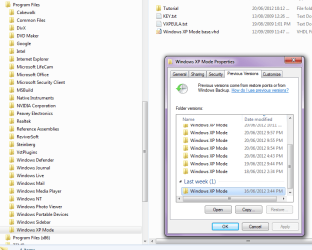
OK, i was able to find a XP Mode folder using 'explorer' more creatively.
There is no .exe in it though.
There are some other files though as per picture...
 

Attachments

  • XP Mode folders .png
    XP Mode folders .png
    29.9 KB · Views: 12

My Computer My Computer

At a glance

Windows 7 Pro 64 bitIntel core i74gigNVIDIA Gforce 240
Computer Manufacturer/Model Number
EverGreen
OS
Windows 7 Pro 64 bit
CPU
Intel core i7
Motherboard
Intel
Memory
4gig
Graphics Card(s)
NVIDIA Gforce 240
Sound Card
onboard realtek
Monitor(s) Displays
Generic PnP
Hard Drives
western digital sata
C:
D:
E:
You won't find any exe files there to begin with. The XP Mode places certain files there since that is the admin account. The main executable is found in "C:\Windows\System32\rundll32.dll" with the target being the VMCPropertyHandler.dll file. The VPC also see several driver files there as well.

The XP Mode tutorial folder is under Program Files while the VPC and integrated components are found under Program Files(x86). MS seems to have "spread the wealth" all over as far as these are concerned! :what::roflmao:
 

My Computers My Computers

  • At a glance

    W7 Ultimate x64/W10 Pro x64/W11 Pro Triple Bo...AMD Phenom II X4 975 Deneb 3.6ghz - 965 2nd r...Kingston Hyper X DDR3 1600 1.5v 16gb - Hyper ...MSI HD Radeon 5750 1gb - MSI HD Radeon 6450 o...
    Computer type
    PC/Desktop
    Computer Manufacturer/Model Number
    Custom builds = 2
    OS
    W7 Ultimate x64/W10 Pro x64/W11 Pro Triple Boot - Main PC W7 Remote PC Micro ATX W7 Pro x64/W11 Pro
    CPU
    AMD Phenom II X4 975 Deneb 3.6ghz - 965 2nd remote pc
    Motherboard
    Gigabyte GA-790XTA-UD4-Gigabyte GA-880GM-D2H remote pc
    Memory
    Kingston Hyper X DDR3 1600 1.5v 16gb - Hyper X Fury 8gb 2nd
    Graphics Card(s)
    MSI HD Radeon 5750 1gb - MSI HD Radeon 6450 on mini tower
    Sound Card
    Creative Labs X-Fi Xtreme Audio P - Realtek onooard 2nd case
    Monitor(s) Displays
    ASUS VW199T-P 19" HP 2082a Main-HP 2082a 20" remote pc
    Screen Resolution
    Asus 1440x900 - HP 1600x900
    Hard Drives
    WD Black 1TB HD per OS W7, W10, and pending W11 presently on 500gb OS Drive - Pending Triple 1TB HDs for Spanned Storage/backup volume
    Single 2TB external USB enclosure, single 1TB System 7 Host/Boot drive, Pending 8TB external HD for system image b
    PSU
    Corsair 750TX - primary / Corsair CX600 - second
    Case
    Antec 900-2 - SSD compatible / NZXT Vulcan mini tower
    Cooling
    Zalman CNPS9900A
    Keyboard
    AZIO L70 Backlit Letters Gaming - ONN Cordless/USB
    Mouse
    MSI DS200 Programmable, Logitech Cordless
    Internet Speed
    30mbps upgrade - primary hard wired - mini tower usb WiFi
    Antivirus
    GFI VIPRE Internet Security 2014 on W7 2016 beta on W10,
    Browser
    Cyberfox, WaterFox 64bit FF variants, FireFox x64, Pale Moon
    Other Info
    Accomdata fan cooled usb 2.0 PIDE/Sata II, III external enclosure.
    Sambient usb/eSata PATA/Sata II, III external enclosure.
  • At a glance

    W7 Pro x64/W11 ProAMD Deneb 3.6ghz - 965Kingston Hyper X Fury 8gbMSI HD Radeon 6450 DVI Output
    Computer type
    PC/Desktop
    System Manufacturer/Model Number
    CUSTOM ASSEMBLY
    OS
    W7 Pro x64/W11 Pro
    CPU
    AMD Deneb 3.6ghz - 965
    Motherboard
    Gigabyte GA-880GM-D2H remote pc
    Memory
    Kingston Hyper X Fury 8gb
    Graphics Card(s)
    MSI HD Radeon 6450 DVI Output
    Sound Card
    Realtek onooard Creative or Other separate PENDING
    Monitor(s) Displays
    VIZIO 32" LCD TV Separate LCD Pending
    Screen Resolution
    1600x1080
    Hard Drives
    WD 500GB OS Host/Boot WD Green 1TB Storage/Backup
    PSU
    Corsair 600W - THERMALTAKE 600W spare case
    Case
    NZXT Vulcan mini tower
    Cooling
    Twin 120mm Top Fans - 240mm Side Cover
    Keyboard
    ONN Cordless/USB Logitech Cordless
    Mouse
    ONN USB/Cordless - Logitech Cordless
    Internet Speed
    DSL 5G
    Browser
    MS Edge, FireFox, WaterFox x64, FireFox Nightly
    Other Info
    OS Testing-Remote Access to Main TeamViewer
Oh OK. :doh:

Should i keep looking for the XP Mode .exe, or will i have to take a different path at this point to get it working again?
 

My Computer My Computer

At a glance

Windows 7 Pro 64 bitIntel core i74gigNVIDIA Gforce 240
Computer Manufacturer/Model Number
EverGreen
OS
Windows 7 Pro 64 bit
CPU
Intel core i7
Motherboard
Intel
Memory
4gig
Graphics Card(s)
NVIDIA Gforce 240
Sound Card
onboard realtek
Monitor(s) Displays
Generic PnP
Hard Drives
western digital sata
C:
D:
E:
To start, your original issue was simply because you removed the password. When Virtual PC Integration Components are installed, you must use passwords; Virtual PC does not let you to login to an Windows vm user account without password.

If you remove your password when integration is enabled, thus causing that XP Mode (or any other Virtual PC vm) does not let you in, simply disable integration features, log in using your account without password, set a password in Control Panel > Users, logout, enable integration and login this time with password you just set. You can also use the built-in XP Mode administrator account this way; by default it has no password so using it when integration is enabled is impossible.

Reading this thread now through a couple of times, it is not clear for me if you have tried simply to uninstall both XP Mode (Control Panel > Programs and Features) and Virtual PC (Control Panel > Programs and Features > View installed updates). Then reboot, download files again and reinstall.

Remember that Virtual PC is not shown as an installed program. Instead it is shown as an installed update.

If this does not help, do system restore to a point EITHER before you uninstalled and when XP Mode worked, or to a point before you installed Virtual PC and XP Mode.

For you and those others facing similar issue, sudden inability to login to XP Mode or any other Virtual PC vm when password is removed or forgotten, please read these posts:
- http://www.sevenforums.com/virtualization/206601-virtual-machine-log.html#post1732152
- http://www.sevenforums.com/virtuali...ograms-administrator-xp-mode.html#post1345410

BTW, the reason you could not find AppData folder is that it is a hidden folder. You need to allow Windows to show hidden files and folders before you can see it.

Kari
 

My Computer My Computer

At a glance

Windows 10 Pro x64 EN-GB1.6 GHz Intel Core i7-720QM Processor6 GBATI Mobility Radeon HD 5850 Graphics
Computer type
Laptop
Computer Manufacturer/Model Number
HP ENVY 17-1150eg
OS
Windows 10 Pro x64 EN-GB
CPU
1.6 GHz Intel Core i7-720QM Processor
Memory
6 GB
Graphics Card(s)
ATI Mobility Radeon HD 5850 Graphics
Sound Card
Beats sound system with integrated subwoofer
Monitor(s) Displays
17" laptop display, 22" LED and 32" Full HD TV through HDMI
Screen Resolution
1600*900 (1), 1920*1080 (2&3)
Hard Drives
Internal: 2 x 500 GB SATA Hard Disk Drive 7200 rpm
External: 2TB for backups, 3TB USB3 network drive for media
Cooling
As Envy runs a bit warm, I have it on a Cooler Master pad
Keyboard
Logitech diNovo Media Desktop Laser (bluetooth)
Mouse
Logitech Performance Mouse MX
Internet Speed
50/10 Mbps VDSL
Antivirus
Windows Defender 4.3.9431.0
Browser
Maxthon 3.5.2., IE11
Thanks for the help Kari,

I will try uninstalling both programs, rebooting, and reinstalling.

If that doesn't work i will try the restore points.

Does it matter what order i install the two - XP Mode , Virtual PC?

Doers it matter if i uninstall before or after the restoring?

When i uninstall do i need to go around and delete left over folders for XP Mode or Virtual PC?
 
Last edited:

My Computer My Computer

At a glance

Windows 7 Pro 64 bitIntel core i74gigNVIDIA Gforce 240
Computer Manufacturer/Model Number
EverGreen
OS
Windows 7 Pro 64 bit
CPU
Intel core i7
Motherboard
Intel
Memory
4gig
Graphics Card(s)
NVIDIA Gforce 240
Sound Card
onboard realtek
Monitor(s) Displays
Generic PnP
Hard Drives
western digital sata
C:
D:
E:
IF you succeed with uninstalling both, then I would recommend you install them in the order told on Virtual PC download site: first XP Mode, then after reboot Virtual PC.

If you do not succeed then this is meaningless: just select a restore point when XP Mode was still working, before you removed the password, and try. If it works, everything is OK. If not, do System restore again, now selecting a point before you installed XP Mode and Virtual PC. Then go to download site, download and install.

Kari
 

My Computer My Computer

At a glance

Windows 10 Pro x64 EN-GB1.6 GHz Intel Core i7-720QM Processor6 GBATI Mobility Radeon HD 5850 Graphics
Computer type
Laptop
Computer Manufacturer/Model Number
HP ENVY 17-1150eg
OS
Windows 10 Pro x64 EN-GB
CPU
1.6 GHz Intel Core i7-720QM Processor
Memory
6 GB
Graphics Card(s)
ATI Mobility Radeon HD 5850 Graphics
Sound Card
Beats sound system with integrated subwoofer
Monitor(s) Displays
17" laptop display, 22" LED and 32" Full HD TV through HDMI
Screen Resolution
1600*900 (1), 1920*1080 (2&3)
Hard Drives
Internal: 2 x 500 GB SATA Hard Disk Drive 7200 rpm
External: 2TB for backups, 3TB USB3 network drive for media
Cooling
As Envy runs a bit warm, I have it on a Cooler Master pad
Keyboard
Logitech diNovo Media Desktop Laser (bluetooth)
Mouse
Logitech Performance Mouse MX
Internet Speed
50/10 Mbps VDSL
Antivirus
Windows Defender 4.3.9431.0
Browser
Maxthon 3.5.2., IE11
Thanks kari. Success! :party:

I was able to install both programs and get XP Mode running after uninstalling both one more time first.

The problem was - somehow an installation of Virtual PC remained. The message that 'this application is not applicable to your system' was misleading as usual... :sarc:
 

My Computer My Computer

At a glance

Windows 7 Pro 64 bitIntel core i74gigNVIDIA Gforce 240
Computer Manufacturer/Model Number
EverGreen
OS
Windows 7 Pro 64 bit
CPU
Intel core i7
Motherboard
Intel
Memory
4gig
Graphics Card(s)
NVIDIA Gforce 240
Sound Card
onboard realtek
Monitor(s) Displays
Generic PnP
Hard Drives
western digital sata
C:
D:
E:
That's good to hear. Now just remember this thing with Virtual PC Integration Components and passwords: If you want to use your XP Mode with user profile which has no password set, you need to disable integration.

Kari
 

My Computer My Computer

At a glance

Windows 10 Pro x64 EN-GB1.6 GHz Intel Core i7-720QM Processor6 GBATI Mobility Radeon HD 5850 Graphics
Computer type
Laptop
Computer Manufacturer/Model Number
HP ENVY 17-1150eg
OS
Windows 10 Pro x64 EN-GB
CPU
1.6 GHz Intel Core i7-720QM Processor
Memory
6 GB
Graphics Card(s)
ATI Mobility Radeon HD 5850 Graphics
Sound Card
Beats sound system with integrated subwoofer
Monitor(s) Displays
17" laptop display, 22" LED and 32" Full HD TV through HDMI
Screen Resolution
1600*900 (1), 1920*1080 (2&3)
Hard Drives
Internal: 2 x 500 GB SATA Hard Disk Drive 7200 rpm
External: 2TB for backups, 3TB USB3 network drive for media
Cooling
As Envy runs a bit warm, I have it on a Cooler Master pad
Keyboard
Logitech diNovo Media Desktop Laser (bluetooth)
Mouse
Logitech Performance Mouse MX
Internet Speed
50/10 Mbps VDSL
Antivirus
Windows Defender 4.3.9431.0
Browser
Maxthon 3.5.2., IE11
Back
Top