can't FORMAT an external Hard Drive in my PC

winterSn0w

New member
Local time
10:44 PM
Messages
8
Location
Philippines
I just can't figure out a way to format a hard drive in my PC. it shows in disk management as UNALLOCATED and NOT INITIALIZED.


I tried doing the stuff I've read in various websites and blogs but still I CAN'T do it. I'm no computer whiz, but I'm quite sure i can understand simple computer instructions. I tried doing the right click thing to select the options, but most of it WERE GREYED OUT!!! so KUDOS to me for trying.


I even resorted in downloading third party applications to easily help me FORMAT the said drive, but lady luck just wont smile on me. It shows me the error CYCLIC REDUNCDANCY CHECK! after i try to format it with fat32formatter.

Any help will be much appreciated guys. I just don't know what to do
 

My Computer My Computer

Computer type
Laptop
Computer Manufacturer/Model Number
Driverpack Solution HP Presario CQ42 Notebook PC
OS
Windows 7 Ultimate 32 bit
Memory
2.00 GB
Antivirus
Microsoft Security Essentials
Browser
Google Chrome and Firefox
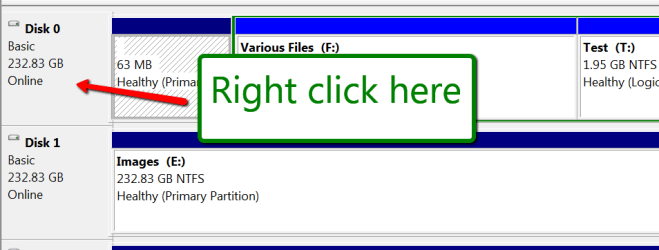
In disk management, right click on the little box where it says Disk0, Disk1, etc. and initialize the disk. Then you can create partitions.
 

Attachments

  • 2015-07-01_1944.png
    2015-07-01_1944.png
    10.1 KB · Views: 1

My Computer My Computer

Computer Manufacturer/Model Number
HP, Dell, Gateway, Toshiba - 4 laptops and 2 desktops
OS
Vista, Windows7, Mint Mate, Zorin, Windows 8
CPU
from 1.6GHz Duo to i7
Monitor(s) Displays
2x HP w2207
Hard Drives
5x HDD, 7x SSD, 12x Externals
Keyboard
with trackball - no mices
Mouse
Trackball mice
Internet Speed
DSL 6000
yeah, i just browsed on the old thread about similar situations, and found the same solutions. I am very much willing to do the steps, the only problem is I cant select the first 5 options when i right clicked on the UNALLOCATED disk. the only options disk management give me are PROPERTIES and HELP.

i even read a thread on how to clean it up using the command line, but even that technique resulted to the same error message. Data Error: cyclic redundancy check

now im really running out of options.

when i ran it over a third party data retriever application, all my file in that drive are almost in perfect condition, i was even able to copy, save and put them on a new external so i have really no problem anymore when it comes to the files. it is just so frustrating because i promised to give the device to my niece, and then the problem arose..

but thanks for the reply. it means a lot dude..
thanks
 

My Computer My Computer

Computer type
Laptop
Computer Manufacturer/Model Number
Driverpack Solution HP Presario CQ42 Notebook PC
OS
Windows 7 Ultimate 32 bit
Memory
2.00 GB
Antivirus
Microsoft Security Essentials
Browser
Google Chrome and Firefox

My Computer My Computer

Computer type
PC/Desktop
Computer Manufacturer/Model Number
Home made Desktop
OS
Windows 10 Pro. 64/ version 1709 Windows 7 Pro/64
CPU
Intel i7-6800K @ 4.3
Motherboard
ASUS X-99 Deluxe II
Memory
Corsair Platinum 16 gig @2400
Graphics Card(s)
EVGA GTX 1070 OC
Monitor(s) Displays
Asus 27" LED LCD/VE278Q
Screen Resolution
1920-1080 or 1280-720 HDMI
Hard Drives
INTEL SSD 730-240 Gb Sata 3.0/
PSU
EVGA Platium 1200W
Case
Phanteks Luxe Tempered Glass 8 fans/ one radiator
Cooling
XSPC/ Water Cooled CPU
Keyboard
Das 4 Professional
Mouse
Logitech M705/MX Anywhere 2-S
Internet Speed
100 mbits
Antivirus
Microsoft Security Essentials/ Malwarebytes Premium 3.0/ SAS
Browser
I.E. 11 default/Firefox/ ISP Time Warner Cable/Spectrum
Other Info
LG BluRay Burner/
Sound system-KLipsch-THX/
Icy Dock ssd Hot Swap bays.
Plug in the drive, open an Elevated Command Prompt,
run the following commands exactly as written with each followed by Enter:

DISKPART
LIST DISK
SELECT DISK # (replace # with the number of the drive, making absolutely certain it is correct)
CLEAN ALL (wipes the drive, takes approx one hour per 320gb)
CONVERT MBR
CREATE PARTITION PRIMARY
FORMAT FS=NTFS
ASSIGN
EXIT

Without closing CMD box, look in Computer to see what letter was assigned the disk. This may also popup in an Autostart box. Then continue with:

CHDSK [drive letter]: /r

Watch results to see what problems are encountered. If problems persist or formatting fails, test the drive with the maker's
HD Diagnostic full scan.
 
@ LayBack Bear

Are you sure you are doing what whs post #3 shows.

You must make sure you are right tick on the proper drive.
If you are ticking on the drive you are booted (C) it will not allow what you are trying to do.

Could you complete this tutorial by Golden with your externals plugged in

-Yep! I performed the same instructions. The options it provided me were OFFLINE, PROPERTIES AND HELP only. The INITIALIZE DISK is GREYED OUT. The same results, however I've encountered a new error message when i ran it with Active@killdisk. I clicked on the kill button of the program and noticed that on the properties window of the drive I'm erasing, it is clearly written in RED: MBR NEEDS TO BE FIXED!!!

And what in the world does that mean? hehehe..I just got home now and will about to check the internet regarding that message. If it was in red, then i guess it is the cause of the problem or would it make my hard drive a complete dud?

whooo...but thanks guys for the help and replies. Like I said, all help will be fully appreciated.
 
Last edited:

My Computer My Computer

Computer type
Laptop
Computer Manufacturer/Model Number
Driverpack Solution HP Presario CQ42 Notebook PC
OS
Windows 7 Ultimate 32 bit
Memory
2.00 GB
Antivirus
Microsoft Security Essentials
Browser
Google Chrome and Firefox
@ gregrocker

i was able to reach the diskpart clean all part in the CMD window, and the result was: Diskpart has encountered an error: The media is write protected. See the system event log for more information.

I'm not sure if I continue to type in the next step which is CONVERT MBR will give me a different result or what. Right now I rerun Active @ Killdisk just to wipe or kill all the data in the drive. It is about halfway done, so I just got to wait a couple more minutes or hours for this to finish, then I'll go and check on the thread as well.

1 more thing buddy, on the properties of the disk (the one I'm trying to format) active @ killdisk said this in RED: MBR NEEDS TO BE FIXED!
what does that mean?
 

My Computer My Computer

Computer type
Laptop
Computer Manufacturer/Model Number
Driverpack Solution HP Presario CQ42 Notebook PC
OS
Windows 7 Ultimate 32 bit
Memory
2.00 GB
Antivirus
Microsoft Security Essentials
Browser
Google Chrome and Firefox
1. Post a screenshot of how your drive looks like in Windows Disk Management. You haven't done that so far. See post#5 and do that. Adhere to all points mentioned in that tutorial and present a full screen untruncated screenshot of WDM.

2. Also install and run the latest version of Partition Wizard 9.0. Post a screenshot of the first screen on launching the application. PW can present some additional information than what WDM shows..

I know that you are just interested in formatting it.

At this stage we do not know the capacity of your drive and also whether it was formatted as an MBR disk or GPT disk.

If sector 0 of your external HDD had gone bad then nothing can be done to revive your external. All indications so far point to that.

We can try to examine Sector 0 of your drive with bootice and check whether we can write zeros to that sector. That will categorically confirm whether it is indeed a bad sector. But that only after the above two screenshots.
 

My Computer My Computer

OS
Windows 7 Home Premium 32 bit
If you succeed with a full wipe (same as Clean All) with your tool then it should clear the MBR. If not you can try the wipe function in Partition Wizard. Post back the pictures of Partition Wizard and Disk Mgmt requested.
 
is there something wrong with the uploading system? I mean, I cant upload any photos of any file extensions. I already waited for about 3-4 hours just for the first 2 screenshots i uploaded, but I'm not sure if what is going on. The window that popped up in where you browsed your desired photos to post and clicked the upload button, just turned white after it said the upload was complete, and then the link is this (http://www.sevenforums.com/newattachment.php?do=manageattach&p=), i pressed enter and this was the result:

Invalid Post specified. If you followed a valid link, please notify the administrator

If you were trying to add an attachment from Internet Explorer, please use the advanced edit mode as there is currently a bug when attaching from quick reply.

I apologize I cant upload the screenshots T.T
 

My Computer My Computer

Computer type
Laptop
Computer Manufacturer/Model Number
Driverpack Solution HP Presario CQ42 Notebook PC
OS
Windows 7 Ultimate 32 bit
Memory
2.00 GB
Antivirus
Microsoft Security Essentials
Browser
Google Chrome and Firefox
I reported this so try again later, or upload your pictures to a file server like OneDrive and post back the link.
 
If you were trying to add an attachment from Internet Explorer, please use the advanced edit mode as there is currently a bug when attaching from quick reply.

I haven't seen that message in a while.
 

My Computer My Computer

Computer type
PC/Desktop
Computer Manufacturer/Model Number
Custom assembled by me :}
OS
Win-7-Pro64bit 7-H-Prem-64bit
CPU
i7-5930K 2nd i9-9940x both water blocked VRM's too
Motherboard
ASUS SABERTOOTH X99 2nd ASUS x299 Apex
Memory
Trident-z 3200C14 2nd Trident-z 3600C16
Graphics Card(s)
EVGA 1080ti ftw3 2nd Titan Xp both water blocked
Sound Card
Built-in Realtek
Monitor(s) Displays
1-AOC G2460PG 24"G-Sync 144Hz/ 2nd 1-ASUS VG248QE 24" 144Hz
Screen Resolution
1920 x 1080 144Hz
Hard Drives
2-Samsung M.2 Evo & Evo Plus
2-Samsung 850 EVO 500GB SSD's/ 3-2.5 W.D. Black 1tb-&3-1tb/3-3.5 WD Black 1tb hdd's
PSU
EVGA SuperNOVA 1000-P2 2nd 1200-P2
Case
2-Corsair Obsidian Series 450D Black ATX Mid Tower
Cooling
Custom water loops
Keyboard
Logitech G710+/ 2nd Logitech G910
Mouse
2-RedDragon M901 Perdition 16400 dpi Gaming mouse = wired
Internet Speed
Comcast Ping 19ms 89.31mbps download speed 6.12mbps upload
Antivirus
Malwarebytes Pro/ Superantispyware Pro
Browser
FireFox & Pale moon
Other Info
2nd ASUS X299 Apex/Intel i9-9940x with Custom water loop/7H-Prem-x64/Corsair 450D case/Ram Trident-z 3600C16 4x8gb / Samsung970Evo plus 500gb SSD/Dual ssd EZ swap evo/PSU EVGA SuperNova 1200w-P2 80+Platinum/GPU Titan Xp /8-ML-140 on push-pull on 2-280GTX rads

My Computer My Computer

Computer type
PC/Desktop
Computer Manufacturer/Model Number
Self built custom
OS
64-bit Windows 11 Pro for Workstations
CPU
Intel i7-8700K OC'd to 5 GHz
Motherboard
ASUS ROG Maximus XI Formula Z390
Memory
64 GB (4x16GB) G.SKILL TridentZ RGB DDR4 3600 MHz
Graphics Card(s)
ASUS ROG-STRIX-GTX1080TI-O11G-GAMING
Sound Card
Integrated
Monitor(s) Displays
2 x Samsung Odyssey G7 27"
Screen Resolution
2560x1440
Hard Drives
1TB Samsung 990 PRO M.2,
4TB Samsung 990 PRO PRO M.2,
TerraMaster F8 SSD Plus NAS
PSU
Seasonic Prime Titanium 850W
Case
Thermaltake Core P3
Cooling
Corsair Hydro H115i
Keyboard
Logitech wireless K800
Mouse
Logitech MX Master 4
Internet Speed
2 Gb/s Download and 100 Mb/s Upload
Antivirus
Malwarebyte Anti-Malware Premium
Browser
Google Chrome
Other Info
Logitech Z625 speaker system,
Logitech BRIO 4K Pro webcam,
HP Color LaserJet Pro MFP M477fdn,
APC SMART-UPS RT 1000 XL - SURT1000XLI,
Galaxy S23 Plus phone
Here are the links for the screenshots through OneDrive:


first was a shot right after i clicked disk management, that window popped up
Microsoft services

next one right after i clicked the initialize disk..
Microsoft services

third when i tried to right click on the smaller square..
Microsoft services

and lastly is when i right clicked on the rectangle part where UNALLOCATED shows
Microsoft services

hope this helps...

this was also the result of Active @ KillDisk i ran earlier
Microsoft services
 
Last edited:

My Computer My Computer

Computer type
Laptop
Computer Manufacturer/Model Number
Driverpack Solution HP Presario CQ42 Notebook PC
OS
Windows 7 Ultimate 32 bit
Memory
2.00 GB
Antivirus
Microsoft Security Essentials
Browser
Google Chrome and Firefox
Cyclic redundancy is a read calculation error, but since there is no data and it identifies the problem with the MBR then we try wiping the MBR which resolves many issues. At the same time the disk should be surface tested and have its file system tested. Partition Wizard can automate these so you don't need to use the commands I gave earlier.

Need to see the Partition Wizard shots to compare. Please try to attach them correctly as given in Disk Management - Post a Screen Capture Image

Then Partition Wizard Wipe Disk - Video Help.

Also run a Partition surface test with Partition Wizard.

Then try to create a Logical partition using Partition Wizard. How to Create Partition | Windows Partition Wizard Tutorial and then Partition Wizard Check File System
 
Last edited:

My Computer My Computer

Computer type
Laptop
Computer Manufacturer/Model Number
Driverpack Solution HP Presario CQ42 Notebook PC
OS
Windows 7 Ultimate 32 bit
Memory
2.00 GB
Antivirus
Microsoft Security Essentials
Browser
Google Chrome and Firefox
:thumbsup:
 

My Computer My Computer

Computer type
PC/Desktop
Computer Manufacturer/Model Number
Self built custom
OS
64-bit Windows 11 Pro for Workstations
CPU
Intel i7-8700K OC'd to 5 GHz
Motherboard
ASUS ROG Maximus XI Formula Z390
Memory
64 GB (4x16GB) G.SKILL TridentZ RGB DDR4 3600 MHz
Graphics Card(s)
ASUS ROG-STRIX-GTX1080TI-O11G-GAMING
Sound Card
Integrated
Monitor(s) Displays
2 x Samsung Odyssey G7 27"
Screen Resolution
2560x1440
Hard Drives
1TB Samsung 990 PRO M.2,
4TB Samsung 990 PRO PRO M.2,
TerraMaster F8 SSD Plus NAS
PSU
Seasonic Prime Titanium 850W
Case
Thermaltake Core P3
Cooling
Corsair Hydro H115i
Keyboard
Logitech wireless K800
Mouse
Logitech MX Master 4
Internet Speed
2 Gb/s Download and 100 Mb/s Upload
Antivirus
Malwarebyte Anti-Malware Premium
Browser
Google Chrome
Other Info
Logitech Z625 speaker system,
Logitech BRIO 4K Pro webcam,
HP Color LaserJet Pro MFP M477fdn,
APC SMART-UPS RT 1000 XL - SURT1000XLI,
Galaxy S23 Plus phone
Ahhh guys, is this an indication of what Jumanji said in his first post in this thread?

Microsoft services

:eek:
 

My Computer My Computer

Computer type
Laptop
Computer Manufacturer/Model Number
Driverpack Solution HP Presario CQ42 Notebook PC
OS
Windows 7 Ultimate 32 bit
Memory
2.00 GB
Antivirus
Microsoft Security Essentials
Browser
Google Chrome and Firefox
Back
Top