Can't format USB drive in windows or ubuntu and no tools work

Difusal

New member
Member
Local time
7:35 AM
Messages
67
HI!

So I got this 16gb datatraveler from kingston. My friend was using it as a live usb driver for ubuntu I think. But she cut the power and now it seems like the drive is dead!

It won't format using windows formating option. diskpart cannot create any new partitions or clean the partition. give a I/O error. HP disk formatting tools and seagate formatting both freeze. I've tried gparted as well but with no luck. I can see the files in the drive, but can't delete them or change them.

Any help?
 

My Computer My Computer

At a glance

Windows 7 Ultimate x64Intel Core i7-720QM 1,60 GHz6 GB DDR3 (1 x 2.048 MB + 1 x 4.096 MB)ATI Mobility Radeon HD 5650
Computer Manufacturer/Model Number
HP
OS
Windows 7 Ultimate x64
CPU
Intel Core i7-720QM 1,60 GHz
Motherboard
Hewlett-Packard 1448 65.35
Memory
6 GB DDR3 (1 x 2.048 MB + 1 x 4.096 MB)
Graphics Card(s)
ATI Mobility Radeon HD 5650
Sound Card
Altec Lansing
Monitor(s) Displays
Monitor LED HP BrightView HD
Screen Resolution
1.366 x 768
Inset USB into your computer,

Open disk management (Right click "My computer" > choose "Manage" > Disk Management):

In disk management - right click the usb drive > delete the partition/drive.
Then right click the drive again > choose "New partition" and follow the wizard.
 

My Computer My Computer

At a glance

Windows 7 Home Premium 64 BitCore I7 1155 3.4GHZ8GB DDR 1600
Computer Manufacturer/Model Number
Cooler Master
OS
Windows 7 Home Premium 64 Bit
CPU
Core I7 1155 3.4GHZ
Memory
8GB DDR 1600
Hard Drives
64 GB SSD - OS
1TB - DATA
PSU
340 Watt Corsair
Case
Cooler Master
Cooling
Cooler Master
Inset USB into your computer,

Open disk management (Right click "My computer" > choose "Manage" > Disk Management):

In disk management - right click the usb drive > delete the partition/drive.
Then right click the drive again > choose "New partition" and follow the wizard.

forgot to mention that I've tried that. didn't work. I've tried low format bu doesn't go from 0%
 

My Computer My Computer

At a glance

Windows 7 Ultimate x64Intel Core i7-720QM 1,60 GHz6 GB DDR3 (1 x 2.048 MB + 1 x 4.096 MB)ATI Mobility Radeon HD 5650
Computer Manufacturer/Model Number
HP
OS
Windows 7 Ultimate x64
CPU
Intel Core i7-720QM 1,60 GHz
Motherboard
Hewlett-Packard 1448 65.35
Memory
6 GB DDR3 (1 x 2.048 MB + 1 x 4.096 MB)
Graphics Card(s)
ATI Mobility Radeon HD 5650
Sound Card
Altec Lansing
Monitor(s) Displays
Monitor LED HP BrightView HD
Screen Resolution
1.366 x 768
Probebly contains corrupted data,

Try this: Insert usb stick into your computer, open my computer to check what drive letter is assigned to the usb stick. For example : drive "E"

Then open a command prompt, and type: chkdsk /f DRIVELETTER:
So for example it should look somthing like this:
chkdsk /f /E:

(E being my drive letter)

Press enter,

Let the check disk take place. then see if you can format it.
 

My Computer My Computer

At a glance

Windows 7 Home Premium 64 BitCore I7 1155 3.4GHZ8GB DDR 1600
Computer Manufacturer/Model Number
Cooler Master
OS
Windows 7 Home Premium 64 Bit
CPU
Core I7 1155 3.4GHZ
Memory
8GB DDR 1600
Hard Drives
64 GB SSD - OS
1TB - DATA
PSU
340 Watt Corsair
Case
Cooler Master
Cooling
Cooler Master
Probebly contains corrupted data,

Try this: Insert usb stick into your computer, open my computer to check what drive letter is assigned to the usb stick. For example : drive "E"

Then open a command prompt, and type: chkdsk /f DRIVELETTER:
So for example it should look somthing like this:
chkdsk /f /E:

(E being my drive letter)

Press enter,

Let the check disk take place. then see if you can format it.

I haven't tried that yet.. Anyway:
Windows is verifying files and folders . . .
56% completed..

Then I tried to format. Still stuck at 0 as we talk
 

My Computer My Computer

At a glance

Windows 7 Ultimate x64Intel Core i7-720QM 1,60 GHz6 GB DDR3 (1 x 2.048 MB + 1 x 4.096 MB)ATI Mobility Radeon HD 5650
Computer Manufacturer/Model Number
HP
OS
Windows 7 Ultimate x64
CPU
Intel Core i7-720QM 1,60 GHz
Motherboard
Hewlett-Packard 1448 65.35
Memory
6 GB DDR3 (1 x 2.048 MB + 1 x 4.096 MB)
Graphics Card(s)
ATI Mobility Radeon HD 5650
Sound Card
Altec Lansing
Monitor(s) Displays
Monitor LED HP BrightView HD
Screen Resolution
1.366 x 768
Zero-fill and format drives with Bootice

Hi Difusal,

I am inclined to think - rightly or wrongly, I do not know :) - that your pendrive perhaps has some sticky first sector (MBR) and that could be the reason for the problem in formatting it.
Can you upload the screenshot of how it looks in the Windows Disk Management? http://www.sevenforums.com/tutorials/274797-disk-management-post-screen-capture-image.html

Though you have said that a lowlevel format was done ( curious to know which program you used for it) and also a regular format was tried with HP USB Disk Storage Format Tool ( Did you run it as administrator? ), try the same process, this time with Bootice Download Bootice 2012.12.12 Free - Modify, backup, restore the MBR and PBR - Softpedia

It is a standalone Windows executable.

Plugin your pendrive. Just (double) click on the Bootice executable to run.

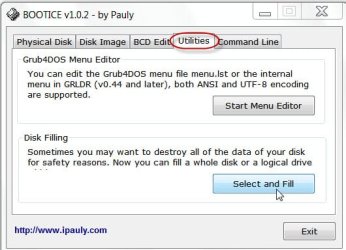
In the GUI, click on the Utilities tab and then Select and Fill.

1Select and Fill.jpg

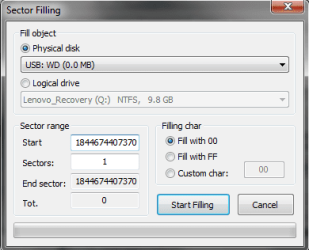
In the Sector Filling dialog box, choose Physical disk, check and select the correct drive, select Fill with 00 and click on Start Filling.

2Start Filling.jpg

If filling is successfully done, click on OK and OK in the subsequent dialog boxes. Close the Window to take you to the main GUI.

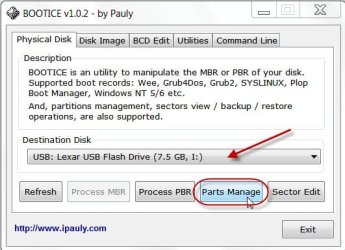
Open the Physical Disk tab, check the correct destination drive is selected and then on Parts Manage.

3Parts Manage.jpg

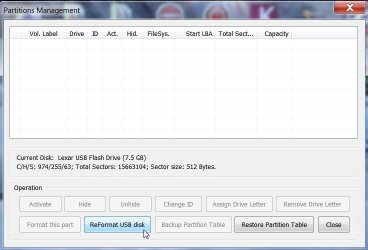
In the ensuing Partitions Mnagement Window, click on reformat USB disk.

4reformat.jpg

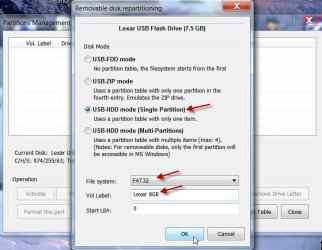
In the Removable disk repartitioning window, select USB-HDD mode (Single Partition), select the File System, give a Label and then OK.

5OK.jpg

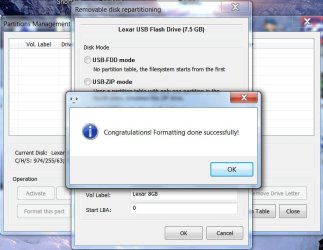
It should now complete the formatting.

6Formatted.jpg

Close Bootice.

I place immense faith on the HP USB Disk Storage Format Utility and if it is not able to format I would say the drive is beyond repair. But here I am not sure whether you ran it as an administrator.

Now the above procedure I had enumerated is purely experimental to check whether it helps.

Good luck.
 

My Computer My Computer

At a glance

Windows 7 Home Premium 32 bit
OS
Windows 7 Home Premium 32 bit
Hi Difusal,

I am inclined to think - rightly or wrongly, I do not know :) - that your pendrive perhaps has some sticky first sector (MBR) and that could be the reason for the problem in formatting it.
Can you upload the screenshot of how it looks in the Windows Disk Management? http://www.sevenforums.com/tutorials/274797-disk-management-post-screen-capture-image.html

Though you have said that a lowlevel format was done ( curious to know which program you used for it) and also a regular format was tried with HP USB Disk Storage Format Tool ( Did you run it as administrator? ), try the same process, this time with Bootice Download Bootice 2012.12.12 Free - Modify, backup, restore the MBR and PBR - Softpedia

It is a standalone Windows executable.

Plugin your pendrive. Just (double) click on the Bootice executable to run.

In the GUI, click on the Utilities tab and then Select and Fill.

View attachment 252884

In the Sector Filling dialog box, choose Physical disk, check and select the correct drive, select Fill with 00 and click on Start Filling.

View attachment 252885

If filling is successfully done, click on OK and OK in the subsequent dialog boxes. Close the Window to take you to the main GUI.

Open the Physical Disk tab, check the correct destination drive is selected and then on Parts Manage.

View attachment 252886

In the ensuing Partitions Mnagement Window, click on reformat USB disk.

View attachment 252887

In the Removable disk repartitioning window, select USB-HDD mode (Single Partition), select the File System, give a Label and then OK.

View attachment 252888

It should now complete the formatting.

View attachment 252890

Close Bootice.

I place immense faith on the HP USB Disk Storage Format Utility and if it is not able to format I would say the drive is beyond repair. But here I am not sure whether you ran it as an administrator.

Now the above procedure I had enumerated is purely experimental to check whether it helps.

Good luck.

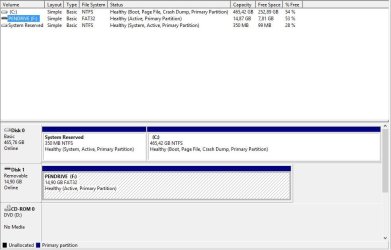
the bootice exe didn't work... I've attached the error in bootioce and the disk mnagement ss
 

Attachments

  • Capture.JPG
    Capture.JPG
    15.6 KB · Views: 5
  • 2.JPG
    2.JPG
    65.2 KB · Views: 3

My Computer My Computer

At a glance

Windows 7 Ultimate x64Intel Core i7-720QM 1,60 GHz6 GB DDR3 (1 x 2.048 MB + 1 x 4.096 MB)ATI Mobility Radeon HD 5650
Computer Manufacturer/Model Number
HP
OS
Windows 7 Ultimate x64
CPU
Intel Core i7-720QM 1,60 GHz
Motherboard
Hewlett-Packard 1448 65.35
Memory
6 GB DDR3 (1 x 2.048 MB + 1 x 4.096 MB)
Graphics Card(s)
ATI Mobility Radeon HD 5650
Sound Card
Altec Lansing
Monitor(s) Displays
Monitor LED HP BrightView HD
Screen Resolution
1.366 x 768
i tried to filling but it show nothing... :cry:
 

Attachments

  • Untitled.png
    Untitled.png
    10.2 KB · Views: 4

My Computer My Computer

At a glance

window 7 professional 32 bit
Computer type
Laptop
Computer Manufacturer/Model Number
thinkpad (lenovo)
OS
window 7 professional 32 bit
Back
Top