
Hello,
Very nice forum here!
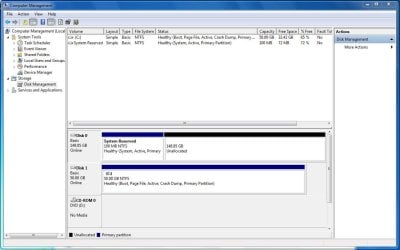
I've installed W7 pro on a 50GB partition on a RAID1 array but it seems that I can't make any new partitions on the remaining unallocated disk space. My array is a pair of WD RE3 500GB drives, so there's at least another 440GB available.
The problem might have started when I made the partition originally in the BIOS RAID setup. I set the size to 50GB there but it wouldn't let me make another one. I figured I'd be able to do that in W7.
Now I'm thinking I should have set the partition size in the BIOS RAID setup to be the whole 500GB and then during the install of W7 set the boot partition to 50GB.
To top it all off, the 100MB system reserved partition ended up on my 160GB backup drive.
I'm about to just start over again with the backup drive disconnected. Any suggestions?
Thanks
Very nice forum here!
I've installed W7 pro on a 50GB partition on a RAID1 array but it seems that I can't make any new partitions on the remaining unallocated disk space. My array is a pair of WD RE3 500GB drives, so there's at least another 440GB available.
The problem might have started when I made the partition originally in the BIOS RAID setup. I set the size to 50GB there but it wouldn't let me make another one. I figured I'd be able to do that in W7.
Now I'm thinking I should have set the partition size in the BIOS RAID setup to be the whole 500GB and then during the install of W7 set the boot partition to 50GB.
To top it all off, the 100MB system reserved partition ended up on my 160GB backup drive.
I'm about to just start over again with the backup drive disconnected. Any suggestions?
Thanks
Attachments
My Computer
At a glance
Windows 7 ProIntel i7-920 Bloomfield6GB total, 3 x 2GB G.Skill Trident DDR3 2000 ...MSI N9600GT-MD1G GeForce 9600 GT 1GB PCI Expr...
- Computer Manufacturer/Model Number
- build-your-own
- OS
- Windows 7 Pro
- CPU
- Intel i7-920 Bloomfield
- Motherboard
- Gigabyte GA-EX58-UD3R
- Memory
- 6GB total, 3 x 2GB G.Skill Trident DDR3 2000 (PC3 16000)
- Graphics Card(s)
- MSI N9600GT-MD1G GeForce 9600 GT 1GB PCI Express 2.0 x16
- Sound Card
- none - sound is part of mother board chipset
- Monitor(s) Displays
- Samsung 24" wide screen, NEC 19"
- Hard Drives
- 2 ea in RAID1 array: Western Digital RE3 500GB 7200 RPM SATA 3GB/s 16MB Cache WD5002ABYS-01B1B0
1 ea as backup: Western Digital WD Caviar Blue
160 GB, SATA 3GB/s, 8 MB Cache, 7200 RPM WD1600AAJS-00WAA0
- PSU
- Corsair TX650
- Case
- Antec One Hundred
- Cooling
- Intel CPU cooler, 4ea 120mm case fans


