Running Out of OS Drive Space, Possible Solutions...

5rrt455645

New member
Local time
2:20 AM
Messages
1
Hi there,

Sorry if I've misposted this but not sure what category this falls in.

I bought an ASUS S56 laptop 6 months back or so that had a hybrid 24 GB SSD and 700 GB HDD. I tried the Windows 8 (which came preinstalled) but I wasn't ready for the change yet so I made the needed BIOS/UEFI changes and installed Windows 7 on the small 24 GB SSD (C:\).

I've setup the defaults so that all new programs and documents are saved on the HDD (E:\) as to keep space available for the OS on the SSD. Now 6 months later my OS is seeming to grow and I'm running out of space on the SSD. I've already disabled hybrid sleep and a few other features in order to minimize the space the OS takes up but I can't seem to stop it from growing.

I'm wondering if there are any additional ways to reduce the space my OS is taking? Is there any files in the C:\Windows that can be deleted? Or is my only true solution to replace the hybrid SSD/HDD with a full size SSD?

Thanks for the help.
 

My Computer My Computer

At a glance

Windows 7 Pro 64 biti5-3317U6 GBIntel HD Graphics 4000
Computer type
Laptop
Computer Manufacturer/Model Number
Asus
OS
Windows 7 Pro 64 bit
CPU
i5-3317U
Memory
6 GB
Graphics Card(s)
Intel HD Graphics 4000
Hard Drives
24 GB SSD with OS
some big HD with rest
Antivirus
AVG
Browser
Google Chrome
You can lower the size of your page file, delete restore points except the most recent one, but in the end, I would go for a larger SSD. ;)
 

My Computer My Computer

At a glance

64-bit Windows 8.1 ProCore(TM) i5 CPU 4330 Haswell @ 3.20GHz12.00 GBIntel(R) HD Graphics
Computer type
PC/Desktop
Computer Manufacturer/Model Number
LENOVO K450 @3.0GHZ
OS
64-bit Windows 8.1 Pro
CPU
Core(TM) i5 CPU 4330 Haswell @ 3.20GHz
Motherboard
LENOVO
Memory
12.00 GB
Graphics Card(s)
Intel(R) HD Graphics
Sound Card
Intel HD integtrated
Monitor(s) Displays
HP 25' ISP Monitor
Screen Resolution
1900/1020
Hard Drives
(1) ST1000DM003-1CH162 (2) Generic STORAGE DEVICE USB Device (3) Generic STORAGE DEVICE USB Device
Internet Speed
100mb down/10mb up
I wonder where all your space goes. The OS should easily fit into 24GBs. I suggest you analyse the space usage with this program. It will give you a nice graphic that will show the big chunks. Click on those and it will tell you what it is.

One more thing you might want to do is to reduce the pagefile to 2GBs maximum. With any RAM 4GB or larger that is plenty.

LOL, Tews beat me to the pagefile deal by 20 seconds. The restore point suggestion is excellent. 1 or 2GBs for the shadowstorage should do. Make frequent images to protect yourself.
 

My Computer My Computer

At a glance

Vista, Windows7, Mint Mate, Zorin, Windows 8from 1.6GHz Duo to i7
Computer Manufacturer/Model Number
HP, Dell, Gateway, Toshiba - 4 laptops and 2 desktops
OS
Vista, Windows7, Mint Mate, Zorin, Windows 8
CPU
from 1.6GHz Duo to i7
Monitor(s) Displays
2x HP w2207
Hard Drives
5x HDD, 7x SSD, 12x Externals
Keyboard
with trackball - no mices
Mouse
Trackball mice
Internet Speed
DSL 6000

My Computer My Computer

At a glance

64-bit Windows 11 Pro for WorkstationsIntel i7-8700K OC'd to 5 GHz64 GB (4x16GB) G.SKILL TridentZ RGB DDR4 3600...ASUS ROG-STRIX-GTX1080TI-O11G-GAMING
Computer type
PC/Desktop
Computer Manufacturer/Model Number
Self built custom
OS
64-bit Windows 11 Pro for Workstations
CPU
Intel i7-8700K OC'd to 5 GHz
Motherboard
ASUS ROG Maximus XI Formula Z390
Memory
64 GB (4x16GB) G.SKILL TridentZ RGB DDR4 3600 MHz
Graphics Card(s)
ASUS ROG-STRIX-GTX1080TI-O11G-GAMING
Sound Card
Integrated
Monitor(s) Displays
2 x Samsung Odyssey G7 27"
Screen Resolution
2560x1440
Hard Drives
1TB Samsung 990 PRO M.2,
4TB Samsung 990 PRO PRO M.2,
TerraMaster F8 SSD Plus NAS
PSU
Seasonic Prime Titanium 850W
Case
Thermaltake Core P3
Cooling
Corsair Hydro H115i
Keyboard
Logitech wireless K800
Mouse
Logitech MX Master 4
Internet Speed
2 Gb/s Download and 100 Mb/s Upload
Antivirus
Malwarebyte Anti-Malware Premium
Browser
Google Chrome
Other Info
Logitech Z625 speaker system,
Logitech BRIO 4K Pro webcam,
HP Color LaserJet Pro MFP M477fdn,
APC SMART-UPS RT 1000 XL - SURT1000XLI,
Galaxy S23 Plus phone
I agree with all the suggestions you have been given to help minimize and reduce the amount of space needed for Win 7 64 Bit.
However I do not believe 24 GB is a realistic/practical amount for Win 7 x64 on an ongoing basis.
I see an apx .5 GB increase in space used monthly, after Patch Tuesday for W7 x64...
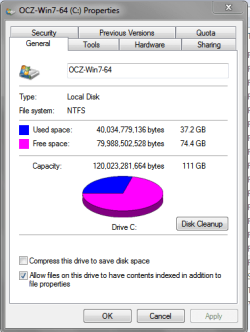
For the screen prints below, the OS was installed ~ 4 years ago, so maybe you won't see the type of space used that I do, if you reinstall the OS (and programs) every "x months".
As I have no problems with an "old" install, I see no need to re-install the OS, all programs, and re-configure everything else.
Anyway, for this Win 7 x64, the Windows folder alone is > 32 GB of space.
Total space for "C" is > 37 GB, and I install all programs on "C".

I remember reading an old SF thread about the min. recommended amount of space needed for Win 7, and I believe the "general consensus" was 60 GB.
If I can find that thread/discussion, I'll post the link.

I haven't run the "Cleanup" for the "new update" and I know i could clean ~ 7 GB of space from this, but how much can that really buy if someone has too small a "C" drive?

WSPSP01.PNG

WSPSP02.PNG
 

My Computer My Computer

At a glance

Multi-Boot W7_Pro_x64 W8.1_Pro_x64 W10_Pro_x6...AMD Athlon II x4 6206GB GSkill DDR2 800AMD 4670 GPU + AMD 4200 IGP
Computer type
PC/Desktop
Computer Manufacturer/Model Number
home built
OS
Multi-Boot W7_Pro_x64 W8.1_Pro_x64 W10_Pro_x64 +Linux_VMs +Chromium_VM
CPU
AMD Athlon II x4 620
Motherboard
Gigabyte GA-MA785G-UD3H
Memory
6GB GSkill DDR2 800
Graphics Card(s)
AMD 4670 GPU + AMD 4200 IGP
Sound Card
on board Realtek ALC889A
Monitor(s) Displays
RCA 40" LCD TV, Insignia 32" LCD TV, HP 15" LCD monitor
Screen Resolution
1680 x 1050
Hard Drives
OCZ Vertex 3 120GB,
Samsung F3 1TB (3),
Several others - WD, Seagate, Hitachi, ...
PSU
Corsair 500 W
Case
Rosewill mid tower
Cooling
CM 90mm rifle
Keyboard
Gyration wireless, Logitech wireless, Dell USB wired
Mouse
Gyration wireless, Logitech wireless, V7 USB wired
Internet Speed
Spectrum - 100Mbps D / 10Mbps U
Antivirus
Avast, MBAM3, EMET, WinPatrol
Browser
Pale Moon, Firefox, IE
Other Info
2 multi-boot PC's
Mainly HTPC/Office/Gen purpose (no gaming).
Trendnet USB KVM.
LG DVD burner/Blue Ray Player.
Tray system for removable SATA backup drives.

Not currently OCd, under-volted.
I use Hybrid sleep, rarely re-boot or shutdown.

Hauppauge HD-PVR, Avermedia PCIe TV Tuner, Hauppauge PCI TV Tuner.
Welcome to the forums! I believe just about everything "doable" has already been mentioned. I too am of the opinion that a newer larger ssd/C drive is called for. At least in the recent future anyway.
 

My Computer My Computer

At a glance

Windows 10x64 Build 1709Intel i7 7700HQ Kaby Lake16 GB DDR4 @2400Nvidia Geforce GTX 1060
Computer type
Laptop
Computer Manufacturer/Model Number
MSI GE72VR Apache Pro-416
OS
Windows 10x64 Build 1709
CPU
Intel i7 7700HQ Kaby Lake
Motherboard
Micro-Star Intl. MS-179B (U3C1)
Memory
16 GB DDR4 @2400
Graphics Card(s)
Nvidia Geforce GTX 1060
Screen Resolution
1920x1080 120Hz
Hard Drives
256 GB Nvme M.2 SSD

1TB HDD@7200
Cooling
Cooler Blast 4
Keyboard
Steel Series
Antivirus
Bit Defender Free
Browser
Edge
I did forget to mention that from what I see the OP has a laptop...
I have desktops, so adding more HDs/SSDs is not an issue for me...
For someone with a single bay Laptop, that's a consideration...
I don't know the costs of upgrading to a larger hybrid drive for a single bay laptop to try and get the best of both worlds in a single device, and I can appreciate that as an important consideration...
 

My Computer My Computer

At a glance

Multi-Boot W7_Pro_x64 W8.1_Pro_x64 W10_Pro_x6...AMD Athlon II x4 6206GB GSkill DDR2 800AMD 4670 GPU + AMD 4200 IGP
Computer type
PC/Desktop
Computer Manufacturer/Model Number
home built
OS
Multi-Boot W7_Pro_x64 W8.1_Pro_x64 W10_Pro_x64 +Linux_VMs +Chromium_VM
CPU
AMD Athlon II x4 620
Motherboard
Gigabyte GA-MA785G-UD3H
Memory
6GB GSkill DDR2 800
Graphics Card(s)
AMD 4670 GPU + AMD 4200 IGP
Sound Card
on board Realtek ALC889A
Monitor(s) Displays
RCA 40" LCD TV, Insignia 32" LCD TV, HP 15" LCD monitor
Screen Resolution
1680 x 1050
Hard Drives
OCZ Vertex 3 120GB,
Samsung F3 1TB (3),
Several others - WD, Seagate, Hitachi, ...
PSU
Corsair 500 W
Case
Rosewill mid tower
Cooling
CM 90mm rifle
Keyboard
Gyration wireless, Logitech wireless, Dell USB wired
Mouse
Gyration wireless, Logitech wireless, V7 USB wired
Internet Speed
Spectrum - 100Mbps D / 10Mbps U
Antivirus
Avast, MBAM3, EMET, WinPatrol
Browser
Pale Moon, Firefox, IE
Other Info
2 multi-boot PC's
Mainly HTPC/Office/Gen purpose (no gaming).
Trendnet USB KVM.
LG DVD burner/Blue Ray Player.
Tray system for removable SATA backup drives.

Not currently OCd, under-volted.
I use Hybrid sleep, rarely re-boot or shutdown.

Hauppauge HD-PVR, Avermedia PCIe TV Tuner, Hauppauge PCI TV Tuner.
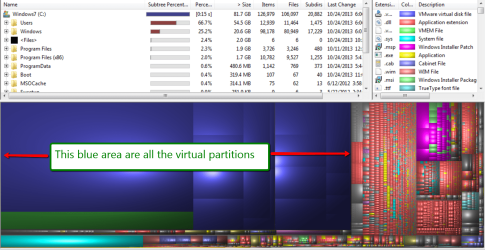
I don't understand why you guys think that Windows 7 needs all this space. I run 5 of my 6 systems on 60GB SSDs and all have more than 50% of free space. This system I am posting from needs 27GB for Windows 7. But this is an 'old' installation and the winsxs folder is well over 10GB. In a new installation this should be around 5GBs. I have also allocated 3GB for the shadowstorage. Windows 7 itself is only 20.6GBs. Below is a WinDirStat picture that shows the whole story.

The only reason I have a 120GB SSD on this system is because I have 3 virtual systems on the SSD (Windows8, and two Linux) which need another 53GBs. The main space eater is Windows 8. On the 60GB machines I run only 1 virtual Linux from the internal SSD and that fits easily. The other virtual systems I run from an external SSD.

To save space, I do, however, always get rid of the hiberfile and reduce the pagefile to 2GBs. My user data is on the spinners - either internal or external (for the laptop). On my wife's laptops she keeps her data on a USB stick. That makes it easy for her to carry her data between her 3 laptops (in 3 locations).
 

Attachments

  • 2013-10-24_2008.png
    2013-10-24_2008.png
    281.5 KB · Views: 3

My Computer My Computer

At a glance

Vista, Windows7, Mint Mate, Zorin, Windows 8from 1.6GHz Duo to i7
Computer Manufacturer/Model Number
HP, Dell, Gateway, Toshiba - 4 laptops and 2 desktops
OS
Vista, Windows7, Mint Mate, Zorin, Windows 8
CPU
from 1.6GHz Duo to i7
Monitor(s) Displays
2x HP w2207
Hard Drives
5x HDD, 7x SSD, 12x Externals
Keyboard
with trackball - no mices
Mouse
Trackball mice
Internet Speed
DSL 6000
:o:oWell.......... ummmmmmmmmm:o I have 7 and all my programs on a 128GB SSD, and still have 87GB free. So....... I guess in my case at least I just like having "extra". I DO have 2 drive bays in my laptop so my space is not as constrained as some peoples are. I just like having all the space I can get and with SSD's dropping in price as they are I just can't help but recommend larger. Guess in that respect I'm typically "American", bigger and more powerful IS better after all ..........:o;)
 

My Computer My Computer

At a glance

Windows 10x64 Build 1709Intel i7 7700HQ Kaby Lake16 GB DDR4 @2400Nvidia Geforce GTX 1060
Computer type
Laptop
Computer Manufacturer/Model Number
MSI GE72VR Apache Pro-416
OS
Windows 10x64 Build 1709
CPU
Intel i7 7700HQ Kaby Lake
Motherboard
Micro-Star Intl. MS-179B (U3C1)
Memory
16 GB DDR4 @2400
Graphics Card(s)
Nvidia Geforce GTX 1060
Screen Resolution
1920x1080 120Hz
Hard Drives
256 GB Nvme M.2 SSD

1TB HDD@7200
Cooling
Cooler Blast 4
Keyboard
Steel Series
Antivirus
Bit Defender Free
Browser
Edge
Back
Top