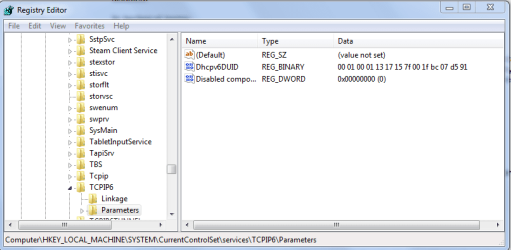
If there isn't a Disabled components key you need to create one by right clicking into the right pane and click on "new" then choose DWORD 32 bit value, then type in Disabled components and set the value to zero like in the picture below. This only ensures that IPv6 is enabled but it may not be the problem you have having.
It might also help to join the Homegroup from an wired eithernet connection instead of wireless then change back to wireless once you join the Homegroup.
You can also try delating the file below on both machines to fix this problem which might help you to join the Homegroup.
The fix seems to be Deleting the file idstore.sst under C:\windows\serviceProfiles\LocalService\AppData\Roaming\PeerNetworking
Make sure the time/date settings are in sync "the same" on both machines and that you have obtained all important Windows updates. You might also need to uninstall your A/V software or third party firewall if using any on both machines for the time being.
The following services may also need to be set to "automatic" in services.msc for Homegroup networking to function properly. To get there type services.msc then hit enter into where it says "search programs and files" lower left on the task bar.
Slowly scroll through the list and set to automatic the following services>, DNS Client, Function Discovery Resource Publication, SSDP Discovery, and UPnP Device Host.