Hello, all.
I'm trying to connect a new computer to my homegroup. They are all Windows 7. The original Computer I created the homegroup on is Win 7 Home Premium, the Laptop I connected a year ago with no problem is a Win 7 Pro, they are both Dell Inspiron, and this one causing me the trouble is a Win 7 Pro Dell Optiplex refurb. It's on the LAN via WiFi - no problems getting online. Then when I went to set it up with the homegroup it says my other computer has created a homegroup and invites me to join, but when I click join and enter the password I get the error msg "Windows cannot set up a homegroup on this computer."
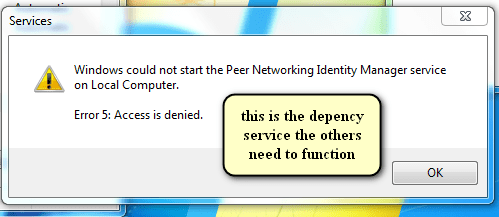
So I go to Network and Sharing and find Network Discovery is off. turned it on, but it kept turning itself off. I found out I had to check if certain services were active and how to start them if they were not. One of these required services, 'Function Discovery Resource Publication' wouldn't start - it took me a whole day to figure out how to resolve that error, but once I did, I was able to set Network Discovery on, but I still couldn't connect to the homegroup. More searching and I found I needed Peer Networking Name Resolution and Peer Networking Grouping services, but I can't start those because 'error 1068 dependency service or group failed to start'. I determined the dependency service for these is Peer Networking Identity Manager so I tried to start that but I got "could not start Peer Networking Identity Manager service on Local Computer error 5: Access is denied.
I followed advice at another forum to delete contents of PeerNetworking folder. That didn't help. Other advice on that forum suggests deleting the ...\idstore.sst from that folder, but I had already deleted all the files from PeerNetworking before I found that advice. I don't even know if that file was in there, so I don't know if that by itself would have worked or not.
I have been at this for days, and finally I am stumped with these Peer Networking services. I am the owner of the machine and I'm logged in with the Administrator account. I can't figure out why I should have access denied to this basic service, or how to fix it.
I'm trying to connect a new computer to my homegroup. They are all Windows 7. The original Computer I created the homegroup on is Win 7 Home Premium, the Laptop I connected a year ago with no problem is a Win 7 Pro, they are both Dell Inspiron, and this one causing me the trouble is a Win 7 Pro Dell Optiplex refurb. It's on the LAN via WiFi - no problems getting online. Then when I went to set it up with the homegroup it says my other computer has created a homegroup and invites me to join, but when I click join and enter the password I get the error msg "Windows cannot set up a homegroup on this computer."
So I go to Network and Sharing and find Network Discovery is off. turned it on, but it kept turning itself off. I found out I had to check if certain services were active and how to start them if they were not. One of these required services, 'Function Discovery Resource Publication' wouldn't start - it took me a whole day to figure out how to resolve that error, but once I did, I was able to set Network Discovery on, but I still couldn't connect to the homegroup. More searching and I found I needed Peer Networking Name Resolution and Peer Networking Grouping services, but I can't start those because 'error 1068 dependency service or group failed to start'. I determined the dependency service for these is Peer Networking Identity Manager so I tried to start that but I got "could not start Peer Networking Identity Manager service on Local Computer error 5: Access is denied.
I followed advice at another forum to delete contents of PeerNetworking folder. That didn't help. Other advice on that forum suggests deleting the ...\idstore.sst from that folder, but I had already deleted all the files from PeerNetworking before I found that advice. I don't even know if that file was in there, so I don't know if that by itself would have worked or not.
I have been at this for days, and finally I am stumped with these Peer Networking services. I am the owner of the machine and I'm logged in with the Administrator account. I can't figure out why I should have access denied to this basic service, or how to fix it.
My Computer
At a glance
Windows 7 Pro x64Intel i5 - 347016 GBIntel(R) HD Graphics
- Computer type
- PC/Desktop
- Computer Manufacturer/Model Number
- Dell Optiplex 7010
- OS
- Windows 7 Pro x64
- CPU
- Intel i5 - 3470
- Motherboard
- Dell Inc. 0WR7PY
- Memory
- 16 GB
- Graphics Card(s)
- Intel(R) HD Graphics
- Sound Card
- Realtek High Definition Audio
- Monitor(s) Displays
- Insignia 50" Flat Screen TV
- Screen Resolution
- 1080p
- Hard Drives
- 1863 GB HITACHI HUA723020ALA640 ATA Device (SATA)
- Keyboard
- Logitech K800
- Mouse
- Logitech M325
- Internet Speed
- 25 Mbps down 5 Mbps up
- Antivirus
- MalwareBytes Premium
- Browser
- Firefox
- Other Info
- I am the rightful King of France