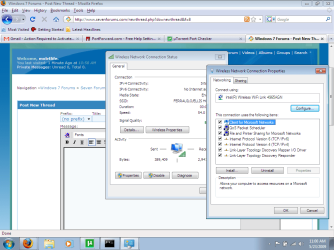
Cant get into wireless properties tab!! Please help!!

mob4life

New member
Local time
3:47 AM
Messages
18
moz-screenshot.jpg
moz-screenshot-1.jpg
moz-screenshot-2.jpg
moz-screenshot-3.jpg
hey im having a major issue that i know someone can fix!!

Please help!!

i just need to get into the properties tab that is grayed out. here is a screen shot.


what can i do to get access to this??
 

Attachments

  • error.png
    error.png
    58.7 KB · Views: 1,319

My Computer

OS
win7
i still cant figure this out. i dont know if its something to do with administrator or what. i am the only person that uses this computer so i really dont know what else to do.
 

My Computer

OS
win7
hello mob4life...

It's nothing you're doing wrong, this option is just not available.
In Windows 7 (and probably on Vista too, or even earlier versions) the Properties option is not available for "Client for Microsoft Networks"... What exactly are you trying to change? no matter what it is, it's not editable from in there...Remember, workgroup and domain settings are not being set through there anymore...
 

My Computer

Computer Manufacturer/Model Number
ENIAC
OS
Windows 7 RC 7100 32bit/64bit
CPU
Intel Core2Duo E4500 2.20 GHz
Motherboard
ASUS P5LD2-X/1333
Memory
2x1GB Kinsgston DDR2 800MHz
Graphics Card(s)
Nvidia 8500GT
Sound Card
Onboard High Definition Audio Device
Monitor(s) Displays
Sony Bravia 42"
Case
LINKW 2222
Cooling
Standard Intel
Keyboard
Some cheap one
Mouse
Microsoft Intellimouse something
Internet Speed
24MBps ADSL
Hi mob4life, welcome to the forums.

The 'Client for Microsoft networks' is not a changeable device. Only the IPv4 & IPv6 can be changed.
 

My Computer

Computer Manufacturer/Model Number
Compaq Desktop
OS
Windows 7 Ultimate x64
CPU
AMD Sempron Dual Core
Memory
3GB
Graphics Card(s)
NVIDIA GeForce 6150SE nForce 430
Screen Resolution
1024x768
Hard Drives
150GB Sata
Thanks for the reply. Im trying to forward ports and the step im on requires me to set up a static IP address. im following instructions posted here http://www. portforward.com/networking/static-vista.htm

i put 2 spaces after www.

is there another way to do that?
 

My Computer

OS
win7
In order to setup a static IP, you need to open the IPV4 properties , not the Client for Microsoft Networks one.

Select Internet Protocol Version 4 TCP/IP , click on properties and there you should be able to follow the guide you have.
 

My Computer

Computer Manufacturer/Model Number
ENIAC
OS
Windows 7 RC 7100 32bit/64bit
CPU
Intel Core2Duo E4500 2.20 GHz
Motherboard
ASUS P5LD2-X/1333
Memory
2x1GB Kinsgston DDR2 800MHz
Graphics Card(s)
Nvidia 8500GT
Sound Card
Onboard High Definition Audio Device
Monitor(s) Displays
Sony Bravia 42"
Case
LINKW 2222
Cooling
Standard Intel
Keyboard
Some cheap one
Mouse
Microsoft Intellimouse something
Internet Speed
24MBps ADSL
You can clearly see that they mean the IPv4 from the screenshot in step #10, they just leave out that small detail in step #9.

It should read 'Highlight Internet Protocol Version 4 (TCP/IPv4) then click the Properties button blah blah'

It's clearly their fault :p

update, actually the guide is correct but they need to word it better, that's why it's a free guide LOL
 

My Computer

Computer Manufacturer/Model Number
Compaq Desktop
OS
Windows 7 Ultimate x64
CPU
AMD Sempron Dual Core
Memory
3GB
Graphics Card(s)
NVIDIA GeForce 6150SE nForce 430
Screen Resolution
1024x768
Hard Drives
150GB Sata
ok so i followed all of the steps then i went back to the port forwarding part and now its saying enter the static IP address u just made 192.168.2.__ (__ represents where im supposed to put my static IP) I went back to cmd and ran ipconfig/all but i didnt see static IP. where can i find that? sorry if this is no longer related to win7 :(
 

My Computer

OS
win7
Back
Top