Can't get my headset mic to work in my newish setup

dpcrowley

New member
Local time
2:32 AM
Messages
25
Hi guys,

I have another issue that I could really use some help with. I have a headset for gaming that I have been using for a while. When I plug it into my computer the sound works but the microphone does not. I have recently downloaded the latest version of realtek audio drivers, I have checked this headset on another windows 7 64 bit machine and the microphone works fine, I have made sure that it is plugged into the right ports and everything and that it is not muted in the program that I am trying to use it in. Is there any other checks you guys could guide me to so I can get this thing up and running.

Thanks again your help is always greatly appreciated
 

My Computer My Computer

At a glance

Windows 7 Professions 64-bit
OS
Windows 7 Professions 64-bit
In Control Panel, go to the sound group. There should be three tabs in that window: Playback, Recording, and Sounds. What devices are listed in the Recording tab, and is there anything that looks like an error notification? Such as the words "currently unavailable" or a red X or something like that? Note any changes that occur when you plug in your headset and let me know.
 

My Computer My Computer

At a glance

MS Windows 7 Ultimate 64-bit SP1Intel Mobile Core 2 Duo T6400 @ 2.00GHz, Penr...4.00 GB Dual-Channel DDR2 @ 399MHz (6-6-6-18)Mobile Intel(R) 4 Series Express Chipset Fami...
Computer Manufacturer/Model Number
Dell Inspiron 1545
OS
MS Windows 7 Ultimate 64-bit SP1
CPU
Intel Mobile Core 2 Duo T6400 @ 2.00GHz, Penryn 45nm
Motherboard
Dell Inc. 0G848F (Microprocessor)
Memory
4.00 GB Dual-Channel DDR2 @ 399MHz (6-6-6-18)
Graphics Card(s)
Mobile Intel(R) 4 Series Express Chipset Family (Integrated)
Sound Card
IDT High Definition Audio CODEC
Monitor(s) Displays
Generic PnP Monitor (DPMS) (1366x768@60Hz)
Screen Resolution
1366x768 (16:9)
Hard Drives
2TB External, with ~1TB partition booting OS
PSU
Laptop
Case
Laptop
Cooling
Laptop vent
Keyboard
Laptop
Mouse
Touchpad, and Logitech wireless USB mouse.
Internet Speed
~150 kb/s
Other Info
I'm running Windows COMPLETELY off a 2TB portable hard drive (since my 300GB internal drive just isn't big enough). It works exactly the same as it would normally, only it has to be constantly connected to my USB port. Obviously. I'll show you how to do it, if you ask! It's pretty cool.

Specs via Speccy
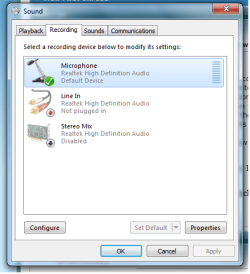
That is what that tab looks like, When I unplug my microphone, the tab says that the microphone is not plugged in, so it is recognizing my mic i'm guessing, but I can't get it to work in sound recorder or any program I am using
 

Attachments

  • Untitled.png
    Untitled.png
    20 KB · Views: 81

My Computer My Computer

At a glance

Windows 7 Professions 64-bit
OS
Windows 7 Professions 64-bit
i think if you are trying to record sound ,then you need to have stereo mix enabled ,try it and see you can always disable it again if it doesnt work for you.
 

My Computer My Computer

At a glance

Microsoft Windows 7 Home Premium 64-bit 7600IIx4 amd athelon 635 processor2x2gbati radeon HD 5450
Computer Manufacturer/Model Number
Hewlett packard/p6512uk
OS
Microsoft Windows 7 Home Premium 64-bit 7600
CPU
IIx4 amd athelon 635 processor
Motherboard
FOXCONN 2AA9
Memory
2x2gb
Graphics Card(s)
ati radeon HD 5450
Sound Card
(1) Realtek High Definition Audio (2) AMD High Definition
Monitor(s) Displays
samsung lcd tv 32"
Screen Resolution
1360x 768
Hard Drives
(1) WDC WD10 01FAES-60Z2A0 SATA Disk Device (2) Maxtor OneTouch USB Device (3) ST310003 33AS USB Device (4) WD My Book 1111 USB Device
PSU
?
Cooling
air!
Keyboard
wireless hp
Mouse
wireless Hp,optical
Internet Speed
1.10mb/s
Antivirus
MSE
Browser
Firefox
I don't think that changed anything. When I enabled it I closed it down and tried to record sound and nothing happened again
 

My Computer My Computer

At a glance

Windows 7 Professions 64-bit
OS
Windows 7 Professions 64-bit
ok, im not sure then, i would disable it again and wait for someone who knows more, fireberd will probably be able to give you an informed answer.
good luck
 

My Computer My Computer

At a glance

Microsoft Windows 7 Home Premium 64-bit 7600IIx4 amd athelon 635 processor2x2gbati radeon HD 5450
Computer Manufacturer/Model Number
Hewlett packard/p6512uk
OS
Microsoft Windows 7 Home Premium 64-bit 7600
CPU
IIx4 amd athelon 635 processor
Motherboard
FOXCONN 2AA9
Memory
2x2gb
Graphics Card(s)
ati radeon HD 5450
Sound Card
(1) Realtek High Definition Audio (2) AMD High Definition
Monitor(s) Displays
samsung lcd tv 32"
Screen Resolution
1360x 768
Hard Drives
(1) WDC WD10 01FAES-60Z2A0 SATA Disk Device (2) Maxtor OneTouch USB Device (3) ST310003 33AS USB Device (4) WD My Book 1111 USB Device
PSU
?
Cooling
air!
Keyboard
wireless hp
Mouse
wireless Hp,optical
Internet Speed
1.10mb/s
Antivirus
MSE
Browser
Firefox
What program are you trying to use to record sound in?
 

My Computer My Computer

At a glance

MS Windows 7 Ultimate 64-bit SP1Intel Mobile Core 2 Duo T6400 @ 2.00GHz, Penr...4.00 GB Dual-Channel DDR2 @ 399MHz (6-6-6-18)Mobile Intel(R) 4 Series Express Chipset Fami...
Computer Manufacturer/Model Number
Dell Inspiron 1545
OS
MS Windows 7 Ultimate 64-bit SP1
CPU
Intel Mobile Core 2 Duo T6400 @ 2.00GHz, Penryn 45nm
Motherboard
Dell Inc. 0G848F (Microprocessor)
Memory
4.00 GB Dual-Channel DDR2 @ 399MHz (6-6-6-18)
Graphics Card(s)
Mobile Intel(R) 4 Series Express Chipset Family (Integrated)
Sound Card
IDT High Definition Audio CODEC
Monitor(s) Displays
Generic PnP Monitor (DPMS) (1366x768@60Hz)
Screen Resolution
1366x768 (16:9)
Hard Drives
2TB External, with ~1TB partition booting OS
PSU
Laptop
Case
Laptop
Cooling
Laptop vent
Keyboard
Laptop
Mouse
Touchpad, and Logitech wireless USB mouse.
Internet Speed
~150 kb/s
Other Info
I'm running Windows COMPLETELY off a 2TB portable hard drive (since my 300GB internal drive just isn't big enough). It works exactly the same as it would normally, only it has to be constantly connected to my USB port. Obviously. I'll show you how to do it, if you ask! It's pretty cool.

Specs via Speccy
I have been trying to get it to work in ventrilo or in sound recorder. Also trying to set up the mic in speech recognition but there is no response there
 

My Computer My Computer

At a glance

Windows 7 Professions 64-bit
OS
Windows 7 Professions 64-bit
Try this tutorial.> http://www.sevenforums.com/tutorials/472-troubleshooting.html

You want to go to Step#4 find the listing "Recording Audio". Double click to "Start".
If your using a desktop PC with front and rear input you will be given a choice to select the input you want to use front or rear.
It will also look for other problems

I ran into this yesterday my first time using a mic. I had it plugged in back but the front jack was "default". Switched it to rear and all is well. :D

Now it works recording or Skype.
Hope that helps.
 

My Computer My Computer

At a glance

Windows7 Pro 64bit SP-1; Windows XP Pro 32bitIntel Core i7-870 Lynnfield 2.93GHz LGA 1156 ...8GB@1400MHz Crucial Ballistix DDR3-1600 4x2GBASUS ENGTX460 DirectCU/2DI/1GD5 1GB 256-bit G...
Computer Manufacturer/Model Number
Hopalong/ Godzilla
OS
Windows7 Pro 64bit SP-1; Windows XP Pro 32bit
CPU
Intel Core i7-870 Lynnfield 2.93GHz LGA 1156 95W Quad-Core
Motherboard
ASUS P7P55D-E PRO
Memory
8GB@1400MHz Crucial Ballistix DDR3-1600 4x2GB
Graphics Card(s)
ASUS ENGTX460 DirectCU/2DI/1GD5 1GB 256-bit GDDR5
Sound Card
VIA Onboard
Monitor(s) Displays
Asus VS248H-P 24"; Samsung SyncMaster 941BW 19"ws
Screen Resolution
1920x1080; 1440x900
Hard Drives
Samsung 830 120GB SSD
Intel 320 120GB SSD
Western Digital Caviar Black WD7501AALS 750GB 7200 RPM SATA 3.0Gb/s
Western Digital Caviar Black WD6401AALS 640GB 7200 RPM SATA 3.0Gb/s
PSU
COOLER MASTER Silent Pro RS850-AMBAJ3-US 850W Modular
Case
COOLER MASTER HAF 932 RC-932-KKN5-GP Black
Cooling
Scythe "Mugen-2 Rev.B" (2 ScytheKaze-Jyuni PWM fans)
Keyboard
Logitech K-320
Mouse
Kensington
Antivirus
Avast Inernet Suite
Browser
IE 9 ; Chrome
The troubleshoot ends after a few seconds saying that it could not identify the problem.
 

My Computer My Computer

At a glance

Windows 7 Professions 64-bit
OS
Windows 7 Professions 64-bit
I'm not sure this will help but it is all I have at the moment.

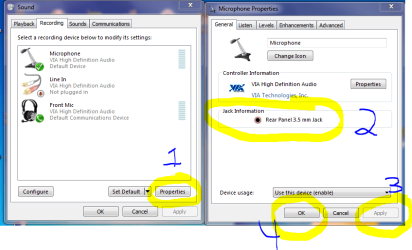
Open the Sound window as below click the Properties button (1).

In the right side of the pic where marked (2) it should show mic inputs. As you can see on mine the rear is enabled.
If the apply button is not greyed out as in my Snip then highlight the jack you wish to use if more than one is shown then click "Apply" then "Okay".

This may be of no help but I provided what I could find. :confused:
Mike
 

Attachments

  • Mic.PNG
    Mic.PNG
    32.4 KB · Views: 178

My Computer My Computer

At a glance

Windows7 Pro 64bit SP-1; Windows XP Pro 32bitIntel Core i7-870 Lynnfield 2.93GHz LGA 1156 ...8GB@1400MHz Crucial Ballistix DDR3-1600 4x2GBASUS ENGTX460 DirectCU/2DI/1GD5 1GB 256-bit G...
Computer Manufacturer/Model Number
Hopalong/ Godzilla
OS
Windows7 Pro 64bit SP-1; Windows XP Pro 32bit
CPU
Intel Core i7-870 Lynnfield 2.93GHz LGA 1156 95W Quad-Core
Motherboard
ASUS P7P55D-E PRO
Memory
8GB@1400MHz Crucial Ballistix DDR3-1600 4x2GB
Graphics Card(s)
ASUS ENGTX460 DirectCU/2DI/1GD5 1GB 256-bit GDDR5
Sound Card
VIA Onboard
Monitor(s) Displays
Asus VS248H-P 24"; Samsung SyncMaster 941BW 19"ws
Screen Resolution
1920x1080; 1440x900
Hard Drives
Samsung 830 120GB SSD
Intel 320 120GB SSD
Western Digital Caviar Black WD7501AALS 750GB 7200 RPM SATA 3.0Gb/s
Western Digital Caviar Black WD6401AALS 640GB 7200 RPM SATA 3.0Gb/s
PSU
COOLER MASTER Silent Pro RS850-AMBAJ3-US 850W Modular
Case
COOLER MASTER HAF 932 RC-932-KKN5-GP Black
Cooling
Scythe "Mugen-2 Rev.B" (2 ScytheKaze-Jyuni PWM fans)
Keyboard
Logitech K-320
Mouse
Kensington
Antivirus
Avast Inernet Suite
Browser
IE 9 ; Chrome
It is showing the port that I have the microphone plugged into and that's the only port that is there. This problem is really bugging the hell out of me, it seems like it could be such an easy fix, I just don't know where to look. Thanks for all your guy's help it is appreciated.
 

My Computer My Computer

At a glance

Windows 7 Professions 64-bit
OS
Windows 7 Professions 64-bit
I don't have a 'front mic' though I just have the microphone set up there. Do I have to set up something like that since I am using a headset?
 

My Computer My Computer

At a glance

Windows 7 Professions 64-bit
OS
Windows 7 Professions 64-bit
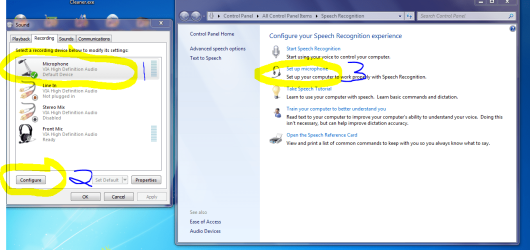
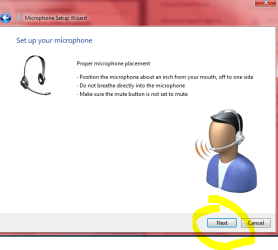
This should work to test your microphone and see if it is being detected by Windows 7.

First picture left side highlight your microphone . Then click configure marked #2
First picture right side window will open. Click #3 "Set up microphone".

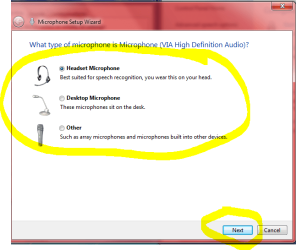
Middle picture of mics will open. I'm not sure which to choose but I would select
"Headset" to try first. That would be the simplest choice and should be the right one. Then click "Next" at bottom of window.

Right picture read then click "Next".

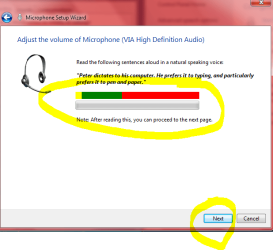
Bottom left picture. This is the test page.
As you speak into the mic the silver bar should turn yellow-green-red according to volume of the mic input.
It will look like the yellow-green-red bar above the silver one as you speak.

I hope that at least will tell you the mic works and is recognized.
If it works here then it may be the recording software you are trying to use is not detecting the mic not Windows 7.

I'm out of info and help again. Give this a try and let us know the results.
Mike
 

Attachments

  • Mic2.PNG
    Mic2.PNG
    82.6 KB · Views: 121
  • Mic3.PNG
    Mic3.PNG
    23.3 KB · Views: 49
  • Mic4.PNG
    Mic4.PNG
    27.1 KB · Views: 47
  • Mic5.PNG
    Mic5.PNG
    20.6 KB · Views: 44

My Computer My Computer

At a glance

Windows7 Pro 64bit SP-1; Windows XP Pro 32bitIntel Core i7-870 Lynnfield 2.93GHz LGA 1156 ...8GB@1400MHz Crucial Ballistix DDR3-1600 4x2GBASUS ENGTX460 DirectCU/2DI/1GD5 1GB 256-bit G...
Computer Manufacturer/Model Number
Hopalong/ Godzilla
OS
Windows7 Pro 64bit SP-1; Windows XP Pro 32bit
CPU
Intel Core i7-870 Lynnfield 2.93GHz LGA 1156 95W Quad-Core
Motherboard
ASUS P7P55D-E PRO
Memory
8GB@1400MHz Crucial Ballistix DDR3-1600 4x2GB
Graphics Card(s)
ASUS ENGTX460 DirectCU/2DI/1GD5 1GB 256-bit GDDR5
Sound Card
VIA Onboard
Monitor(s) Displays
Asus VS248H-P 24"; Samsung SyncMaster 941BW 19"ws
Screen Resolution
1920x1080; 1440x900
Hard Drives
Samsung 830 120GB SSD
Intel 320 120GB SSD
Western Digital Caviar Black WD7501AALS 750GB 7200 RPM SATA 3.0Gb/s
Western Digital Caviar Black WD6401AALS 640GB 7200 RPM SATA 3.0Gb/s
PSU
COOLER MASTER Silent Pro RS850-AMBAJ3-US 850W Modular
Case
COOLER MASTER HAF 932 RC-932-KKN5-GP Black
Cooling
Scythe "Mugen-2 Rev.B" (2 ScytheKaze-Jyuni PWM fans)
Keyboard
Logitech K-320
Mouse
Kensington
Antivirus
Avast Inernet Suite
Browser
IE 9 ; Chrome
I have already tried this unfortunately, and when I get to the bottom right picture my mic cant pick up any sort of sound im making. Thanks for your help man, unfortunately I guess I'll just have to have my laptop setup for ventrilo with my mic and just game on my desktop. THANKS EVERYONE ALWAYS GREATLY APPRECIATED!
 

My Computer My Computer

At a glance

Windows 7 Professions 64-bit
OS
Windows 7 Professions 64-bit
I'm just not sure of what the problem is. :(

Sorry I couldn't be of more help.
Mike
 

My Computer My Computer

At a glance

Windows7 Pro 64bit SP-1; Windows XP Pro 32bitIntel Core i7-870 Lynnfield 2.93GHz LGA 1156 ...8GB@1400MHz Crucial Ballistix DDR3-1600 4x2GBASUS ENGTX460 DirectCU/2DI/1GD5 1GB 256-bit G...
Computer Manufacturer/Model Number
Hopalong/ Godzilla
OS
Windows7 Pro 64bit SP-1; Windows XP Pro 32bit
CPU
Intel Core i7-870 Lynnfield 2.93GHz LGA 1156 95W Quad-Core
Motherboard
ASUS P7P55D-E PRO
Memory
8GB@1400MHz Crucial Ballistix DDR3-1600 4x2GB
Graphics Card(s)
ASUS ENGTX460 DirectCU/2DI/1GD5 1GB 256-bit GDDR5
Sound Card
VIA Onboard
Monitor(s) Displays
Asus VS248H-P 24"; Samsung SyncMaster 941BW 19"ws
Screen Resolution
1920x1080; 1440x900
Hard Drives
Samsung 830 120GB SSD
Intel 320 120GB SSD
Western Digital Caviar Black WD7501AALS 750GB 7200 RPM SATA 3.0Gb/s
Western Digital Caviar Black WD6401AALS 640GB 7200 RPM SATA 3.0Gb/s
PSU
COOLER MASTER Silent Pro RS850-AMBAJ3-US 850W Modular
Case
COOLER MASTER HAF 932 RC-932-KKN5-GP Black
Cooling
Scythe "Mugen-2 Rev.B" (2 ScytheKaze-Jyuni PWM fans)
Keyboard
Logitech K-320
Mouse
Kensington
Antivirus
Avast Inernet Suite
Browser
IE 9 ; Chrome
Crowley,

Have you found a fix to your problem? I am having THE EXACT same issue...using laptop with vent while I game LOL. I have a Gigabyte GA-Z77-D3H motherboard and have the most recent drivers installed (new drivers just came out thought that would fix it). Wondering what you have. I can get sound through my headset, but the mic won't work. It doesn't pick any sound up, went through the same process you did. I've tried multiple mics that have worked on other win7 computers.
 

My Computer My Computer

At a glance

64
OS
64
I had the exact same problem. The solution turned out to be relatively simple. I just right clicked on the volume control on the task bar, then selected Recording Devices. Select the properties of the device you are using, and then move to the Custom bar. Because I use a sound card, and my mic is plugged into the back, I had to un-check the Front Speaker option, and it worked perfectly.
 

My Computer My Computer

At a glance

Windows 7 x64
Computer type
PC/Desktop
Computer Manufacturer/Model Number
Custom Build
OS
Windows 7 x64
Back
Top