Can't get my laptop to boot up.

danmat72

New member
Local time
1:30 AM
Messages
6
Mcafee showed it stopped a trojan. A few seconds later my laptop crashed. I restarted and it stop halfway goes into startup repair, says it cannot repair this computer automatically. I tried system recovery and after attempting to restore to an earlier point in time, it came back with an error message that system restore stopped midway. Now it states there are no prior restore points when I had at least five.

How can I fix this without using recovery management and saving my files and documents.
 

My Computer My Computer

At a glance

windows seven 64bit
Computer Manufacturer/Model Number
Acer aspire 5250-0468
OS
windows seven 64bit
Hello and welcome danmat ave you tried a safe mode boot yet? > power on and tap the F8 key.

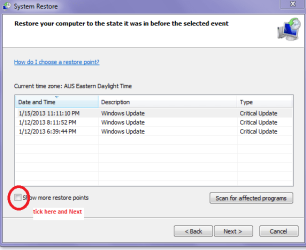
Then see if you can get to system restore in there. In the system restore window there is a little box to tick for other restore points but i am first guessing you know this already?
 

Attachments

  • SYSRES.PNG
    SYSRES.PNG
    13 KB · Views: 7

My Computer My Computer

At a glance

Desk1 7 Home Prem / Desk2 10 Pro / Main lap A...Desk1 i5 3750K / Laptop i7 GTX 860M / Desk2 i...Desk1 8GB (1866) / Desk2 16GB (1333) / Laptop...Desk 1& 2NVidia GTX 650 & Laptops on board Intel
Computer type
PC/Desktop
Computer Manufacturer/Model Number
Own build (new) Desk1 / Asus ROG Win 7 / Desk2 1st build
OS
Desk1 7 Home Prem / Desk2 10 Pro / Main lap Asus ROG 10 Pro 2 laptop Toshiba 7 Pro Asus P2520 7 & 10
CPU
Desk1 i5 3750K / Laptop i7 GTX 860M / Desk2 i5 2500
Motherboard
Desk1 Asus P877-V / Desk2 Gigabyte H67 UD3H / Laptop ?
Memory
Desk1 8GB (1866) / Desk2 16GB (1333) / Laptop 8Gb DDR3
Graphics Card(s)
Desk 1& 2NVidia GTX 650 & Laptops on board Intel
Sound Card
Desk 1 & 2 -XONAR DG Realtek High Def audio Laptop
Monitor(s) Displays
Desk 1 Benq HD 2450 / Desk2 Philips 24" / Laptop 17.5"
Screen Resolution
1920x1080 D1 & D2 & Laptop 1
Hard Drives
Desk1 Samsung 120GB 830 SSD
Asus ROG 256GB 850 Pro SSD
Desk2 Samsung 840 256 SSD
Toshiba 120GB EVO
PSU
Desk 1 Corsair HX 1050/ Laptop ? / Desk 2 Corsair HX 650
Case
Desk 1 Cooler HAF XM ? Toshiba laptop / Desk2 Coolermaster
Cooling
Fans on all Desk1 -2 Desk2 - all Coolermasters 5 Laptop ?
Keyboard
Desk 1 MS Sidewinder X6 Desk 2 MS Sidewinder X 4
Mouse
Desk 1&2 - Gigabyte MS 900 gamer - laptop - Logitec wireless
Internet Speed
ADSL2+
Other Info
One other Desktop (tester) and spare Toshba laptop both with SSD's
Running Kaspersky 2016 ISS on all machines config'd identically
Logitec audio stereo systems on each machine (x3)
Canon MG5250MFC
Router/modem TP-Link running WPA2SK
Thanks for responding ICit2lol.

Yes I already tried that. At first it would give me restore points but now it says there are no restore points at all.
 

My Computer My Computer

At a glance

windows seven 64bit
Computer Manufacturer/Model Number
Acer aspire 5250-0468
OS
windows seven 64bit
Thanks for responding ICit2lol.

Yes I already tried that. At first it would give me restore points but now it says there are no restore points at all.
Well danmat to start with mate just lets try a scannow > Start > type in cmd > right clcik on the command prompt window > run as admin > type sfc /scannow and > Enter

http://www.sevenforums.com/tutorials/1538-sfc-scannow-command-system-file-checker.html

If you cannot do this in a normal boot it will run in safe mode.

OOPs menat t sya yes there is a space between sfc and /scannow.
 
Last edited by a moderator:

My Computer My Computer

At a glance

Desk1 7 Home Prem / Desk2 10 Pro / Main lap A...Desk1 i5 3750K / Laptop i7 GTX 860M / Desk2 i...Desk1 8GB (1866) / Desk2 16GB (1333) / Laptop...Desk 1& 2NVidia GTX 650 & Laptops on board Intel
Computer type
PC/Desktop
Computer Manufacturer/Model Number
Own build (new) Desk1 / Asus ROG Win 7 / Desk2 1st build
OS
Desk1 7 Home Prem / Desk2 10 Pro / Main lap Asus ROG 10 Pro 2 laptop Toshiba 7 Pro Asus P2520 7 & 10
CPU
Desk1 i5 3750K / Laptop i7 GTX 860M / Desk2 i5 2500
Motherboard
Desk1 Asus P877-V / Desk2 Gigabyte H67 UD3H / Laptop ?
Memory
Desk1 8GB (1866) / Desk2 16GB (1333) / Laptop 8Gb DDR3
Graphics Card(s)
Desk 1& 2NVidia GTX 650 & Laptops on board Intel
Sound Card
Desk 1 & 2 -XONAR DG Realtek High Def audio Laptop
Monitor(s) Displays
Desk 1 Benq HD 2450 / Desk2 Philips 24" / Laptop 17.5"
Screen Resolution
1920x1080 D1 & D2 & Laptop 1
Hard Drives
Desk1 Samsung 120GB 830 SSD
Asus ROG 256GB 850 Pro SSD
Desk2 Samsung 840 256 SSD
Toshiba 120GB EVO
PSU
Desk 1 Corsair HX 1050/ Laptop ? / Desk 2 Corsair HX 650
Case
Desk 1 Cooler HAF XM ? Toshiba laptop / Desk2 Coolermaster
Cooling
Fans on all Desk1 -2 Desk2 - all Coolermasters 5 Laptop ?
Keyboard
Desk 1 MS Sidewinder X6 Desk 2 MS Sidewinder X 4
Mouse
Desk 1&2 - Gigabyte MS 900 gamer - laptop - Logitec wireless
Internet Speed
ADSL2+
Other Info
One other Desktop (tester) and spare Toshba laptop both with SSD's
Running Kaspersky 2016 ISS on all machines config'd identically
Logitec audio stereo systems on each machine (x3)
Canon MG5250MFC
Router/modem TP-Link running WPA2SK
Sorry for the delay. I was able to get to the command prompt through the system recovery options.

However, it says it is an Administrator: X:\windows\system32\cmd.exe

I typed in sfc/scannow and it states "there is a system repair which requires reboot to complete. Restart windows and run sfc again.

Everytime the laptop starts to reboot it stops on the starting windows screen cuts off and tries to reboot again stopping at the same place and then going into system recovery. Hence where I am stuck at.
 

My Computer My Computer

At a glance

windows seven 64bit
Computer Manufacturer/Model Number
Acer aspire 5250-0468
OS
windows seven 64bit
Sorry for the delay. I was able to get to the command prompt through the system recovery options.

However, it says it is an Administrator: X:\windows\system32\cmd.exe

I typed in sfc/scannow and it states "there is a system repair which requires reboot to complete. Restart windows and run sfc again.

Everytime the laptop starts to reboot it stops on the starting windows screen cuts off and tries to reboot again stopping at the same place and then going into system recovery. Hence where I am stuck at.
Now Dan I think what you have done is to type that sfc /scannow as one word if I read your post right it needs a spacebar hit between the sfc and /scannow To try the safe mode way > power on and tap the F8 key it should download the drivers an then go into safe mode. Then try the sfc

Another way of doing that is to just power off the mains and take battery out (for laptops and then when you power back on you should get a list of options asking whether you want to start windows normally > NO > arrow up to the safe mode and hit Enter the same thing should happen. But this is not really the way to do it only in times of dire need like the machine will not shut off at all.

Just as a matter of interest have you backed up any data or the system before now? because if we have to reinstall you will lose the data.

We will get there Dan just be patient I know that it looks bad but from my own early experiences I always though the worst ;)
 

My Computer My Computer

At a glance

Desk1 7 Home Prem / Desk2 10 Pro / Main lap A...Desk1 i5 3750K / Laptop i7 GTX 860M / Desk2 i...Desk1 8GB (1866) / Desk2 16GB (1333) / Laptop...Desk 1& 2NVidia GTX 650 & Laptops on board Intel
Computer type
PC/Desktop
Computer Manufacturer/Model Number
Own build (new) Desk1 / Asus ROG Win 7 / Desk2 1st build
OS
Desk1 7 Home Prem / Desk2 10 Pro / Main lap Asus ROG 10 Pro 2 laptop Toshiba 7 Pro Asus P2520 7 & 10
CPU
Desk1 i5 3750K / Laptop i7 GTX 860M / Desk2 i5 2500
Motherboard
Desk1 Asus P877-V / Desk2 Gigabyte H67 UD3H / Laptop ?
Memory
Desk1 8GB (1866) / Desk2 16GB (1333) / Laptop 8Gb DDR3
Graphics Card(s)
Desk 1& 2NVidia GTX 650 & Laptops on board Intel
Sound Card
Desk 1 & 2 -XONAR DG Realtek High Def audio Laptop
Monitor(s) Displays
Desk 1 Benq HD 2450 / Desk2 Philips 24" / Laptop 17.5"
Screen Resolution
1920x1080 D1 & D2 & Laptop 1
Hard Drives
Desk1 Samsung 120GB 830 SSD
Asus ROG 256GB 850 Pro SSD
Desk2 Samsung 840 256 SSD
Toshiba 120GB EVO
PSU
Desk 1 Corsair HX 1050/ Laptop ? / Desk 2 Corsair HX 650
Case
Desk 1 Cooler HAF XM ? Toshiba laptop / Desk2 Coolermaster
Cooling
Fans on all Desk1 -2 Desk2 - all Coolermasters 5 Laptop ?
Keyboard
Desk 1 MS Sidewinder X6 Desk 2 MS Sidewinder X 4
Mouse
Desk 1&2 - Gigabyte MS 900 gamer - laptop - Logitec wireless
Internet Speed
ADSL2+
Other Info
One other Desktop (tester) and spare Toshba laptop both with SSD's
Running Kaspersky 2016 ISS on all machines config'd identically
Logitec audio stereo systems on each machine (x3)
Canon MG5250MFC
Router/modem TP-Link running WPA2SK
Tried to boot it through safe mode as well and all it does is shuts down ans tries to reboot and goes into startup repair.
 

My Computer My Computer

At a glance

windows seven 64bit
Computer Manufacturer/Model Number
Acer aspire 5250-0468
OS
windows seven 64bit
Just tried removing the battery. Computer came on, shut down, restarted and went into windows error recovery. There is no safe mode selection. Only start windows normally and launch start up repair.
 

My Computer My Computer

At a glance

windows seven 64bit
Computer Manufacturer/Model Number
Acer aspire 5250-0468
OS
windows seven 64bit
Trying not to go to factory restore because I didn't backup a lot data and files I didn't back up.
 

My Computer My Computer

At a glance

windows seven 64bit
Computer Manufacturer/Model Number
Acer aspire 5250-0468
OS
windows seven 64bit
Back
Top