now that i have tried everything i know how, it was time to hit the forums and see if all you fine people can help me.
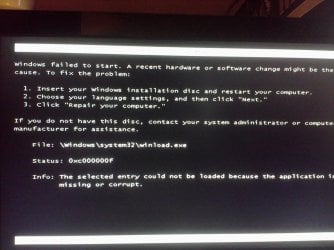
i logged on to my computer this morning and it would not start up. i finally managed to do a system restore. well....it stuck on starting services screen for almost 2 hours. so i shut it off in frustration. my mistake i know. i ended up having to use a system restore disk. easy fix so i thought. when i created one, it only made half of the restore. ok.....now the problem. i went and bought a windows 7 disk. went to load it. no matter what i do it will not go past the windows boot manager screen. it says to put disk in and restart. i do and it goes back to the same screen, here is what it says at the bottom
1.insert disk and restart
2. choose langagen click next
3. click repair
file: \windows\system32\winload.exe
Status: 0xc000000f
info: the selected entry could not be loaded because the application is corrupt or missing
i am totally lost now. thank you in advance
i logged on to my computer this morning and it would not start up. i finally managed to do a system restore. well....it stuck on starting services screen for almost 2 hours. so i shut it off in frustration. my mistake i know. i ended up having to use a system restore disk. easy fix so i thought. when i created one, it only made half of the restore. ok.....now the problem. i went and bought a windows 7 disk. went to load it. no matter what i do it will not go past the windows boot manager screen. it says to put disk in and restart. i do and it goes back to the same screen, here is what it says at the bottom
1.insert disk and restart
2. choose langagen click next
3. click repair
file: \windows\system32\winload.exe
Status: 0xc000000f
info: the selected entry could not be loaded because the application is corrupt or missing
i am totally lost now. thank you in advance
My Computer
- OS
- window 7 64 home premium