Can't get Win 7 Update to check for updates

I don't think I compressed the file correctly so attached is a second try.
 

My Computer My Computer

At a glance

Win7 Pro x86/Win7 Pro x64/Win 10 Pro x64Intel Core 2 Duo E7200 2.53 gHz/Core 2 Duo E8...
Computer type
PC/Desktop
Computer Manufacturer/Model Number
Dell Optiplex 755/Optiplex 780/Latitude E6400/Precision T3500
OS
Win7 Pro x86/Win7 Pro x64/Win 10 Pro x64
CPU
Intel Core 2 Duo E7200 2.53 gHz/Core 2 Duo E8400 3.0 gHz/
Internet Speed
FiOS 100 mB
Antivirus
Bitdefender Total Security
Browser
SeaMonkey/Edge
permissions

Hi Henrik,
Can you check to see if your permissions match mine, Trusted installer section.
 

Attachments

  • wuperm.PNG
    wuperm.PNG
    39.1 KB · Views: 1

My Computer My Computer

At a glance

W7 home premium 32bit/W7HP 64bit/w10 tp insid...E5300 dual core3gbNvidia Geforce 7100 Nforce 630i
Computer type
PC/Desktop
Computer Manufacturer/Model Number
medionl/Aspire 6930G/acer x55a
OS
W7 home premium 32bit/W7HP 64bit/w10 tp insider ring
CPU
E5300 dual core
Motherboard
medion MS7366
Memory
3gb
Graphics Card(s)
Nvidia Geforce 7100 Nforce 630i
Monitor(s) Displays
avixc
Internet Speed
n (isp resticted to 72)
Antivirus
mse/pands
Browser
palemoon
Other Info
Belkin Fd7050 n USB using Railink RT2870 drivers, more upto date
Hi --

It took me a while to find the page you had shown. I had no idea all this existed.

Under 'Trusted Installer', all of the permission boxes were checked except for 'Special Permissions" (which you hadn't shown).
 

My Computer My Computer

At a glance

Win7 Pro x86/Win7 Pro x64/Win 10 Pro x64Intel Core 2 Duo E7200 2.53 gHz/Core 2 Duo E8...
Computer type
PC/Desktop
Computer Manufacturer/Model Number
Dell Optiplex 755/Optiplex 780/Latitude E6400/Precision T3500
OS
Win7 Pro x86/Win7 Pro x64/Win 10 Pro x64
CPU
Intel Core 2 Duo E7200 2.53 gHz/Core 2 Duo E8400 3.0 gHz/
Internet Speed
FiOS 100 mB
Antivirus
Bitdefender Total Security
Browser
SeaMonkey/Edge

My Computer My Computer

At a glance

Windows 10x64 Build 1709Intel i7 7700HQ Kaby Lake16 GB DDR4 @2400Nvidia Geforce GTX 1060
Computer type
Laptop
Computer Manufacturer/Model Number
MSI GE72VR Apache Pro-416
OS
Windows 10x64 Build 1709
CPU
Intel i7 7700HQ Kaby Lake
Motherboard
Micro-Star Intl. MS-179B (U3C1)
Memory
16 GB DDR4 @2400
Graphics Card(s)
Nvidia Geforce GTX 1060
Screen Resolution
1920x1080 120Hz
Hard Drives
256 GB Nvme M.2 SSD

1TB HDD@7200
Cooling
Cooler Blast 4
Keyboard
Steel Series
Antivirus
Bit Defender Free
Browser
Edge

Attachments

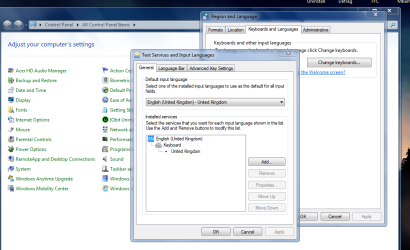
  • instlang.PNG
    instlang.PNG
    60.1 KB · Views: 0

My Computer My Computer

At a glance

W7 home premium 32bit/W7HP 64bit/w10 tp insid...E5300 dual core3gbNvidia Geforce 7100 Nforce 630i
Computer type
PC/Desktop
Computer Manufacturer/Model Number
medionl/Aspire 6930G/acer x55a
OS
W7 home premium 32bit/W7HP 64bit/w10 tp insider ring
CPU
E5300 dual core
Motherboard
medion MS7366
Memory
3gb
Graphics Card(s)
Nvidia Geforce 7100 Nforce 630i
Monitor(s) Displays
avixc
Internet Speed
n (isp resticted to 72)
Antivirus
mse/pands
Browser
palemoon
Other Info
Belkin Fd7050 n USB using Railink RT2870 drivers, more upto date
Before I get to Torchwood's suggestions of today, let me report on what I think has been PROGRESS! Per Indianacarnie's suggestions, I ran the 'Windows Update Troubleshooter'. I couldn't quite figure out whether anything had been fixed so I then ran 'SFC'. SFC reported that it had fixed some things.

I then downloaded a fresh copy of SURT and ran it. It took a long time but it installed properly (miracle of miracles) and generated the log files Wben353 wanted to see. These are attached.

While you all are digesting these SURT log files, I will do the things Torchwood suggested this afternoon.
 

Attachments

Last edited:

My Computer My Computer

At a glance

Win7 Pro x86/Win7 Pro x64/Win 10 Pro x64Intel Core 2 Duo E7200 2.53 gHz/Core 2 Duo E8...
Computer type
PC/Desktop
Computer Manufacturer/Model Number
Dell Optiplex 755/Optiplex 780/Latitude E6400/Precision T3500
OS
Win7 Pro x86/Win7 Pro x64/Win 10 Pro x64
CPU
Intel Core 2 Duo E7200 2.53 gHz/Core 2 Duo E8400 3.0 gHz/
Internet Speed
FiOS 100 mB
Antivirus
Bitdefender Total Security
Browser
SeaMonkey/Edge
ie

Well its pointing towards IE, so what version please.
and if installed, uninstall KB2937610.

Roy
 

My Computer My Computer

At a glance

W7 home premium 32bit/W7HP 64bit/w10 tp insid...E5300 dual core3gbNvidia Geforce 7100 Nforce 630i
Computer type
PC/Desktop
Computer Manufacturer/Model Number
medionl/Aspire 6930G/acer x55a
OS
W7 home premium 32bit/W7HP 64bit/w10 tp insider ring
CPU
E5300 dual core
Motherboard
medion MS7366
Memory
3gb
Graphics Card(s)
Nvidia Geforce 7100 Nforce 630i
Monitor(s) Displays
avixc
Internet Speed
n (isp resticted to 72)
Antivirus
mse/pands
Browser
palemoon
Other Info
Belkin Fd7050 n USB using Railink RT2870 drivers, more upto date
SP1: Yes

IE: 11.09600.17207

Language: US English

I could not find KB2937610 in the installed update list and thus could not uninstall it.


Diagnostic Report (1.9.0027.0):
-----------------------------------------
Windows Validation Data-->

Validation Code: 0
Cached Online Validation Code: N/A, hr = 0xc004f012
Windows Product Key: *****-*****-M4X88-XJPY2-JJXR8
Windows Product Key Hash: R87Xv7J8Gz1YYOywQvZKQRs+Wm4=
Windows Product ID: 00359-OEM-8683307-16401
Windows Product ID Type: 3
Windows License Type: OEM System Builder
Windows OS version: 6.1.7601.2.00010300.1.0.003
ID: {28455E1A-C652-4C8C-ACB7-0A8996063532}(1)
Is Admin: Yes
TestCab: 0x0
LegitcheckControl ActiveX: N/A, hr = 0x80070002
Signed By: N/A, hr = 0x80070002
Product Name: Windows 7 Home Premium
Architecture: 0x00000000
Build lab: 7601.win7sp1_gdr.150316-1654
TTS Error:
Validation Diagnostic:
Resolution Status: N/A

Vista WgaER Data-->
ThreatID(s): N/A, hr = 0x80070002
Version: N/A, hr = 0x80070002

Windows XP Notifications Data-->
Cached Result: N/A, hr = 0x80070002
File Exists: No
Version: N/A, hr = 0x80070002
WgaTray.exe Signed By: N/A, hr = 0x80070002
WgaLogon.dll Signed By: N/A, hr = 0x80070002

OGA Notifications Data-->
Cached Result: N/A, hr = 0x80070002
Version: N/A, hr = 0x80070002
OGAExec.exe Signed By: N/A, hr = 0x80070002
OGAAddin.dll Signed By: N/A, hr = 0x80070002

OGA Data-->
Office Status: 109 N/A
OGA Version: N/A, 0x80070002
Signed By: N/A, hr = 0x80070002
Office Diagnostics: 025D1FF3-364-80041010_025D1FF3-229-80041010_025D1FF3-230-1_025D1FF3-517-80040154_025D1FF3-237-80040154_025D1FF3-238-2_025D1FF3-244-80070002_025D1FF3-258-3

Browser Data-->
Proxy settings: N/A
User Agent: Mozilla/4.0 (compatible; MSIE 8.0; Win32)
Default Browser: F:\Mozilla\SeaMonkey\seamonkey.exe
Download signed ActiveX controls: Prompt
Download unsigned ActiveX controls: Disabled
Run ActiveX controls and plug-ins: Allowed
Initialize and script ActiveX controls not marked as safe: Disabled
Allow scripting of Internet Explorer Webbrowser control: Disabled
Active scripting: Allowed
Script ActiveX controls marked as safe for scripting: Allowed

File Scan Data-->
File Mismatch: C:\Windows\system32\wat\watadminsvc.exe[Hr = 0x80070003]
File Mismatch: C:\Windows\system32\wat\npwatweb.dll[Hr = 0x80070003]
File Mismatch: C:\Windows\system32\wat\watux.exe[Hr = 0x80070003]
File Mismatch: C:\Windows\system32\wat\watweb.dll[Hr = 0x80070003]

Other data-->
Office Details: <GenuineResults><MachineData><UGUID>{28455E1A-C652-4C8C-ACB7-0A8996063532}</UGUID><Version>1.9.0027.0</Version><OS>6.1.7601.2.00010300.1.0.003</OS><Architecture>x32</Architecture><PKey>*****-*****-*****-*****-JJXR8</PKey><PID>00359-OEM-8683307-16401</PID><PIDType>3</PIDType><SID>S-1-5-21-1001588870-3417195663-3815244164</SID><SYSTEM><Manufacturer>Dell Inc.</Manufacturer><Model>OptiPlex 755 </Model></SYSTEM><BIOS><Manufacturer>Dell Inc.</Manufacturer><Version>A22</Version><SMBIOSVersion major="2" minor="5"/><Date>20120611000000.000000+000</Date></BIOS><HWID>339D3E07018400F8</HWID><UserLCID>0409</UserLCID><SystemLCID>0409</SystemLCID><TimeZone>Eastern Standard Time(GMT-05:00)</TimeZone><iJoin>0</iJoin><SBID><stat>3</stat><msppid></msppid><name></name><model></model></SBID><OEM><OEMID>DELL </OEMID><OEMTableID>B9K </OEMTableID></OEM><GANotification/></MachineData><Software><Office><Result>109</Result><Products/><Applications/></Office></Software></GenuineResults>

Spsys.log Content: 0x80070002

Licensing Data-->
Software licensing service version: 6.1.7601.17514

Name: Windows(R) 7, HomePremium edition
Description: Windows Operating System - Windows(R) 7, OEM_COA_NSLP channel
Activation ID: 9ab82e0c-ffc9-4107-baa1-c65a8bd3ccc3
Application ID: 55c92734-d682-4d71-983e-d6ec3f16059f
Extended PID: 00359-00172-833-016401-02-1033-7601.0000-2402014
Installation ID: 016151761856607364344136150154657254571860690496670032
Processor Certificate URL: SpcService Web Service
Machine Certificate URL: RacService Web Service
Use License URL: UseLicenseService Web Service
Product Key Certificate URL: PkcService Web Service
Partial Product Key: JJXR8
License Status: Licensed
Remaining Windows rearm count: 2
Trusted time: 2/27/2016 8:06:15 PM

Windows Activation Technologies-->
HrOffline: 0x00000000
HrOnline: N/A
HealthStatus: 0x0000000000000000
Event Time Stamp: N/A
ActiveX: Not Registered - 0x80040154
Admin Service: Not Registered - 0x80040154
HealthStatus Bitmask Output:


HWID Data-->
HWID Hash Current: MgAAAAEABAABAAIAAAABAAAAAQABAAEAeqgQ1eRkynRk/tCHiP3qemrmIr3auWpNRso=

OEM Activation 1.0 Data-->
N/A

OEM Activation 2.0 Data-->
BIOS valid for OA 2.0: yes
Windows marker version: 0x0
OEMID and OEMTableID Consistent: yes
BIOS Information:
ACPI Table Name OEMID Value OEMTableID Value
APIC DELL B9K
FACP DELL B9K
HPET DELL B9K
BOOT DELL B9K
MCFG DELL B9K
SSDT DELL st_ex
ASF! DELL B9K
TCPA DELL B9K
____ DELL B9K
SLIC DELL B9K
SSDT DELL st_ex
SSDT DELL st_ex
SSDT DELL st_ex

Diagnostic Report (1.9.0027.0):
-----------------------------------------
Windows Validation Data-->

Validation Code: 0
Cached Online Validation Code: N/A, hr = 0xc004f012
Windows Product Key: *****-*****-M4X88-XJPY2-JJXR8
Windows Product Key Hash: R87Xv7J8Gz1YYOywQvZKQRs+Wm4=
Windows Product ID: 00359-OEM-8683307-16401
Windows Product ID Type: 3
Windows License Type: OEM System Builder
Windows OS version: 6.1.7601.2.00010300.1.0.003
ID: {28455E1A-C652-4C8C-ACB7-0A8996063532}(1)
Is Admin: Yes
TestCab: 0x0
LegitcheckControl ActiveX: N/A, hr = 0x80070002
Signed By: N/A, hr = 0x80070002
Product Name: Windows 7 Home Premium
Architecture: 0x00000000
Build lab: 7601.win7sp1_gdr.150316-1654
TTS Error:
Validation Diagnostic:
Resolution Status: N/A

Vista WgaER Data-->
ThreatID(s): N/A, hr = 0x80070002
Version: N/A, hr = 0x80070002

Windows XP Notifications Data-->
Cached Result: N/A, hr = 0x80070002
File Exists: No
Version: N/A, hr = 0x80070002
WgaTray.exe Signed By: N/A, hr = 0x80070002
WgaLogon.dll Signed By: N/A, hr = 0x80070002

OGA Notifications Data-->
Cached Result: N/A, hr = 0x80070002
Version: N/A, hr = 0x80070002
OGAExec.exe Signed By: N/A, hr = 0x80070002
OGAAddin.dll Signed By: N/A, hr = 0x80070002

OGA Data-->
Office Status: 109 N/A
OGA Version: N/A, 0x80070002
Signed By: N/A, hr = 0x80070002
Office Diagnostics: 025D1FF3-364-80041010_025D1FF3-229-80041010_025D1FF3-230-1_025D1FF3-517-80040154_025D1FF3-237-80040154_025D1FF3-238-2_025D1FF3-244-80070002_025D1FF3-258-3

Browser Data-->
Proxy settings: N/A
User Agent: Mozilla/4.0 (compatible; MSIE 8.0; Win32)
Default Browser: F:\Mozilla\SeaMonkey\seamonkey.exe
Download signed ActiveX controls: Prompt
Download unsigned ActiveX controls: Disabled
Run ActiveX controls and plug-ins: Allowed
Initialize and script ActiveX controls not marked as safe: Disabled
Allow scripting of Internet Explorer Webbrowser control: Disabled
Active scripting: Allowed
Script ActiveX controls marked as safe for scripting: Allowed

File Scan Data-->
File Mismatch: C:\Windows\system32\wat\watadminsvc.exe[Hr = 0x80070003]
File Mismatch: C:\Windows\system32\wat\npwatweb.dll[Hr = 0x80070003]
File Mismatch: C:\Windows\system32\wat\watux.exe[Hr = 0x80070003]
File Mismatch: C:\Windows\system32\wat\watweb.dll[Hr = 0x80070003]

Other data-->
Office Details: <GenuineResults><MachineData><UGUID>{28455E1A-C652-4C8C-ACB7-0A8996063532}</UGUID><Version>1.9.0027.0</Version><OS>6.1.7601.2.00010300.1.0.003</OS><Architecture>x32</Architecture><PKey>*****-*****-*****-*****-JJXR8</PKey><PID>00359-OEM-8683307-16401</PID><PIDType>3</PIDType><SID>S-1-5-21-1001588870-3417195663-3815244164</SID><SYSTEM><Manufacturer>Dell Inc.</Manufacturer><Model>OptiPlex 755 </Model></SYSTEM><BIOS><Manufacturer>Dell Inc.</Manufacturer><Version>A22</Version><SMBIOSVersion major="2" minor="5"/><Date>20120611000000.000000+000</Date></BIOS><HWID>339D3E07018400F8</HWID><UserLCID>0409</UserLCID><SystemLCID>0409</SystemLCID><TimeZone>Eastern Standard Time(GMT-05:00)</TimeZone><iJoin>0</iJoin><SBID><stat>3</stat><msppid></msppid><name></name><model></model></SBID><OEM><OEMID>DELL </OEMID><OEMTableID>B9K </OEMTableID></OEM><GANotification/></MachineData><Software><Office><Result>109</Result><Products/><Applications/></Office></Software></GenuineResults>

Spsys.log Content: 0x80070002

Licensing Data-->
Software licensing service version: 6.1.7601.17514

Name: Windows(R) 7, HomePremium edition
Description: Windows Operating System - Windows(R) 7, OEM_COA_NSLP channel
Activation ID: 9ab82e0c-ffc9-4107-baa1-c65a8bd3ccc3
Application ID: 55c92734-d682-4d71-983e-d6ec3f16059f
Extended PID: 00359-00172-833-016401-02-1033-7601.0000-2402014
Installation ID: 016151761856607364344136150154657254571860690496670032
Processor Certificate URL: SpcService Web Service
Machine Certificate URL: RacService Web Service
Use License URL: UseLicenseService Web Service
Product Key Certificate URL: PkcService Web Service
Partial Product Key: JJXR8
License Status: Licensed
Remaining Windows rearm count: 2
Trusted time: 2/27/2016 8:06:15 PM

Windows Activation Technologies-->
HrOffline: 0x00000000
HrOnline: N/A
HealthStatus: 0x0000000000000000
Event Time Stamp: N/A
ActiveX: Not Registered - 0x80040154
Admin Service: Not Registered - 0x80040154
HealthStatus Bitmask Output:


HWID Data-->
HWID Hash Current: MgAAAAEABAABAAIAAAABAAAAAQABAAEAeqgQ1eRkynRk/tCHiP3qemrmIr3auWpNRso=

OEM Activation 1.0 Data-->
N/A

OEM Activation 2.0 Data-->
BIOS valid for OA 2.0: yes
Windows marker version: 0x0
OEMID and OEMTableID Consistent: yes
BIOS Information:
ACPI Table Name OEMID Value OEMTableID Value
APIC DELL B9K
FACP DELL B9K
HPET DELL B9K
BOOT DELL B9K
MCFG DELL B9K
SSDT DELL st_ex
ASF! DELL B9K
TCPA DELL B9K
____ DELL B9K
SLIC DELL B9K
SSDT DELL st_ex
SSDT DELL st_ex
SSDT DELL st_ex
 

My Computer My Computer

At a glance

Win7 Pro x86/Win7 Pro x64/Win 10 Pro x64Intel Core 2 Duo E7200 2.53 gHz/Core 2 Duo E8...
Computer type
PC/Desktop
Computer Manufacturer/Model Number
Dell Optiplex 755/Optiplex 780/Latitude E6400/Precision T3500
OS
Win7 Pro x86/Win7 Pro x64/Win 10 Pro x64
CPU
Intel Core 2 Duo E7200 2.53 gHz/Core 2 Duo E8400 3.0 gHz/
Internet Speed
FiOS 100 mB
Antivirus
Bitdefender Total Security
Browser
SeaMonkey/Edge
now were gettin there

Hi Henrik,
Please d/l and run KB971033.
This will activate the system, from MGAdiag
File Scan Data-->
File Mismatch: C:\Windows\system32\wat\watadminsvc.exe[Hr = 0x80070003]
File Mismatch: C:\Windows\system32\wat\npwatweb.dll[Hr = 0x80070003]
File Mismatch: C:\Windows\system32\wat\watux.exe[Hr = 0x80070003]
File Mismatch: C:\Windows\system32\wat\watweb.dll[Hr = 0x80070003]
Windows Activation Technologies-->
HrOffline: 0x00000000
HrOnline: N/A
HealthStatus: 0x0000000000000000
Event Time Stamp: N/A
ActiveX: Not Registered - 0x80040154
Admin Service: Not Registered - 0x80040154

and remove the above
REBOOT
rerun the MGAdiag, those errors should be gone.

Try updating again.

Roy
 

My Computer My Computer

At a glance

W7 home premium 32bit/W7HP 64bit/w10 tp insid...E5300 dual core3gbNvidia Geforce 7100 Nforce 630i
Computer type
PC/Desktop
Computer Manufacturer/Model Number
medionl/Aspire 6930G/acer x55a
OS
W7 home premium 32bit/W7HP 64bit/w10 tp insider ring
CPU
E5300 dual core
Motherboard
medion MS7366
Memory
3gb
Graphics Card(s)
Nvidia Geforce 7100 Nforce 630i
Monitor(s) Displays
avixc
Internet Speed
n (isp resticted to 72)
Antivirus
mse/pands
Browser
palemoon
Other Info
Belkin Fd7050 n USB using Railink RT2870 drivers, more upto date
Yesterday, I followed your instructions and then tried to make Windows Update work. It worked, mostly. That is, it downloaded and installed about 63 updates without difficulty. I did, however, restrict the downloads to 15 - 20 updates at a time and with Kaspersky Internet Security (KIS) turned off (just in case KIS was somehow interfering with the Windows Update process. I did, however NOT include KB3035583 and KB2952664 in the downloads and installation as I understand installation of these two updates will trigger Microsoft's unwelcome Windows 10 update pleadings.

There were strange two anomalies with the download process: KB2937610 was listed in the items for download. It was listed as the only failed installation but no error code was given. IE 11 was also listed as a 'recommended' update. Although I thought that strange as I think I am already running IE 11, I told Windows Update to include it. That update also failed and error code 9C48 was listed as the reason.

Those two anomalies bothered me sufficiently that I reran SURT this morning. Today's SURT log files are attached. Although I don't really understand the inner workings of all of the Windows NT-derived Windows operating systems, I see that today's SURT log notes what looks to me like big problems with KB2937610. That causes me to wonder if much, if not all, of the problems I have been experiencing are caused by a partial or partly failed KB2937610 installation. If that could be the case, is there some way to force the de-installation of whatever bits of KB2937610 code are in my system? KB2937610 is NOT listed on the Windows Update page as an 'installed update'.

Similarly, the failed re-installation of IE 11 also makes me wonder if the IE 11 installation was also partial or faulty. Again, and if this guess has any probability of being right, is there any way to force a de-installation of IE 11 so it could be reinstalled properly. IE 11 is NOT listed on the Windows Update page as an 'installed update' although when I bring up IE 11's 'help' page it calls itself IE 11 as previously noted. Interestingly, IE 10 IS listed as an 'installed update' on the Windows Update page.
 

Attachments

Last edited:

My Computer My Computer

At a glance

Win7 Pro x86/Win7 Pro x64/Win 10 Pro x64Intel Core 2 Duo E7200 2.53 gHz/Core 2 Duo E8...
Computer type
PC/Desktop
Computer Manufacturer/Model Number
Dell Optiplex 755/Optiplex 780/Latitude E6400/Precision T3500
OS
Win7 Pro x86/Win7 Pro x64/Win 10 Pro x64
CPU
Intel Core 2 Duo E7200 2.53 gHz/Core 2 Duo E8400 3.0 gHz/
Internet Speed
FiOS 100 mB
Antivirus
Bitdefender Total Security
Browser
SeaMonkey/Edge
ie11

Hi Henrik,

PLEASE SET WINDOWS UPDATE TO NEVER.

now lets try these, from an elevated command prompt
copy the following

FORFILES /P %WINDIR%\servicing\Packages /M Microsoft-Windows-InternetExplorer-*11.*.mum /c "cmd /c echo Uninstalling package @fname && start /w pkgmgr /up:@fname /quiet /norestart
  • Paste the command into the Command Prompt window, and then press Enter.
It should then default to your previous version of IE.

before we try and reinstall IE11,
and when the above has worked:geek:

please run the following
these will remove any pending updates
Net stop bits
Net stop wuauserv
Ipconfig /flushdns
cd \documents and settings\all users\application data\microsoft\network\downloader
Del qmgr0.dat
Del qmgr1.dat
Net start bits
Net start wuauserv

2

  • Net stop wuauserv
  • cd %systemroot%
  • Ren SoftwareDistribution SoftwareDistribution.old
  • Net start wuauserv
Then reboot

use the IE11 standalone installer to upate.
Download Internet Explorer 11 for Windows 7 from Official Microsoft Download Center

reboot

turn on windows updates

Roy
 

My Computer My Computer

At a glance

W7 home premium 32bit/W7HP 64bit/w10 tp insid...E5300 dual core3gbNvidia Geforce 7100 Nforce 630i
Computer type
PC/Desktop
Computer Manufacturer/Model Number
medionl/Aspire 6930G/acer x55a
OS
W7 home premium 32bit/W7HP 64bit/w10 tp insider ring
CPU
E5300 dual core
Motherboard
medion MS7366
Memory
3gb
Graphics Card(s)
Nvidia Geforce 7100 Nforce 630i
Monitor(s) Displays
avixc
Internet Speed
n (isp resticted to 72)
Antivirus
mse/pands
Browser
palemoon
Other Info
Belkin Fd7050 n USB using Railink RT2870 drivers, more upto date
After following your instructions, something didn't seem to work correctly or I made an error in typing in those DOS instructions. The removal for KB2937610 failed as follows: 'Installer encountered an error: 0x800b0100 No signature was present in the subject'.

After following though the steps for removing IE 11, upon reboot I received the following message: "Windows cannot find 'c:\windows\system32\ie4uinit.exe'".

Despite this message, I downloaded the IE 11 standalone package and tried to install it. It started to install but then reported: "Did not finish installing. Windows cannot find 'http://gomicrosoft.com/ fw link/? Link ID=299204'"

I'm stuck on what to do next.
 

My Computer My Computer

At a glance

Win7 Pro x86/Win7 Pro x64/Win 10 Pro x64Intel Core 2 Duo E7200 2.53 gHz/Core 2 Duo E8...
Computer type
PC/Desktop
Computer Manufacturer/Model Number
Dell Optiplex 755/Optiplex 780/Latitude E6400/Precision T3500
OS
Win7 Pro x86/Win7 Pro x64/Win 10 Pro x64
CPU
Intel Core 2 Duo E7200 2.53 gHz/Core 2 Duo E8400 3.0 gHz/
Internet Speed
FiOS 100 mB
Antivirus
Bitdefender Total Security
Browser
SeaMonkey/Edge
early error

Hi Henrik,
That i4 error tells me that ie11 partially installed a quite while back.
please follow this link, to reinstall it

http://www.sevenforums.com/tutorials/49819-icon-cache-rebuild.html?ltr=I


COPY AND PASTE. in an elevated command mode

wusa /uninstall /kb:2937610

please turn off your updates again.

Need to know the current state of netframework installed, and IE version


Roy
 

My Computer My Computer

At a glance

W7 home premium 32bit/W7HP 64bit/w10 tp insid...E5300 dual core3gbNvidia Geforce 7100 Nforce 630i
Computer type
PC/Desktop
Computer Manufacturer/Model Number
medionl/Aspire 6930G/acer x55a
OS
W7 home premium 32bit/W7HP 64bit/w10 tp insider ring
CPU
E5300 dual core
Motherboard
medion MS7366
Memory
3gb
Graphics Card(s)
Nvidia Geforce 7100 Nforce 630i
Monitor(s) Displays
avixc
Internet Speed
n (isp resticted to 72)
Antivirus
mse/pands
Browser
palemoon
Other Info
Belkin Fd7050 n USB using Railink RT2870 drivers, more upto date
Hello, again. The icon cache - rebuild didn't go exactly the way the instructions indicated - I won't bother to describe exactly how things transpired but I think I came out with the correct result. IE 11 is now listed as an installed update on the Windows Update page and seems to be working correctly. Turning Windows Update's search function back on yielded several updates (in addition to KB3035583 and KB2952664 that I have deliberately avoided) and, interestingly, KB2952664 was also listed in the 'recommended' category (Microsoft just doesn't want to give up on browbeating folks about Win10, I guess). KB2937610 was, however, listed in the regular update category. I downloaded and installed only the two .Net Framework 4.6.1 updates listed without difficulty. IE 11 now identifies itself as IE 11.0.9600.18204. My guess is that this means that the IE 11 problem is now fixed and I thank you for that.

Following your instructions for getting rid of the bits of KB2937610 that SURT keeps finding didn't work. The error code '0x800b0100' came up with the comment "no signature was present in the subject". I even downloaded the standalone version of KB2937610 and tried installing that thinking that a standalone installation might leave a 'tail' that your 'remove' instruction might hook onto and eliminate the entire problem. That installation failed and your 'remove' instruction also didn't work.

I am not certain I know how to ascertain "... the current state of netframework installed" as other than listing the two Netframework 4.6.1 security updates that installed today that I now see on the installed Windows Update list, there is nothing in the Windows Update list showing anything about any version of Netframework being present. Maybe I am looking in the wrong place.

The most recent SURT log files are attached -- and thank you for sticking with me on this mess.
 

Attachments

My Computer My Computer

At a glance

Win7 Pro x86/Win7 Pro x64/Win 10 Pro x64Intel Core 2 Duo E7200 2.53 gHz/Core 2 Duo E8...
Computer type
PC/Desktop
Computer Manufacturer/Model Number
Dell Optiplex 755/Optiplex 780/Latitude E6400/Precision T3500
OS
Win7 Pro x86/Win7 Pro x64/Win 10 Pro x64
CPU
Intel Core 2 Duo E7200 2.53 gHz/Core 2 Duo E8400 3.0 gHz/
Internet Speed
FiOS 100 mB
Antivirus
Bitdefender Total Security
Browser
SeaMonkey/Edge
Hi Henrick,
Missed your last post ooops

please run the netframework repair tool
Download Microsoft .NET Framework Repair Tool from Official Microsoft Download Center

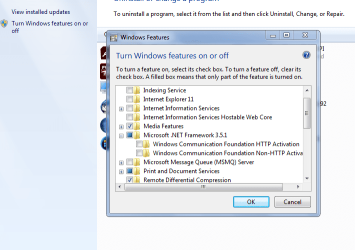
Program versions from Controlpanel >> programes >> turn features on/of (top left side)

Mine shows IE11 unchecked as i do not use it , (palemoon/waterfox)
As you use Seamonkey you could uncheck it as well

Net framework should have a blue box, click on the +
yours should be the same as mine

still working on the logs

Roy
 

Attachments

  • progfeat.PNG
    progfeat.PNG
    34 KB · Views: 5

My Computer My Computer

At a glance

W7 home premium 32bit/W7HP 64bit/w10 tp insid...E5300 dual core3gbNvidia Geforce 7100 Nforce 630i
Computer type
PC/Desktop
Computer Manufacturer/Model Number
medionl/Aspire 6930G/acer x55a
OS
W7 home premium 32bit/W7HP 64bit/w10 tp insider ring
CPU
E5300 dual core
Motherboard
medion MS7366
Memory
3gb
Graphics Card(s)
Nvidia Geforce 7100 Nforce 630i
Monitor(s) Displays
avixc
Internet Speed
n (isp resticted to 72)
Antivirus
mse/pands
Browser
palemoon
Other Info
Belkin Fd7050 n USB using Railink RT2870 drivers, more upto date
I located, downloaded, and ran the .Net Framework Repair Tool. After part one ran, it told me to try and load the item that had been failing. It would not install. I then ran part two. Part two gathered up about half a dozen files and indicated that they would be sent to Microsoft for analysis.

I then pulled up the On/Off Features page and got to the 'Windows Features' box. Rather than list the features I had operating, that box simply remained blank (other than the information lines at the top of the box). Nothing I tried would cause the box to show any of the features that were operating. Either I missed a step or something is really screwed up.

The latest SURT logs from tonight are attached.
 

Attachments

My Computer My Computer

At a glance

Win7 Pro x86/Win7 Pro x64/Win 10 Pro x64Intel Core 2 Duo E7200 2.53 gHz/Core 2 Duo E8...
Computer type
PC/Desktop
Computer Manufacturer/Model Number
Dell Optiplex 755/Optiplex 780/Latitude E6400/Precision T3500
OS
Win7 Pro x86/Win7 Pro x64/Win 10 Pro x64
CPU
Intel Core 2 Duo E7200 2.53 gHz/Core 2 Duo E8400 3.0 gHz/
Internet Speed
FiOS 100 mB
Antivirus
Bitdefender Total Security
Browser
SeaMonkey/Edge
Hi Henrik,
Been reviewing this thread.
Unfortunately I cant get hold of the >>32bit<< manifest files, 64bit yes
However,
Is the Get windows 10 logo showing(bottom right), or is KB3035583 installed
therefor you could accept it, and have a fully operational comp.

IF its not or you want to stay wth 7, we can hopefully create a repair install disc

You did say earlier that you were there when the comp was purchased(2012?), and that the code on the sticker is legible, but you have no OS discs.

The MGAdiag report is showing a system builder installation, ie not the original OS (more than likely Vista), and because of this you may be able to download from MS a W7 SP1 iso, PROVIDING that the sticker code ends JJXR8 and showing as W7 (not sure if it will be), if not we'll get it another way.
from this link then click on the W7 picture,
Software Download

Roy

That features box does take a while to load.
 

My Computer My Computer

At a glance

W7 home premium 32bit/W7HP 64bit/w10 tp insid...E5300 dual core3gbNvidia Geforce 7100 Nforce 630i
Computer type
PC/Desktop
Computer Manufacturer/Model Number
medionl/Aspire 6930G/acer x55a
OS
W7 home premium 32bit/W7HP 64bit/w10 tp insider ring
CPU
E5300 dual core
Motherboard
medion MS7366
Memory
3gb
Graphics Card(s)
Nvidia Geforce 7100 Nforce 630i
Monitor(s) Displays
avixc
Internet Speed
n (isp resticted to 72)
Antivirus
mse/pands
Browser
palemoon
Other Info
Belkin Fd7050 n USB using Railink RT2870 drivers, more upto date
First, as to the 'Windows Features' box not filling. When I bring the 'Windows Features' box up, it momentarily contains the message 'please wait' before remaining empty (blank). I even let it run for four hours and nothing happened and the box remained empty.

To answer your other questions: No Windows 10 logo shows and no KB3035583 is installed (I have deliberately NOT installed this update) and I very much want to stay with Windows 7.

The PC was originally purchased in early 2015, the code on the sticker is legible, and Win 7 Home Prime was pre-installed but no OS media discs were provided. A set of Dell driver file discs was included but no OS media. The PC is a Dell 'refurbished' computer and the original OS was Vista (the Vista sticker is also still on the case but stamped over and is more-or-less unreadable). Actually, the computer was part of a large US Federal government order where the government either did not take delivery of all the units ordered or Dell manufactured more units than the contract specified. This computer was actually brand new when purchased except for the change in the operating system. Such new 'refurbished' Dell computers from government contracts are quite common in this area and are extraordinarily attractively priced which is why people buy them even though one has no choice about their configuration.

The Win 7 OS sticker did end in JJXR8 but when I entered the entire sticker number on Microsoft's 'Software Download' page, the following message was returned: "Error. The product key you entered appears to be for software pre-installed by the device manufacturer. Please contact the device manufacturer for software recovery options."

I have spent an entire day trying to find out how to get any assistance from Dell without any success. My feeling is that both Microsoft and Dell just don't care about customer service. During further investigation, I also learned all about the demise of OS ISO availability via Digital River.

Today, I successfully downloaded and installed 21 updates via 'Windows Update'. Included were two .NET 3.5.1 updates that installed successfully but which, interestingly, do not appear on the 'Installed Updates' list. 18 of the other 19 updates all appear on the 'Installed Updates' list. As usual, KB2937610 did not successfully install. While I may not know what I am talking about, it seems to me that if I could just get rid of all of .NET 3.5.1, my problem would be solved. .NET 4.5.1 is installed and updates properly. Accordingly, I remain pretty confused.
 

My Computer My Computer

At a glance

Win7 Pro x86/Win7 Pro x64/Win 10 Pro x64Intel Core 2 Duo E7200 2.53 gHz/Core 2 Duo E8...
Computer type
PC/Desktop
Computer Manufacturer/Model Number
Dell Optiplex 755/Optiplex 780/Latitude E6400/Precision T3500
OS
Win7 Pro x86/Win7 Pro x64/Win 10 Pro x64
CPU
Intel Core 2 Duo E7200 2.53 gHz/Core 2 Duo E8400 3.0 gHz/
Internet Speed
FiOS 100 mB
Antivirus
Bitdefender Total Security
Browser
SeaMonkey/Edge
options

Hi Henrik,
Just thinking out loud here

Its less than a year old still under Guarentee?? check via dell website,
will they replace it with/without receipt?
do you know anyone with Dell 32(64 option) bit Home discs (full set), will dell supply discs year again.
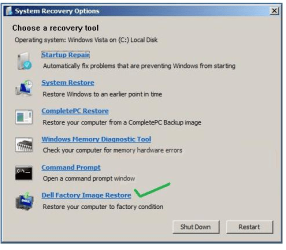
Is there a factory reset option available orb/allprogs/dell/recovery-factory restore
shame about DR would have been an early options
have you got another comp what is it Dell? 32/64 bit
Backup media dell request site Need Backup Media? | Dell US
try start up repair also in ss
 

Attachments

  • henrik.PNG
    henrik.PNG
    65.6 KB · Views: 29

My Computer My Computer

At a glance

W7 home premium 32bit/W7HP 64bit/w10 tp insid...E5300 dual core3gbNvidia Geforce 7100 Nforce 630i
Computer type
PC/Desktop
Computer Manufacturer/Model Number
medionl/Aspire 6930G/acer x55a
OS
W7 home premium 32bit/W7HP 64bit/w10 tp insider ring
CPU
E5300 dual core
Motherboard
medion MS7366
Memory
3gb
Graphics Card(s)
Nvidia Geforce 7100 Nforce 630i
Monitor(s) Displays
avixc
Internet Speed
n (isp resticted to 72)
Antivirus
mse/pands
Browser
palemoon
Other Info
Belkin Fd7050 n USB using Railink RT2870 drivers, more upto date
Trying to get support via Dell has proved to be a complete bust and support for refurbished, but new, PCs appears marginal. As I get it from Dell, the attitude is conversion to Windows 10 - which I do not want - is my only option.

Other approaches:

1) I got hold of the chap who first told my uncle about these refurbished, but new, Dell PCs. He has one claimed to be in good operating order that was purchased just a week prior to my uncle purchasing the PC I now have and from the same retail source. It originated as part the same government contract as mine and is identical to the 32 bit Optiplex 755 I now have except for the processor. His machine has a 2.66 gHz E7300 CPU whereas mine has a 2.53 gHz E7200 CPU. He, too, did not get any backup Win7 Home Premium media with the purchase. He has, however, a DVD image of the machine's hard drive made about a week after purchase that he is willing to let me use. I have read elsewhere on the SevenForums site that it is apparently possible to change the Microsoft OS COA number, although as I read it, the process is a bit cumbersome. As my machine has not yet been put in regular use, there is nothing on the hard drive I have to worry about saving if such an approach (using an image from another PC) would involve replacing everything on my hard drive. Might using this image solve my problem?

2) Looking around, I see a number of 'repair/reinstall' discs advertised for around US$10.00 that are claimed to enable one to universally repair or reinstall the Win 7 OS. I assume that such discs contain ISO copies of Win 7 from before Microsoft cut off the availability of such copies via Digital River early last year. What are the odds that such discs aren't full of malware and that their use would be legal in Microsoft's eyes allowing the number on my Win 7 Home Premium COA to be used to successfully authenticate the reinstalled Win 7 Home Premium OS on my PC?

3) Another friend has an official Microsoft Win 7 Pro Upgrade disc that was used to upgrade several PCs from XP to Win 7 Pro in the office where he works part time. To make use of this disc, I assume it would involve buying a legit Win 7 Pro COA from somebody, loading XP on my machine first (I have original XP media), then doing a clean upgrade install of Win 7 Pro on my machine. I have no idea what finding a usable COA would cost but would such an approach work?

4) I have seen a number of new Win 7 Pro and Win 7 Home Premium refurbishment/system builder discs, complete with COA, advertised for about US$50.00 - US$55.00 I assume that such discs are considered 'OEM' and would only be valid on the first PC they were installed on. Assuming that such discs will result in a legitimate Win 7 OS installation, what irks me is that I already have a valid Win 7 Home Premium COA and having to pay out an additional US$50.00 or so simply because something has gone wrong with the installation of a .NET3.5.1 update strikes me as a pretty poor excuse for anything resembling 'customer support'.

5) Do you have any recommendations beyond those I have listed above for getting out of this mess? I have really appreciated all of your suggestions and have learned a lot about repairing Win 7 installations as we have gone through this. You are one really great instructor. I just wish we had arrived at a workable repair - something that is no fault of yours. Thank you again for your interest and time.
 

My Computer My Computer

At a glance

Win7 Pro x86/Win7 Pro x64/Win 10 Pro x64Intel Core 2 Duo E7200 2.53 gHz/Core 2 Duo E8...
Computer type
PC/Desktop
Computer Manufacturer/Model Number
Dell Optiplex 755/Optiplex 780/Latitude E6400/Precision T3500
OS
Win7 Pro x86/Win7 Pro x64/Win 10 Pro x64
CPU
Intel Core 2 Duo E7200 2.53 gHz/Core 2 Duo E8400 3.0 gHz/
Internet Speed
FiOS 100 mB
Antivirus
Bitdefender Total Security
Browser
SeaMonkey/Edge
Back
Top