Solved Can't get Windows update to download updates for other MS products

iamnewborn

New member
Local time
11:44 PM
Messages
8
Hello
I have a new Windows 7 installation.
The regular Windows Update is working fine.
But when i click "Get updates for other Microsoft products",
385966


Internet Exporer opens and tries to access the URL http://www.update.microsoft.com/microsoftupdate/v6/vistadefault.aspx?ln=en-us... And then - nothing. I have double checked this URL from other locations - bad luck.
So how to get updates for other products like MS Office now?
 

My Computer My Computer

At a glance

Windows 8.1 With Update 3
Computer type
PC/Desktop
OS
Windows 8.1 With Update 3
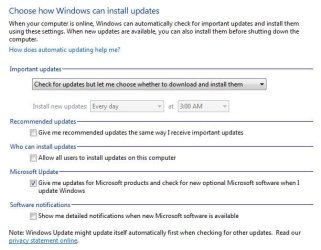
Does the Change settings window look like this?
 

Attachments

  • Capture.JPG
    Capture.JPG
    48.4 KB · Views: 12

My Computer My Computer

At a glance

Windows 7 Professional SP1 64-bitIntel Core i7-4790 3.60 GHz32 GB DDR3-1600 MHzIntegrated Intel HD Graphics 4600
Computer type
PC/Desktop
Computer Manufacturer/Model Number
Dell OptiPlex 9020
OS
Windows 7 Professional SP1 64-bit
CPU
Intel Core i7-4790 3.60 GHz
Memory
32 GB DDR3-1600 MHz
Graphics Card(s)
Integrated Intel HD Graphics 4600
Monitor(s) Displays
Viewsonic 32" LCD
Hard Drives
Kingston SATA 3 240 GB SSD
Internet Speed
Spectrum Internet 1000 Mbps
None of the above, except "Recommended updates" and "Who can install updates".
 

My Computer My Computer

At a glance

Windows 8.1 With Update 3
Computer type
PC/Desktop
OS
Windows 8.1 With Update 3
UPDATE: Microsoft Update is working again!. I don't know what it is - a temporary outage (that lasted at least 24 hours), or it will be shutted down in soon. Maybe there is an alternative solution for update.microsoft.com, but i don't know what.
 

My Computer My Computer

At a glance

Windows 8.1 With Update 3
Computer type
PC/Desktop
OS
Windows 8.1 With Update 3
The antivirus app that I install and use in Windows 7 Pro SP1 64-bit is Microsoft Security Essentials 4.10.209.0.

After it's installed and its definition files are updated, the "Give me updates for Microsoft products - - -" entry adds itself to the "Change settings" window.

Unless you manually install a Microsoft product first (such as MSE or Silverlight or Office), I don't believe that entry will appear.
 

My Computer My Computer

At a glance

Windows 7 Professional SP1 64-bitIntel Core i7-4790 3.60 GHz32 GB DDR3-1600 MHzIntegrated Intel HD Graphics 4600
Computer type
PC/Desktop
Computer Manufacturer/Model Number
Dell OptiPlex 9020
OS
Windows 7 Professional SP1 64-bit
CPU
Intel Core i7-4790 3.60 GHz
Memory
32 GB DDR3-1600 MHz
Graphics Card(s)
Integrated Intel HD Graphics 4600
Monitor(s) Displays
Viewsonic 32" LCD
Hard Drives
Kingston SATA 3 240 GB SSD
Internet Speed
Spectrum Internet 1000 Mbps
The antivirus app that I install and use in Windows 7 Pro SP1 64-bit is Microsoft Security Essentials 4.10.209.0.

After it's installed and its definition files are updated, the "Give me updates for Microsoft products - - -" entry adds itself to the "Change settings" window.

Unless you manually install a Microsoft product first (such as MSE or Silverlight or Office), I don't believe that entry will appear.

I believe that is so as well!

:thumbsup:
 

My Computer My Computer

At a glance

Win 10 x64, Linux Lite, Win 7 x64, BlackArch,...
Computer type
PC/Desktop
Computer Manufacturer/Model Number
HP Desktop & Compaq Laptop
OS
Win 10 x64, Linux Lite, Win 7 x64, BlackArch, & Kali
Hard Drives
Samsung 850 Pro 256Gb,
Hitachi HDD 1Tb,
Crucial MX SSD 250Gb
Segate 3Tb USB 3.0 Ext. Backup HDD
Internet Speed
150Mbps dn, 20Mbps up
Antivirus
Avast Free, Malwarebytes Anti-Exploit & Anti-Ransomware
Browser
Firefox, Chrome, Opera, & VPN
I have installed MS Office, but it has not appeared.
BTW, when you run MS Office product for the first time, it asks you how to deal with updates - "Use recommended", "Install only updates" and "Don't make changes". If you miss it or choose "Don't make changes", you cannot invoke this dialog again.
This article says: Change recommended update and diagnostic settings - Office Support
"If you're using Windows 7 (applies to Office 2010 and 2013)

Click Start, and then click Control Panel

Click System and Security, and then click Windows Update.

Click Change Settings.

Choose your settings, and then click OK."

But there is no such option until you choose "Use recommended" or "Install only updates" in the MS Office dialog. Or choose "Get updates for other Microsoft products", which is not working periodically.
 

My Computer My Computer

At a glance

Windows 8.1 With Update 3
Computer type
PC/Desktop
OS
Windows 8.1 With Update 3
Back
Top